


文章目录
getResponseWithInterceptorChain()
  Response getResponseWithInterceptorChain() throws IOException {
    // Build a full stack of interceptors.
    List<Interceptor> interceptors = new ArrayList<>();
    interceptors.addAll(client.interceptors());
    interceptors.add(retryAndFollowUpInterceptor);
    interceptors.add(new BridgeInterceptor(client.cookieJar()));
    interceptors.add(new CacheInterceptor(client.internalCache()));
    interceptors.add(new ConnectInterceptor(client));
    if (!forWebSocket) {
      interceptors.addAll(client.networkInterceptors());
    }
    interceptors.add(new CallServerInterceptor(forWebSocket));

    Interceptor.Chain chain = new RealInterceptorChain(interceptors, null, null, null, 0,
        originalRequest, this, eventListener, client.connectTimeoutMillis(),
        client.readTimeoutMillis(), client.writeTimeoutMillis());

    return chain.proceed(originalRequest);
  }
从源码中可以看出 经过层层list内的Interceptor拦截之后,组装成一个Response返回。
Interceptor
public interface Interceptor {
  Response intercept(Chain chain) throws IOException;

  interface Chain {
    Request request();
    //分发处理
    Response proceed(Request request) throws IOException;

    Connection connection();
  }
}
Chain是拦截器发生的主要接口。
所有的拦截器
- RetryAndFollowUpInterceptor——这个拦截器主要是做重试,网络错误,以及重定向的一些操作。
- BridgeInterceptor——主要将用户的请求转换为网络的请求,负责对Request和Response报文进行加工。
- CacheInterceptor——缓存拦截器
- ConnectIntercepter——连接拦截器,主要是处理连接服务器,以及http,https的包装
- CallServerInterceptor——服务拦截器,主要是发送、读取数据,是拦截器的最后一个环节。
RealInterceptorChain的责任链模式通过层层拦截进而完成组装okhttp的拦截功能。
责任链
  Response getResponseWithInterceptorChain() throws IOException {
    //省略
    Interceptor.Chain chain = new RealInterceptorChain(
        interceptors, null, null, null, 0, originalRequest);
    return chain.proceed(originalRequest);
  }
getResponseWithInterceptorChain()通过new RealInterceptorChain(interceptors, null, null, null, 0, originalRequest)方式实现了拦截器的第一次初始化操作。
  public RealInterceptorChain(List<Interceptor> interceptors, StreamAllocation streamAllocation,
      HttpCodec httpCodec, RealConnection connection, int index, Request request) {
    this.interceptors = interceptors;
    this.connection = connection;
    this.streamAllocation = streamAllocation;
    this.httpCodec = httpCodec;
    this.index = index;
    this.request = request;
  }

  //注意这个多态方法
  @Override public Response proceed(Request request) throws IOException {
    return proceed(request, streamAllocation, httpCodec, connection);
  }


  public Response proceed(Request request, StreamAllocation streamAllocation, HttpCodec httpCodec, RealConnection connection) throws IOException {
//忽略部分代码
    // Call the next interceptor in the chain.
    RealInterceptorChain next = new RealInterceptorChain(
        interceptors, streamAllocation, httpCodec, connection, index + 1, request);
    Interceptor interceptor = interceptors.get(index);
    Response response = interceptor.intercept(next);

//忽略部分代码
    }

    return response;
  }
其中:
proceed()调用自己的构造器通过index+1创建下一个拦截器,然后接着调用interceptor.intercept(next),下一个拦截器接着又会调用chain.proceed(networkRequest),往复下去,实现链式调用排好的构造器。
那么子类又如何将返回值回传给父类呢?
proceed(Request request)和proceed(Request request, StreamAllocation streamAllocation, HttpCodec httpCodec, RealConnection connection)这两个多态方法,因为不同的拦截器会回调不同的方法。我们也就可以知道不同的参数在不同的拦截器中得到了初始化。
RetryAndFollowUpInterceptor
@Override public Response intercept(Chain chain) throws IOException {
 //忽略部分代码
response = ((RealInterceptorChain) chain).proceed(request, streamAllocation, null, null);
//回调RealInterceptorChain的proceed方法!注意此地的参数是四个值,streamAllocation在此地被赋值

 //忽略部分代码
}
BridgeInterceptor
 @Override public Response intercept(Chain chain) throws IOException {
    //忽略部分代码
    Response networkResponse = chain.proceed(requestBuilder.build());
    注意此地RealInterceptorChain的proceed方法!注意此地的参数是一个,

    //回调RealInterceptorChain的proceed方法
    //忽略部分代码
}
CacheInterceptor
@Override public Response intercept(Chain chain) throws IOException {
  //忽略部分代码
 networkResponse = chain.proceed(networkRequest);
  注意此地RealInterceptorChain的proceed方法!注意此地的参数是一个

 //忽略部分代码
}
ConnectInterceptor
@Override public Response intercept(Chain chain) throws IOException {
 //忽略部分代码
 return realChain.proceed(request, streamAllocation, httpCodec, connection);
  注意此地RealInterceptorChain的proceed方法!注意此地的参数是四个,httpCodec, connection在此得到赋值。

 }
CallServerInterceptor
 @Override public Response intercept(Chain chain) throws IOException {
 //忽略部分代码
    return response;
}
CallServerInterceptor之前的拦截器均调用了相关的realChain.proceed方法进行一个链式的组装。
RetryAndFollowUpInterceptor
public final class RetryAndFollowUpInterceptor implements Interceptor {

	······

  @Override public Response intercept(Chain chain) throws IOException {
    Request request = chain.request();

    streamAllocation = new StreamAllocation(
        // 三个参数分别对应:(1)全局的连接池,(2)连接线路Address, (3)堆栈对象
        client.connectionPool(), createAddress(request.url()), callStackTrace);

    int followUpCount = 0;
    Response priorResponse = null;
    while (true) {
      if (canceled) {
        streamAllocation.release();
        throw new IOException("Canceled");
      }

      Response response = null;
      boolean releaseConnection = true;
      try {
        //  执行下一个拦截器,即BridgeInterceptor
        // RealInterceptorChain会将初始化好的连接对象传递给下一个拦截器,也是贯穿整个请求的对象,在拦截器执行过程中,的几个属性字段会一步一步赋值
        response = ((RealInterceptorChain) chain).proceed(request, streamAllocation, null, null);
        releaseConnection = false;
      } catch (RouteException e) {
        // The attempt to connect via a route failed. The request will not have been sent.
         //  如果有异常,判断是否要恢复
        if (!recover(e.getLastConnectException(), false, request)) {
          throw e.getLastConnectException();
        }
        releaseConnection = false;
        continue;
      } catch (IOException e) {
        // An attempt to communicate with a server failed. The request may have been sent.
        boolean requestSendStarted = !(e instanceof ConnectionShutdownException);
        if (!recover(e, requestSendStarted, request)) throw e;
        releaseConnection = false;
        continue;
      } finally {
        // We're throwing an unchecked exception. Release any resources.
        if (releaseConnection) {
          streamAllocation.streamFailed(null);
          streamAllocation.release();
        }
      }

      // Attach the prior response if it exists. Such responses never have a body.
      if (priorResponse != null) {
        response = response.newBuilder()
            .priorResponse(priorResponse.newBuilder()
                    .body(null)
                    .build())
            .build();
      }
      // 检查是否符合要求
      Request followUp = followUpRequest(response);

      if (followUp == null) {
        if (!forWebSocket) {
          streamAllocation.release();
        }
        // 返回结果
        return response;
      }
       //不符合,关闭响应流
      closeQuietly(response.body());
       // 是否超过最大限制
      if (++followUpCount > MAX_FOLLOW_UPS) {
        streamAllocation.release();
        throw new ProtocolException("Too many follow-up requests: " + followUpCount);
      }

      if (followUp.body() instanceof UnrepeatableRequestBody) {
        streamAllocation.release();
        throw new HttpRetryException("Cannot retry streamed HTTP body", response.code());
      }
      // 是否有相同的连接
      if (!sameConnection(response, followUp.url())) {
        streamAllocation.release();
        streamAllocation = new StreamAllocation(
            client.connectionPool(), createAddress(followUp.url()), callStackTrace);
      } else if (streamAllocation.codec() != null) {
        throw new IllegalStateException("Closing the body of " + response
            + " didn't close its backing stream. Bad interceptor?");
      }

      request = followUp;
      priorResponse = response;
    }
  }
	······

  /**
   * Report and attempt to recover from a failure to communicate with a server. Returns true if
   * {@code e} is recoverable, or false if the failure is permanent. Requests with a body can only
   * be recovered if the body is buffered or if the failure occurred before the request has been
   * sent.
   */
  private boolean recover(IOException e, boolean requestSendStarted, Request userRequest) {
    streamAllocation.streamFailed(e);
    // 1. 应用层配置不在连接,默认为true
    // The application layer has forbidden retries.
    if (!client.retryOnConnectionFailure()) return false;
    // 2. 请求Request出错不能继续使用
    // We can't send the request body again.
    if (requestSendStarted && userRequest.body() instanceof UnrepeatableRequestBody) return false;
    //  是否可以恢复的
    // This exception is fatal.
    if (!isRecoverable(e, requestSendStarted)) return false;
    // 4. 没用更多线路可供选择
    // No more routes to attempt.
    if (!streamAllocation.hasMoreRoutes()) return false;

    // For failure recovery, use the same route selector with a new connection.
    return true;
  }

  1.应用层配置不在连接(默认为true),则不可恢复
  2.请求Request是不可重复使用的Request,则不可恢复
  3.根据Exception的类型判断是否可以恢复的 (isRecoverable()方法)
    3.1、如果是协议错误(ProtocolException)则不可恢复
    3.2、如果是中断异常(InterruptedIOException)则不可恢复
    3.3、如果是SSL握手错误(SSLHandshakeException && CertificateException)则不可恢复
    3.4、certificate pinning错误(SSLPeerUnverifiedException)则不可恢复
  4.没用更多线路可供选择 则不可恢复
  如果上述条件都不满足,则这个request可以恢复

  private boolean isRecoverable(IOException e, boolean requestSendStarted) {
    // If there was a protocol problem, don't recover.
    if (e instanceof ProtocolException) {
      return false;
    }

    // If there was an interruption don't recover, but if there was a timeout connecting to a route
    // we should try the next route (if there is one).
    if (e instanceof InterruptedIOException) {
      return e instanceof SocketTimeoutException && !requestSendStarted;
    }

    // Look for known client-side or negotiation errors that are unlikely to be fixed by trying
    // again with a different route.
    if (e instanceof SSLHandshakeException) {
      // If the problem was a CertificateException from the X509TrustManager,
      // do not retry.
      if (e.getCause() instanceof CertificateException) {
        return false;
      }
    }
    if (e instanceof SSLPeerUnverifiedException) {
      // e.g. a certificate pinning error.
      return false;
    }

    // An example of one we might want to retry with a different route is a problem connecting to a
    // proxy and would manifest as a standard IOException. Unless it is one we know we should not
    // retry, we return true and try a new route.
    return true;
  }

  /**
   * Figures out the HTTP request to make in response to receiving {@code userResponse}. This will
   * either add authentication headers, follow redirects or handle a client request timeout. If a
   * follow-up is either unnecessary or not applicable, this returns null.
   */
  private Request followUpRequest(Response userResponse) throws IOException {
    if (userResponse == null) throw new IllegalStateException();
    Connection connection = streamAllocation.connection();
    Route route = connection != null
        ? connection.route()
        : null;
    int responseCode = userResponse.code();

    final String method = userResponse.request().method();
    switch (responseCode) {
      case HTTP_PROXY_AUTH:
        Proxy selectedProxy = route != null
            ? route.proxy()
            : client.proxy();
        if (selectedProxy.type() != Proxy.Type.HTTP) {
          throw new ProtocolException("Received HTTP_PROXY_AUTH (407) code while not using proxy");
        }
        return client.proxyAuthenticator().authenticate(route, userResponse);

      case HTTP_UNAUTHORIZED:
        return client.authenticator().authenticate(route, userResponse);

      case HTTP_PERM_REDIRECT:
      case HTTP_TEMP_REDIRECT:
        // "If the 307 or 308 status code is received in response to a request other than GET
        // or HEAD, the user agent MUST NOT automatically redirect the request"
        if (!method.equals("GET") && !method.equals("HEAD")) {
          return null;
        }
        // fall-through
      case HTTP_MULT_CHOICE:
      case HTTP_MOVED_PERM:
      case HTTP_MOVED_TEMP:
      case HTTP_SEE_OTHER:
        // Does the client allow redirects?
        if (!client.followRedirects()) return null;

        String location = userResponse.header("Location");
        if (location == null) return null;
        HttpUrl url = userResponse.request().url().resolve(location);

        // Don't follow redirects to unsupported protocols.
        if (url == null) return null;

        // If configured, don't follow redirects between SSL and non-SSL.
        boolean sameScheme = url.scheme().equals(userResponse.request().url().scheme());
        if (!sameScheme && !client.followSslRedirects()) return null;

        // Most redirects don't include a request body.
        Request.Builder requestBuilder = userResponse.request().newBuilder();
        if (HttpMethod.permitsRequestBody(method)) {
          final boolean maintainBody = HttpMethod.redirectsWithBody(method);
          if (HttpMethod.redirectsToGet(method)) {
            requestBuilder.method("GET", null);
          } else {
            RequestBody requestBody = maintainBody ? userResponse.request().body() : null;
            requestBuilder.method(method, requestBody);
          }
          if (!maintainBody) {
            requestBuilder.removeHeader("Transfer-Encoding");
            requestBuilder.removeHeader("Content-Length");
            requestBuilder.removeHeader("Content-Type");
          }
        }

        // When redirecting across hosts, drop all authentication headers. This
        // is potentially annoying to the application layer since they have no
        // way to retain them.
        if (!sameConnection(userResponse, url)) {
          requestBuilder.removeHeader("Authorization");
        }

        return requestBuilder.url(url).build();

      case HTTP_CLIENT_TIMEOUT:
        // 408's are rare in practice, but some servers like HAProxy use this response code. The
        // spec says that we may repeat the request without modifications. Modern browsers also
        // repeat the request (even non-idempotent ones.)
        if (userResponse.request().body() instanceof UnrepeatableRequestBody) {
          return null;
        }

        return userResponse.request();

      default:
        return null;
    }
  }

  /**
   * Returns true if an HTTP request for {@code followUp} can reuse the connection used by this
   * engine.
   */
  private boolean sameConnection(Response response, HttpUrl followUp) {
    HttpUrl url = response.request().url();
    return url.host().equals(followUp.host())
        && url.port() == followUp.port()
        && url.scheme().equals(followUp.scheme());
  }
}
顺着上面的源码,我们梳理一下intercept的整体流程:
- 根据url创建Address对象,实例化StreamAllocation
- 开启while(true)循环
- 检测是否取消
- 执行下一个拦截器BridgeInterceptor
- 如果发生异常,在catch里面判断是否继续请求
- 如果priorResponse不为空,则说明前面已经获取到了相应
- 结合获取的Response和先前的Response调用followUpRequest检查相应是否需要重定向,如果不需要则返回当前请求
- 重定向次数+1,同时判断是否达到最大限制数量。
- 检查是否有相同的链接,是:释放,重新创建
- 重新设置request,并把当前的Response保存到priorResponse,继续while循环
BridgeInterceptor
这个类主要完成:
- 从应用层数据类型到网络层数据类型的转换,将我们的javaBean放进报文内
- cookie处理
- Gzip转码
public final class BridgeInterceptor implements Interceptor {
  private final CookieJar cookieJar;

  public BridgeInterceptor(CookieJar cookieJar) {
    this.cookieJar = cookieJar;
  }

  @Override public Response intercept(Chain chain) throws IOException {
    Request userRequest = chain.request();
    Request.Builder requestBuilder = userRequest.newBuilder();

    //请求头部报文处理
    RequestBody body = userRequest.body();
    if (body != null) {
      MediaType contentType = body.contentType();
      if (contentType != null) {
        requestBuilder.header("Content-Type", contentType.toString());
      }

      long contentLength = body.contentLength();
      if (contentLength != -1) {
        requestBuilder.header("Content-Length", Long.toString(contentLength));
        requestBuilder.removeHeader("Transfer-Encoding");
      } else {
        requestBuilder.header("Transfer-Encoding", "chunked");
        requestBuilder.removeHeader("Content-Length");
      }
    }

    if (userRequest.header("Host") == null) {
      requestBuilder.header("Host", hostHeader(userRequest.url(), false));
    }

    if (userRequest.header("Connection") == null) {
      requestBuilder.header("Connection", "Keep-Alive");
    }


    //如果我们不自定义编解码方式的方式,默认使用Gzip的编解码
    // If we add an "Accept-Encoding: gzip" header field we're responsible for also decompressing
    // the transfer stream.
    boolean transparentGzip = false;
    if (userRequest.header("Accept-Encoding") == null && userRequest.header("Range") == null) {
      transparentGzip = true;
      requestBuilder.header("Accept-Encoding", "gzip");
    }
    //在创建ohHttpClient的时候,添加的cookiejar。
    List<Cookie> cookies = cookieJar.loadForRequest(userRequest.url());
    if (!cookies.isEmpty()) {
      requestBuilder.header("Cookie", cookieHeader(cookies));
    }

    if (userRequest.header("User-Agent") == null) {
      requestBuilder.header("User-Agent", Version.userAgent());
    }

    Response networkResponse = chain.proceed(requestBuilder.build());

    HttpHeaders.receiveHeaders(cookieJar, userRequest.url(), networkResponse.headers());

    Response.Builder responseBuilder = networkResponse.newBuilder()
        .request(userRequest);

    if (transparentGzip
        && "gzip".equalsIgnoreCase(networkResponse.header("Content-Encoding"))
        && HttpHeaders.hasBody(networkResponse)) {
      GzipSource responseBody = new GzipSource(networkResponse.body().source());
      Headers strippedHeaders = networkResponse.headers().newBuilder()
          .removeAll("Content-Encoding")
          .removeAll("Content-Length")
          .build();
      responseBuilder.headers(strippedHeaders);
      responseBuilder.body(new RealResponseBody(strippedHeaders, Okio.buffer(responseBody)));
    }

    return responseBuilder.build();
  }

//从前面okHttpClient 中设置的cookieJar,然后设置到请求头的Cookie中去。
  /** Returns a 'Cookie' HTTP request header with all cookies, like {@code a=b; c=d}. */
  private String cookieHeader(List<Cookie> cookies) {
    StringBuilder cookieHeader = new StringBuilder();
    for (int i = 0, size = cookies.size(); i < size; i++) {
      if (i > 0) {
        cookieHeader.append("; ");
      }
      Cookie cookie = cookies.get(i);
      cookieHeader.append(cookie.name()).append('=').append(cookie.value());
    }
    return cookieHeader.toString();
  }
}
CacheInterceptor
CacheInterceptor主要完成了:根据报文CacheControl、Cache等内容结合本地的缓存控制策略进行缓存处理
public final class CacheInterceptor implements Interceptor {
  final InternalCache cache;

  public CacheInterceptor(InternalCache cache) {
    this.cache = cache;
  }

  @Override public Response intercept(Chain chain) throws IOException {
    //1. 读取候选缓存;
    Response cacheCandidate = cache != null
        ? cache.get(chain.request())
        : null;

    long now = System.currentTimeMillis();
    //2. 创建缓存策略(强制缓存,对比缓存等策略);
    CacheStrategy strategy = new CacheStrategy.Factory(now, chain.request(), cacheCandidate).get();
    Request networkRequest = strategy.networkRequest;
    Response cacheResponse = strategy.cacheResponse;

    if (cache != null) {
      cache.trackResponse(strategy);
    }

    if (cacheCandidate != null && cacheResponse == null) {
      closeQuietly(cacheCandidate.body()); // The cache candidate wasn't applicable. Close it.
    }

    // If we're forbidden from using the network and the cache is insufficient, fail.
     //根据策略,不使用网络,缓存又没有直接报错;
    if (networkRequest == null && cacheResponse == null) {
      return new Response.Builder()
          .request(chain.request())
          .protocol(Protocol.HTTP_1_1)
          .code(504)
          .message("Unsatisfiable Request (only-if-cached)")
          .body(Util.EMPTY_RESPONSE)
          .sentRequestAtMillis(-1L)
          .receivedResponseAtMillis(System.currentTimeMillis())
          .build();
    }
    // 4. 根据策略,不使用网络,有缓存就直接返回;
    // If we don't need the network, we're done.
    if (networkRequest == null) {
      return cacheResponse.newBuilder()
          .cacheResponse(stripBody(cacheResponse))
          .build();
    }

    Response networkResponse = null;
    try {
      // 5. 前面个都没有返回,走下一个拦截器;
      networkResponse = chain.proceed(networkRequest);
    } finally {
      // If we're crashing on I/O or otherwise, don't leak the cache body.
      if (networkResponse == null && cacheCandidate != null) {
        closeQuietly(cacheCandidate.body());
      }
    }
    //6. 接收到的网络结果,如果是code 304, 使用缓存,返回缓存结果(对比缓存)
    // If we have a cache response too, then we're doing a conditional get.
    if (cacheResponse != null) {
      if (networkResponse.code() == HTTP_NOT_MODIFIED) {
        Response response = cacheResponse.newBuilder()
            .headers(combine(cacheResponse.headers(), networkResponse.headers()))
            .sentRequestAtMillis(networkResponse.sentRequestAtMillis())
            .receivedResponseAtMillis(networkResponse.receivedResponseAtMillis())
            .cacheResponse(stripBody(cacheResponse))
            .networkResponse(stripBody(networkResponse))
            .build();
        networkResponse.body().close();

        // Update the cache after combining headers but before stripping the
        // Content-Encoding header (as performed by initContentStream()).
        cache.trackConditionalCacheHit();
        cache.update(cacheResponse, response);
        return response;
      } else {
        closeQuietly(cacheResponse.body());
      }
    }
     //7. 读取网络结果;
    Response response = networkResponse.newBuilder()
        .cacheResponse(stripBody(cacheResponse))
        .networkResponse(stripBody(networkResponse))
        .build();
     //8. 对数据进行缓存;
    if (cache != null) {
      if (HttpHeaders.hasBody(response) && CacheStrategy.isCacheable(response, networkRequest)) {
        // Offer this request to the cache.
        CacheRequest cacheRequest = cache.put(response);
        return cacheWritingResponse(cacheRequest, response);
      }

      if (HttpMethod.invalidatesCache(networkRequest.method())) {
        try {
          cache.remove(networkRequest);
        } catch (IOException ignored) {
          // The cache cannot be written.
        }
      }
    }

    return response;
  }
ConnectInterceptor
这个拦截器主要完成了与后台建立连接完成通信前的准备工作
public final class ConnectInterceptor implements Interceptor {
  public final OkHttpClient client;

  public ConnectInterceptor(OkHttpClient client) {
    this.client = client;
  }

  @Override public Response intercept(Chain chain) throws IOException {
    RealInterceptorChain realChain = (RealInterceptorChain) chain;
    Request request = realChain.request();
    StreamAllocation streamAllocation = realChain.streamAllocation();

    // We need the network to satisfy this request. Possibly for validating a conditional GET.
    boolean doExtensiveHealthChecks = !request.method().equals("GET");
    HttpCodec httpCodec = streamAllocation.newStream(client, doExtensiveHealthChecks);
    RealConnection connection = streamAllocation.connection();

    return realChain.proceed(request, streamAllocation, httpCodec, connection);
  }
}
CallServerInterceptor
这个拦截器主要完成了:连接搭建后真正的通信操作,利用okio进行流式的传递。
public final class CallServerInterceptor implements Interceptor {
  private final boolean forWebSocket;

  public CallServerInterceptor(boolean forWebSocket) {
    this.forWebSocket = forWebSocket;
  }

  @Override public Response intercept(Chain chain) throws IOException {
    RealInterceptorChain realChain = (RealInterceptorChain) chain;
    HttpCodec httpCodec = realChain.httpStream();
    //HttpCodec用来读写数据

    StreamAllocation streamAllocation = realChain.streamAllocation();
    RealConnection connection = (RealConnection) realChain.connection();
    Request request = realChain.request();

    long sentRequestMillis = System.currentTimeMillis();
    //写入请求头
    httpCodec.writeRequestHeaders(request);

    Response.Builder responseBuilder = null;
    if (HttpMethod.permitsRequestBody(request.method()) && request.body() != null) {
      // If there's a "Expect: 100-continue" header on the request, wait for a "HTTP/1.1 100
      // Continue" response before transmitting the request body. If we don't get that, return what
      // we did get (such as a 4xx response) without ever transmitting the request body.
      if ("100-continue".equalsIgnoreCase(request.header("Expect"))) {
        httpCodec.flushRequest();
        responseBuilder = httpCodec.readResponseHeaders(true);
      }
       //写入请求体
      if (responseBuilder == null) {
        // Write the request body if the "Expect: 100-continue" expectation was met.
        Sink requestBodyOut = httpCodec.createRequestBody(request, request.body().contentLength());
        BufferedSink bufferedRequestBody = Okio.buffer(requestBodyOut);
        request.body().writeTo(bufferedRequestBody);
        bufferedRequestBody.close();
      } else if (!connection.isMultiplexed()) {
        // If the "Expect: 100-continue" expectation wasn't met, prevent the HTTP/1 connection from
        // being reused. Otherwise we're still obligated to transmit the request body to leave the
        // connection in a consistent state.
        streamAllocation.noNewStreams();
      }
    }

    httpCodec.finishRequest();
    //读取响应头
    if (responseBuilder == null) {
      responseBuilder = httpCodec.readResponseHeaders(false);
    }

    Response response = responseBuilder
        .request(request)
        .handshake(streamAllocation.connection().handshake())
        .sentRequestAtMillis(sentRequestMillis)
        .receivedResponseAtMillis(System.currentTimeMillis())
        .build();
    //读取响应体
    int code = response.code();
    if (forWebSocket && code == 101) {
      // Connection is upgrading, but we need to ensure interceptors see a non-null response body.
      response = response.newBuilder()
          .body(Util.EMPTY_RESPONSE)
          .build();
    } else {
      response = response.newBuilder()
          .body(httpCodec.openResponseBody(response))
          .build();
    }

    if ("close".equalsIgnoreCase(response.request().header("Connection"))
        || "close".equalsIgnoreCase(response.header("Connection"))) {
      streamAllocation.noNewStreams();
    }

    if ((code == 204 || code == 205) && response.body().contentLength() > 0) {
      throw new ProtocolException(
          "HTTP " + code + " had non-zero Content-Length: " + response.body().contentLength());
    }

    return response;
  }
}
总结
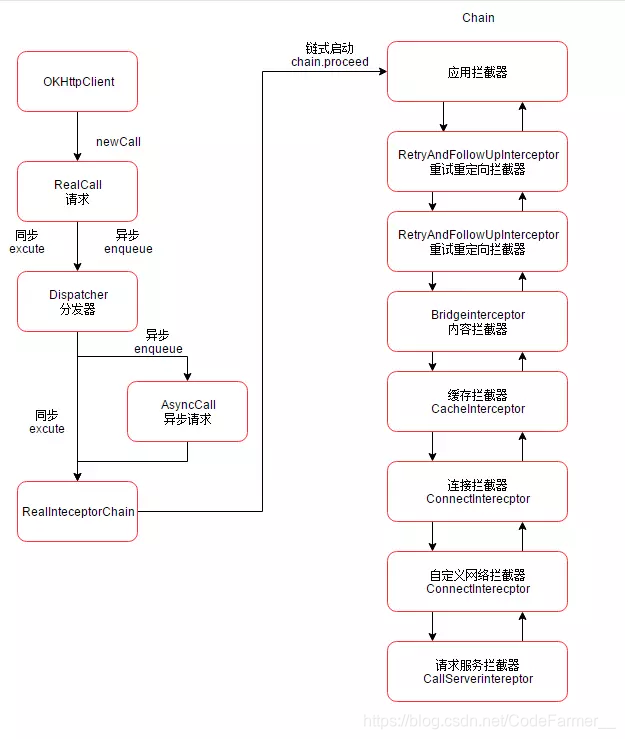
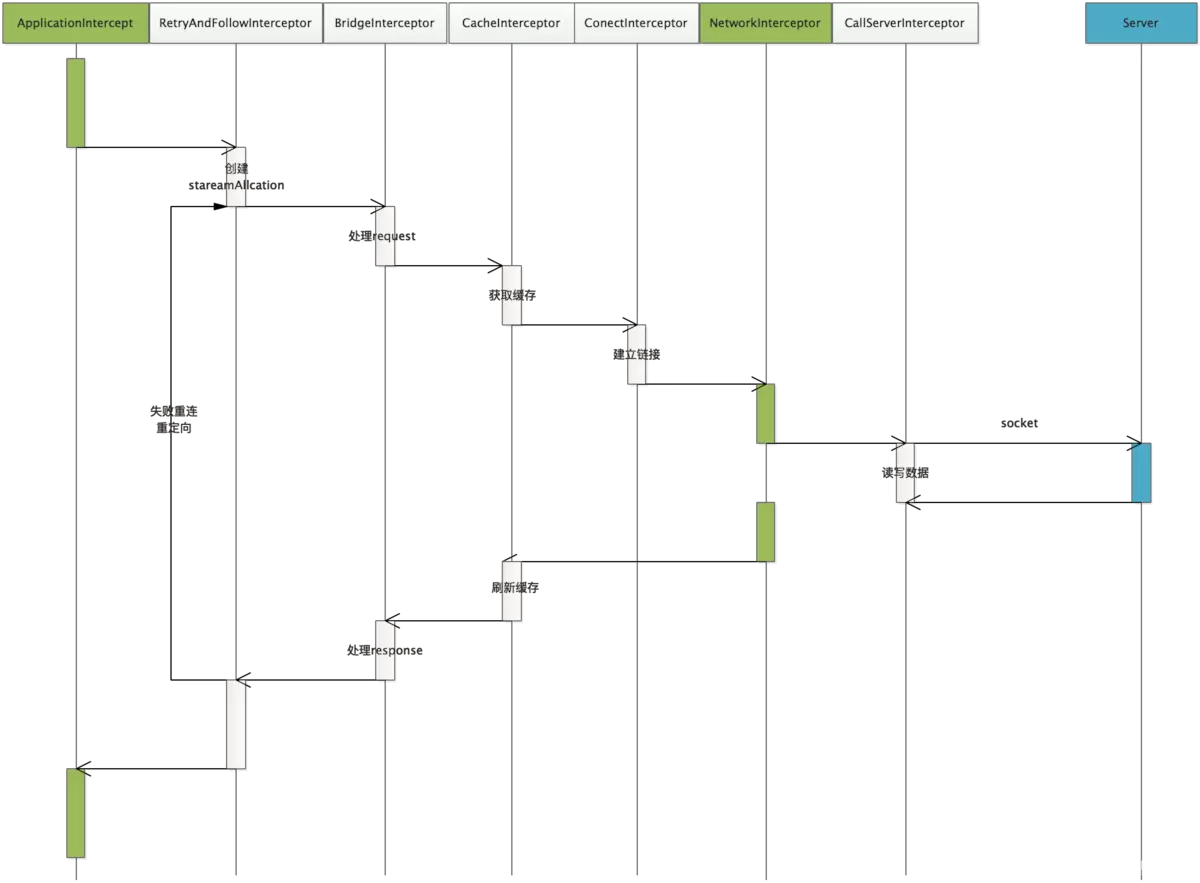
- RetryAndFollowUpInterceptor ——它是一个负责失败重连的拦截器。它是 Okhttp 内置的第一个拦截器,通过 while (true) 的死循环来进行对异常结果或者响应结果判断是否要进行重新请求。
- BridgeInterceptor——为用户构建的一个 Request 请求转化为能够进行网络访问的请求,同时将网络请求回来的响应 Response 转化为用户可用的 Response。比如,涉及的网络文件的类型和网页的编码,返回的数据的解压处理等等。
- CacheInterceptor—— 根据 OkHttpClient 对象的配置以及缓存策略对请求值进行缓存。
- ConnectInterceptor—— 负责与服务器建立 Socket 连接,并且创建了一个 HttpStream 它包括通向服务器的输入流和输出流。
- CallServerInterceptor——使用 HttpStream 与服务器进行数据的读写操作的。

 701


 扫一扫


 被折叠的 条评论
为什么被折叠?
 到【灌水乐园】发言


