



本文字数:66854;估计阅读时间:168分钟
作者:Lionel Palacin and Al Brown
本文在公众号【ClickHouseInc】首发

有越来越多的人都认为,AI 驱动的可观测性系统将会,很快的消减甚至取代站点可靠性工程师(Site Reliability Engineers,SRE)的职责。这种观点相当激进——在 ClickHouse,我们也很好奇,这一愿景到底离现实还有多远。
为此,我们从 SRE 的诸多职责中选择了一项具体任务——根本原因分析(RCA-Root cause analysis),并设计了一个实验,来验证现有 AI 模型在独立完成这项任务时的表现。
继续阅读,了解我们是如何构建并执行这个实验的,更重要的是,我们从中得到了哪些有价值的结论。
总结:自主完成根本原因分析(RCA)的能力尚未成熟。我们评估发现,利用大语言模型(Large Language Models,LLM)以更低成本、更高效率定位生产问题的设想尚未实现,即使是 GPT-5 表现也未能优于其他模型。
当前更适合的做法是将大语言模型用于协助调查过程、总结调查结果、撰写状态更新以及提出后续建议,而核心判断仍应由工程师通过高效、可搜索的可观测性系统掌控。
实验:用大语言模型(LLM)通过简单提示做根因分析(RCA)
这个实验本身并不复杂。我们为模型提供了一个正在运行的应用的可观测性数据,并用一个非常基础的提示词,让模型尝试识别用户报告异常的根本原因。
参与验证的模型
为了进行实验,我们首先需要选出参与的模型。我们挑选了五个模型,其中既包括广为人知的选手,也有一些不太常见但颇具潜力的模型:
-
Claude Sonnet 4:Claude 以其结构化的推理能力和细致的回答风格著称。它擅长按部就班地分析问题,在处理跨系统的复杂故障时尤其有帮助。
-
OpenAI GPT-o3:OpenAI 推出的进阶模型,专为高速响应和多模态输入而优化,在性能和响应速度之间取得了良好平衡。
-
OpenAI GPT-4.1:在通用推理和语言理解方面依然表现强劲,不过速度较慢,反应也不如 GPT-o3 灵敏。我们将其作为一个对照基线。
-
Gemini 2.5 Pro:这是 Google 最新推出的 Pro 版本,已深度整合入其生态系统。它在多步推理方面表现优秀,在代码分析和故障排查任务中尤为突出。
我们并没有测试市面上所有可用模型——这在现实中几乎不可能做到——而是选择了我们可以方便访问,并且看起来适合这项任务的模型。我们的目标不是评选冠军,而是了解这些模型在面对真实事故数据时,各自能发挥出什么样的表现。
异常情况
我们需要一份来自具有异常问题的实时应用的可观测性数据。为此,我们选择了运行 OpenTelemetry 演示应用(https://opentelemetry.io/docs/demo/),以生成包含不同类型异常的四个数据集。
正如下方架构图所示,OpenTelemetry 演示应用本身具有一定复杂性,包含多个服务组件、一个用户可交互的前端页面以及一个负载生成器。整体架构在很大程度上贴近真实的生产环境。此外,该应用还预置了一些可以通过 功能开关(https://opentelemetry.io/docs/demo/feature-flags/) 启用的异常场景,便于模拟不同类型的问题。
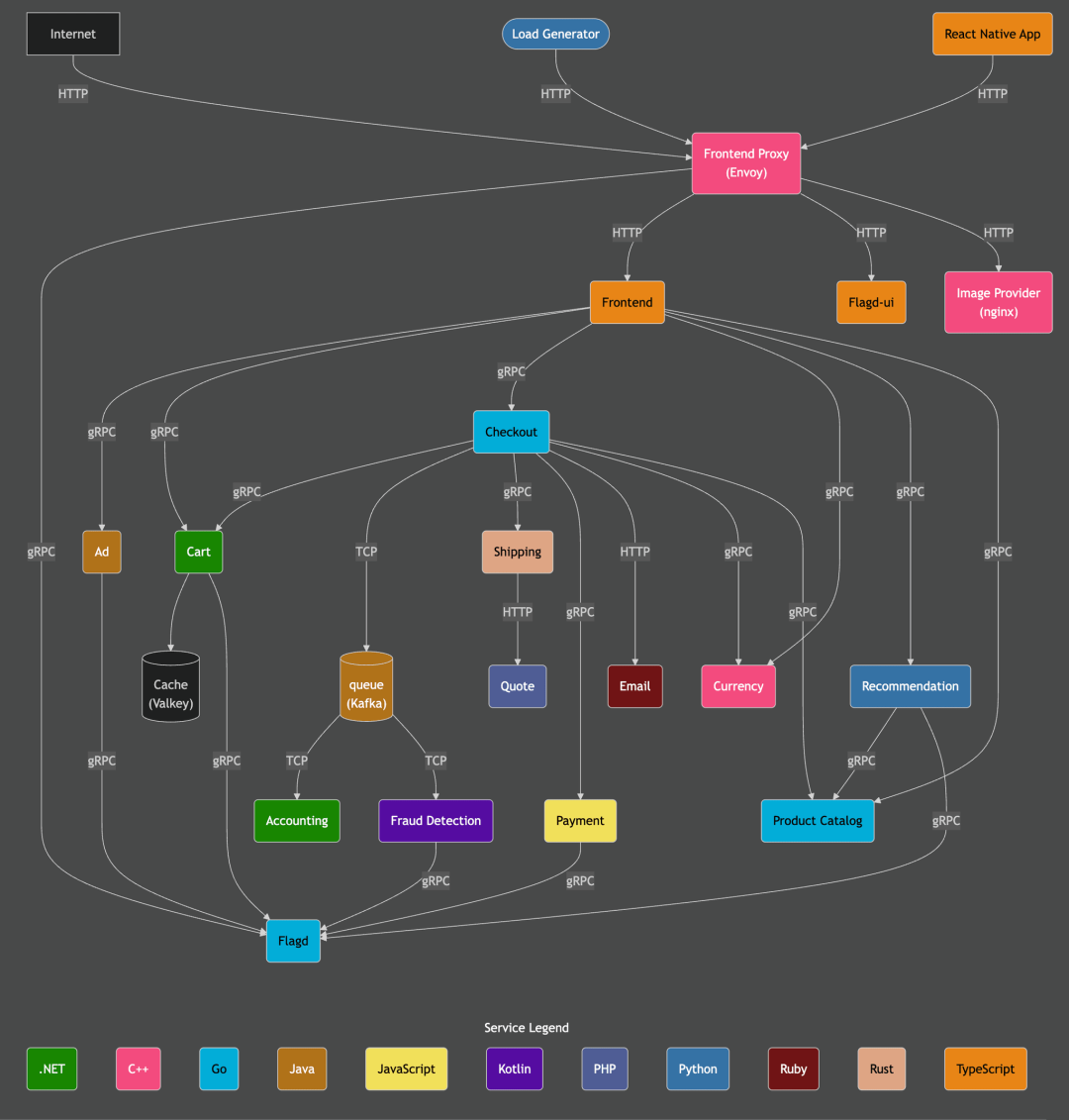
我们基于这个应用构建了三个新的数据集,每个数据集都聚焦于一个特定的异常,并覆盖约 1 小时的运行数据。第四个测试则使用了我们已有的 ClickStack 公共演示(https://play-clickstack.clickhouse.com/) 数据集,时长为 48 小时。
下表总结了这四个数据集及其对应的功能开关配置:
| 名称 |
数据库 |
时长 |
功能开关 |
描述 |
| 异常 1 |
otel_anomaly_1 |
1 小时 |
paymentFailure |
在调用 charge 方法时触发错误,仅影响 loyalty status 为 gold 的用户。 |
| 异常 2 |
otel_anomaly_2 |
1 小时 |
recommendationCacheFailure |
缓存容量以 1.4 倍速持续增长,造成内存泄漏,约 50% 的请求会触发增长。 |
| 异常 3 |
otel_anomaly_3 |
1 小时 |
productCatalogFailure |
对 product ID 为 OLJCESPC7Z 的 GetProduct 请求返回错误。 |
| 演示异常 |
otel_v2 |
48 小时 |
paymentCacheLeak |
payment cache 服务发生内存泄漏,当缓存填满后会显著拖慢应用响应速度。 |
我们的数据采集流程如下:
首先在 Kubernetes 集群中部署 OpenTelemetry 演示应用,并通过 ClickStack 进行 数据采集配置(https://clickhouse.com/docs/use-cases/observability/clickstack/ingesting-data/overview)。具体操作可以参考这个 GitHub 仓库(https://github.com/ClickHouse/opentelemetry-demo) 中的说明文档。
应用启动并开始将遥测数据写入 ClickHouse 后,我们将系统负载提升至 1000 名并发用户。当用户数量稳定后,开启目标异常对应的功能开关,并持续运行约 40 分钟。随后关闭该开关,再运行 10 分钟进行收尾。最终,每个数据集包含约 1 小时的完整数据。
SELECT
    min(TimestampTime),
    max(TimestampTime)
FROM otel_anomaly_3.otel_logs
┌──min(TimestampTime)─┬──max(TimestampTime)─┐
│ 2025-07-22 08:25:40 │ 2025-07-22 09:36:01 │
└─────────────────────┴─────────────────────┘现在我们已经完成了数据集的采集,接下来将首先进行人工分析,然后测试各个模型在排查这些异常时的实际表现,看看哪个模型更具实用价值。
实验方法
手动排查
在将问题交给大语言模型(LLM)分析之前,我们需要像 SRE 一样,先对每个异常进行全面的人工排查,找出其真实的根本原因。这一步是后续验证模型效果的基准:如果模型的判断正确,我们能确认;如果出现偏差,我们也可以适时纠正并辅助其深入。
在这一环节中,我们使用了基于 ClickHouse 构建的可观测性平台 ClickStack(https://clickhouse.com/use-cases/observability)。
我们逐个定位问题,确认异常点,并记录下完整的排查路径。这将成为之后评估模型表现的参考标准。
AI 驱动的排查
接下来轮到 AI 模型上场。
我们通过连接到 ClickHouse MCP 服务(https://clickhouse.com/docs/use-cases/AI/MCP/librechat) 的 LibreChat(https://www.librechat.ai/),让每个大语言模型在完全相同的场景下执行任务。借助这一配置,模型可以直接查询实际的可观测性数据,自主进行分析推理。
为便于观测整个过程中的 Token 使用量,我们还对 LibreChat 和 ClickHouse MCP Server 进行了仪表化(https://clickhouse.com/blog/llm-observability-clickstack-mcp)。遥测数据保存在 ClickHouse 中,因此我们可以通过查询语句统计整个分析过程中所消耗的 Token 数。
SELECT
    LogAttributes['conversationId'] AS conversationId,
    sum(toUInt32OrZero(LogAttributes['completionTokens'])) AS completionTokens,
    sum(toUInt32OrZero(LogAttributes['tokenCount'])) AS tokenCount,
    sum(toUInt32OrZero(LogAttributes['promptTokens'])) AS promptTokens,
    anyIf(LogAttributes['text'], (LogAttributes['text']) != '') AS prompt,
    min(Timestamp) AS start_time,
    max(Timestamp) AS end_time
FROM otel_logs
WHERE conversationId =
GROUP BY conversationId
每次测试我们都以相同的提示词开始:
"你是一个可观测性智能体,可以访问一个演示应用的 OpenTelemetry 数据。用户报告了使用应用时遇到问题,你能识别出具体问题、根本原因,并提出可能的解决方案吗?"
如果模型在首次提示后就能准确定位问题,那就非常理想。如果没有,我们会根据其回答进一步追问;若完全偏离方向,则提供更多上下文帮助其重回正轨。
针对每个异常,我们都会记录以下几个维度:
-
模型发现了哪些问题
-
判断是否准确
-
是否需要人工引导
-
使用了多少 Token
-
整体分析耗时
这些数据帮助我们评估模型在真实 SRE 场景下的效率与可靠性。
实验详解
在这一部分,我们将逐一分析各个异常情况。每个异常都先进行人工排查,随后在模型中使用统一提示词进行测试,并记录模型的响应过程。如果模型在初始阶段未能定位问题,我们会通过进一步提示引导其深入分析。
异常 1:支付服务故障
场景一:用户反馈在结账流程中遇到问题,填写完所有订单信息后点击“下单”按钮时出现错误提示。
手动排查
这个问题在 ClickStack 中排查起来相对简单。我们首先查看一个包含异常的用户会话。

在该会话的 trace 视图中,我们发现 payment service 返回了错误信息,提示 loyalty 等级为 gold 的用户所用的 Token 无效,导致支付请求失败。
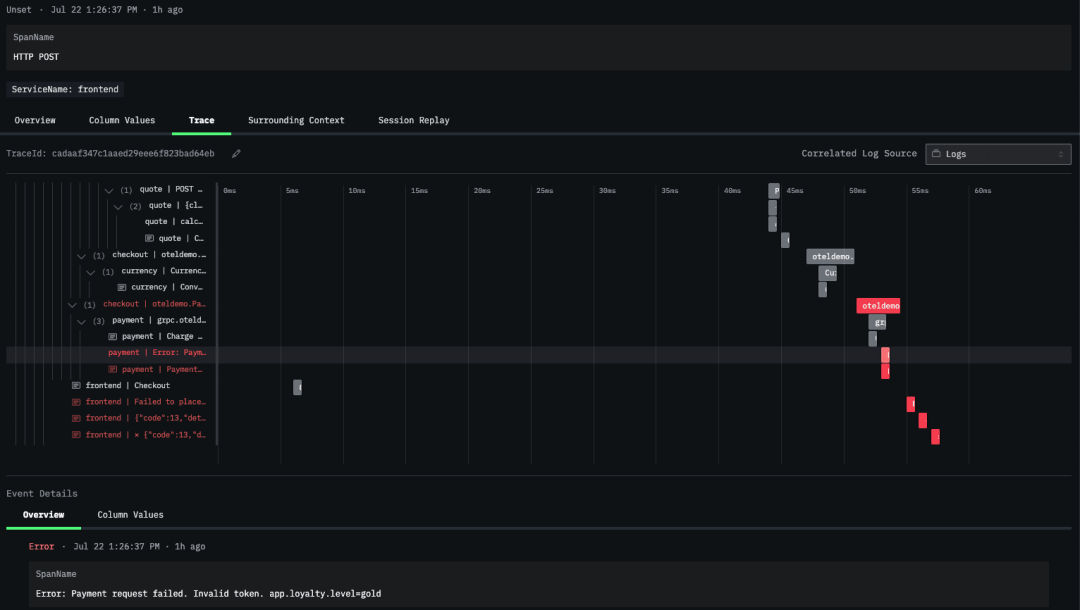
接着,我们在 traces explorer 视图中进一步筛选仅与 payment service 相关的追踪数据,验证了该错误确实只影响 Gold 等级用户。
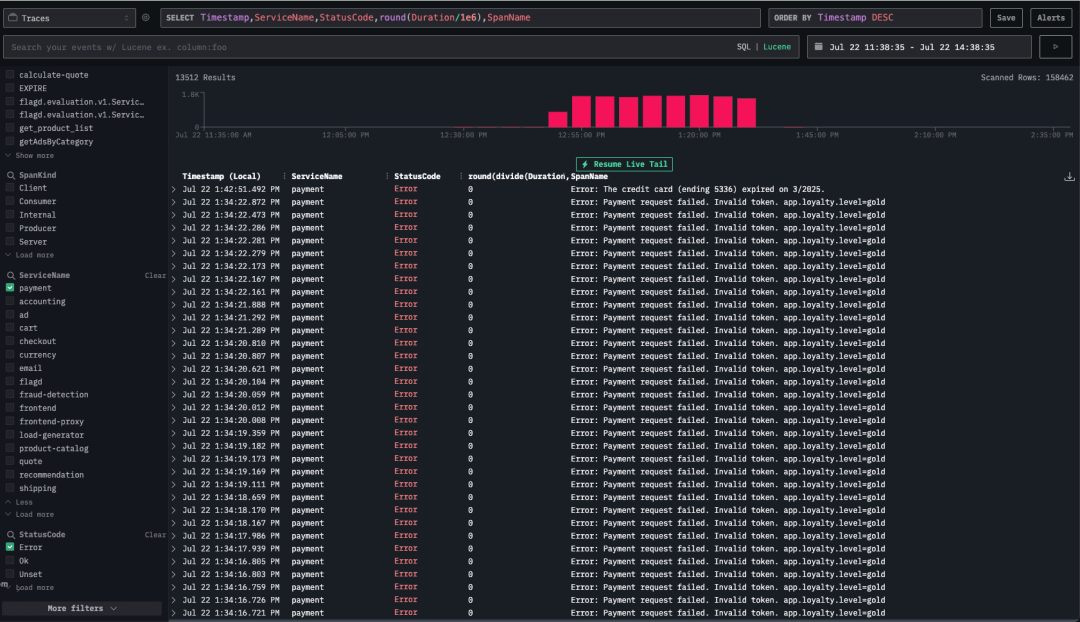
综上所述,payment service 在处理 Gold loyalty 用户的支付请求时存在问题。
LLM 排查
Claude Sonnet 4 模型
Claude Sonnet 4 模型在首次提示后便成功定位了问题根因,并给出了解释。
查看完整交互过程:
Claude Sonnet 4 - 异常 1 分析过程
提示词 1:
You're an Observability agent and have access to OpenTelemetry data from a demo application. Users have reported issues using the application, can you identify what is the issue, the root cause and suggest potential solutions?模型响应片段:
Evidence
	1. Traces
– Payment service: 13,512 error spans, all named
"Error: Payment request failed. Invalid token. app.loyalty.level=gold"
– Checkout service: 27,024 error spans (same TraceId chain) with gRPC method oteledemo.PaymentService/Charge returning INTERNAL.
– Frontend / frontend-proxy: ~29,000 error spans ("Failed to place order").
	2. Logs
– 27,010 "failed to charge card: ... Invalid token ... loyalty.level=gold" log records.
– Small number (~6,000) of ECONNREFUSED errors, but they are an order of magnitude lower than the “Invalid token” failures.
	3. Metrics
– No CPU / memory anomalies; latency spikes coincide with spikes in payment errors.
– Error rate is almost 100% for PlaceOrder when loyalty.level = gold.
OpenAI o3 模型
OpenAI o3 模型在首次响应中未能使用 MCP 服务连接查询 ClickHouse 数据。在后续提示后,它才成功查询了数据并进行了分析,但分析重点落在受影响的上层 trace 节点上,而未触及真正的根因。在我们提供明确引导后,它才定位到问题源头。
查看完整交互过程:
OpenAI o3 - 异常 1 分析过程
提示词 1:
You're an Observability agent and have access to OpenTelemetry data from a demo application. Users have reported issues using the application, can you identify what is the issue, the root cause and suggest potential solutions?模型响应片段:
Evidence
	1. Traces
– Payment service: 13,512 error spans, all named
"Error: Payment request failed. Invalid token. app.loyalty.level=gold"
– Checkout service: 27,024 error spans (same TraceId chain) with gRPC method oteledemo.PaymentService/Charge returning INTERNAL.
– Frontend / frontend-proxy: ~29,000 error spans ("Failed to place order").
	2. Logs
– 27,010 "failed to charge card: ... Invalid token ... loyalty.level=gold" log records.
– Small number (~6,000) of ECONNREFUSED errors, but they are an order of magnitude lower than the “Invalid token” failures.
	3. Metrics
– No CPU / memory anomalies; latency spikes coincide with spikes in payment errors.
– Error rate is almost 100% for PlaceOrder when loyalty.level = gold.
OpenAI GPT4.1 模型
OpenAI GPT-4.1 模型在多轮提示下逐步收敛到正确答案。初始分析偏离方向,经过两轮进一步提示后,成功识别出支付服务中 loyalty 等级处理异常的问题。
查看完整交互过程:
OpenAI GPT-4.1 - 异常 1 分析过程
提示词 1:
You're an Observability agent and have access to OpenTelemetry data from a demo application. Users have reported issues using the application, can you identify what is the issue, the root cause and suggest potential solutions?响应节选:
To help you identify the issue, root cause, and suggest solutions, I’ll need to analyze relevant OpenTelemetry data from your demo application. This typically includes traces, metrics, and logs. Here’s how we’ll approach this:
	1. Issue Identification: I’ll look for error traces, high latencies, dropped requests, or anomalies.
	2. Root Cause Analysis: I’ll analyze the traces to see where bottlenecks, errors, or resource issues might exist (e.g., slow database calls, timeouts, dependency errors).
	3. Potential Solutions: Based on findings, I’ll suggest actionable solutions.
提示词 2:
You have access to the data, can you start analyzing?响应节选:
Observed Issue
- High average span durations in several services, especially load-generator, frontend-proxy, and frontend.
- No explicit errors in logs or trace statuses.
- This points toward a potential performance/bottleneck issue rather than a code crash or failure.
提示词 3:
Users have been reported issues during the payment process响应节选:
Impact
- Users, particularly with gold loyalty level, cannot complete payment, resulting in user-facing failures and high error rates in backend logs and traces.
Gemini 2.5 Pro
Gemini 2.5 Pro 模型在尝试使用 MCP 工具查询数据库时最初遇到了一些问题。最开始分析的方向偏向于某个非关键 API 的延迟指标。经过引导后,它逐步聚焦于 payment 流程,并准确识别出了 Gold 用户支付失败的问题。
查看完整交互过程:
Gemini 2.5 Pro - 异常 1 分析过程
提示词 1:
You're an Observability agent and have access to OpenTelemetry data from a demo application. Users have reported issues using the application, can you identify what is the issue, the root cause and suggest potential solutions?响应节选:
### Issue

The application is experiencing high latency, with the `frontend-proxy` service being the most affected. The P95 latency for this service is over 1 second, which is significantly impacting the user experience.

### Root Cause

The root cause of the high latency is long-running calls from the `frontend-proxy` service to the `flagd.evaluation.v1.Service/EventStream` endpoint of the `flagd` service. The trace analysis shows that these calls can take over 3 minutes to complete. This is because the `EventStream` is a streaming endpoint designed to provide real-time updates of feature flags. The `frontend-proxy` is making a request to this endpoint and holding the connection open, which is causing the long-running spans and, consequently, the high latency.

The `canceled: "true"` attribute on the `router flagservice egress` span in the `frontend-proxy` service suggests that the proxy is timing out and canceling the request. However, the `flagd` service does not seem to be handling this cancellation correctly and continues to process the request, keeping the stream open for an extended period.

### Solution

To resolve this issue, the following actions are recommended:

*   **Use a Short-Lived RPC for Feature Flag Evaluation**: Instead of using the `EventStream` endpoint, the `frontend-proxy` should use a more appropriate, short-lived RPC for fetching feature flags. This will ensure that the connections are not held open for extended periods, reducing the latency of the `frontend-proxy` service.
*   **Investigate the `flagd` Service**: The `flagd` service should be investigated to understand why it's not handling client-side cancellations correctly. The developers should ensure that the service gracefully handles canceled requests and closes the streams promptly.
*   **Review the `frontend-proxy` Configuration**: The `frontend-proxy`'s configuration should be reviewed to ensure that it's correctly handling streaming responses and that the timeouts are set to appropriate values.

By implementing these solutions, you should be able to significantly reduce the latency of the `frontend-proxy` service and improve the overall performance and reliability of your application.
提示词 2:
Users have reported issues during the payment process响应节选:
Based on my investigation, I've identified the root cause of the payment issues and have recommendations for a solution.

### Summary of Findings

*   **No Explicit Errors:** My initial search for traces and logs with an "ERROR" status for the `payment` service came up empty. This indicates that the application is not correctly flagging these issues as errors.
*   **Anomalous Span Names:** An analysis of the service's trace data revealed a peculiar pattern: spans being created with names that are actually error messages. For example:
    *   `Error: Payment request failed. Invalid token. app.loyalty.level=gold`
    *   `Error: The credit card (ending 1791) expired on 1/2025.`
*   **Error Context:** By examining these "error spans," I found that the "Invalid token" error consistently occurs for users with the `app.loyalty.level` attribute set to `gold`.

### Root Cause

The user-reported payment issues are caused by a bug in the `payment` service that specifically affects customers with a "gold" loyalty status. When these users attempt to make a payment, the service fails with an "Invalid token" error.

Furthermore, the application is handling these errors incorrectly from an observability standpoint. Instead of setting the status of the parent span (e.g., the `charge` or `grpc.oteldemo.PaymentService/Charge` span) to `ERROR`, the developers have written code that creates a new, zero-duration span with the error message as its name. This practice hides the errors from standard monitoring dashboards and makes it difficult to track the error rate of the service.

### Recommended Solutions

1.  **Fix the Payment Logic:**
    *   **Immediate Priority:** The development team must investigate and fix the bug in the `payment` service that causes token validation to fail for "gold" loyalty members. This is the primary cause of the user-facing issue.

2.  **Correct the Instrumentation:**
    *   **Best Practice:** The practice of creating new spans to log errors should be stopped. Instead, developers should adhere to OpenTelemetry best practices:
        *   When an error occurs, the `StatusCode` of the existing span in which the error happened should be set to `ERROR`.
        *   The error details should be recorded as an `Event` (also known as a `Log`) within that span, including attributes for the exception type, message, and stack trace. This ensures that errors are properly tracked, correlated with traces, and can be used to trigger alerts.

By addressing both the underlying bug in the payment logic and the incorrect instrumentation, you will resolve the user-reported issues and significantly improve the observability and reliability of your application.
大语言模型调查总结
| 模型 |
是否成功定位根因 |
MCP 调用次数 |
分析时长 |
输入 Token 数 |
输出 Token 数 |
估算成本 |
| Claude 4 Sonnet |
是 |
15 |
2 分钟 |
1,028,123 |
4,487 |
$3.15 |
| OpenAI o3 |
是 |
15 |
2 分钟 |
57,397 |
2,845 |
$0.17 |
| OpenAI GPT-4.1 |
是(需少量引导) |
14 |
3 分钟 |
43,47 |
2,224 |
$0.10 |
| Gemini 2.5 Pro |
是(需少量引导) |
12 |
3 分钟 |
313,892 |
7,451 |
$0.90 |
异常 2:推荐缓存泄漏
接下来分析的异常发生在 recommendation cache 服务中,该服务引入了一个问题,导致 CPU 使用率异常飙高。
手动排查
我们首先从日志入手,发现错误信息数量显著上升。
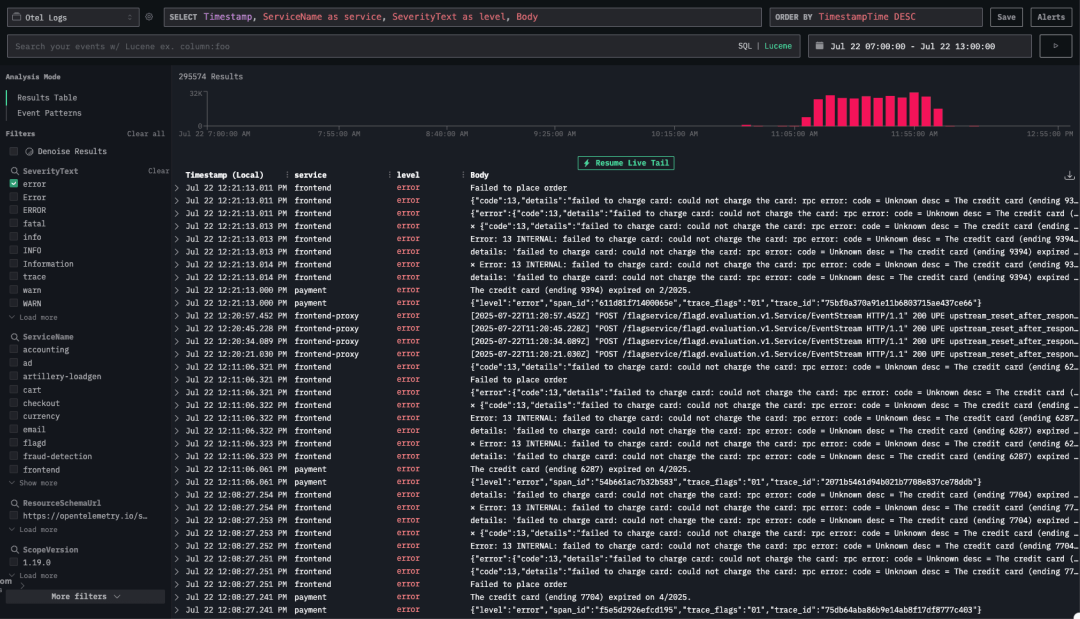
在初步浏览日志时,并未立刻发现异常的具体原因。我们注意到多条连接错误日志,例如:⨯ Error: 14 UNAVAILABLE: No connection established. Last error: connect ECONNREFUSED 34.118.225.39:8080 (2025-07-22T11:05:44.834Z)。
接着,我们在 Trace Explorer 中将视图过滤为仅包含错误的 trace,并排除了产生大量干扰信息的 load-generator 服务。
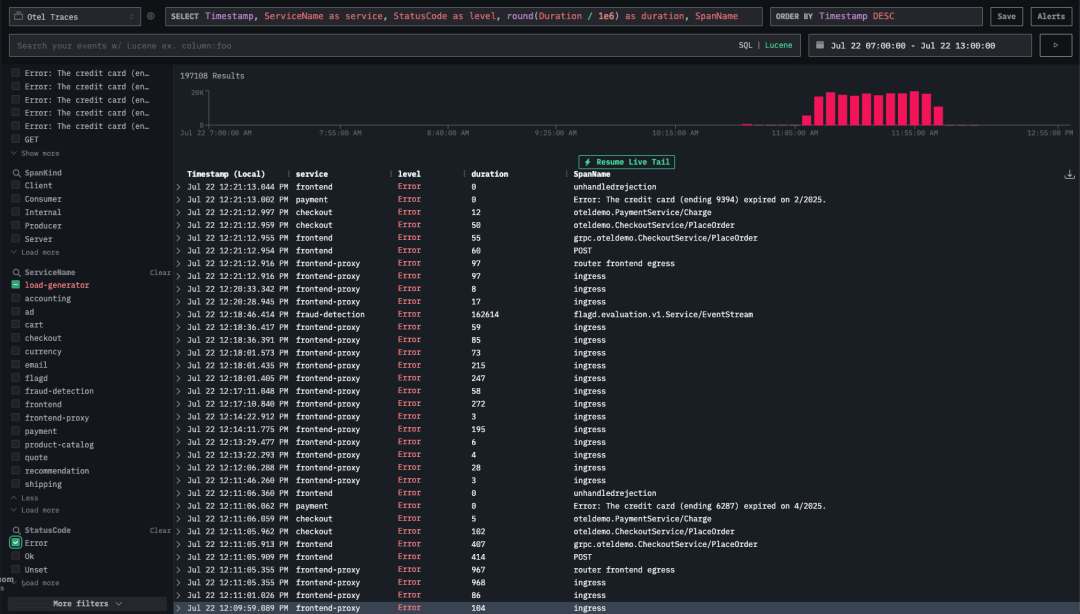
进一步排查发现,这些错误主要集中在
 最低0.47元/天 解锁文章






 扫一扫
扫一扫


 被折叠的 条评论
为什么被折叠?
被折叠的 条评论
为什么被折叠?
 到【灌水乐园】发言





