



 本文介绍如何创建Spring Cloud项目中的Consumer模块,包括配置pom.xml引入所需依赖、设置application.yml、注入RESTTEMPLATE并创建Controller来实现远程服务调用。
1.Consumer模块的创建
pom.xml文件编写:
-
<?xml version=”1.0″ encoding=”UTF-8″?>
-
<project xmlns=”http://maven.apache.org/POM/4.0.0″
-
xmlns:xsi=”http://www.w3.org/2001/XMLSchema-instance”
-
xsi:schemaLocation=”http://maven.apache.org/POM/4.0.0 http://maven.apache.org/xsd/maven-4.0.0.xsd”>
-
<parent>
-
<artifactId>springcloud</artifactId>
-
<groupId>com.csh</groupId>
-
<version>1.0-SNAPSHOT</version>
-
</parent>
-
<modelVersion>4.0.0</modelVersion>
-
<artifactId>springcloud-consumer-dept-80</artifactId>
-
<dependencies>
-
<dependency>
-
<groupId>com.csh</groupId>
-
<artifactId>springcloudapi</artifactId>
-
<version>1.0-SNAPSHOT</version>
-
</dependency>
-
<dependency>
-
<groupId>org.springframework.boot</groupId>
-
<artifactId>spring-boot-starter-web</artifactId>
-
</dependency>
-
<dependency>
-
<groupId>org.springframework.cloud</groupId>
-
<artifactId>spring-cloud-starter-ribbon</artifactId>
-
<version>1.4.7.RELEASE</version>
-
</dependency>
-
<dependency>
-
<groupId>org.springframework.cloud</groupId>
-
<artifactId>spring-cloud-starter-config</artifactId>
-
</dependency>
-
<dependency>
-
<groupId>org.springframework.cloud</groupId>
-
<artifactId>spring-cloud-starter-eureka</artifactId>
-
<version>1.4.7.RELEASE</version>
-
</dependency>
-
<dependency>
-
<groupId>org.springframework.boot</groupId>
-
<artifactId>spring-boot-devtools</artifactId>
-
</dependency>
-
</dependencies>
-
<properties>
-
<maven.compiler.source>8</maven.compiler.source>
-
<maven.compiler.target>8</maven.compiler.target>
-
</properties>
-
</project>
application.yml文件编写
-
server:
-
port: 80
新建一个CONFIGBEAN包注入 RESTTEMPLATE!
-
package com.csh.springcloud.config;
-
import org.springframework.cloud.client.loadbalancer.LoadBalanced;
-
import org.springframework.context.annotation.Bean;
-
import org.springframework.context.annotation.Configuration;
-
import org.springframework.web.client.RestTemplate;
-
@Configuration
-
public class ConfigBean {
-
@Bean
-
@LoadBalanced
-
public RestTemplate getrestTemplate()
-
{
-
return new RestTemplate() ;}
-
}
创建CONTROLLER包,编写DEPTCONSUMERCONTROLLER类
-
package com.csh.springcloud.controller;
-
import com.csh.springcloud.pojo.Dept;
-
import org.springframework.beans.factory.annotation.Autowired;
-
import org.springframework.web.bind.annotation.PathVariable;
-
import org.springframework.web.bind.annotation.RequestMapping;
-
import org.springframework.web.bind.annotation.RestController;
-
import org.springframework.web.client.RestTemplate;
-
import java.util.List;
-
@RestController
-
public class DeptComsumerController {
-
@Autowired
-
RestTemplate restTemplate;
-
private static final String REST_URL_PREFIX=”http://localhost:8001″;
-
@RequestMapping(“/consumer/dept/add”)
-
public boolean add(Dept dept)
-
{
-
return restTemplate.getForObject(REST_URL_PREFIX+”/dept/add”,boolean.class);
-
}
-
@RequestMapping(“/consumer/dept/get/{id}”)
-
public Dept getbyid(@PathVariable(“id”) int id)
-
{
-
return restTemplate.getForObject(REST_URL_PREFIX+”/dept/find/”+id,Dept.class);
-
}
-
@RequestMapping(“/consumer/dept/list”)
-
public List<Dept> list()
-
{
-
return restTemplate.getForObject(REST_URL_PREFIX+”/dept/selectall”,List.class);
-
}
-
}
RestTemplate提供了多种便捷访问远程Http服务的方法,是一种简单便捷的访问restful服务模板
类,是Spring提供的用于访问Rest服务的客户端模板工具集
使用RestTemplate访问restful接口非常的简单粗暴且无脑
(url,requsetMap,ResponseBean.class) 这三个参数分别代表REST请求地址,请求参数,
Http响应转换 被 转换成的对象类型
编写主启动类
-
package com.csh.springcloud;
-
import org.springframework.boot.SpringApplication;
-
import org.springframework.boot.autoconfigure.SpringBootApplication;
-
import org.springframework.cloud.netflix.eureka.EnableEurekaClient;
-
@EnableEurekaClient
-
@SpringBootApplication
-
public class Springcloudconsumer80 {
-
public static void main(String[] args) {
-
SpringApplication.run(Springcloudconsumer80.class,args);
-
}
-
}
2.访问测试
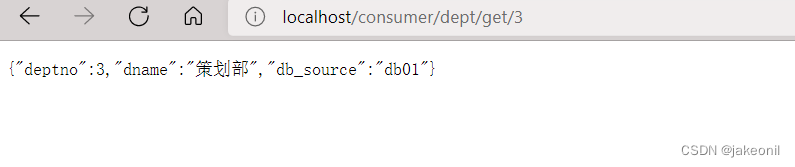

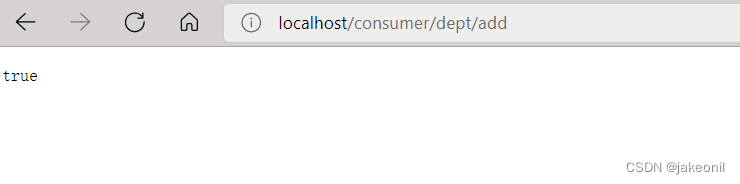





 扫一扫
扫一扫


 168万+
168万+

 被折叠的 条评论
为什么被折叠?
被折叠的 条评论
为什么被折叠?
 到【灌水乐园】发言





