



1、环境介绍
硬件:野火鲁班猫2h(rk3568)
2、前言
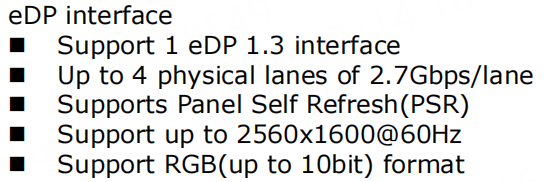
本文主要介绍在野火鲁班猫2h下点亮京东方GV101WXM-N81 10.1寸 edp屏。
3、RK3568 eDP资源
4、eDP硬件接口
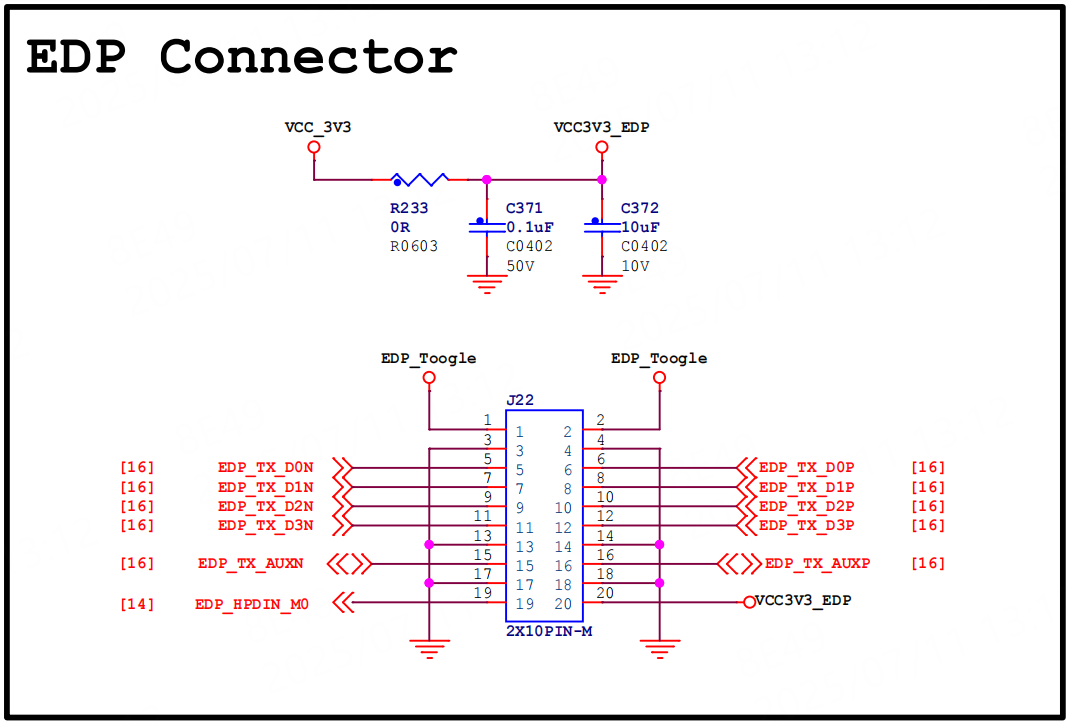
eDP硬件接口可以总结为三大核心通道:
Main-Link(主通道):用于传输 视频/音频 数据,高速差分对构成(TX0~TX3),最多 4 通道(Lane),但有些屏只用 2 Lane。AUX CH(辅助通道):低速单对差分线(AUX+/-),用于传输配置命令和参数。HPD(Hot Plug Detect):表示热插拔检测通道,用于检测HPD信号由Sink端(屏幕)驱动,通知 Source 端是否有设备接入。(选配)

如下图是鲁班猫2h的eDP接口原理图:
5、原理图查看
5.1、背光


EDP_BL_EN(背光使能脚):GPIO4_C2EDP_BL_PWM(背光驱动脚):PWM15_IR_M1
5.2、触摸
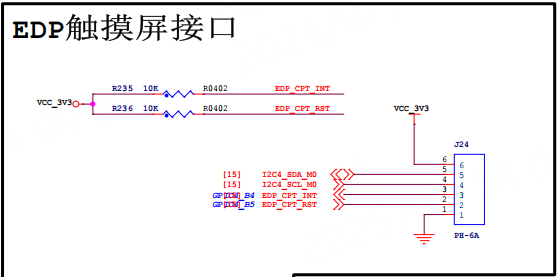
I2C编号:I2C4EDP_CPT_INT(触摸中断脚):GPIO4_B4EDP_CPT_RST(触摸复位脚):GPIO4_B5
6、设备树配置
这里使用vp1链接edp接口。下面直接给出设备树配置:
/ {
    backlight_edp: backlight-edp {
        status = "okay";
        compatible = "pwm-backlight";
        pwms = <&pwm15 0 50000 0>;
        brightness-levels = <
            95  95  95  95  95  95  95  95
            95  95  95  95  95  95  95  95
            95  95  95  95  95  95  95  95
            95  95  95  95  95  95  95  95
            95  95  95  95  95  95  95  95
            95  95  95  95  95  95  95  95
            95  95  95  95  95  95  95  95
            95  95  95  95  95  95  95  95
            95  95  95  95  95  95  95  95
            95  95  95  95  95  95  95  95
            95  95  95  95  95  95  95  95
            88  89  90  91  92  93  94  95
            96  97  98  99 100 101 102 103
            104 105 106 107 108 109 110 111
            112 113 114 115 116 117 118 119
            120 121 122 123 124 125 126 127
            128 129 130 131 132 133 134 135
            136 137 138 139 140 141 142 143
            144 145 146 147 148 149 150 151
            152 153 154 155 156 157 158 159
            160 161 162 163 164 165 166 167
            168 169 170 171 172 173 174 175
            176 177 178 179 180 181 182 183
            184 185 186 187 188 189 190 191
            192 193 194 195 196 197 198 199
            200 201 202 203 204 205 206 207
            208 209 210 211 212 213 214 215
            216 217 218 219 220 221 222 223
            224 225 226 227 228 229 230 231
            232 233 234 235 236 237 238 239
            240 241 242 243 244 245 246 247
            248 249 250 251 252 253 254 255
        >;
        default-brightness-level = <200>;
    };

    vdd_3v3_edp: vdd-3v3-edp-regulator {
        compatible = "regulator-fixed";
        enable-active-high;
        regulator-boot-on;
        regulator-name = "vdd_3v3_edp_lcd";
        regulator-always-on;
        regulator-min-microvolt = <3300000>;
        regulator-max-microvolt = <3300000>;
    };

    edp_panel: edp-panel {
        status = "okay";
        compatible = "simple-panel";
        power-supply = <&vdd_3v3_edp>;
        enable-gpios = <&gpio4 RK_PC2 GPIO_ACTIVE_HIGH>;
        backlight = <&backlight_edp>;
        prepare-delay-ms = <100>;
        enable-delay-ms = <100>;

        /* 如果你的屏幕不支持EDID获取timing,那需要手动填写timing参数 */
        /*
        display-timings {
            native-mode = <&timing0>;
            timing0: timing0 {
                clock-frequency = <160000000>;
                hactive = <1200>;
                vactive = <1920>;
                hback-porch = <21>;
                hfront-porch = <120>;
                vback-porch = <18>;
                vfront-porch = <21>;
                hsync-len = <20>;
                vsync-len = <3>;
                hsync-active = <0>;
                vsync-active = <0>;
                de-active = <0>;
                pixelclk-active = <0>;
            };
        };
        */

        port {
            panel_in_edp: endpoint {
                remote-endpoint = <&edp_out_panel>;
            };
        };
    };
}

&pwm15 {
    status = "okay";
	pinctrl-0 = <&pwm15m1_pins>;
}

&edp_phy {
    status = "okay";
}

&edp_in_vp0 {
    status = "disabled";
}

&edp_in_vp1 {
    status = "okay";
}

&edp_in_vp1 {
    status = "okay";
}

&edp {
    force-hpd; // 如果你的屏幕接口不支持HDP热插拔
    status = "okay";
    ports {
        port@1 {
            reg = <1>;
            edp_out_panel: endpoint@0 {
                remote-endpoint = <&panel_in_edp>;
            };
        };
    };
}

&i2c4 {
	status = "okay";
	clock-frequency = <100000>;
	#address-cells = <1>;
	#size-cells = <0>;
	inctrl-names = "default";
	pinctrl-0 = <&i2c4m0_xfer>;

	gt911: gt911@5d {
		status = "okay";
		interrupt-parent = <&gpio4>;
		interrupts = <RK_PB4 IRQ_TYPE_LEVEL_LOW>;
		reset-gpios = <&gpio4 RK_PB5 GPIO_ACTIVE_LOW>;
		irq-gpios = <&gpio4 RK_PB4 GPIO_ACTIVE_HIGH>;
		compatible = "goodix,gt911";
		reg = <0x5d>;
	};
};
7、总结
参考文章:
《Rockchip_Developer_Guide_eDP_CN.pdf》
嵌入式Linux学习交流群:424571391





 扫一扫
扫一扫


 2974
2974

 被折叠的 条评论
为什么被折叠?
被折叠的 条评论
为什么被折叠?
 到【灌水乐园】发言





