


📑往期推文全新看点(附带最新·鸿蒙全栈学习笔记)
模糊
动画效果可以丰富界面的细节,提升UI界面的真实感和品质感。例如,模糊和阴影效果可以让物体看起来更加立体,使得动画更加生动。ArkUI提供了丰富的效果接口,开发者可快速打造出精致、个性化的效果。本章中主要对常用的模糊、阴影和色彩效果等效果接口进行了介绍。
模糊可以用来体现界面空间的纵深感,区分前后元素的层级关系。
| 接口 | 说明 |
|---|---|
| backdropBlur | 为当前组件添加背景模糊效果,入参为模糊半径。 |
| blur | 为当前组件添加内容模糊效果,入参为模糊半径。 |
| backgroundBlurStyle | 为当前组件添加背景模糊效果,入参为模糊样式。 |
| foregroundBlurStyle | 为当前组件添加内容模糊效果,入参为模糊样式。 |
| motionBlur | 为当前组件添加由缩放大小或位移变化引起的运动过程中的动态模糊效果,入参为模糊半径和锚点坐标。 |
说明
以上接口是实时模糊接口,会每帧进行实时渲染,性能负载较高。当模糊内容和模糊半径都不需要变化时,建议使用静态模糊接口 blur 。
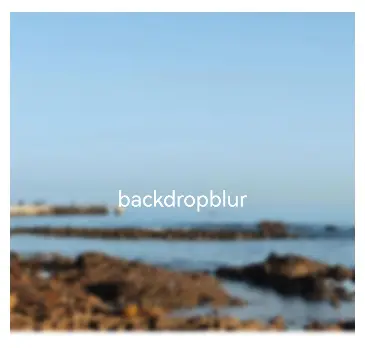
使用backdropBlur为组件添加背景模糊
@Entry
@Component
struct BlurEffectsExample {
  build() {
    Column({ space: 10 }) {
      Text('backdropBlur')
        .width('90%')
        .height('90%')
        .fontSize(20)
        .fontColor(Color.White)
        .textAlign(TextAlign.Center)
        .backdropBlur(10) // 对背景进行模糊
        .backgroundImage($r('app.media.share'))
        .backgroundImageSize({ width: 400, height: 300 })
    }
    .width('100%')
    .height('50%')
    .margin({ top: 20 })
  }
}
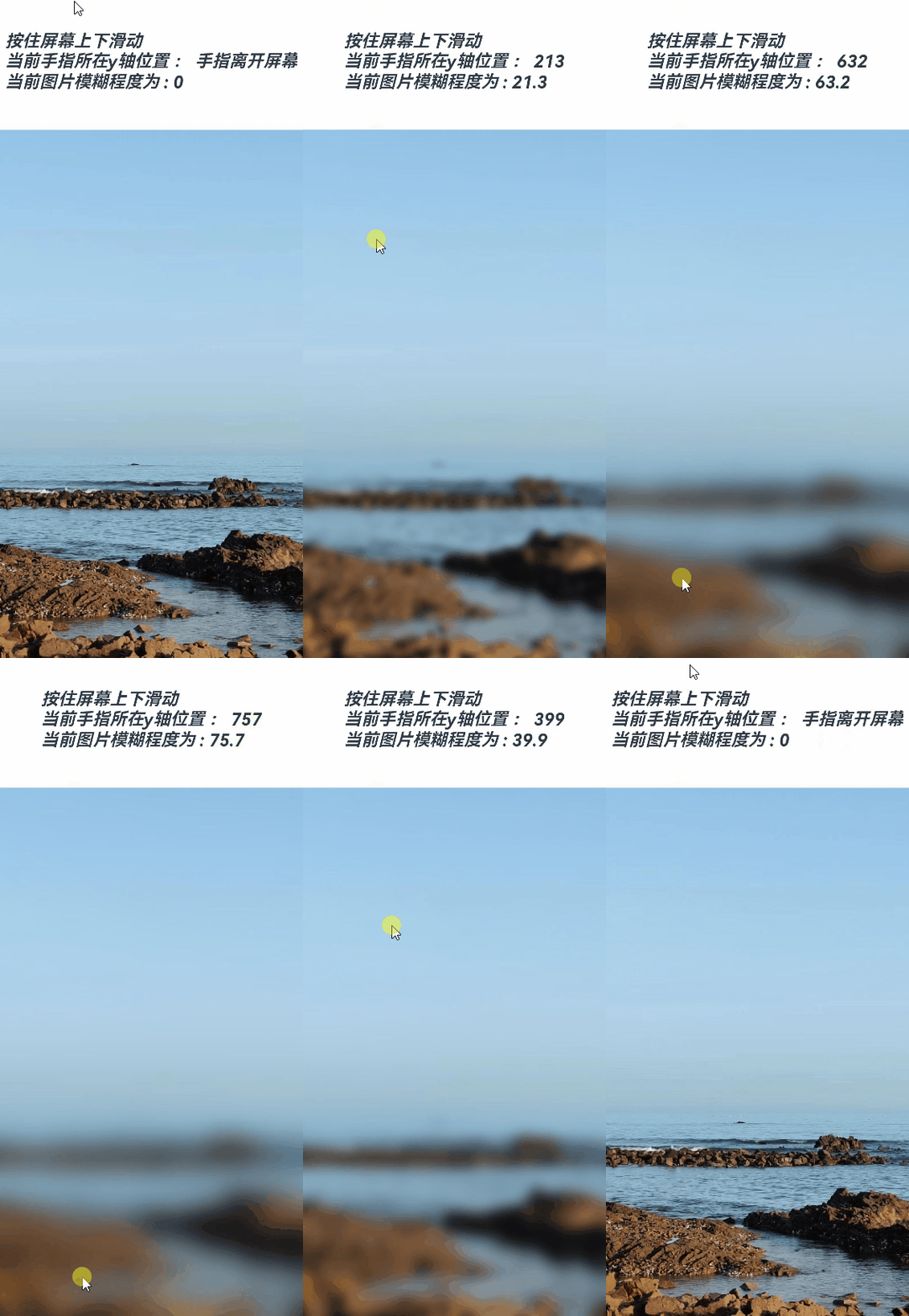
使用blur为组件添加内容模糊
@Entry
@Component
struct Index1 {
  @State radius: number = 0;
  @State text: string = '';
  @State y: string = '手指不在屏幕上';

  aboutToAppear() {
    this.text = "按住屏幕上下滑动\n" + "当前手指所在y轴位置 : " + this.y +
    "\n" + "当前图片模糊程度为 : " + this.radius;
  }

  build() {
    Flex({ direction: FlexDirection.Column, alignItems: ItemAlign.Center, justifyContent: FlexAlign.SpaceBetween }) {
      Text(this.text)
        .height(200)
        .fontSize(20)
        .fontWeight(FontWeight.Bold)
        .fontFamily("cursive")
        .fontStyle(FontStyle.Italic)
      Image($r("app.media.wall"))
        .blur(this.radius) // 使用blur接口为照片组件添加内容模糊效果
        .height('100%')
        .width("100%")
        .objectFit(ImageFit.Cover)
    }.height('100%')
    .width("100%")
    .onTouch((event?: TouchEvent) => {
      if(event){
        if (event.type === TouchType.Move) {
          this.y = Number(event.touches[0].y.toString()).toString();
          this.radius = Number(this.y) / 10; // 根据跟手过程中的滑动距离修改模糊半径,配合模糊接口,形成跟手模糊效果
        }
        if (event.type === TouchType.Up) {
          this.radius = 0;
          this.y = '手指离开屏幕';
        }
      }
      this.text = "按住屏幕上下滑动\n" + "当前手指所在y轴位置 : " + this.y +
      "\n" + "当前图片模糊程度为 : " + this.radius;
    })
  }
}
使用backgroundBlurStyle为组件添加背景模糊效果
@Entry
@Component
struct BackDropBlurStyleDemo {
  build() {
    Grid() {
      GridItem() {
        Column() {
          Column() {
            Text('原图')
              .fontSize(20)
              .fontColor(Color.White)
              .textAlign(TextAlign.Center)
              .width('100%')
              .height('100%')
          }
          .height(100)
          .aspectRatio(1)
          .borderRadius(10)
          .backgroundImage($r('app.media.share'))

          Text('原图')
            .fontSize(12)
            .fontColor(Color.Black)
        }
        .height('100%')
        .justifyContent(FlexAlign.Start)
      }
      .width(200)
      .height(200)

      GridItem() {
        Column() {
          Column() {
            Text('Thin')
              .fontSize(20)
              .fontColor(Color.White)
              .textAlign(TextAlign.Center)
              .width('100%')
              .height('100%')
          }
          .height(100)
          .aspectRatio(1)
          .borderRadius(10)
          .backgroundImage($r('app.media.share'))
          // BlurStyle.Thin: 为组件添加轻薄材质模糊效果
          // ThemeColorMode.LIGHT: 固定使用浅色模式效果
          // AdaptiveColor.DEFAULT: 不使用取色模糊,使用默认的颜色作为蒙版颜色
          // scale: 背景材质模糊效果程度,默认值是1
          .backgroundBlurStyle(BlurStyle.Thin, {
            colorMode: ThemeColorMode.LIGHT,
            adaptiveColor: AdaptiveColor.DEFAULT,
            scale: 0.1
          })

          Text('Thin')
            .fontSize(12)
            .fontColor(Color.Black)
        }
        .height('100%')
        .justifyContent(FlexAlign.Start)
      }
      .width(200)
      .height(200)

      GridItem() {
        Column() {
          Column() {
            Text('Regular')
              .fontSize(20)
              .fontColor(Color.White)
              .textAlign(TextAlign.Center)
              .width('100%')
              .height('100%')
          }
          .height(100)
          .aspectRatio(1)
          .borderRadius(10)
          .backgroundImage($r('app.media.share'))
          .backgroundBlurStyle(BlurStyle.Regular, {
            colorMode: ThemeColorMode.LIGHT,
            adaptiveColor: AdaptiveColor.DEFAULT,
            scale: 0.1
          })

          Text('Regular')
            .fontSize(12)
            .fontColor(Color.Black)
        }
        .height('100%')
        .justifyContent(FlexAlign.Start)
      }
      .width(200)
      .height(200)

      GridItem() {
        Column() {
          Column() {
            Text('Thick')
              .fontSize(20)
              .fontColor(Color.White)
              .textAlign(TextAlign.Center)
              .width('100%')
              .height('100%')
          }
          .height(100)
          .aspectRatio(1)
          .borderRadius(10)
          .backgroundImage($r('app.media.share'))
          .backgroundBlurStyle(BlurStyle.Thick, {
            colorMode: ThemeColorMode.LIGHT,
            adaptiveColor: AdaptiveColor.DEFAULT,
            scale: 0.1
          })

          Text('Thick')
            .fontSize(12)
            .fontColor(Color.Black)
        }
        .height('100%')
        .justifyContent(FlexAlign.Start)
      }
      .width(200)
      .height(200)

      GridItem() {
        Column() {
          Column() {
            Text('BACKGROUND_THIN')
              .fontSize(12)
              .fontColor(Color.White)
              .textAlign(TextAlign.Center)
              .width('100%')
              .height('100%')
          }
          .height(100)
          .aspectRatio(1)
          .borderRadius(10)
          .backgroundImage($r('app.media.share'))
          .backgroundBlurStyle(BlurStyle.BACKGROUND_THIN, {
            colorMode: ThemeColorMode.LIGHT,
            adaptiveColor: AdaptiveColor.DEFAULT,
            scale: 0.1
          })

          Text('BACKGROUND_THIN')
            .fontSize(12)
            .fontColor(Color.Black)
        }
        .height('100%')
        .justifyContent(FlexAlign.Start)
      }
      .width(200)
      .height(200)

      GridItem() {
        Column() {
          Column() {
            Text('BACKGROUND_REGULAR')
              .fontSize(12)
              .fontColor(Color.White)
              .textAlign(TextAlign.Center)
              .width('100%')
              .height('100%')
          }
          .height(100)
          .aspectRatio(1)
          .borderRadius(10)
          .backgroundImage($r('app.media.share'))
          .backgroundBlurStyle(BlurStyle.BACKGROUND_REGULAR, {
            colorMode: ThemeColorMode.LIGHT,
            adaptiveColor: AdaptiveColor.DEFAULT,
            scale: 0.1
          })

          Text('BACKGROUND_REGULAR')
            .fontSize(12)
            .fontColor(Color.Black)
        }
        .height('100%')
        .justifyContent(FlexAlign.Start)
      }
      .width(200)
      .height(200)

      GridItem() {
        Column() {
          Column() {
            Text('BACKGROUND_THICK')
              .fontSize(12)
              .fontColor(Color.White)
              .textAlign(TextAlign.Center)
              .width('100%')
              .height('100%')
          }
          .height(100)
          .aspectRatio(1)
          .borderRadius(10)
          .backgroundImage($r('app.media.share'))
          .backgroundBlurStyle(BlurStyle.BACKGROUND_THICK, {
            colorMode: ThemeColorMode.LIGHT,
            adaptiveColor: AdaptiveColor.DEFAULT,
            scale: 0.1
          })

          Text('BACKGROUND_THICK')
            .fontSize(12)
            .fontColor(Color.Black)
        }
        .height('100%')
        .justifyContent(FlexAlign.Start)
      }
      .width(200)
      .height(200)

      GridItem() {
        Column() {
          Column() {
            Text('BACKGROUND_ULTRA_THICK')
              .fontSize(12)
              .fontColor(Color.White)
              .textAlign(TextAlign.Center)
              .width('100%')
              .height('100%')
          }
          .height(100)
          .aspectRatio(1)
          .borderRadius(10)
          .backgroundImage($r('app.media.share'))
          .backgroundBlurStyle(BlurStyle.BACKGROUND_ULTRA_THICK, {
            colorMode: ThemeColorMode.LIGHT,
            adaptiveColor: AdaptiveColor.DEFAULT,
            scale: 0.1
          })

          Text('BACKGROUND_ULTRA_THICK')
            .fontSize(12)
            .fontColor(Color.Black)
        }
        .height('100%')
        .justifyContent(FlexAlign.Start)
      }
      .width(200)
      .height(200)
    }
    .columnsTemplate('1fr 1fr')
    .rowsTemplate('1fr 1fr 1fr 1fr')
    .width('100%')
    .height('100%')
    .margin({ top: 40 })
  }
}

使用foregroundBlurStyle为组件添加内容模糊效果
@Entry
@Component
struct ForegroundBlurStyleDemo {
  build() {
    Grid() {
      GridItem() {
        Column() {
          Column() {
            Text('原图')
              .fontSize(20)
              .fontColor(Color.White)
              .textAlign(TextAlign.Center)
              .width('100%')
              .height('100%')
          }
          .height(100)
          .aspectRatio(1)
          .borderRadius(10)
          .backgroundImage($r('app.media.share'))

          Text('原图')
            .fontSize(12)
            .fontColor(Color.Black)
        }
        .height('100%')
        .justifyContent(FlexAlign.Start)
      }
      .width(200)
      .height(200)

      GridItem() {
        Column() {
          Column() {
            Text('Thin')
              .fontSize(20)
              .fontColor(Color.White)
              .textAlign(TextAlign.Center)
              .width('100%')
              .height('100%')
          }
          .height(100)
          .aspectRatio(1)
          .borderRadius(10)
          .backgroundImage($r('app.media.share'))
          // BlurStyle.Thin: 为组件添加轻薄材质模糊效果
          // ThemeColorMode.LIGHT: 固定使用浅色模式效果
          // AdaptiveColor.DEFAULT: 不使用取色模糊,使用默认的颜色作为蒙版颜色
          // scale: 背景材质模糊效果程度,默认值是1
          .foregroundBlurStyle(BlurStyle.Thin, {
            colorMode: ThemeColorMode.LIGHT,
            adaptiveColor: AdaptiveColor.DEFAULT,
            scale: 0.1
          })

          Text('Thin')
            .fontSize(12)
            .fontColor(Color.Black)
        }
        .height('100%')
        .justifyContent(FlexAlign.Start)
      }
      .width(200)
      .height(200)

      GridItem() {
        Column() {
          Column() {
            Text('Regular')
              .fontSize(20)
              .fontColor(Color.White)
              .textAlign(TextAlign.Center)
              .width('100%')
              .height('100%')
          }
          .height(100)
          .aspectRatio(1)
          .borderRadius(10)
          .backgroundImage($r('app.media.share'))
          .foregroundBlurStyle(BlurStyle.Regular, {
            colorMode: ThemeColorMode.LIGHT,
            adaptiveColor: AdaptiveColor.DEFAULT,
            scale: 0.1
          })

          Text('Regular')
            .fontSize(12)
            .fontColor(Color.Black)
        }
        .height('100%')
        .justifyContent(FlexAlign.Start)
      }
      .width(200)
      .height(200)

      GridItem() {
        Column() {
          Column() {
            Text('Thick')
              .fontSize(20)
              .fontColor(Color.White)
              .textAlign(TextAlign.Center)
              .width('100%')
              .height('100%')
          }
          .height(100)
          .aspectRatio(1)
          .borderRadius(10)
          .backgroundImage($r('app.media.share'))
          .foregroundBlurStyle(BlurStyle.Thick, {
            colorMode: ThemeColorMode.LIGHT,
            adaptiveColor: AdaptiveColor.DEFAULT,
            scale: 0.1
          })

          Text('Thick')
            .fontSize(12)
            .fontColor(Color.Black)
        }
        .height('100%')
        .justifyContent(FlexAlign.Start)
      }
      .width(200)
      .height(200)

      GridItem() {
        Column() {
          Column() {
            Text('BACKGROUND_THIN')
              .fontSize(12)
              .fontColor(Color.White)
              .textAlign(TextAlign.Center)
              .width('100%')
              .height('100%')
          }
          .height(100)
          .aspectRatio(1)
          .borderRadius(10)
          .backgroundImage($r('app.media.share'))
          .foregroundBlurStyle(BlurStyle.BACKGROUND_THIN, {
            colorMode: ThemeColorMode.LIGHT,
            adaptiveColor: AdaptiveColor.DEFAULT,
            scale: 0.1
          })

          Text('BACKGROUND_THIN')
            .fontSize(12)
            .fontColor(Color.Black)
        }
        .height('100%')
        .justifyContent(FlexAlign.Start)
      }
      .width(200)
      .height(200)

      GridItem() {
        Column() {
          Column() {
            Text('BACKGROUND_REGULAR')
              .fontSize(12)
              .fontColor(Color.White)
              .textAlign(TextAlign.Center)
              .width('100%')
              .height('100%')
          }
          .height(100)
          .aspectRatio(1)
          .borderRadius(10)
          .backgroundImage($r('app.media.share'))
          .foregroundBlurStyle(BlurStyle.BACKGROUND_REGULAR, {
            colorMode: ThemeColorMode.LIGHT,
            adaptiveColor: AdaptiveColor.DEFAULT,
            scale: 0.1
          })

          Text('BACKGROUND_REGULAR')
            .fontSize(12)
            .fontColor(Color.Black)
        }
        .height('100%')
        .justifyContent(FlexAlign.Start)
      }
      .width(200)
      .height(200)

      GridItem() {
        Column() {
          Column() {
            Text('BACKGROUND_THICK')
              .fontSize(12)
              .fontColor(Color.White)
              .textAlign(TextAlign.Center)
              .width('100%')
              .height('100%')
          }
          .height(100)
          .aspectRatio(1)
          .borderRadius(10)
          .backgroundImage($r('app.media.share'))
          .foregroundBlurStyle(BlurStyle.BACKGROUND_THICK, {
            colorMode: ThemeColorMode.LIGHT,
            adaptiveColor: AdaptiveColor.DEFAULT,
            scale: 0.1
          })

          Text('BACKGROUND_THICK')
            .fontSize(12)
            .fontColor(Color.Black)
        }
        .height('100%')
        .justifyContent(FlexAlign.Start)
      }
      .width(200)
      .height(200)

      GridItem() {
        Column() {
          Column() {
            Text('BACKGROUND_ULTRA_THICK')
              .fontSize(12)
              .fontColor(Color.White)
              .textAlign(TextAlign.Center)
              .width('100%')
              .height('100%')
          }
          .height(100)
          .aspectRatio(1)
          .borderRadius(10)
          .backgroundImage($r('app.media.share'))
          .foregroundBlurStyle(BlurStyle.BACKGROUND_ULTRA_THICK, {
            colorMode: ThemeColorMode.LIGHT,
            adaptiveColor: AdaptiveColor.DEFAULT,
            scale: 0.1
          })

          Text('BACKGROUND_ULTRA_THICK')
            .fontSize(12)
            .fontColor(Color.Black)
        }
        .height('100%')
        .justifyContent(FlexAlign.Start)
      }
      .width(200)
      .height(200)
    }
    .columnsTemplate('1fr 1fr')
    .rowsTemplate('1fr 1fr 1fr 1fr')
    .width('100%')
    .height('100%')
    .margin({ top: 40 })
  }
}

使用motionBlur为组件添加运动模糊效果
import { curves } from '@kit.ArkUI';

@Entry
@Component
struct motionBlurTest {
  @State widthSize: number = 400
  @State heightSize: number = 320
  @State flag: boolean = true
  @State radius: number = 0
  @State x: number = 0
  @State y: number = 0

  build() {
    Column() {
      Column() {
        Image($r('app.media.testImg'))
          .width(this.widthSize)
          .height(this.heightSize)
          .onClick(() => {
            this.radius = 5;
            this.x = 0.5;
            this.y = 0.5;
            if (this.flag) {
              this.widthSize = 100;
              this.heightSize = 80;
            } else {
              this.widthSize = 400;
              this.heightSize = 320;
            }
            this.flag = !this.flag;
          })
          .animation({
            duration: 2000,
            curve: curves.springCurve(10, 1, 228, 30),
            onFinish: () => {
              this.radius = 0;
            }
          })
          .motionBlur({ radius: this.radius, anchor: { x: this.x, y: this.y } })
      }
    }.width('100%').margin({ top: 5 })
  }
}

阴影
阴影接口 shadow 可以为当前组件添加阴影效果,该接口支持两种类型参数,开发者可配置 ShadowOptions 自定义阴影效果。ShadowOptions模式下,当radius = 0 或者 color 的透明度为0时,无阴影效果。
@Entry
@Component
struct ShadowOptionDemo {
  build() {
    Row() {
      Column() {
        Column() {
          Text('shadowOption').fontSize(12)
        }
        .width(100)
        .aspectRatio(1)
        .margin(10)
        .justifyContent(FlexAlign.Center)
        .backgroundColor(Color.White)
        .borderRadius(20)
        .shadow({ radius: 10, color: Color.Gray })

        Column() {
          Text('shadowOption').fontSize(12)
        }
        .width(100)
        .aspectRatio(1)
        .margin(10)
        .justifyContent(FlexAlign.Center)
        .backgroundColor('#a8a888')
        .borderRadius(20)
        .shadow({ radius: 10, color: Color.Gray, offsetX: 20, offsetY: 20 })
      }
      .width('100%')
      .height('100%')
      .justifyContent(FlexAlign.Center)
    }
    .height('100%')
  }
}

色彩
通过颜色渐变接口,可以设置组件的背景颜色渐变效果,实现在两个或多个指定的颜色之间进行平稳的过渡。
| 接口 | 说明 |
|---|---|
| linearGradient | 为当前组件添加线性渐变的颜色渐变效果。 |
| sweepGradient | 为当前组件添加角度渐变的颜色渐变效果。 |
| radialGradient | 为当前组件添加径向渐变的颜色渐变效果。 |
为组件添加线性渐变效果
@Entry
@Component
struct LinearGradientDemo {
  build() {
    Grid() {
      GridItem() {
        Column() {
          Text('angle: 180')
            .fontSize(15)
        }
        .width(100)
        .height(100)
        .justifyContent(FlexAlign.Center)
        .borderRadius(10)
        .linearGradient({
          // 0点方向顺时针旋转为正向角度,线性渐变起始角度的默认值为180°
          colors: [
            [0xf56c6c, 0.0], // 颜色断点1的颜色和比重,对应组件在180°方向上的起始位置
            [0xffffff, 1.0], // 颜色断点2的颜色和比重,对应组件在180°方向上的终点位置
          ]
        })
      }

      GridItem() {
        Column() {
          Text('angle: 45')
            .fontSize(15)
        }
        .width(100)
        .height(100)
        .justifyContent(FlexAlign.Center)
        .borderRadius(10)
        .linearGradient({
          angle: 45, // 设置颜色渐变起始角度为顺时针方向45°
          colors: [
            [0xf56c6c, 0.0],
            [0xffffff, 1.0],
          ]
        })
      }

      GridItem() {
        Column() {
          Text('repeat: true')
            .fontSize(15)
        }
        .width(100)
        .height(100)
        .justifyContent(FlexAlign.Center)
        .borderRadius(10)
        .linearGradient({
          repeating: true, // 在当前组件内0.3到1.0区域内重复0到0.3区域的颜色渐变效果
          colors: [
            [0xf56c6c, 0.0],
            [0xE6A23C, .3],
          ]
        })
      }

      GridItem() {
        Column() {
          Text('repeat: false')
            .fontSize(15)
        }
        .width(100)
        .height(100)
        .justifyContent(FlexAlign.Center)
        .borderRadius(10)
        .linearGradient({
          colors: [
            [0xf56c6c, 0.0], // repeating默认为false,此时组件内只有0到0.3区域内存在颜色渐变效果
            [0xE6A23C, .3],
          ]
        })
      }
    }
    .columnsGap(10)
    .rowsGap(10)
    .columnsTemplate('1fr 1fr')
    .rowsTemplate('1fr 1fr 1fr')
    .width('100%')
    .height('100%')
  }
}

为组件添加角度渐变效果
@Entry
@Component
struct SweepGradientDemo {
  build() {
    Grid() {
      GridItem() {
        Column() {
          Text('center: 50')
            .fontSize(15)
        }
        .width(100)
        .height(100)
        .justifyContent(FlexAlign.Center)
        .borderRadius(10)
        .sweepGradient({
          center: [50, 50], // 角度渐变中心点
          start: 0, // 角度渐变的起点
          end: 360, // 角度渐变的终点。
          repeating: true, // 渐变效果在重复
          colors: [
          // 当前组件中,按照中心点和渐变的起点和终点值,
          // 角度区域为0-0.125的范围,从颜色断点1的颜色渐变到颜色断点2的颜色,
          // 角度区域0.125到0.25的范围,从颜色断点2的颜色渐变到颜色断点3的颜色,
          // 因为repeating设置为true,角度区域0.25到1的范围,重复区域0到0.25的颜色渐变效果
            [0xf56c6c, 0], // 颜色断点1的颜色和比重,对应角度为0*360°=0°,角点为中心点
            [0xffffff, 0.125], // 颜色断点2的颜色和比重
            [0x409EFF, 0.25] // 颜色断点3的颜色和比重
          ]
        })
      }

      GridItem() {
        Column() {
          Text('center: 0')
            .fontSize(15)
        }
        .width(100)
        .height(100)
        .justifyContent(FlexAlign.Center)
        .borderRadius(10)
        .sweepGradient({
          center: [0, 0], // 角度渐变中心点,当前为组件的左上角坐标
          start: 0,
          end: 360,
          repeating: true,
          colors: [
          // 当前组件中,因为角度渐变中心是组件的左上角,所以从颜色断点1到颜色断点3的角度范围,恰好可以覆盖整个组件
            [0xf56c6c, 0], // 颜色断点1的颜色和比重,对应角度为0*360°=0°
            [0xffffff, 0.125], // 色断点2的颜色和比重,对应角度为0.125*360°=45°
            [0x409EFF, 0.25] // 色断点3的颜色和比重,对应角度为0.25*360°=90°
          ]
        })
      }

      GridItem() {
        Column() {
          Text('repeat: true')
            .fontSize(15)
        }
        .width(100)
        .height(100)
        .justifyContent(FlexAlign.Center)
        .borderRadius(10)
        .sweepGradient({
          center: [50, 50],
          start: 0,
          end: 360,
          repeating: true,
          colors: [
            [0xf56c6c, 0],
            [0xffffff, 0.125],
            [0x409EFF, 0.25]
          ]
        })
      }

      GridItem() {
        Column() {
          Text('repeat: false')
            .fontSize(15)
        }
        .width(100)
        .height(100)
        .justifyContent(FlexAlign.Center)
        .borderRadius(10)
        .sweepGradient({
          center: [50, 50],
          start: 0,
          end: 360,
          repeating: false, //只在颜色断点角度覆盖范围内产生颜色渐变效果,其余范围内不重复
          colors: [
            [0xf56c6c, 0],
            [0xffffff, 0.125],
            [0x409EFF, 0.25]
          ]
        })
      }
    }
    .columnsGap(10)
    .rowsGap(10)
    .columnsTemplate('1fr 1fr')
    .rowsTemplate('1fr 1fr 1fr')
    .width('100%')
    .height(437)
  }
}

为组件添加径向渐变效果
@Entry
@Component
struct radialGradientDemo {
  build() {
    Grid() {
      GridItem() {
        Column() {
          Text('center: 50')
            .fontSize(15)
        }
        .width(100)
        .height(100)
        .justifyContent(FlexAlign.Center)
        .borderRadius(10)
        .radialGradient({
          center: [50, 50], // 径向渐变中心点
          radius: 100, // 径向渐变半径
          repeating: true, // 允许在组件内渐变范围外重复按照渐变范围内效果着色
          colors: [
            // 组件内以[50,50]为中心点,在半径为0到12.5的范围内从颜色断点1的颜色渐变到颜色断点2的颜色,
            // 在半径为12.5到25的范围内从颜色断点2的颜色渐变到颜色断点3的颜色,
            // 组件外其他半径范围内按照半径为0到25的渐变效果重复着色
            [0xf56c6c, 0], // 颜色断点1的颜色和比重,对应半径为0*100=0
            [0xffffff, 0.125], // 颜色断点2的颜色和比重,对应半径为0.125*100=12.5
            [0x409EFF, 0.25] // 颜色断点3的颜色和比重,对应半径为0.25*100=25
          ]
        })
      }

      GridItem() {
        Column() {
          Text('center: 0')
            .fontSize(15)
        }
        .width(100)
        .height(100)
        .justifyContent(FlexAlign.Center)
        .borderRadius(10)
        .radialGradient({
          center: [0, 0], // 径向渐变中心点,当前为组件左上角坐标
          radius: 100,
          repeating: true,
          colors: [
            [0xf56c6c, 0],
            [0xffffff, 0.125],
            [0x409EFF, 0.25]
          ]
        })
      }

      GridItem() {
        Column() {
          Text('repeat: true')
            .fontSize(15)
        }
        .width(100)
        .height(100)
        .justifyContent(FlexAlign.Center)
        .borderRadius(10)
        .radialGradient({
          center: [50, 50],
          radius: 100,
          repeating: true,
          colors: [
            [0xf56c6c, 0],
            [0xffffff, 0.125],
            [0x409EFF, 0.25]
          ]
        })
      }

      GridItem() {
        Column() {
          Text('repeat: false')
            .fontSize(15)
        }
        .width(100)
        .height(100)
        .justifyContent(FlexAlign.Center)
        .borderRadius(10)
        .radialGradient({
          center: [50, 50],
          radius: 100,
          repeating: false, // 在组件内渐变范围外不重复按照渐变范围内效果着色
          colors: [
            [0xf56c6c, 0],
            [0xffffff, 0.125],
            [0x409EFF, 0.25]
          ]
        })
      }
    }
    .columnsGap(10)
    .rowsGap(10)
    .columnsTemplate('1fr 1fr')
    .rowsTemplate('1fr 1fr 1fr')
    .width('100%')
    .height('100%')
  }
}




 7309


 扫一扫


 被折叠的 条评论
为什么被折叠?
 到【灌水乐园】发言


