



一. CRUD
增加(Create)
查询(Retrieve)
更新(Update)
删除(Delete)
二.增加(Create)
语法 : INSERT [INTO] table_name
[(column [, column] ...)]
VALUES
(value_list) [, (value_list)] ...
value_list: value, [, value] ...
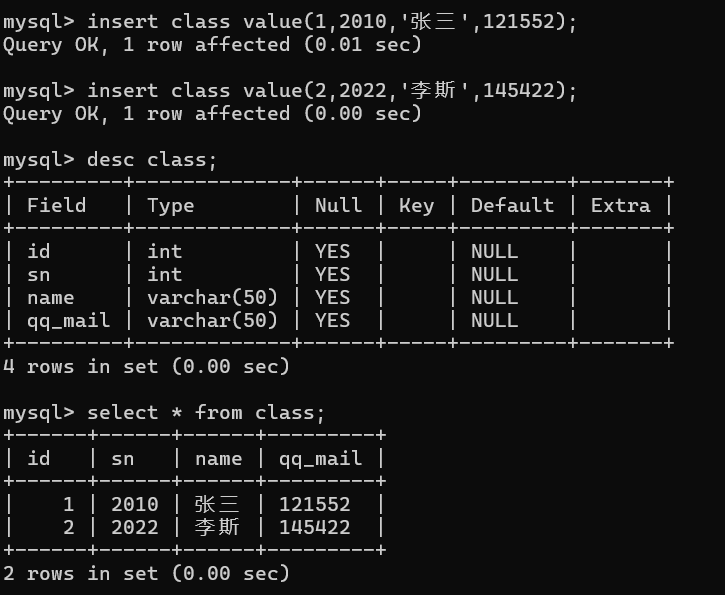
1.单行数据+全列插入
语法 : insert [into] 表名 [ 字段 ,字段 ] values(值 1[,值 2]) ;
示例 :
create table class(
id int,
sn int comment '学号',
name varchar(50) comment'姓名',
qq_mail varchar(50) comment'qq邮箱'
);
insert class value(1,2010,'张三',121552);
insert class value(2,2022,'李斯',145422);
select * from class;
2. 多行数据+指定列插入
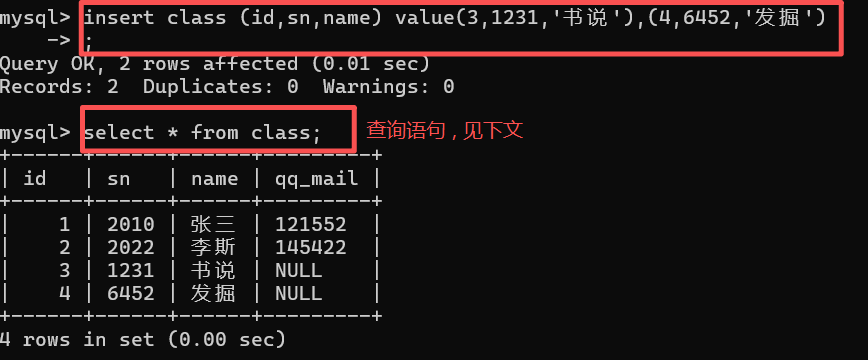
语法 : insert [into] 表名 [(指定列 1 , 列 2)] values (值 1,值 2) [,(值 1 , 值 2)]
示例 : insert class (id,sn,name) value(3,1231,'书说'),(4,6452,'发掘');
select * from class;
三.查询
语法 : SELECT
[DISTINCT] select_expr [, select_expr] ...
[FROM table_references]
[WHERE where_condition]
[GROUPBY {col_name | expr}, ...]
[HAVING where_condition]
[ORDERBY {col_name | expr } [ASC | DESC], ... ]
[LIMIT {[offset,] row_count | row_count OFFSEToffset}]
案例 :
-- 创建考试成绩表
DROP TABLE IF EXISTS exam_result;
CREATE TABLE exam_result (
id INT,
name VARCHAR(20),
chinese DECIMAL(3,1),
math DECIMAL(3,1),
english DECIMAL(3,1)
);
-- 插入测试数据
INSERT INTO exam_result (id,name, chinese, math, english) VALUES
(1,'唐三藏', 67, 98, 56),
(2,'孙悟空', 87.5, 78, 77),
(3,'猪悟能', 88, 98.5, 90),
(4,'曹孟德', 82, 84, 67),
(5,'刘玄德', 55.5, 85, 45),
(6,'孙权', 70, 73, 78.5),
(7,'宋公明', 75, 65, 30);
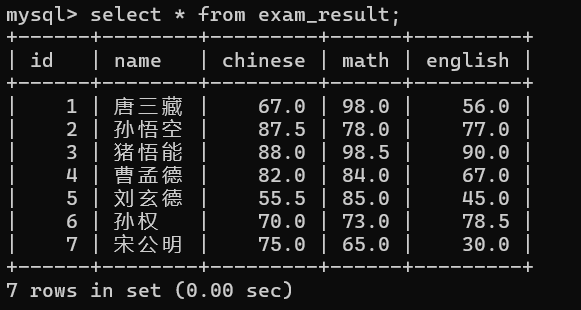
select * from exam_result;
1. 全列查询
语法 : select * from 表名
示例 : select * from exam_result;
- 通常情况下 不建议使用 * 进行全列查询
- 查询的列越多 , 意味着需要传输的数据量越大
- 可能会影响到索引的使用
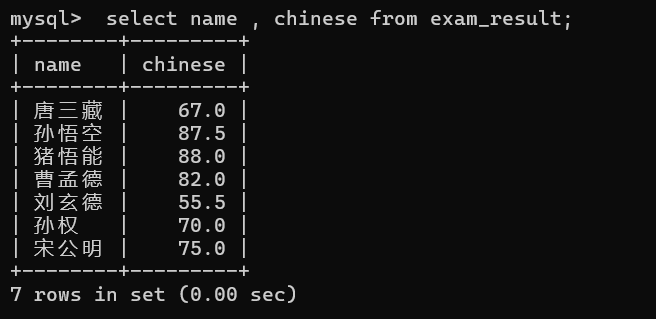
2.指定列查询
语法 : select 列名1 [, 列名2] from 表名 ;
示例 : select name , chinese from exam_result ;
3.查询字段为表达式
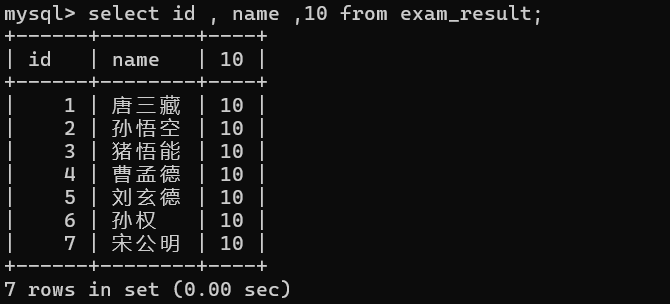
① 表达式不包含字段
示例 : select id , name ,10 from exam_result;
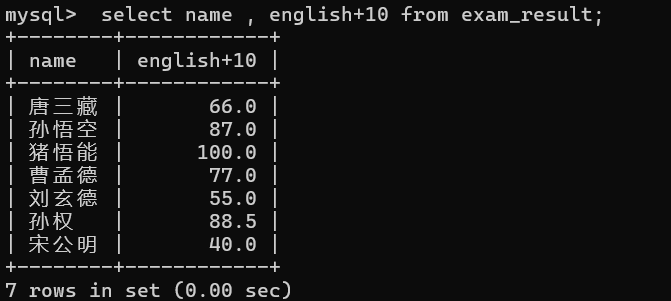
② 表达式包含一个字段
示例 : select name , english+10 from exam_result;
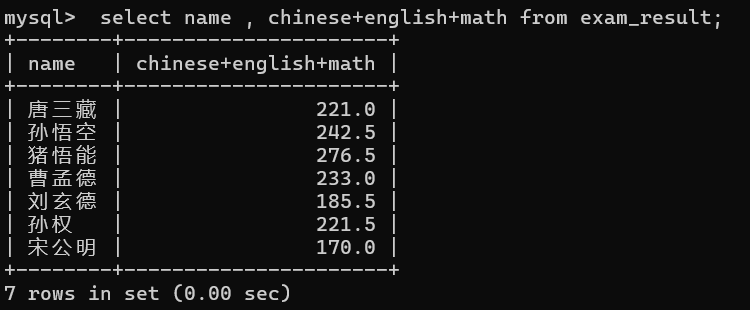
③ 表达式包含多个字段
示例 : select name , chinese+english+math from exam_result;
4.别名
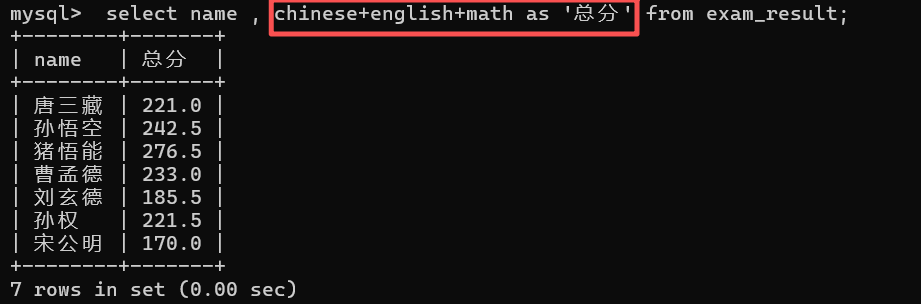
- 为查询结果中的指定列 指定别名 , 表示返回的结果集中 , 以别名作为该列的名称
语法 : select 列名 [as] 别名 [列名2 [as] 别名2....] from 表名;
示例 : select name , chinese+english+math as '总分' from exam_result;
注意 :
- 如果别名中包含空格 , 则需要用 '' 将整个别名包裹起来
- 我们的表本来没有这一项 , 通过表达式查询的结果时通过一个 临时表返回给我们的 , 执行完之后就删除了
- 在 MySQL 中所有的查询结果都会通过临时表返回个用户
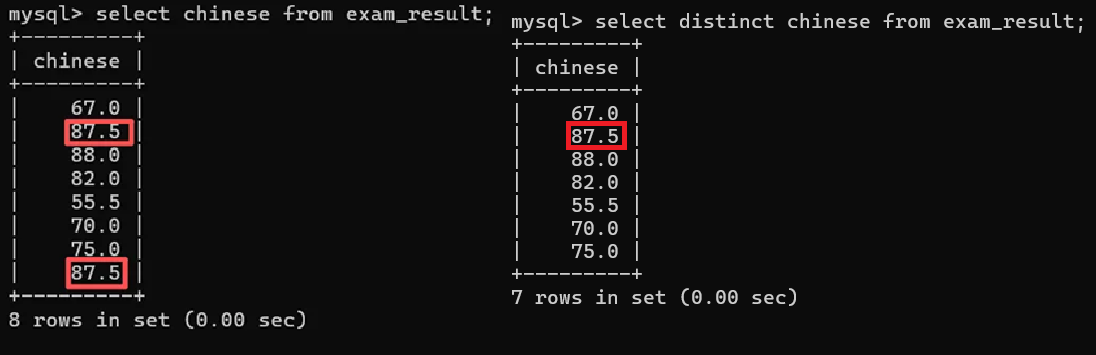
5.去重 (distinct)
语法 : select dinstinct 列名 from 表名
注意 :
- 如果去重的时多个字段 , 只有在这些字段的数据行之间的数据完全一致时 , 才会去重
- 去重后 , 重复记录只会保留一条
示例 :
insert exam_result values(8,'孙行者', 87.5, 76, 77);
select chinese from exam_result;
select chinese from exam_result;
6.排序 (order by)
语法 : select 列名 from 表名 order by 列名 [asc|desc];
- asc 为升序
- desc 为降序
- 不写 , 则默认为 asc
示例 : select name , chinese from exam_result order by chinese asc;
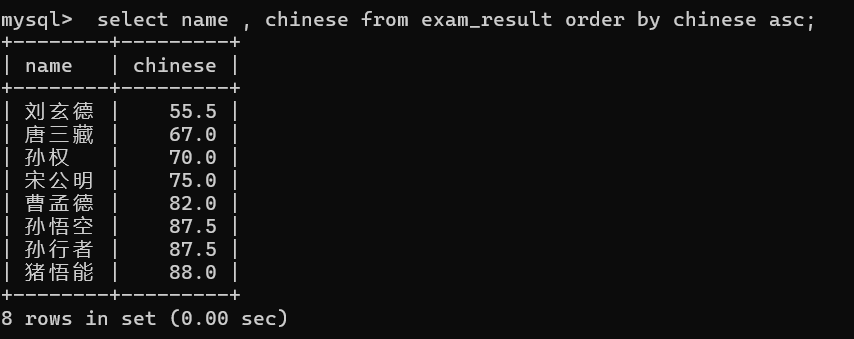
① 没有 order by 子句的查询 , 返回的顺序是未定义的 , 永远不要依赖这个顺序
②NULL 数据排序 , 视为比任何数据都要小 , 升序在最上面 , 降序在最下面
示例 :
insert exam_result values(9,'马超', 87.5, 76, NULL);
select name , english from exam_result order by english asc;
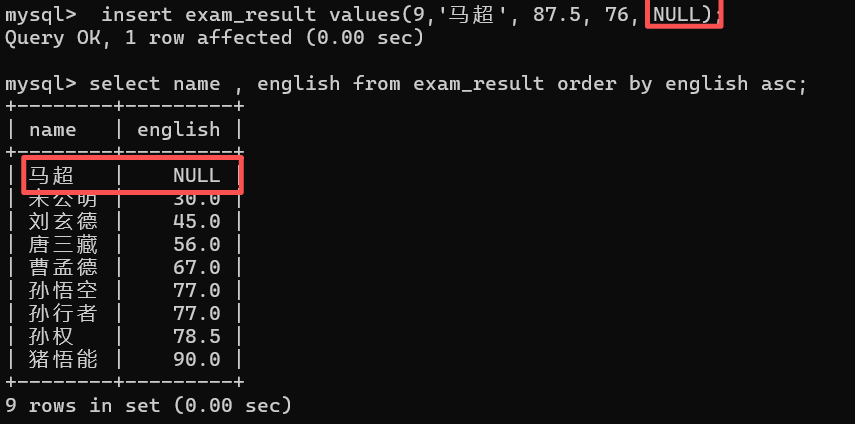
NULL 不论与任何值运算 , 返回值都是 NULL ; NULL 始终被判定为 False ; NULL 的值不为 0 , 它就是 NULL
③ 使用表达式及别名排序
示例 1 : select name , chinese+math+english as '总分' from exam_result order by chinese+math+english desc;
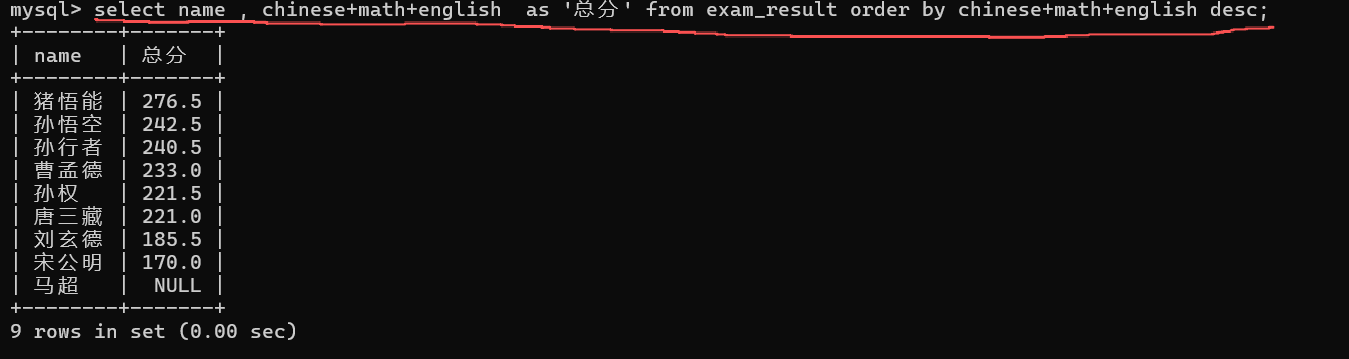
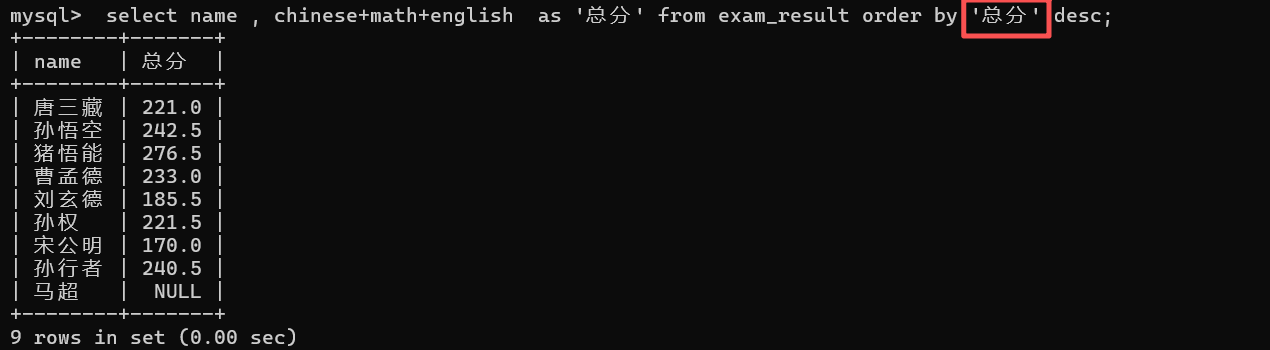
注意 : 由于 NULL 的值比较特殊 , NULL 与 任何值计算都为 NULL
示例 2 : select name , chinese+math+english as '总分' from exam_result order by '总分' desc;
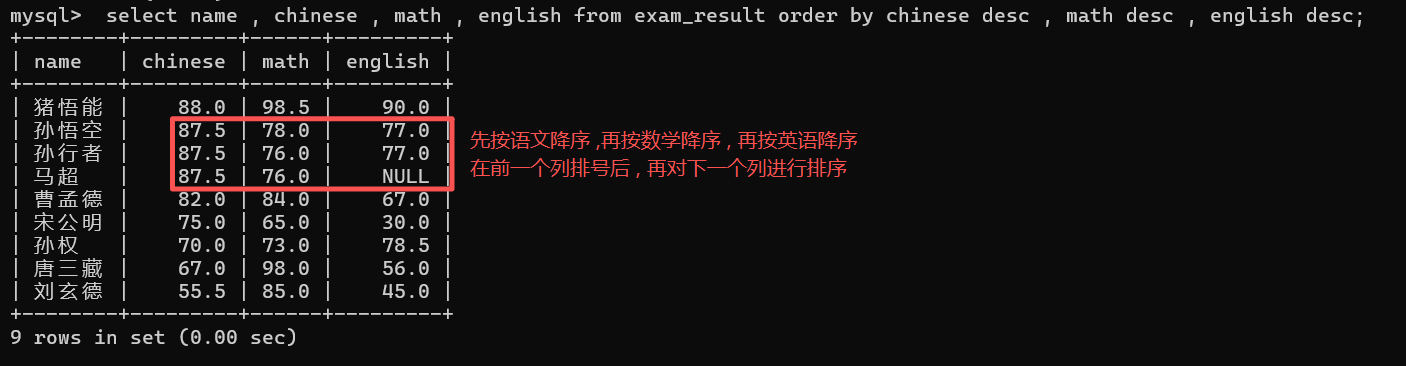
④ 可以对多个字段进行排序 , 排序优先级按书写顺序 , 并且可以为不同列指定不同的排序顺序
语法 : select 列名1, 列名2, 列名3 ... from 表名 order by 列名2[asc|desc], 列名3[asc|desc]...;
示例 : select name , chinese , math , english from exam_result order by chinese desc , math desc , english desc;
注意 :
列名之间用逗号隔开
在选择列名时 , 可以加入不需排序的列名 , 进行参考
7.条件查询 (where)
比较运算符 :
|
运算符 |
说明 |
|
> ,>= , < , <= |
MYSQL 中不允许使用 70 <= chinese <= 80 |
|
= |
等于 , NULL 不安全 , 例如 NULL = NULL 的结果是 NULL |
|
<=> |
等于 , NULL 安全 , 例如 NULL <=> NULL 的结果是 TRUE(1) |
|
!= , <> |
不等于 |
|
betwen a1 and a2 |
范围匹配 , [ a1 , a2 ] , 返回 TRUE(1) , 或 FALSE(0) |
|
in (列表或集合) |
如果是 ( ) 中的任意一个 , 返回 TRUE(1) ; 否则 FALSE(0) |
|
IS NULL |
是 NULL |
|
IS NOT NULL |
不是 NULL |
|
LIKE |
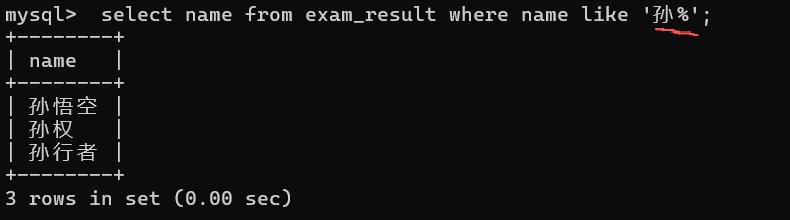
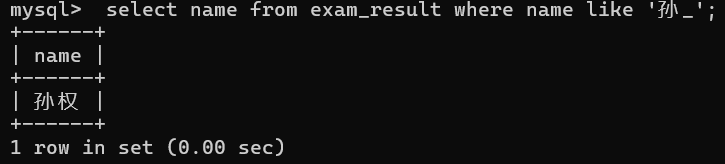
模糊匹配 , % 表示任意多个字符(包含 0) , _ 表示任意一个字符 |
逻辑运算符 :
|
运算符 |
说明 |
对应 Java |
|
AND |
多个条件都为 TRUE(1) , 结果才为 TRUE(1) |
&& |
|
OR |
任意一个条件为 TRUE(1), 结果才为 TRUE(1) |
|| |
|
NOT |
条件为 TRUE(1) , 结果为 FALSE(0) |
! |
注意 :
where 的条件可以使用表达式 , 但不能使用别名
优先级 : NOT > AND > OR
语法 : select * from 表名 where 列名/表达式 运算符 条件;
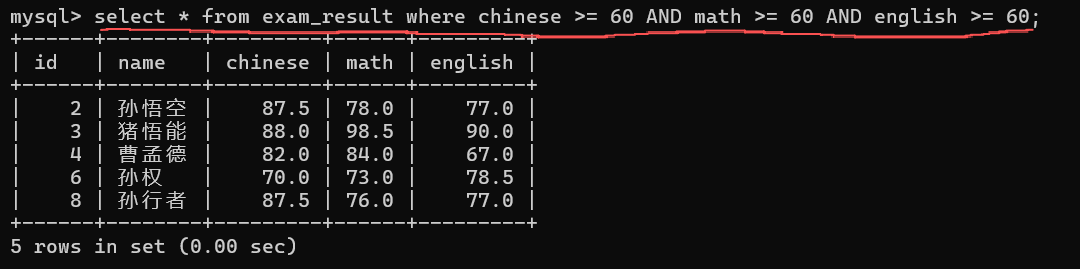
示例 1 :
select * from exam_result where chinese >= 60 AND math >= 60 AND english >= 60;
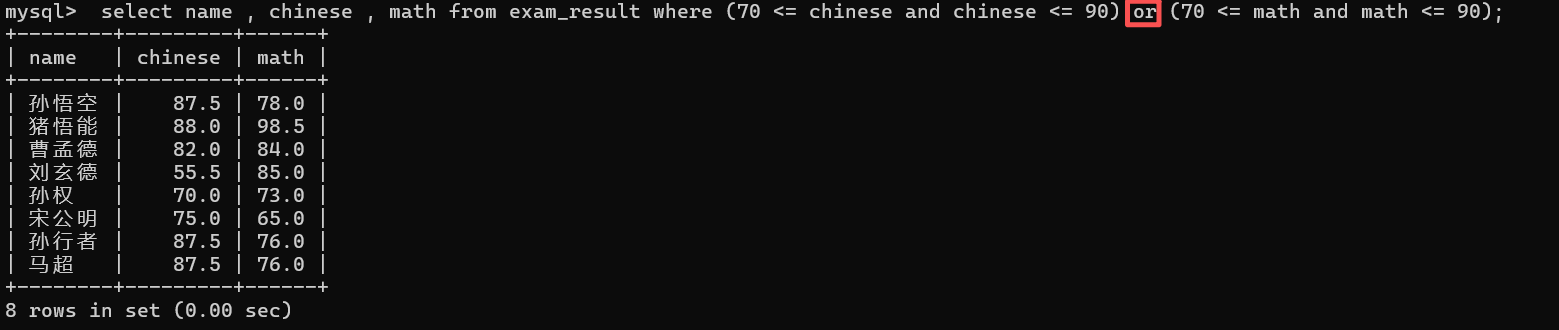
示例 2 :
select name , chinese , math from exam_result where (70 <= chinese and chinese <= 90) or (70 <= math and math <= 90);
select name , chinese , math from exam_result where (chinese between 70 and 90) AND (math between 70 and 90);

示例 3 :
select name , chinese from exam_result where chinese in (66,67,68,69,70);

示例 4 :
select name from exam_result where name like '孙%';
select name from exam_result where name like '孙_';
8.分页查询 (limit)
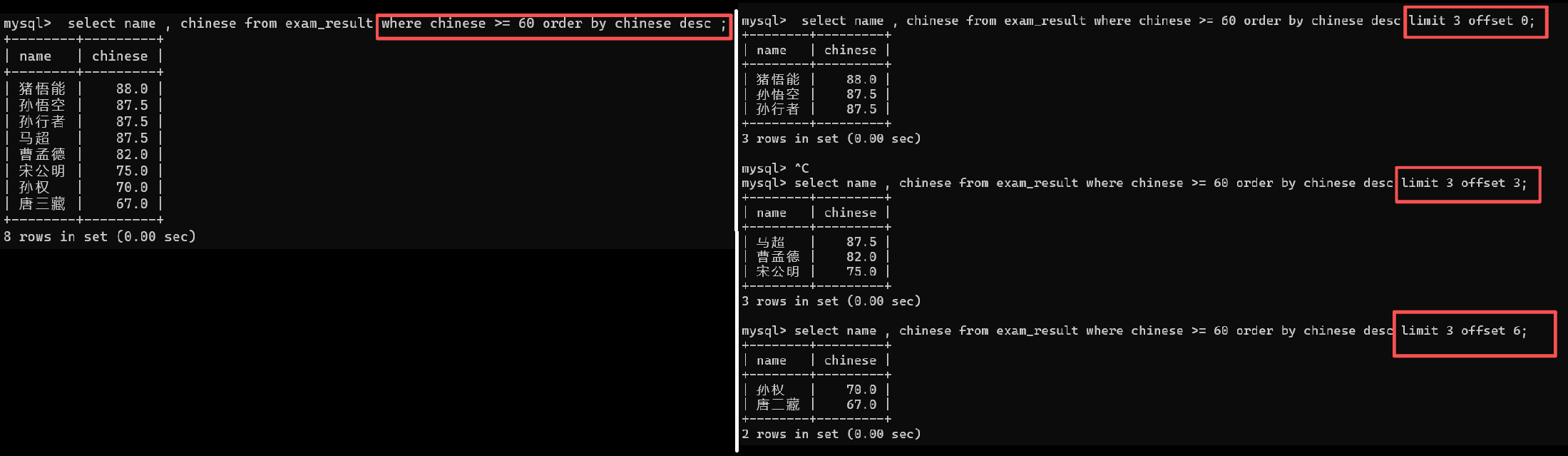
作用 : 限制查询结果集的条数
语法 :
从 0 开始,筛选 n 条结果 : SELECT ... FROMtable_name [WHERE ...] [ORDERBY ...] LIMIT n;
从 s 开始,筛选 n 条结果 : SELECT ... FROMtable_name [WHERE ...] [ORDERBY ...] LIMIT s, n;
从 s 开始,筛选 n 条结果 : SELECT ... FROMtable_name [WHERE ...] [ORDERBY ...] LIMIT n OFFSET s;
offect : 偏移量
示例 :
select name , chinese from exam_result where chinese >= 60 order by chinese desc ;
对比 : -------------------------------------------------------------------
select name , chinese from exam_result where chinese >= 60 order by chinese desc limit 3 offset 0;
select name , chinese from exam_result where chinese >= 60 order by chinese desc limit 3 offset 3;
select name , chinese from exam_result where chinese >= 60 order by chinese desc limit 3 offset 6;
9.部分 MySQL 执行顺序

由于 where 是在 select 之前执行的 , 所以在 判断条件时 不能使用别名
- 如果要在数据中查询某些数据 , 首先确定表 , 先执行 from
- 在查询的过程中要根据指定的查询条件把符合条件的数据过滤出来 , 执行 where
- 执行 select 后面被指定的列 , 这些列是需要加入到最终的结果集中
- 排序操作 , 根据 order by 中指定的列名和排序顺序规则进行最后的排序
四. 修改 (update)
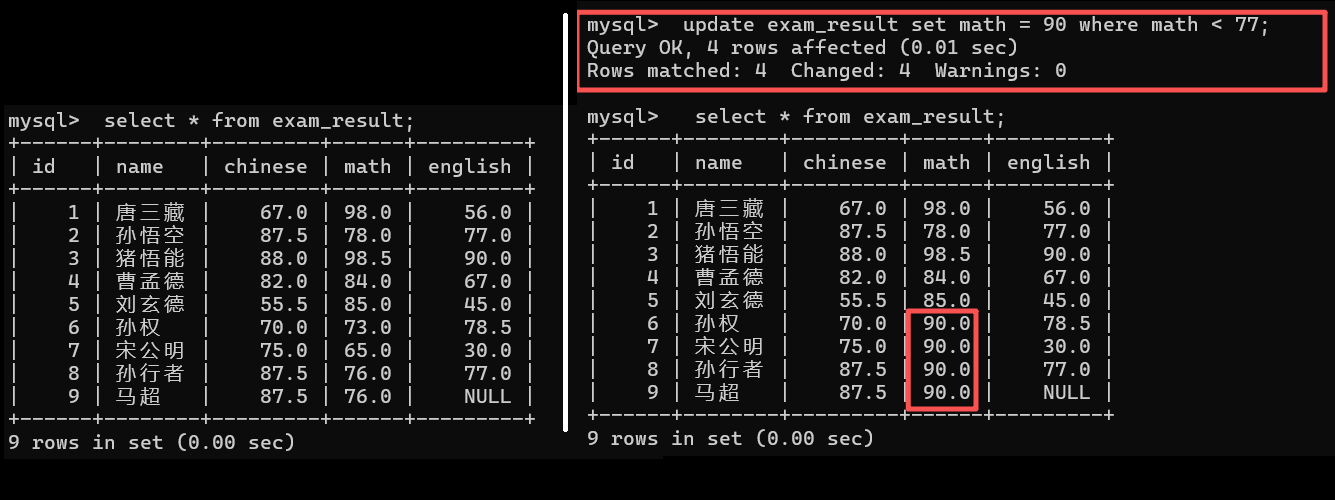
语法 : update 表名 set 列名1 = 值 [,列名2 = 值....] [where...] [order by....] [limit ....];
示例 :
select * from exam_result;
update exam_result set math = 90 where math < 77; (如果数学成绩小于 77 , 则将数学成绩改为 90)
select * from exam_result;
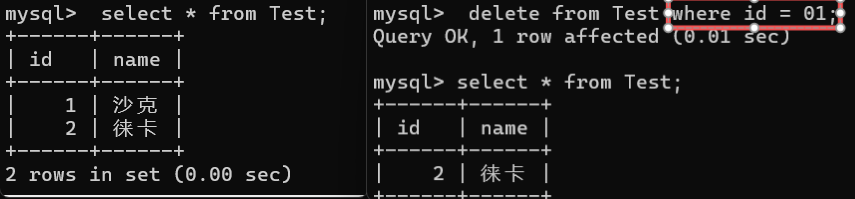
五.删除(Delete)
语法 : delete from 表名 [where...] [order by...] [limit...];
示例 :
create table if not exists Test(
id int ,
name varchar(20)
);
insert into Test values(01,'沙克'),(02,'徕卡');
select * from Test;
delete from Test where id = 01;
select * from Test;
完





 扫一扫
扫一扫


 1508
1508

 被折叠的 条评论
为什么被折叠?
被折叠的 条评论
为什么被折叠?
 到【灌水乐园】发言





