


1、安装huggingface_hub库
pip install -U huggingface_hub
2、获取huggingface token
huggingface token获取地址:huggingface token
需登录huggingface,点击右上角头像->setting->点击左侧列表Access Tokens->create new token。记得保存下来,以便后续使用。
3、修改~/.bashrc,配置国内镜像与huggingface token。
- 编辑
~/.bashrc:(vscode连接的话,可以直接在用户目录下找到)
vim ~/.bashrc
- 添加配置:
export HF_ENDPOINT="https://hf-mirror.com"
export HUGGINGFACE_TOKEN='your huggingface token'
- 刷新
~/.bashrc,使修改生效:
source ~/.bashrc
4、登录hugging face
huggingface-cli login
输入保存的huggingface token。
- 验证是否成功登录
huggingface-cli whoami
5、下载模型
huggingface-cli download --resume-download <模型ID> --local-dir <本地保存路径>
- 例如
huggingface-cli download --resume-download google-bert/bert-base-uncased --local-dir google-bert/bert-base-uncased
6、下载数据集
- 和下载模型类似,只需指定类型为数据集:
--repo-type dataset
huggingface-cli download --repo-type dataset --resume-download <数据集名称> --local-dir <本地保存路径>
补充
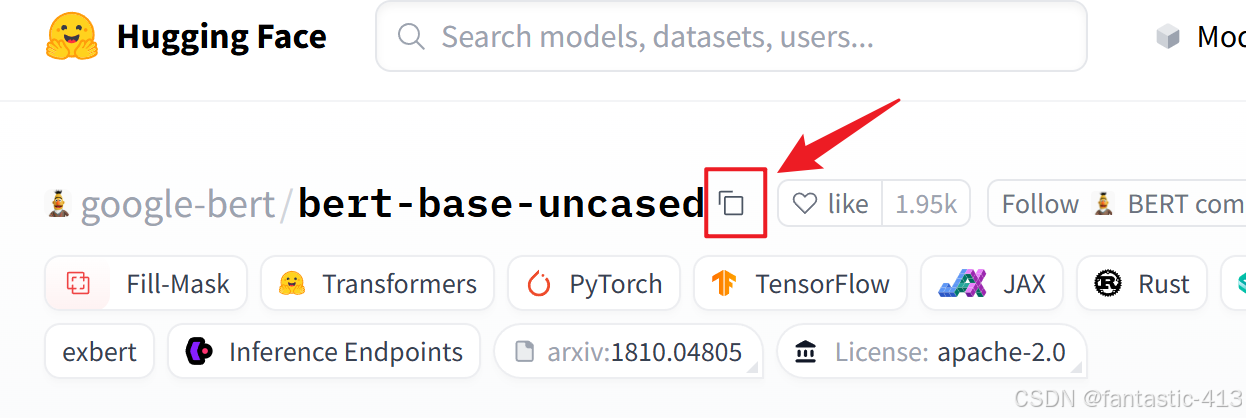
模型ID和数据集名称只需点击huggingface上的复制即可。






 扫一扫
扫一扫


 3797
3797

 被折叠的 条评论
为什么被折叠?
被折叠的 条评论
为什么被折叠?
 到【灌水乐园】发言





