


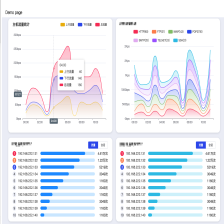
 本文提供了一种使用Vue、ElementUI、Echarts和Typescript创建带有进度条的顶部统计图的教程。详细介绍了数据结构、组件代码(包括template和TypeScript部分)以及CSS/SCSS样式。最终组件具备自适应、自定义颜色和文字省略功能。
简介:本文会教你如何使用 Vue_ElementUI_Echarts_Typescript 实现漂亮的带进度条的TOP统计图。
文中使用的各种包的版本:
“vue”: “^2.6.11”,
“echarts”: “^5.2.2”,
“lodash”: “^4.17.20”,
“typescript”: “~3.9.3”,
“element-ui”: “2.15.6”
“vue-class-component”: “^7.2.3”,
“vue-property-decorator”: “^8.4.2”,
要实现的效果图

- 组件支持自适应,自定义颜色列表,文字自动省略等功能
提示:安装本文中需要的包以后,下述代码即可直接使用,如果没有使用Typescript,则自己酌情转换一下就行。
一、数据结构
  /** TOP5数据示例 */
  private topRateData: any = [
    {name: '192.85.1.2', rate: 80, value: '4.61万', unit: '次', color: '#F94565', bgColor: '#FEDAE0'},
    {name: '192.168.222.138', rate: 70, value: '1.22万', unit: '次', color: '#FF905D', bgColor: '#FFE9DF'},
    {name: '192.168.2.33', rate: 60, value: '5219', unit: '次', color: '#3761EE'},
    {name: '192.168.2.34', rate: 50, value: '3049', unit: '次'},
    {name: '10.10.7.1', rate: 40, value: '1160', unit: '次'},
  ];
二、使用示例
<IconProgressTop
	layout-type="top-index"
	style="height: 330px;"
	:show-rate-num="false"
	text-fixed-width="110"
	title="TOP5标题"
	:data="topRateData"
/>
二、组件代码
1.template
- IconProgressTop组件代码如下:
<template>
  <div class="col-block col-block--card">
    <div class="col-block__title">
      {{ title }}
      <el-radio-group v-if="tabMode" v-model="tabValue">
        <el-radio-button v-for="(name, idx) in tabNameList" :key="idx" :label="name"></el-radio-button>
      </el-radio-group>
    </div>
    <div class="col-block__content--full-b30" :style="`margin-top: ${(tabMode && tabNameList.length > 0) ? 0 : contentMarginTop};`">
      <div v-for="(item, index) in this.formatData" class="progress-bar1_0 progress-bar1_0--has-icon" :style="`height: ${1/data.length * 100}%`">
        <!-- 多行风格 -->
        <div v-if="layoutType === 'multi-line'" class="progress-bar1_0__item-row progress-bar1_0__item-row--multi-line">
          <div class="progress-bar1_0__item-row--multi-line__top-area content-between">
            <div class="progress-bar1_0__item-row--multi-line__top-area__text start-center">
              <div class="progress-bar1_0__item-row__icon progress-bar1_0__item-row__icon--multi-line" :style="{borderColor: getProgressColor(item)}"></div>
              <div class="progress-bar1_0__item-row--multi-line__top-area__inner_text">{{item.name}}</div>
            </div>
            <div class="progress-bar1_0__item-row--multi-line__top-area__inner-value">{{item.value}}{{item.unit}}</div>
          </div>
          <ProgressNew class="progress-bar1_0__item-row__rate-bar progress-bar1_0__item-row__rate-bar--multi-line" :show-text="false" :color="getProgressColor(item)" :width="135" :stroke-width="13" type="line" :percentage="item.rate" :trail-color="getProgressBgColor(item)"></ProgressNew>
        </div>
        <!-- 单行风格 -->
        <div v-else :class="`progress-bar1_0__item-row progress-bar1_0__item-row start-center ${(showBorder && index > 0) ? 'is-border' : ''}`">
          <!-- 带序号样式 -->
          <div v-if="layoutType === 'top-index'" :style="{backgroundColor: getIndexBgColor(item), color: getIndexColor(item)}" class="progress-bar1_0__item-row__icon progress-bar1_0__item-row__icon--top-index">
            {{index+1}}
          </div>
          <div v-if="item.icon" :class="`progress-bar1_0__item-row__icon progress-bar1_0__item-row__icon--${item.icon}`"></div>
          <div class="progress-bar1_0__item-row__text ellipsis-text" :style="{width: (textFixedWidth * 1 + 10) + 'px'}">
            <el-tooltip :content="item.name" placement="left-end" effect="light">
              <span @click="emitTextClick(item)">{{item.name}}</span>
            </el-tooltip>
          </div>
          <div v-if="showRateNum" class="progress-bar1_0__item-row__rate-text">{{item.rate}}%</div>
          <ProgressNew class="progress-bar1_0__item-row__rate-bar" :show-text="false" :color="getProgressColor(item)" :width="135" :stroke-width="13" type="line" :percentage="item.rate" :trail-color="getProgressBgColor(item)"></ProgressNew>
          <div class="progress-bar1_0__item-row__value">{{item.value}}</div>
          <div class="progress-bar1_0__item-row__unit">{{item.unit}}</div>
        </div>
      </div>
    </div>
  </div>
</template>
2.TypeScript
- 主体组件的代码如下:
import Vue from 'vue';
import ProgressNew from '@/components/common-components/common/ProgressNew.vue'
import {
  Component, Emit, Prop, Watch
} from 'vue-property-decorator';

/** 每行数据的参数规定 */
interface InterfacePropData {
  // 名称
  name: string,
  // 显示比例,不需要带%,方便数值计算
  rate: number,
  // 显示数值
  value: number,
  // 数值单位
  unit: string,
  // 所属图标
  icon?: string,
  // 进度条颜色
  color?: string,
  // 进度条背景颜色
  bgColor?: string,
}

@Component({
  components: {
    ProgressNew
  }
})
/** 带图标等级占比TOP图组件 */
export default class IconStatsCard extends Vue {
  /***********************************************************************************************
   * 属性
   * *******************************************************************************************/
  // 风格类型 可选类型【top-index(带序号)、multi-line(多行显示)】
  @Prop({default: ''}) readonly layoutType ?: string
  // 标题
  @Prop(String) readonly title ?: string
  // 组件需要的数据
  @Prop(Array) readonly data !: Array<InterfacePropData>
  // 是否显示百分比
  @Prop({default: true}) readonly showRateNum ?: boolean
  // 是否显示虚线
  @Prop({default: true}) readonly showBorder ?: boolean
  // 每行的标题文本固定宽度
  @Prop({default: 40}) readonly textFixedWidth ?: string | number
  // 所有进度条设置指定颜色
  @Prop({default: ''}) readonly forceBarColor ?: string
  // 所有进度条设置指定背景色
  @Prop({default: ''}) readonly forceBarBgColor ?: string
  // 默认内容区域距离标题的高度
  @Prop({default: '10px'}) readonly contentMarginTop ?: string
  // 是否开启tab模式,开启则切换右侧tab后会更新数据
  @Prop({default: false}) readonly tabMode ?: boolean
  // 是否开启tab模式,开启则切换右侧tab后会更新数据
  @Prop({default: () => []}) readonly tabNameList ?: Array<string>
  // tab切换后的回调函数列表
  @Prop({default: () => []}) readonly tabCallback ?: Array<Function>

  /** 格式化后的数据 */
  protected formatData: Array<InterfacePropData> = [];
  /** tab值 */
  protected tabValue: string = '';

  /***********************************************************************************************
   * 方法
   * *******************************************************************************************/

  @Emit('textClick')
  private emitTextClick(data: any) {
    return data;
  }

  /** 获取进度条颜色 */
  protected getProgressColor(item: InterfacePropData) {
    if (this.forceBarColor) {
      return this.forceBarColor;
    }
    // 如果不存在,则设置默认颜色
    return item.color ? item.color : '#3761EE';
  }

  /** 获取进度条背景颜色 */
  protected getProgressBgColor(item: InterfacePropData) {
    if (this.forceBarBgColor) {
      return this.forceBarBgColor;
    }
    // 如果不存在,则设置默认颜色
    return item.bgColor ? item.bgColor : '#D7DFFC';
  }

  /** 获取序号颜色 */
  protected getIndexColor(item: InterfacePropData) {
    // 如果不存在,则设置默认颜色
    return item.color ? '#FFFFFF' : '#333333';
  }

  /** 获取序号背景颜色 */
  protected getIndexBgColor(item: InterfacePropData) {
    // 如果不存在,则设置默认颜色
    return item.color ? item.color : '#EEF0F7';
  }

  /** 监听tab切换 */
  @Watch('tabValue')
  protected tabValueChange(newVal: string) {
    let idx: any = this.tabNameList?.indexOf(newVal);
    if (idx === -1) {
      return false;
    }
    // 调用回调函数
    this.formatData = this.tabCallback ? this.tabCallback[idx](newVal) : [];
  }

  mounted() {
    this.tabValue = this.tabNameList ? this.tabNameList[0] : '';
    this.formatData = this.data;
  }
}
- 包含的子组件代码(ProgressNew组件整体代码实现)
<template>
    <div
        class="el-progress"
        :class="[
      'el-progress--' + type,
      status ? 'is-' + status : '',
      {
        'el-progress--without-text': !showText,
        'el-progress--text-inside': textInside,
      }
    ]"
        role="progressbar"
        :aria-valuenow="percentage"
        aria-valuemin="0"
        aria-valuemax="100"
    >
        <div class="el-progress-bar" v-if="type === 'line'">
            <div class="el-progress-bar__outer" :style="{height: trailHeight ? trailHeight + 'px' : strokeWidth + 'px', overflow: trailHeight ? 'unset' : 'hidden', backgroundColor: this.trailColor ? this.trailColor : '#EBEEF5'}">
                <div class="el-progress-bar__inner" :style="barStyle">
                    <div class="el-progress-bar__innerText" v-if="showText && textInside">{{ content }}</div>
                </div>
            </div>
        </div>
        <div class="el-progress-circle" :style="{height: width + 'px', width: width + 'px'}" v-else>
            <svg viewBox="0 0 100 100">
                <path
                    class="el-progress-circle__track"
                    :d="trackPath"
                    :stroke="trailStroke"
                    :stroke-width="relativeStrokeWidth"
                    fill="none"
                    :style="trailPathStyle"></path>
                <path
                    class="el-progress-circle__path"
                    :d="trackPath"
                    :stroke="stroke"
                    fill="none"
                    :stroke-linecap="strokeLinecap"
                    :stroke-width="percentage ? relativeStrokeWidth : 0"
                    :style="circlePathStyle"></path>
            </svg>
        </div>
        <div
            class="el-progress__text"
            v-if="showText && !textInside"
            :style="{fontSize: progressTextSize + 'px'}"
        >
            <template v-if="!status">{{ content }}</template>
            <i v-else :class="iconClass"></i>
        </div>
    </div>
</template>
<script>
export default {
    name: 'ProgressNew',
    props: {
        type: {
            type: String,
            default: 'line',
            validator: val => ['line', 'circle', 'dashboard'].indexOf(val) > -1
        },
        percentage: {
            type: Number,
            default: 0,
            required: true,
            validator: val => val >= 0 && val <= 100
        },
        status: {
            type: String,
            validator: val => ['success', 'exception', 'warning'].indexOf(val) > -1
        },
        trailHeight: {
            type: Number,
            default: 0
        },
        strokeWidth: {
            type: Number,
            default: 6
        },
        strokeLinecap: {
            type: String,
            default: 'round'
        },
        textInside: {
            type: Boolean,
            default: false
        },
        width: {
            type: Number,
            default: 126
        },
        showText: {
            type: Boolean,
            default: true
        },
        trailColor: {
            type: [String, Array, Function],
            default: ''
        },
        color: {
            type: [String, Array, Function],
            default: ''
        },
        format: Function
    },
    computed: {
        barStyle() {
            const style = {};
            style.width = this.percentage + '%';
            if (this.trailHeight > 0) {
                style.height = this.strokeWidth + 'px';
                style.top = (this.strokeWidth / 4) * -1 + 'px';
            }
            style.backgroundColor = this.getCurrentColor(this.percentage);
            return style;
        },
        relativeStrokeWidth() {
            return (this.strokeWidth / this.width * 100).toFixed(1);
        },
        radius() {
            if (this.type === 'circle' || this.type === 'dashboard') {
                return parseInt(50 - parseFloat(this.relativeStrokeWidth) / 2, 10);
            } else {
                return 0;
            }
        },
        trackPath() {
            const radius = this.radius;
            const isDashboard = this.type === 'dashboard';
            return `
          M 50 50
          m 0 ${isDashboard ? '' : '-'}${radius}
          a ${radius} ${radius} 0 1 1 0 ${isDashboard ? '-' : ''}${radius * 2}
          a ${radius} ${radius} 0 1 1 0 ${isDashboard ? '' : '-'}${radius * 2}
          `;
        },
        perimeter() {
            return 2 * Math.PI * this.radius;
        },
        rate() {
            return this.type === 'dashboard' ? 0.75 : 1;
        },
        strokeDashoffset() {
            const offset = -1 * this.perimeter * (1 - this.rate) / 2;
            return `${offset}px`;
        },
        trailPathStyle() {
            return {
                strokeDasharray: `${(this.perimeter * this.rate)}px, ${this.perimeter}px`,
                strokeDashoffset: this.strokeDashoffset
            };
        },
        circlePathStyle() {
            return {
                strokeDasharray: `${this.perimeter * this.rate * (this.percentage / 100)}px, ${this.perimeter}px`,
                strokeDashoffset: this.strokeDashoffset,
                transition: 'stroke-dasharray 0.6s ease 0s, stroke 0.6s ease'
            };
        },
        trailStroke() {
            return this.trailColor ? this.trailColor : '#e5e9f2';
        },
        stroke() {
            let ret;
            if (this.color) {
                ret = this.getCurrentColor(this.percentage);
            } else {
                switch (this.status) {
                    case 'success':
                        ret = '#13ce66';
                        break;
                    case 'exception':
                        ret = '#ff4949';
                        break;
                    case 'warning':
                        ret = '#e6a23c';
                        break;
                    default:
                        ret = '#20a0ff';
                }
            }
            return ret;
        },
        iconClass() {
            if (this.status === 'warning') {
                return 'el-icon-warning';
            }
            if (this.type === 'line') {
                return this.status === 'success' ? 'el-icon-circle-check' : 'el-icon-circle-close';
            } else {
                return this.status === 'success' ? 'el-icon-check' : 'el-icon-close';
            }
        },
        progressTextSize() {
            return this.type === 'line'
                ? 12 + this.strokeWidth * 0.4
                : this.width * 0.111111 + 2;
        },
        content() {
            if (typeof this.format === 'function') {
                return this.format(this.percentage) || '';
            } else {
                return `${this.percentage}%`;
            }
        }
    },
    methods: {
        getCurrentColor(percentage) {
            if (typeof this.color === 'function') {
                return this.color(percentage);
            } else if (typeof this.color === 'string') {
                return this.color;
            } else {
                return this.getLevelColor(percentage);
            }
        },
        getLevelColor(percentage) {
            const colorArray = this.getColorArray().sort((a, b) => a.percentage - b.percentage);

            for (let i = 0; i < colorArray.length; i++) {
                if (colorArray[i].percentage > percentage) {
                    return colorArray[i].color;
                }
            }
            return colorArray[colorArray.length - 1].color;
        },
        getColorArray() {
            const color = this.color;
            const span = 100 / color.length;
            return color.map((seriesColor, index) => {
                if (typeof seriesColor === 'string') {
                    return {
                        color: seriesColor,
                        percentage: (index + 1) * span
                    };
                }
                return seriesColor;
            });
        }
    }
};
</script>
三、CSS/SCSS样式
.progress-bar1_0 {
  &--has-icon {}
  &__item-row {
    height: 100%;
    line-height: 100%;
    overflow: hidden;
    > div {
      align-self: center;
    }
    &.is-border {
      border-top: 1px dashed $gray-dash-border-color;
    }
    &__icon {
      min-width: 32px;
      min-height: 32px;
      margin-right: 10px;
      background-repeat: no-repeat;
      background-size: 100%;
      background-position: center;
      &--top-index {
        line-height: 20px;
        min-width: 20px;
        min-height: 20px;
        text-align: center;
        border-radius: 100%;
        background-color: #ccc;
        color: #fff;
      }
      &--multi-line {
        line-height: 15px;
        min-width: 15px;
        min-height: 15px;
        text-align: center;
        align-items: center;
        border-radius: 100%;
        background-color: #fff;
        border-width: 3px;
        border-style: solid;
        border-color: $blue-color
      }
    }
    &--multi-line{
      &__top-area {
        line-height: 30px;
        height: 30px;
        color: #666;
      }
    }
    &__text {
      min-width: 40px;
      margin-right: 10px;
      cursor: pointer;
      &:hover {
        color: $blue-color
      }
    }
    &__rate-text {
      width: 55px;
      margin-right: 10px;
    }
    &__rate-bar {
      width: calc(100% - 220px);
      margin-right: 5px;
      &--multi-line {
        width: 100%;
        margin-right: 0;
      }
    }
    &__value, &__unit, &__rate-text {
      font-weight: bolder;
    }
    &__value {
      width: 55px;
      text-align: right;
    }
    &__unit {
      width: 15px;
    }
  }
}
总结:
至此,我们的组件编码就已经完成了,小伙伴们可以尝试着跑起来了。
本专栏会定期更新 Vue_ElementUI_Echarts_Typescript 有关的实例教程,希望感兴趣的小伙伴们多多关注~ 有问题在评论区留言吧~ 谢谢





 扫一扫
扫一扫


 1491
1491

 被折叠的 条评论
为什么被折叠?
被折叠的 条评论
为什么被折叠?
 到【灌水乐园】发言





