



 本文详细介绍Python中re模块的使用方法,包括正则表达式的编译、匹配、搜索、分割、查找等功能函数的运用,以及如何利用这些函数处理文本并获取所需信息。
一、re模块
Python通过re模块提供对正则表达式的支持。
使用re的一般步骤是:
- 1. 将正则表达式的字符串形式编译为Pattern实例
- 2. 使用re库常用的功能函数处理文本并获得结果
- 3. 对得到的结果进行其他的操作,获取想要的信息。
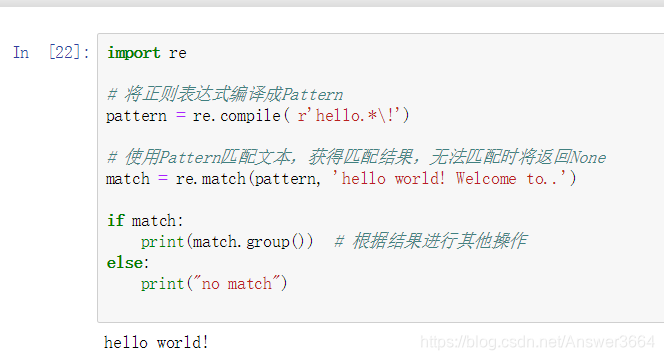
import re

# 将正则表达式编译成Pattern
pattern =re.compile( r'hello.*\!')

# 使用Pattern匹配文本,获得匹配结果,无法匹配时将返回None
match = re.match(pattern, 'hello world! Welcome to..')

if match:
    print(match.group())  # 根据结果进行其他操作
else:
    print("no match")
运行结果:
为什么要用r'....'(raw):正则表达式中用“\”表示转义,而python中也用“\”表示转义,当遇到特殊字符需要转义时,你要花费心思到底需要几个“\”,所以为了避免这个情况,使用原生字符串类型来书写正则表达式。
二、re.compile()
re.compile("strPattern"[, flags])
这个函数用于将字符串形式的正则表达式编译为Pattern对象。
第一个参数:正则表达式字符串
第二个参数:是匹配模式,取值可以使用或运算符'|'表示同时生效,比如re.I | re.M。也可以在正则表示式中指定匹配模式,例如:re.compile('pattern', re.I)等价于re.compile('(?i)pattern')
flag可选值有:
- re.I(re.IGNORECASE): 忽略大小写(括号内是完整写法,下同)
- re.M(MULTILINE): 多行模式,影响^'和'$'
- re.S(DOTALL): 点任意匹配模式,改变'.'的行为
- re.L(LOCALE): 使预定字符类 \w \W \b \B \s \S 取决于当前区域设定
- re.U(UNICODE): 使预定字符类 \w \W \b \B \s \S \d \D 取决于unicode定义的字符属性
- re.X(VERBOSE): 详细模式。这个模式下正则表达式可以是多行,忽略空白字符,并可以加入注释。
# pattern = re.compile( r'Hello.*\!', re.I)
pattern = re.compile( r'(?i)Hello.*\!')

match = re.match(pattern, 'hello world! Welcome to..')

if match:
    print(match.group())
else:
    print("no match")

对于re.X的用法下面两个表达式是等价的
regex_1 = re.compile(r"""\d +  # 数字部分
                         \.    # 小数点部分
                         \d *  # 小数的数字部分""", re.X)
regex_2 = re.compile(r"\d+\.\d*")
三、re常用函数
★1、re.match()
语法:re.match(pattern, string[, flags]) 这里flags和上面re.compile()的取值相同,同下
属性:
- string: 匹配时使用的文本。
- re: 匹配时使用的Pattern对象。
- pos: 文本中正则表达式开始搜索的索引。值与Pattern.match()和Pattern.seach()方法的同名参数相同。
- endpos: 文本中正则表达式结束搜索的索引。值与Pattern.match()和Pattern.seach()方法的同名参数相同。
- lastindex: 最后一个被捕获的分组在文本中的索引。如果没有被捕获的分组,将为None。
- lastgroup: 最后一个被捕获的分组的别名。如果这个分组没有别名或者没有被捕获的分组,将为None。
方法:
- group([group1, …]): 获得一个或多个分组截获的字符串;指定多个参数时将以元组形式返回。group1可以使用编号也可以使用别名;编号0代表整个匹配的子串;不填写参数时,返回group(0);没有截获字符串的组返回None;截获了多次的组返回最后一次截获的子串。
- groups([default]): 以元组形式返回全部分组截获的字符串。相当于调用group(1,2,…last)。default表示没有截获字符串的组以这个值替代,默认为None。
- groupdict([default]): 返回以有别名的组的别名为键、以该组截获的子串为值的字典,没有别名的组不包含在内。default含义同上。
- start([group]): 返回指定的组截获的子串在string中的起始索引(子串第一个字符的索引)。group默认值为0。
- end([group]): 返回指定的组截获的子串在string中的结束索引(子串最后一个字符的索引+1)。group默认值为0。
- span([group]): 返回(start(group), end(group))。
- expand(template): 将匹配到的分组代入template中然后返回。template中可以使用\id或\g、\g引用分组,但不能使用编号0。\id与\g是等价的;但\10将被认为是第10个分组,如果你想表达\1之后是字符'0',只能使用\g<1>0。
pattern = re.compile( r'(\w+)\s(\w+)(?P<sign>.*)')

match = re.match(pattern, 'hello world!')

print ("match.string:", match.string)
print ("match.re:", match.re)
print ("match.pos:", match.pos)
print ("match.endpos:", match.endpos)
print ("match.lastindex:", match.lastindex)
print ("match.lastgroup:", match.lastgroup)

print ("match.group(1,2):", match.group(1, 2))
print ("match.groups():", match.groups())
print ("match.groupdict():", match.groupdict())
print ("match.start(2):", match.start(2))
print ("match.end(2):", match.end(2))
print ("match.span(2):", match.span(2))
print (r"match.expand(r'\2 \1\3'):", match.expand(r'\2 \1\3'))
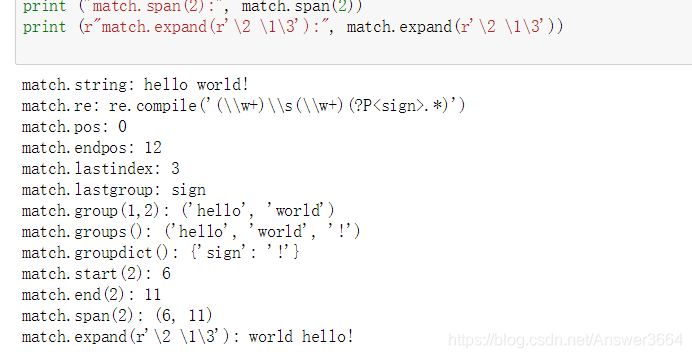
注意:这个方法并不是完全匹配。当pattern结束时若string还有剩余字符,仍然视为成功。想要完全匹配,可以在表达式末尾加上边界匹配符'$'。
2、re.search()
语法:re.search(pattern, string[, flags])
扫描整个字符串并返回第一个成功的匹配对象,否则返回None。
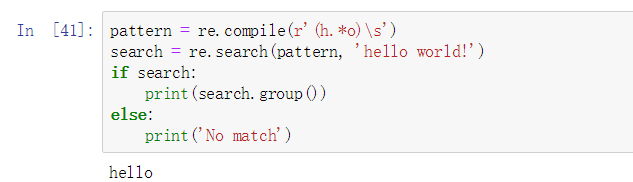
pattern = re.compile(r'(h.*o)\s')
search = re.search(pattern, 'hello world!')
if search:
    print(search.group())
else:
    print('no match')
3、re.split()
语法:re.split(pattern, string[, maxsplit])
- 按照能够匹配的子串将string分割后返回列表。
- maxsplit用于指定最大分割次数,不指定将全部分割。
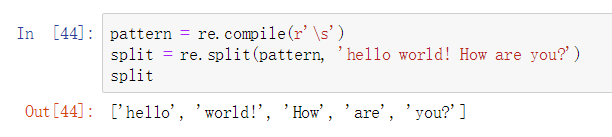
pattern = re.compile(r'\s')
split = re.split(pattern, 'hello world! How are you?')
split
4、re.findall()
语法:re.findall(pattern, string[, flags]):
- 搜索string,以列表形式返回全部能匹配的子串。
pattern = re.compile(r'\d+')
findall = re.findall(pattern, 'hello11world2How33are4you05')
findall

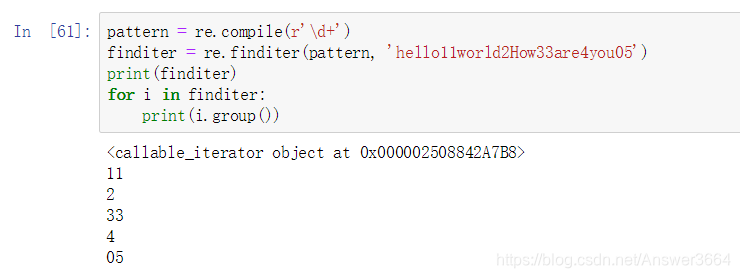
5、re.finditer()
语法:re.finditer(pattern, string[, flags])
- 搜索string,返回一个顺序访问每一个匹配结果的迭代器。
pattern = re.compile(r'\d+')
finditer = re.finditer(pattern, 'hello11world2How33are4you05')
print(finditer)
for i in finditer:
    print(i.group())
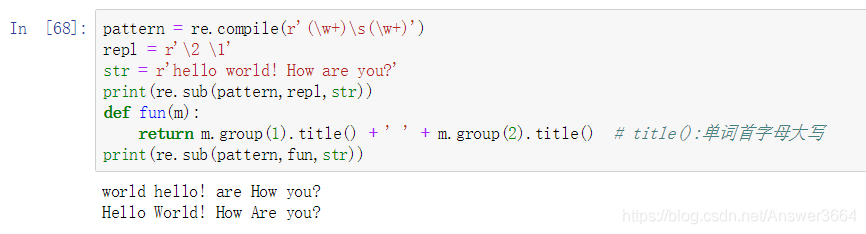
6、re.sub()
语法: re.sub(pattern, repl, string[, count])
使用repl替换string中每一个匹配的子串后返回替换后的字符串。
- 当repl是一个字符串时,可以使用\id或\g、\g引用分组,但不能使用编号0。
- 当repl是一个方法时,这个方法应当只接受一个参数(Match对象),并返回一个字符串用于替换(返回的字符串中不能再引用分组)。 count用于指定最多替换次数,不指定时全部替换。
pattern = re.compile(r'(\w+)\s(\w+)')
repl = r'\2 \1'
str = r'hello world! How are you?'
print(re.sub(pattern,repl,str))
def fun(m):
    return m.group(1).title() + ' ' + m.group(2).title()  # title():单词首字母大写
print(re.sub(pattern,fun,str))
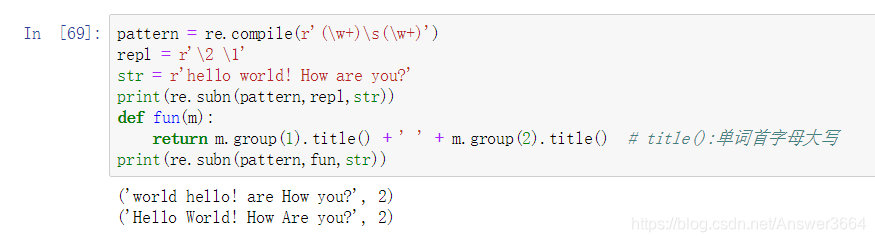
7、re.subn()
语法:re.sub(pattern, repl, string[, count])
- 返回替换的次数
pattern = re.compile(r'(\w+)\s(\w+)')
repl = r'\2 \1'
str = r'hello world! How are you?'
print(re.subn(pattern,repl,str))
def fun(m):
    return m.group(1).title() + ' ' + m.group(2).title()  # title():单词首字母大写
print(re.subn(pattern,fun,str))






 扫一扫
扫一扫


 被折叠的 条评论
为什么被折叠?
被折叠的 条评论
为什么被折叠?
 到【灌水乐园】发言





