



工具(Tools) 扩展了 智能体(Agents) 的能力,使其能够获取实时数据、执行代码、查询外部数据库,并在现实世界中执行操作。
在底层,工具本质上是具有明确定义输入和输出的可调用函数,这些函数会被传递给 聊天模型(Chat Model)。模型会根据对话上下文决定是否调用某个工具,并确定应传入哪些参数。
关于模型如何处理工具调用的详细说明,请参阅 工具调用(Tool Calling)。
创建工具
基础工具定义
创建工具最简单的方式是使用 @tool 装饰器。默认情况下,函数的文档字符串(docstring)会作为工具的描述,帮助模型理解何时应使用该工具:
from langchain.tools import tool

@tool
def search_database(query: str, limit: int = 10) -> str:
    """在客户数据库中搜索匹配指定查询条件的记录。

    Args:
        query: 要搜索的关键词
        limit: 返回结果的最大数量
    """
    return f"找到 {limit} 条关于 '{query}' 的结果"
类型提示(Type hints)是必需的,因为它们定义了工具的输入结构(input schema)。文档字符串应简洁且信息丰富,以帮助模型准确理解工具的用途。
服务端工具调用(Server-side tool use)
某些聊天模型(例如 OpenAI、Anthropic 和 Gemini)支持 内置工具(built-in tools),这些工具在服务端执行,例如网络搜索或代码解释器。请查阅 提供商概览(Provider Overview),了解如何在你使用的具体聊天模型中启用这些功能。
自定义工具属性
- 自定义工具名称
默认情况下,工具名称取自函数名。如果需要更具描述性的名称,可以显式指定:
@tool("web_search")  # 自定义名称
def search(query: str) -> str:
    """在网络上搜索信息。"""
    return f"搜索结果:{query}"

print(search.name)  # 输出: web_search
- 自定义工具描述
你可以覆盖自动生成的工具描述,为模型提供更清晰的使用指引:
@tool("calculator", description="执行算术运算。遇到任何数学问题都应使用此工具。")
def calc(expression: str) -> str:
    """计算数学表达式。"""
    return str(eval(expression))
- 高级输入结构定义
对于复杂输入,可以使用 Pydantic 模型或 JSON Schema 进行定义:
- Pydantic 模型
from pydantic import BaseModel, Field
from typing import Literal

class WeatherInput(BaseModel):
    """Input for weather queries."""
    location: str = Field(description="City name or coordinates")
    units: Literal["celsius", "fahrenheit"] = Field(
        default="celsius",
        description="Temperature unit preference"
    )
    include_forecast: bool = Field(
        default=False,
        description="Include 5-day forecast"
    )

@tool(args_schema=WeatherInput)
def get_weather(location: str, units: str = "celsius", include_forecast: bool = False) -> str:
    """Get current weather and optional forecast."""
    temp = 22 if units == "celsius" else 72
    result = f"Current weather in {location}: {temp} degrees {units[0].upper()}"
    if include_forecast:
        result += "\nNext 5 days: Sunny"
    return result
- JSON Schema
weather_schema = {
    "type": "object",
    "properties": {
        "location": {"type": "string"},
        "units": {"type": "string"},
        "include_forecast": {"type": "boolean"}
    },
    "required": ["location", "units", "include_forecast"]
}

@tool(args_schema=weather_schema)
def get_weather(location: str, units: str = "celsius", include_forecast: bool = False) -> str:
    """Get current weather and optional forecast."""
    temp = 22 if units == "celsius" else 72
    result = f"Current weather in {location}: {temp} degrees {units[0].upper()}"
    if include_forecast:
        result += "\nNext 5 days: Sunny"
    return result
- 保留参数名
以下参数名已被系统保留,不能用作工具参数,否则会导致运行时错误:
| 参数名 | 用途说明 |
|---|---|
| config | 保留用于内部向工具传递 RunnableConfig |
| runtime | 保留用于 ToolRuntime 参数(用于访问状态、上下文、存储等) |
若需访问运行时信息,请使用 ToolRuntime 参数,而不是自行定义名为 config 或 runtime 的参数。
访问上下文(Accessing Context)
为什么这很重要? 当工具能够访问智能体状态、运行时上下文和长期记忆时,其能力最为强大。这使得工具能做出上下文感知的决策、个性化响应,并在多轮对话中保持信息一致性。
运行时上下文(Runtime Context)允许你在运行时将依赖项(如数据库连接、用户 ID 或配置)注入工具,从而提升工具的可测试性和复用性。
通过 ToolRuntime 参数,工具可以访问以下运行时信息:
- State(状态):在执行过程中流动的可变数据(如消息列表、计数器、自定义字段)
- Context(上下文):不可变的配置信息,如用户 ID、会话详情或应用特定配置
- Store(存储):跨会话的持久化长期记忆
- Stream Writer(流写入器):在工具执行过程中流式输出自定义更新
- Config(配置):当前执行的 RunnableConfig
- Tool Call ID(工具调用 ID):当前工具调用的唯一标识符
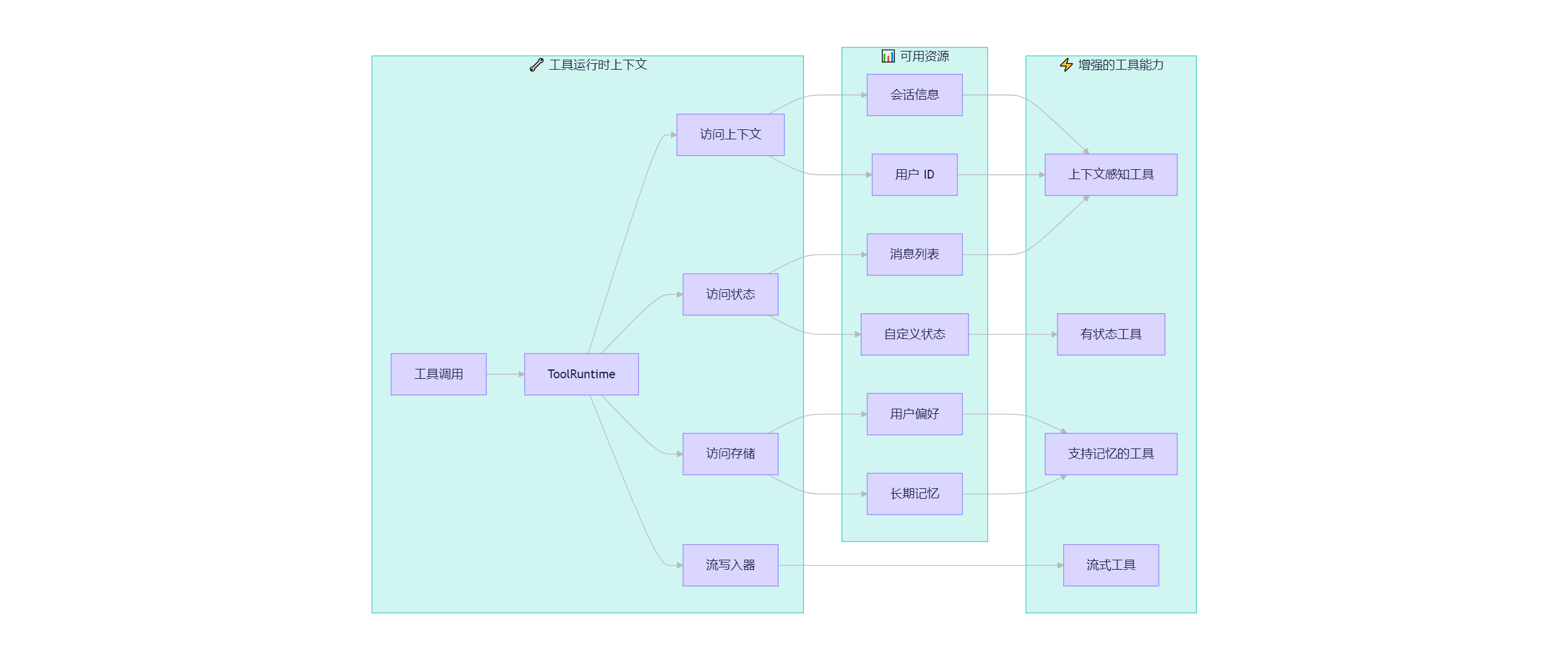
ToolRuntime
使用 ToolRuntime 可以在一个参数中统一访问所有运行时信息。只需在工具函数签名中添加 runtime: ToolRuntime,系统会自动注入该参数,而不会暴露给大语言模型(LLM)。
ToolRuntime 是一个统一参数,为工具提供对状态、上下文、存储、流写入、配置和工具调用 ID 的访问能力。它取代了旧版中分散使用的 InjectedState、InjectedStore、get_runtime 和 InjectedToolCallId 等注解。
运行时会自动为你提供这些能力,无需显式传递参数或依赖全局状态。
访问状态(State)
工具可通过 ToolRuntime 访问当前图(graph)的状态:
from langchain.tools import tool, ToolRuntime

# 访问当前对话状态
@tool
def summarize_conversation(
    runtime: ToolRuntime
) -> str:
    """总结当前对话内容。"""
    messages = runtime.state["messages"]

    human_msgs = sum(1 for m in messages if m.__class__.__name__ == "HumanMessage")
    ai_msgs = sum(1 for m in messages if m.__class__.__name__ == "AIMessage")
    tool_msgs = sum(1 for m in messages if m.__class__.__name__ == "ToolMessage")

    return f"对话包含 {human_msgs} 条用户消息、{ai_msgs} 条 AI 回复和 {tool_msgs} 条工具结果"

# 访问自定义状态字段
@tool
def get_user_preference(
    pref_name: str,
    runtime: ToolRuntime  # ToolRuntime 对模型不可见
) -> str:
    """获取用户的某项偏好设置。"""
    preferences = runtime.state.get("user_preferences", {})
    return preferences.get(pref_name, "未设置")
runtime 参数对模型是隐藏的。以上例中,模型在工具 Schema 中仅看到 pref_name,不会看到 runtime。
更新状态(Updating State)
使用 Command 可更新智能体状态或控制图的执行流程:
from langgraph.types import Command
from langchain.messages import RemoveMessage
from langgraph.graph.message import REMOVE_ALL_MESSAGES
from langchain.tools import tool, ToolRuntime

# 清空对话历史
@tool
def clear_conversation() -> Command:
    """清空对话历史。"""
    return Command(
        update={
            "messages": [RemoveMessage(id=REMOVE_ALL_MESSAGES)],
        }
    )

# 更新用户姓名
@tool
def update_user_name(
    new_name: str,
    runtime: ToolRuntime
) -> Command:
    """更新用户姓名。"""
    return Command(update={"user_name": new_name})
上下文(Context)
通过 runtime.context 可访问不可变的配置和上下文数据,如用户 ID、会话信息或应用配置:
from dataclasses import dataclass
from langchain_openai import ChatOpenAI
from langchain.agents import create_agent
from langchain.tools import tool, ToolRuntime

USER_DATABASE = {
    "user123": {
        "name": "Alice Johnson",
        "account_type": "Premium",
        "balance": 5000,
        "email": "alice@example.com"
    },
    "user456": {
        "name": "Bob Smith",
        "account_type": "Standard",
        "balance": 1200,
        "email": "bob@example.com"
    }
}

@dataclass
class UserContext:
    user_id: str

@tool
def get_account_info(runtime: ToolRuntime[UserContext]) -> str:
    """获取当前用户的账户信息。"""
    user_id = runtime.context.user_id

    if user_id in USER_DATABASE:
        user = USER_DATABASE[user_id]
        return f"账户持有人:{user['name']}\n类型:{user['account_type']}\n余额:${user['balance']}"
    return "用户未找到"

model = ChatOpenAI(model="gpt-4o")
agent = create_agent(
    model,
    tools=[get_account_info],
    context_schema=UserContext,
    system_prompt="你是一名金融助手。"
)

result = agent.invoke(
    {"messages": [{"role": "user", "content": "我的当前余额是多少?"}]},
    context=UserContext(user_id="user123")
)
记忆(Memory / Store)
通过 runtime.store 可访问跨会话的持久化数据。存储(Store)允许你保存和检索用户或应用级别的长期信息:
from typing import Any
from langgraph.store.memory import InMemoryStore
from langchain.agents import create_agent
from langchain.tools import tool, ToolRuntime

# 读取用户信息
@tool
def get_user_info(user_id: str, runtime: ToolRuntime) -> str:
    """查询用户信息。"""
    store = runtime.store
    user_info = store.get(("users",), user_id)
    return str(user_info.value) if user_info else "未知用户"

# 保存用户信息
@tool
def save_user_info(user_id: str, user_info: dict[str, Any], runtime: ToolRuntime) -> str:
    """保存用户信息。"""
    store = runtime.store
    store.put(("users",), user_id, user_info)
    return "用户信息保存成功。"

store = InMemoryStore()
agent = create_agent(
    model,
    tools=[get_user_info, save_user_info],
    store=store
)

# 第一次会话:保存用户信息
agent.invoke({
    "messages": [{"role": "user", "content": "保存以下用户信息:userid: abc123, name: Foo, age: 25, email: foo@langchain.dev"}]
})

# 第二次会话:读取用户信息
agent.invoke({
    "messages": [{"role": "user", "content": "获取 ID 为 'abc123' 的用户信息"}]
})
# 输出示例:
# - 姓名:Foo
# - 年龄:25
# - 邮箱:foo@langchain.dev
流写入器(Stream Writer)
通过 runtime.stream_writer,工具可在执行过程中流式输出自定义更新,适用于向用户提供实时反馈:
from langchain.tools import tool, ToolRuntime

@tool
def get_weather(city: str, runtime: ToolRuntime) -> str:
    """获取指定城市的天气。"""
    writer = runtime.stream_writer

    # 在执行过程中流式输出进度
    writer(f"正在查询城市 {city} 的数据...")
    writer(f"已获取 {city} 的天气数据")

    return f"{city} 永远阳光明媚!"
若在工具中使用 runtime.stream_writer,则必须在 LangGraph 的执行上下文中调用该工具。更多详情请参阅 流式处理(Streaming)。






 扫一扫
扫一扫


 2149
2149

 被折叠的 条评论
为什么被折叠?
被折叠的 条评论
为什么被折叠?
 到【灌水乐园】发言





