



大语言模型(LLMs) 是强大的 AI 工具,能够像人类一样理解和生成文本。它们用途广泛,无需为每项任务单独训练,即可完成内容创作、语言翻译、文本摘要和问答等任务。
除了文本生成,许多模型还支持以下能力:
- 工具调用(Tool calling):调用外部工具(如数据库查询或 API 调用),并在响应中使用其结果。
- 结构化输出(Structured output):强制模型的响应遵循预定义的格式。
- 多模态(Multimodality):处理并返回非文本数据,如图像、音频和视频。
- 推理(Reasoning):模型通过多步推理得出结论。
模型是 智能体(Agents) 的推理引擎。它驱动智能体的决策流程,决定调用哪些工具、如何解读结果,以及何时给出最终答案。
你所选择模型的质量和能力,将直接影响智能体的基础可靠性和性能表现。不同模型擅长不同任务——有些更擅长遵循复杂指令,有些在结构化推理方面更强,还有一些支持更大的上下文窗口以处理更多信息。
LangChain 提供了统一的模型接口,支持接入众多主流模型提供商,让你可以轻松实验并切换不同模型,从而为你的应用场景找到最佳选择。
如需了解特定提供商的集成方式和功能详情,请参阅该提供商的 聊天模型页面。
基本用法
模型有两种使用方式:
- 配合智能体(With agents):在创建 智能体 时动态指定模型。
- 独立使用(Standalone):直接调用模型(不依赖智能体循环),用于文本生成、分类、信息抽取等任务,无需引入智能体框架。
两种场景下使用的是相同的模型接口,这为你提供了极大的灵活性:你可以从简单任务起步,按需逐步扩展到更复杂的基于智能体的工作流。
初始化模型
在 LangChain 中使用独立模型最简单的方式,是通过 init_chat_model 从你选择的 聊天模型提供商 初始化一个模型(示例如下):
👉 阅读 OpenAI 聊天模型集成文档
pip install -U "langchain[openai]"
- init_chat_model
import os from langchain.chat_models import init_chat_model os.environ["OPENAI_API_KEY"] = "sk-..." model = init_chat_model("gpt-4.1") - ChatOpenAI
import os
from langchain_openai import ChatOpenAI

os.environ["OPENAI_API_KEY"] = "sk-..."

model = ChatOpenAI(model="gpt-4.1")
👉 阅读 Anthropic 聊天模型集成文档
pip install -U "langchain[anthropic]"
- init_chat_model
import os from langchain.chat_models import init_chat_model os.environ["ANTHROPIC_API_KEY"] = "sk-..." model = init_chat_model("claude-sonnet-4-5-20250929") - ChatAnthropic
import os
from langchain_anthropic import ChatAnthropic

os.environ["ANTHROPIC_API_KEY"] = "sk-..."

model = ChatAnthropic(model="claude-sonnet-4-5-20250929")
👉 阅读 Azure 聊天模型集成文档
pip install -U "langchain[openai]"
- init_chat_model
import os from langchain.chat_models import init_chat_model os.environ["AZURE_OPENAI_API_KEY"] = "..." os.environ["AZURE_OPENAI_ENDPOINT"] = "..." os.environ["OPENAI_API_VERSION"] = "2025-03-01-preview" model = init_chat_model( "azure_openai:gpt-4.1", azure_deployment=os.environ["AZURE_OPENAI_DEPLOYMENT_NAME"], ) - AzureChatOpenAI
import os
from langchain_openai import AzureChatOpenAI

os.environ["AZURE_OPENAI_API_KEY"] = "..."
os.environ["AZURE_OPENAI_ENDPOINT"] = "..."
os.environ["OPENAI_API_VERSION"] = "2025-03-01-preview"

model = AzureChatOpenAI(
    model="gpt-4.1",
    azure_deployment=os.environ["AZURE_OPENAI_DEPLOYMENT_NAME"]
)
pip install -U "langchain[google-genai]"
-
init_chat_model
import os from langchain.chat_models import init_chat_model os.environ["GOOGLE_API_KEY"] = "..." model = init_chat_model("google_genai:gemini-2.5-flash-lite") -
ChatGoogleGenerativeAI
import os
from langchain_google_genai import ChatGoogleGenerativeAI

os.environ["GOOGLE_API_KEY"] = "..."

model = ChatGoogleGenerativeAI(model="gemini-2.5-flash-lite")
👉 阅读 AWS Bedrock 聊天模型集成文档
pip install -U "langchain[aws]"
-
init_chat_model
from langchain.chat_models import init_chat_model # 请按此处步骤配置凭证: # https://docs.aws.amazon.com/bedrock/latest/userguide/getting-started.html model = init_chat_model( "anthropic.claude-3-5-sonnet-20240620-v1:0", model_provider="bedrock_converse", ) -
ChatBedrock
from langchain_aws import ChatBedrock

model = ChatBedrock(model="anthropic.claude-3-5-sonnet-20240620-v1:0")
👉 阅读 HuggingFace 聊天模型集成文档
pip install -U "langchain[huggingface]"
-
init_chat_model
import os from langchain.chat_models import init_chat_model os.environ["HUGGINGFACEHUB_API_TOKEN"] = "hf_..." model = init_chat_model( "microsoft/Phi-3-mini-4k-instruct", model_provider="huggingface", temperature=0.7, max_tokens=1024, ) -
ChatHuggingFace
import os
from langchain_huggingface import ChatHuggingFace, HuggingFaceEndpoint

os.environ["HUGGINGFACEHUB_API_TOKEN"] = "hf_..."

llm = HuggingFaceEndpoint(
    repo_id="microsoft/Phi-3-mini-4k-instruct",
    temperature=0.7,
    max_length=1024,
)
model = ChatHuggingFace(llm=llm)
response = model.invoke("为什么鹦鹉会说话?")
这里需要注意:init_chat_model方法中的模型名称,可选地以提供方为前缀(例如,“openai:gpt-4o”)。
如果未指定,将尝试从模型名称推断模型提供方。更多细节(包括如何传递模型 参数),请参阅 init_chat_model 文档。
支持模型
LangChain 支持所有主要的模型提供商,包括 OpenAI、Anthropic、谷歌、Azure、AWS Bedrock 等等。每个提供商都提供了具有不同能力的多种模型。有关 LangChain 支持的完整模型列表,请参阅集成页面。
核心方法
- invoke
模型接收消息作为输入,在生成完整响应后输出消息。 - stream
调用模型,并在生成过程中实时流式输出结果。 - batch
批量发送多个请求给模型,以提升处理效率。
除聊天模型外,LangChain 还支持其他相关技术,如嵌入模型(embedding models)和向量存储(vector stores)。详情请见 集成页面。
参数(Parameters)
聊天模型接受一系列参数用于配置其行为。具体支持的参数因模型和提供商而异,但常见标准参数包括:
- model string (
required)
你要使用的具体模型名称或标识符。你也可以使用{model_provider}:{model}格式(例如openai:o1)在一个参数中同时指定提供商和模型。 - api_key string
用于向模型提供商进行身份验证的密钥。通常在注册模型访问权限时获取。一般通过设置 环境变量 来使用。 - temperature number
控制模型输出的随机性。数值越高,响应越有创造性;数值越低,响应越确定。 - max_tokens number
限制响应中的总 token 数量,从而控制输出长度。 - timeout number
等待模型响应的最大时间(秒),超时则取消请求。 - max_retries number
当请求因网络超时或速率限制等原因失败时,系统最多重试的次数。
使用 init_chat_model 时,可通过内联的 **kwargs 传递这些参数:
model = init_chat_model(
    "claude-sonnet-4-5-20250929",
    # 传递给模型的关键字参数:
    temperature=0.7,
    timeout=30,
    max_tokens=1000,
)
每个聊天模型集成可能还支持额外的参数,用于控制提供商特有的功能。
例如,ChatOpenAI 提供 use_responses_api 参数,用于指定使用 OpenAI 的 Responses API 还是 Completions API。
要查看某个聊天模型支持的所有参数,请访问 聊天模型集成页面。
调用方式(Invocation)
必须显式调用聊天模型才能生成输出。LangChain 提供三种主要调用方法,适用于不同场景。
Invoke
最直接的调用方式是使用 invoke(),传入单条消息或消息列表:
response = model.invoke("为什么鹦鹉的羽毛这么鲜艳?")
print(response)
你可以向聊天模型传入消息列表,以表示对话历史。每条消息都有一个角色(role),用于标识该消息的发送者。
关于角色、消息类型和内容的更多细节,请参阅 消息(Messages)指南。
# 字典格式
conversation = [
    {"role": "system", "content": "你是一个能将英文翻译成法语的助手。"},
    {"role": "user", "content": "翻译:I love programming."},
    {"role": "assistant", "content": "J'adore la programmation."},
    {"role": "user", "content": "翻译:I love building applications."}
]

response = model.invoke(conversation)
print(response)  # AIMessage("J'adore créer des applications.")
# 消息对象格式
from langchain.messages import HumanMessage, AIMessage, SystemMessage

conversation = [
    SystemMessage("你是一个能将英文翻译成法语的助手。"),
    HumanMessage("翻译:I love programming."),
    AIMessage("J'adore la programmation."),
    HumanMessage("翻译:I love building applications.")
]

response = model.invoke(conversation)
print(response)  # AIMessage("J'adore créer des applications.")
如果你的调用返回的是字符串,请确认你使用的是聊天模型(chat model),而非传统 LLM。旧式的文本补全型 LLM 会直接返回字符串,而 LangChain 的聊天模型类名均以 “Chat” 开头,例如
ChatOpenAI。
Stream
大多数模型支持在生成过程中流式输出内容。渐进式显示输出能显著提升用户体验,尤其适用于长文本响应。
调用 stream() 会返回一个 迭代器,实时产出输出片段。你可以用循环实时处理每个片段:
# 基础文本流式输出
for chunk in model.stream("为什么鹦鹉的羽毛这么鲜艳?"):
    print(chunk.text, end="|", flush=True)
# 流式输出工具调用、推理过程等内容
for chunk in model.stream("天空是什么颜色?"):
    for block in chunk.content_blocks:
        if block["type"] == "reasoning" and (reasoning := block.get("reasoning")):
            print(f"推理: {reasoning}")
        elif block["type"] == "tool_call_chunk":
            print(f"工具调用片段: {block}")
        elif block["type"] == "text":
            print(block["text"])
        else:
            ...
与 invoke()(在模型完成全部生成后返回单个 AIMessage)不同,stream() 返回多个 AIMessageChunk 对象,每个包含输出的一部分。重要的是,流中的每个 chunk 都可以通过累加(+)合并成完整消息:
full = None  # None | AIMessageChunk
for chunk in model.stream("天空是什么颜色?"):
    full = chunk if full is None else full + chunk
    print(full.text)

# The
# The sky
# The sky is
# The sky is typically
# The sky is typically blue
# ...

print(full.content_blocks)
# [{"type": "text", "text": "The sky is typically blue..."}]
最终得到的消息可与 invoke() 生成的消息同等对待——例如,可将其加入消息历史并作为上下文再次传给模型。
流式输出仅在程序的所有环节都能处理 chunk 流时才有效。例如,若某个应用需要先将完整输出加载到内存才能处理,则无法使用流式。 LangChain 聊天模型还可通过
astream_events()流式输出语义化事件。
这简化了基于事件类型和其他元数据的过滤,并在后台自动聚合完整消息。示例如下:

```python
async for event in model.astream_events("Hello"):
    if event["event"] == "on_chat_model_start":
        print(f"输入: {event['data']['input']}")
    elif event["event"] == "on_chat_model_stream":
        print(f"Token: {event['data']['chunk'].text}")
    elif event["event"] == "on_chat_model_end":
        print(f"完整消息: {event['data']['output'].text}")
    else:
        pass
Input: Hello
Token: Hi
Token:  there
Token: !
Token:  How
Token:  can
Token:  I
...
Full message: Hi there! How can I help today?
有关事件类型等详细信息,请参阅
astream_events()参考文档。
LangChain 在某些情况下会自动启用流式模式,即使你没有显式调用流式方法。当你使用非流式的 invoke 方法但仍希望整个应用(包括模型中间结果)支持流式输出时,这一特性非常有用。
例如,在 LangGraph 智能体 中,你可以在节点内调用 model.invoke(),但如果整体运行在流式模式下,LangChain 会自动转为流式处理。
工作原理
当你调用 invoke() 时,如果 LangChain 检测到你正在尝试流式整个应用,它会自动切换到内部流式模式。对调用代码而言,结果完全一致;但在模型流式生成过程中,LangChain 会自动触发回调系统中的 on_llm_new_token 事件。
这些回调事件使得 LangGraph 的 stream() 和 astream_events() 能够实时暴露模型输出。
Batch
将多个独立请求批量发送给模型,可显著提升性能并降低成本,因为处理可以并行进行:
responses = model.batch([
    "为什么鹦鹉的羽毛这么鲜艳?",
    "飞机是如何飞行的?",
    "什么是量子计算?"
])
for response in responses:
    print(response)
本节描述的是聊天模型的 batch() 方法,它在客户端并行化模型调用。
这与推理提供商(如 OpenAI 或 Anthropic)提供的 批量 API 是不同的。
默认情况下,batch() 仅在整批处理完成后返回所有结果。如果你希望在每个输入生成完毕后立即获得其输出,可使用 batch_as_completed() 流式获取结果:
for response in model.batch_as_completed([
    "为什么鹦鹉的羽毛这么鲜艳?",
    "飞机是如何飞行的?",
    "什么是量子计算?"
]):
    print(response)
使用 batch_as_completed() 时,结果可能乱序返回。每个结果都包含输入索引,可用于重建原始顺序。 当使用 batch() 或 batch_as_completed() 处理大量输入时,你可能希望控制最大并发数。可通过在 RunnableConfig 字典中设置 max_concurrency 实现:
model.batch(
    list_of_inputs,
    config={
        'max_concurrency': 5,  # 限制最多 5 个并发调用
    }
)
完整支持的属性列表请参阅 RunnableConfig 参考文档。
更多批处理细节,请参阅 参考文档。
工具调用(Tool calling)
模型可以请求调用工具来执行任务,例如从数据库获取数据、搜索网页或运行代码。工具由两部分组成:
- 模式(Schema):包括工具名称、描述和参数定义(通常为 JSON Schema);
- 函数或 协程(coroutine):用于实际执行。
你可能会听到“函数调用(function calling)”这一术语。在 LangChain 中,它与“工具调用(tool calling)”可互换使用。
以下是用户与模型之间工具调用的基本流程:
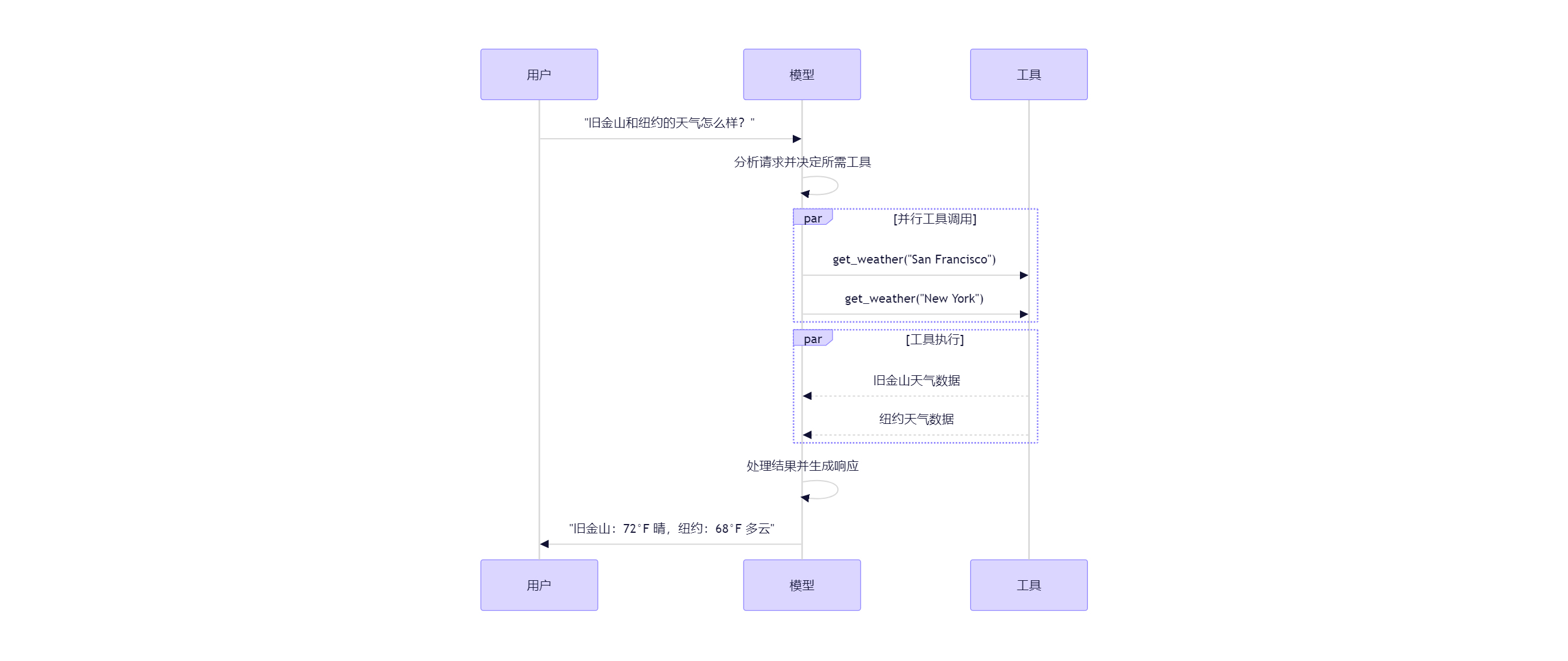
要让模型使用你定义的工具,必须通过 bind_tools 将其绑定。后续调用中,模型可根据需要选择调用任意已绑定的工具。
部分模型提供商(如 ChatOpenAI、ChatAnthropic)还提供 内置工具,可通过模型参数启用。详情请查阅相应 提供商文档。
创建工具的更多选项和细节,请参阅 工具指南。
from langchain.tools import tool

@tool
def get_weather(location: str) -> str:
    """获取某地的天气。"""
    return f"{location} 天气晴朗。"

model_with_tools = model.bind_tools([get_weather])  # [!code highlight]

response = model_with_tools.invoke("波士顿天气如何?")
for tool_call in response.tool_calls:
    # 查看模型发起的工具调用
    print(f"工具: {tool_call['name']}")
    print(f"参数: {tool_call['args']}")
当绑定用户自定义工具时,模型的响应包含一个执行工具的请求。如果你不使用智能体,则需自行执行该工具并将结果返回给模型,供其后续推理使用;而使用智能体时,智能体循环会自动处理这一流程。
以下是几种常见的工具调用使用方式:
- 工具结果回传模型形成对话循环
当模型返回工具调用请求后,你需要执行工具并将结果传回模型。这形成了一个对话循环,使模型能利用工具结果生成最终回答。LangChain 的 智能体 抽象已内置此编排逻辑。
简单示例如下:

```python
# 将(可能多个)工具绑定到模型
model_with_tools = model.bind_tools([get_weather])

# 步骤1:模型生成工具调用
messages = [{"role": "user", "content": "波士顿天气如何?"}]
ai_msg = model_with_tools.invoke(messages)
messages.append(ai_msg)

# 步骤2:执行工具并收集结果
for tool_call in ai_msg.tool_calls:
    tool_result = get_weather.invoke(tool_call)
    messages.append(tool_result)

# 步骤3:将结果传回模型以生成最终响应
final_response = model_with_tools.invoke(messages)
print(final_response.text)
# "波士顿当前天气为 72°F,晴朗。"
工具返回的每个 ToolMessage 都包含一个 tool_call_id,与原始工具调用匹配,帮助模型关联请求与结果。
- 强制使用工具
默认情况下,模型可根据用户输入自由选择调用哪个工具。但你也可以强制模型使用某个特定工具,或从给定列表中任选一个:
# 强制使用任意一个工具
model_with_tools = model.bind_tools([tool_1], tool_choice="any")
# 强制使用特定工具
model_with_tools = model.bind_tools([tool_1], tool_choice="tool_1")
- 并行调用工具
许多模型支持在适当时机并行调用多个工具,从而同时从不同来源获取信息。
model_with_tools = model.bind_tools([get_weather])

response = model_with_tools.invoke("波士顿和东京的天气如何?")

# 模型可能生成多个工具调用
print(response.tool_calls)
# [
#   {'name': 'get_weather', 'args': {'location': 'Boston'}, 'id': 'call_1'},
#   {'name': 'get_weather', 'args': {'location': 'Tokyo'}, 'id': 'call_2'},
# ]

# 执行所有工具(可用 async 并行执行)
results = []
for tool_call in response.tool_calls:
    if tool_call['name'] == 'get_weather':
        result = get_weather.invoke(tool_call)
    ...
    results.append(result)
模型会根据请求操作的独立性,智能判断是否适合并行执行。
大多数支持工具调用的模型默认启用并行调用。部分模型(如 OpenAI 和 Anthropic)允许你禁用此功能,只需设置 parallel_tool_calls=False:
model.bind_tools([get_weather], parallel_tool_calls=False)
- 流式调用工具
在流式响应中,工具调用通过ToolCallChunk逐步构建。这让你能在完整响应生成前就看到工具调用过程。
for chunk in model_with_tools.stream("波士顿和东京的天气如何?"):
    for tool_chunk in chunk.tool_call_chunks:
        if name := tool_chunk.get("name"):
            print(f"工具: {name}")
        if id_ := tool_chunk.get("id"):
            print(f"ID: {id_}")
        if args := tool_chunk.get("args"):
            print(f"参数: {args}")

# 输出示例:
# Tool: get_weather
# ID: call_SvMlU1TVIZugrFLckFE2ceRE
# Args: {"lo
# Args: catio
# Args: n": "B
# Args: osto
# Args: n"}
# ...
你可以累积 chunks 以构建完整的工具调用:
gathered = None
for chunk in model_with_tools.stream("波士顿天气如何?"):
    gathered = chunk if gathered is None else gathered + chunk
    print(gathered.tool_calls)
结构化输出(Structured output)
你可以要求模型按照指定的 Schema 格式返回响应。这对于确保输出易于解析并在后续处理中使用非常有用。LangChain 支持多种 Schema 类型和结构化输出方法。
Pydantic 模型 提供最丰富的功能,包括字段验证、描述和嵌套结构。
from pydantic import BaseModel, Field

class Movie(BaseModel):
    """一部电影的详细信息。"""
    title: str = Field(..., description="电影标题")
    year: int = Field(..., description="上映年份")
    director: str = Field(..., description="导演")
    rating: float = Field(..., description="评分(满分10分)")

model_with_structure = model.with_structured_output(Movie)
response = model_with_structure.invoke("提供电影《盗梦空间》的详细信息")
print(response)  # Movie(title="Inception", year=2010, director="Christopher Nolan", rating=8.8)
TypedDict 是更轻量的选择,使用 Python 内置类型提示,适用于无需运行时验证的场景。
from typing_extensions import TypedDict, Annotated

class MovieDict(TypedDict):
    """一部电影的详细信息。"""
    title: Annotated[str, ..., "电影标题"]
    year: Annotated[int, ..., "上映年份"]
    director: Annotated[str, ..., "导演"]
    rating: Annotated[float, ..., "评分(满分10分)"]

model_with_structure = model.with_structured_output(MovieDict)
response = model_with_structure.invoke("提供电影《盗梦空间》的详细信息")
print(response)  # {'title': 'Inception', 'year': 2010, 'director': 'Christopher Nolan', 'rating': 8.8}
如需最大控制力或跨平台兼容性,可直接提供原始 JSON Schema。
import json

json_schema = {
    "title": "Movie",
    "description": "一部电影的详细信息",
    "type": "object",
    "properties": {
        "title": {"type": "string", "description": "电影标题"},
        "year": {"type": "integer", "description": "上映年份"},
        "director": {"type": "string", "description": "导演"},
        "rating": {"type": "number", "description": "评分(满分10分)"}
    },
    "required": ["title", "year", "director", "rating"]
}

model_with_structure = model.with_structured_output(
    json_schema,
    method="json_schema",
)
response = model_with_structure.invoke("提供电影《盗梦空间》的详细信息")
print(response)  # {'title': 'Inception', 'year': 2010, ...}
结构化输出的关键考虑因素:
method 参数:部分提供商支持不同方法(‘json_schema’、‘function_calling’、‘json_mode’)
- ‘json_schema’:通常指提供商原生的结构化输出功能
- ‘function_calling’:通过强制 工具调用 来实现结构化输出
- ‘json_mode’:某些提供商的早期方案,仅保证输出合法 JSON,Schema 需在提示词中描述
- include_raw:设为 True 可同时获取解析后的对象和原始 AIMessage
- 验证:Pydantic 模型提供自动验证,TypedDict 和 JSON Schema 需手动验证
有时需要同时获取原始 AIMessage 和解析后的结构,以便访问 token 统计 等元数据。可通过设置 include_raw=True 实现:
model_with_structure = model.with_structured_output(Movie, include_raw=True)
response = model_with_structure.invoke("提供电影《盗梦空间》的详细信息")
response
# {
#     "raw": AIMessage(...),
#     "parsed": Movie(title=..., year=..., ...),
#     "parsing_error": None,
# }
Schema 支持嵌套: ```python # Pydantic BaseModel class Actor(BaseModel): name: str role: str
from pydantic import BaseModel, Field

class Actor(BaseModel):
    name: str
    role: str

class MovieDetails(BaseModel):
    title: str
    year: int
    cast: list[Actor]
    genres: list[str]
    budget: float | None = Field(None, description="预算(百万美元)")

model_with_structure = model.with_structured_output(MovieDetails)
from typing_extensions import Annotated, TypedDict

class Actor(TypedDict):
    name: str
    role: str

class MovieDetails(TypedDict):
    title: str
    year: int
    cast: list[Actor]
    genres: list[str]
    budget: Annotated[float | None, ..., "预算(百万美元)"]

model_with_structure = model.with_structured_output(MovieDetails)
高级主题
模型能力画像(Model Profiles)
模型能力画像功能要求 langchain>=1.1。
LangChain 的聊天模型可通过 .profile 属性暴露一个字典,描述其支持的功能与能力:
model.profile
# {
#   "max_input_tokens": 400000,
#   "image_inputs": True,
#   "reasoning_output": True,
#   "tool_calling": True,
#   ...
# }
完整的字段列表请参阅 API 参考文档。
大部分模型画像数据来源于开源项目 models.dev,该项目致力于提供模型能力的标准化数据。LangChain 在此基础上增加了额外字段以适配自身使用场景,并会持续与上游项目保持同步。
模型画像数据使应用程序能够动态适配不同模型的能力。例如:
- 摘要中间件(Summarization middleware) 可根据模型的上下文窗口大小自动触发摘要逻辑。
- 在 create_agent 中,结构化输出(Structured output) 策略可自动推断(例如通过检查模型是否原生支持结构化输出)。
- 可根据模型支持的 模态类型(modalities) 和最大输入 token 数量对输入进行过滤或截断。
如果画像数据缺失、过时或不准确,可以手动修改。
选项一:快速修复(Quick Fix)
实例化聊天模型时可传入自定义画像:
custom_profile = {
    "max_input_tokens": 100_000,
    "tool_calling": True,
    "structured_output": True,
    # ...
}
model = init_chat_model("...", profile=custom_profile)
.profile 本身是一个普通 dict,也可就地更新。若该模型实例被多个地方共享,建议使用 model_copy 避免意外修改共享状态:
new_profile = model.profile | {"key": "value"}
model.model_copy(update={"profile": new_profile})
选项二:修复上游数据(Fix Upstream)
数据主源为 models.dev 项目。LangChain 的各 集成包(integration packages) 会在此基础上合并额外字段和覆盖项,并随包一同发布。
更新流程如下:
- (如需)向 models.dev 的 GitHub 仓库 提交 PR,更新原始数据。
- (如需)在对应 LangChain 集成包的 langchain_/data/profile_augmentations.toml 文件中更新补充字段或覆盖项,并提交 PR。
- 使用 langchain-model-profiles CLI 工具拉取最新数据、合并增强项并更新本地画像:
pip install langchain-model-profiles
langchain-profiles refresh --provider <provider> --data-dir <data_dir>
该命令将:
- 从 models.dev 下载 的最新数据;
- 合并 <data_dir> 中 profile_augmentations.toml 的增强配置;
- 将最终画像写入 <data_dir>/profiles.py。
示例:在 LangChain 单体仓库 的 libs/partners/anthropic 目录下执行:
uv run --with langchain-model-profiles --provider anthropic --data-dir langchain_anthropic/data
模型能力画像目前为 Beta 功能,其格式未来可能发生变化。
多模态(Multimodal)
部分模型能够处理和返回非文本数据,如图像、音频、视频等。您可以通过提供 内容块(content blocks) 向模型传递非文本输入。
所有底层支持多模态的 LangChain 聊天模型均兼容以下格式:
- 跨厂商标准格式(详见 消息指南)
- OpenAI 的 聊天补全(chat completions) 格式
- 特定厂商的原生格式(例如 Anthropic 模型接受 Anthropic 原生格式)
更多细节请参阅消息指南中的 多模态章节。
某些模型 还能在响应中返回多模态数据。若启用此功能,返回的 AIMessage 将包含多模态类型的内容块:
response = model.invoke("画一只猫")
print(response.content_blocks)
# [
#     {"type": "text", "text": "这是一只猫的图片"},
#     {"type": "image", "base64": "...", "mime_type": "image/jpeg"},
# ]
具体厂商支持情况请查阅 集成页面。
推理(Reasoning)
许多模型具备多步推理能力,可将复杂问题拆解为若干小步骤逐步求解。
若底层模型支持,您可以显式获取推理过程,以便理解模型如何得出最终答案。
- 流式输出推理步骤
for chunk in model.stream("为什么鹦鹉羽毛颜色鲜艳?"):
    reasoning_steps = [r for r in chunk.content_blocks if r["type"] == "reasoning"]
    print(reasoning_steps if reasoning_steps else chunk.text)
- 完整推理输出
# 完整推理输出
response = model.invoke("为什么鹦鹉羽毛颜色鲜艳?")
reasoning_steps = [b for b in response.content_blocks if b["type"] == "reasoning"]
print(" ".join(step["reasoning"] for step in reasoning_steps))
部分模型还允许您指定推理强度(如 ‘low’ 或 ‘high’ 级别),甚至完全关闭推理功能。具体形式可能是分类级别,也可能是整数形式的 token 预算。
本地模型(Local Models)
LangChain 支持在本地硬件上运行模型,适用于以下场景:
- 数据隐私要求极高;
- 需要调用自定义模型;
- 希望避免云模型的调用成本。
Ollama 是本地运行聊天模型和嵌入模型最简便的方式之一。
提示缓存(Prompt Caching)
许多厂商提供提示缓存功能,对重复 token 序列进行缓存以降低延迟和成本。缓存机制分为两类:
- 隐式缓存(Implicit):命中缓存后自动享受费用减免,无需额外操作。例如 OpenAI 和 Gemini。
- 显式缓存(Explicit):需手动指定缓存点以获得更精细控制或确保成本节省。例如:
(1)ChatOpenAI(通过 prompt_cache_key)
(2)Anthropic 的 AnthropicPromptCachingMiddleware
(3)Gemini
(4)AWS Bedrock
提示缓存通常仅在输入 token 数超过一定阈值时才会生效。详情请查阅各 厂商页面。
缓存使用情况会体现在模型响应的 用量元数据(usage metadata) 中。
服务端工具调用(Server-side Tool Use)
部分厂商支持服务端工具调用循环:模型可在单轮对话中调用网络搜索、代码解释器等工具,并分析结果。
若模型在服务端调用了工具,响应消息的内容将包含工具调用及其结果。通过访问响应的 内容块(content blocks),即可获得与厂商无关的标准化表示:
from langchain.chat_models import init_chat_model

model = init_chat_model("gpt-4.1-mini")
tool = {"type": "web_search"}
model_with_tools = model.bind_tools([tool])

response = model_with_tools.invoke("今天有什么正面新闻?")
response.content_blocks
# 输出示例
[
    {
        "type": "server_tool_call",
        "name": "web_search",
        "args": {"query": "positive news stories today", "type": "search"},
        "id": "ws_abc123"
    },
    {
        "type": "server_tool_result",
        "tool_call_id": "ws_abc123",
        "status": "success"
    },
    {
        "type": "text",
        "text": "以下是今天的几条正面新闻……",
        "annotations": [
            {
                "start_index": 337,
                "end_index": 410,
                "title": "文章标题",
                "type": "citation",
                "url": "..."
            }
        ]
    }
]
这代表单轮对话,无需像客户端 工具调用(tool-calling) 那样手动传入 ToolMessage。
具体支持的工具及用法请查阅对应 集成页面。
速率限制(Rate Limiting)
多数聊天模型厂商会对单位时间内的调用次数设限。一旦触发限流,通常会收到错误响应,需等待后重试。
为便于管理,LangChain 的聊天模型集成支持在初始化时传入 rate_limiter 参数,以控制请求速率。
LangChain 内置了(可选的)InMemoryRateLimiter,线程安全,可在同一进程的多个线程间共享。
from langchain_core.rate_limiters import InMemoryRateLimiter

rate_limiter = InMemoryRateLimiter(
    requests_per_second=0.1,      # 每 10 秒 1 次请求
    check_every_n_seconds=0.1,    # 每 100ms 检查是否可发起请求
    max_bucket_size=10,           # 控制最大突发请求数
)

model = init_chat_model(
    model="gpt-5",
    model_provider="openai",
    rate_limiter=rate_limiter  # [!code highlight]
)
此限流器仅能限制单位时间内的请求数量,无法基于请求大小(如 token 数)进行限流。
自定义 Base URL 或代理(Base URL or Proxy)
多数聊天模型集成支持配置 API 请求的 Base URL,便于使用兼容 OpenAI API 的模型服务或通过代理服务器调用。
许多厂商提供 OpenAI 兼容 API(如 Together AI、vLLM)。使用 init_chat_model 时只需指定 base_url:
model = init_chat_model(
    model="MODEL_NAME",
    model_provider="openai",
    base_url="BASE_URL",
    api_key="YOUR_API_KEY",
)
若直接使用聊天模型类实例化,参数名可能因厂商而异。请查阅对应 参考文档。
对于需要 HTTP 代理的部署,部分集成支持代理设置:
from langchain_openai import ChatOpenAI

model = ChatOpenAI(
    model="gpt-4o",
    openai_proxy="http://proxy.example.com:8080"
)
代理支持因集成而异,请查阅具体厂商的 参考文档。
对数概率(Log Probabilities)
部分模型支持在初始化时设置 logprobs=True,以返回每个 token 的对数概率(表示该 token 出现的可能性):
model = init_chat_model(model="gpt-4o", model_provider="openai").bind(logprobs=True)

response = model.invoke("为什么鹦鹉会说话?")
print(response.response_metadata["logprobs"])
Token 用量(Token Usage)
多数模型厂商会在响应中返回 token 用量信息。若可用,该信息将包含在模型生成的 AIMessage 对象中。详情见 消息指南。
部分厂商 API(如 OpenAI 和 Azure OpenAI)在流式响应中需显式开启才能获取用量数据。详见 流式用量元数据 章节。
您可通过回调(callback)或上下文管理器(context manager)跟踪整个应用中各模型的累计 token 消耗:
- 通过回调(callback)
from langchain.chat_models import init_chat_model
from langchain_core.callbacks import UsageMetadataCallbackHandler

model_1 = init_chat_model(model="gpt-4o-mini")
model_2 = init_chat_model(model="claude-haiku-4-5-20251001")

callback = UsageMetadataCallbackHandler()
result_1 = model_1.invoke("Hello", config={"callbacks": [callback]})
result_2 = model_2.invoke("Hello", config={"callbacks": [callback]})
callback.usage_metadata
- 上下文管理器(context manager)
from langchain.chat_models import init_chat_model
from langchain_core.callbacks import get_usage_metadata_callback

model_1 = init_chat_model(model="gpt-4o-mini")
model_2 = init_chat_model(model="claude-haiku-4-5-20251001")

with get_usage_metadata_callback() as cb:
    model_1.invoke("Hello")
    model_2.invoke("Hello")
    print(cb.usage_metadata)
调用配置(Invocation Config)
调用模型时,可通过 config 参数传入 RunnableConfig 字典,实现对执行行为、回调和元数据的运行时控制。
常见配置项包括:
response = model.invoke(
    "讲个笑话",
    config={
        "run_name": "joke_generation",      # 本次运行的自定义名称
        "tags": ["humor", "demo"],          # 用于分类的标签
        "metadata": {"user_id": "123"},     # 自定义元数据
        "callbacks": [my_callback_handler], # 回调处理器
    }
)
这些配置在以下场景特别有用:
- 使用 LangSmith 进行追踪调试;
- 实现自定义日志或监控;
- 生产环境中控制资源使用;
- 在复杂流水线中追踪调用链路。
在日志和追踪中标识本次调用,不会被子调用继承。 标签会被所有子调用继承,便于在调试工具中筛选和组织。 自定义键值对,用于传递上下文信息,会被所有子调用继承。 控制 batch() 或 batch_as_completed() 的最大并发数。 执行过程中事件的监听与响应处理器。 链式调用的最大递归深度,防止复杂流水线中出现无限循环。 完整的 RunnableConfig 属性列表请查阅官方文档。
可配置模型(Configurable Models)
您可通过 configurable_fields 创建运行时可配置的模型。若未指定模型值,默认 ‘model’ 和 ‘model_provider’ 为可配置项。
from langchain.chat_models import init_chat_model

configurable_model = init_chat_model(temperature=0)

configurable_model.invoke(
    "你叫什么名字?",
    config={"configurable": {"model": "gpt-5-nano"}},  # 使用 GPT-5-Nano
)
configurable_model.invoke(
    "你叫什么名字?",
    config={"configurable": {"model": "claude-sonnet-4-5-20250929"}},  # 使用 Claude
)
可创建带默认值的可配置模型,指定哪些参数可配置,并为可配置参数添加前缀(适用于含多个模型的链):
first_model = init_chat_model(
    model="gpt-4.1-mini",
    temperature=0,
    configurable_fields=("model", "model_provider", "temperature", "max_tokens"),
    config_prefix="first",
)

first_model.invoke("你叫什么名字?")  # 使用默认值
first_model.invoke(
    "你叫什么名字?",
    config={
        "configurable": {
            "first_model": "claude-sonnet-4-5-20250929",
            "first_temperature": 0.5,
            "first_max_tokens": 100,
        }
    },
)
更多 configurable_fields 和 config_prefix 用法请参阅 init_chat_model 文档。
可对可配置模型调用 bind_tools、with_structured_output、with_configurable 等声明式操作,并像普通模型一样将其接入链式流程。
from pydantic import BaseModel, Field

class GetWeather(BaseModel):
    """获取指定地点的当前天气"""
    location: str = Field(..., description="城市和州,例如 San Francisco, CA")

class GetPopulation(BaseModel):
    """获取指定地点的当前人口"""
    location: str = Field(..., description="城市和州,例如 San Francisco, CA")

model = init_chat_model(temperature=0)
model_with_tools = model.bind_tools([GetWeather, GetPopulation])

model_with_tools.invoke(
    "2024 年洛杉矶和纽约哪个更大?",
    config={"configurable": {"model": "gpt-4.1-mini"}}
).tool_calls
[
    {'name': 'GetPopulation', 'args': {'location': 'Los Angeles, CA'}, ...},
    {'name': 'GetPopulation', 'args': {'location': 'New York, NY'}, ...}
]
model_with_tools.invoke(
    "2024 年洛杉矶和纽约哪个更大?",
    config={"configurable": {"model": "claude-sonnet-4-5-20250929"}},
).tool_calls
[
    {'name': 'GetPopulation', 'args': {'location': 'Los Angeles, CA'}, ...},
    {'name': 'GetPopulation', 'args': {'location': 'New York City, NY'}, ...}
]






 扫一扫
扫一扫


 2345
2345

 被折叠的 条评论
为什么被折叠?
被折叠的 条评论
为什么被折叠?
 到【灌水乐园】发言





