



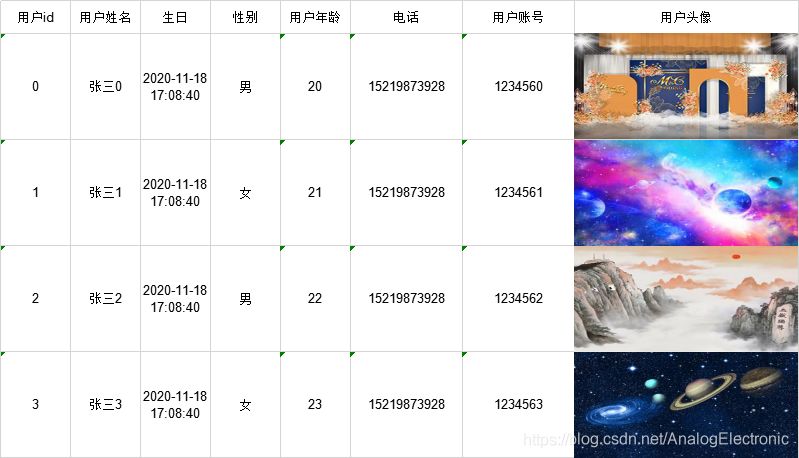
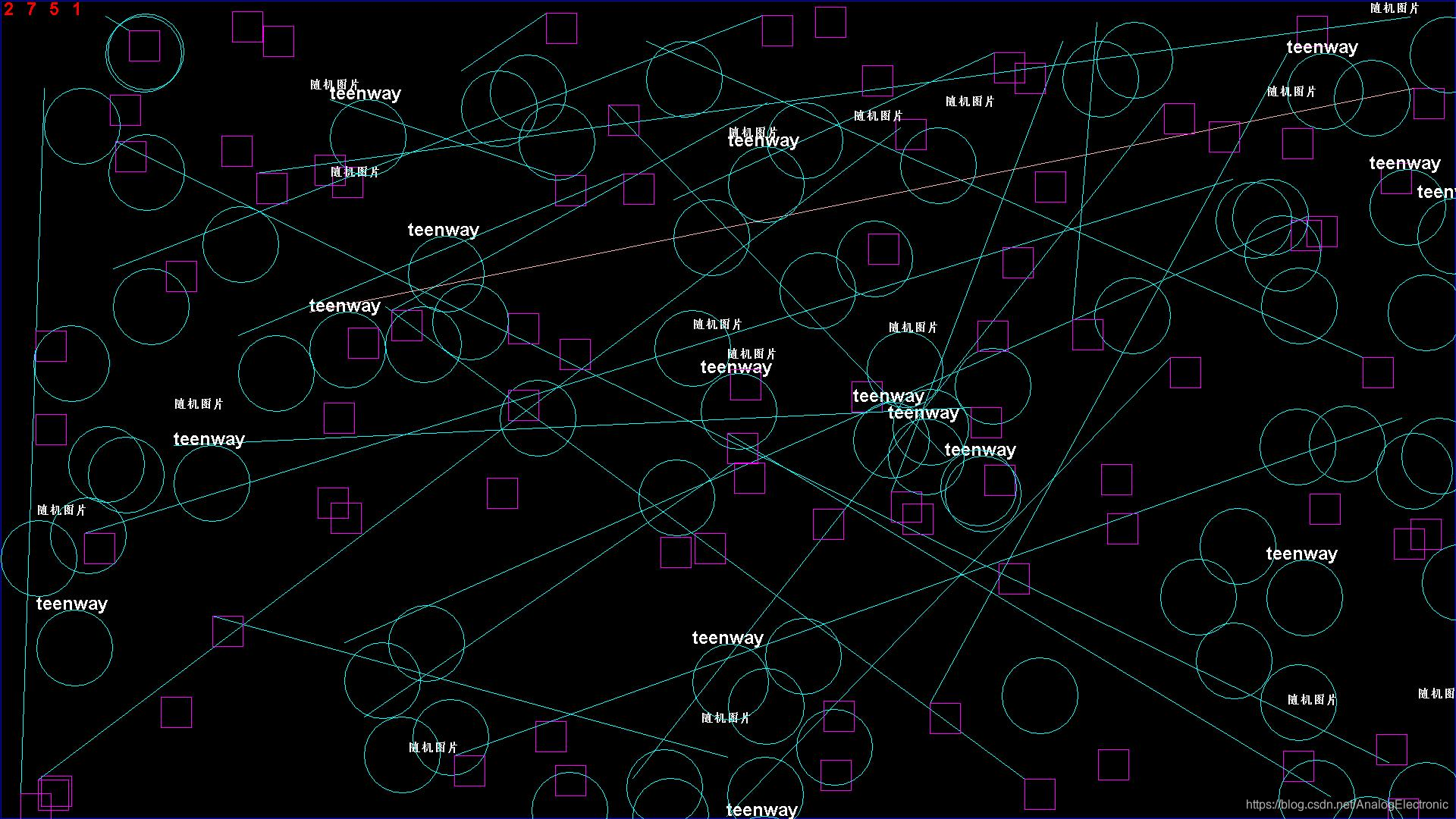
 博客提及实体类Member.java,用户可通过在浏览器输入http://localhost:8081/export和http://localhost:8081/getImage分别获得相应内容,涉及后端开发中通过特定地址获取资源的操作。
实体类
Member.java
package springboot.domain;

import cn.afterturn.easypoi.excel.annotation.Excel;
import lombok.Data;

import java.util.Date;

/**
 * @author *cruder
 * @version 1.0
 * @since 2020/11/15 10:35
 */
@Data
public class Member {

    @Excel(name = "用户id") //表明这个字段要导出到excel或从excel导入
    private Long id;

    @Excel(name = "用户姓名")
    private String name;

    @Excel(name = "生日", format = "yyyy-MM-dd HH:mm:ss")
    //format指定字段导入导出的日期格式化类型
    private Date birthday;

    @Excel(name = "性别", replace = {"男_0", "女_1"}) //replace使用的时候直接"实际含义_数据库实际内容"即可,导入导出均适用
    private String sex;

    @Excel(name = "用户年龄")
    private String age;

    @Excel(name = "电话", width = 16)
    private String phone;

    @Excel(name = "用户账号", width = 16)
    private String loginName;

    @Excel(name = "用户头像", width = 32, height = 32, type = 2)
    //type等于2表示导出的类型为图片。导入的也是一样。
    private String pic;

    public Member() {}

    public Member(Long id, String name, String sex, Date birthday, String age, String phone, String loginName, String pic) {
        this.id = id;
        this.name = name;
        this.sex = sex;
        this.birthday = birthday;
        this.age = age;
        this.phone = phone;
        this.loginName = loginName;
        this.pic = pic;
    }//getset省略
}
package springboot.controller;

import cn.afterturn.easypoi.excel.ExcelExportUtil;
import cn.afterturn.easypoi.excel.entity.ExportParams;

import org.apache.poi.ss.usermodel.*;
import org.apache.poi.ss.util.CellRangeAddress;
import org.springframework.beans.factory.annotation.Autowired;
import org.springframework.web.bind.annotation.GetMapping;
import org.springframework.web.bind.annotation.RequestMapping;
import org.springframework.web.bind.annotation.RestController;
import springboot.domain.Member;
import springboot.domain.TUser;
import springboot.domain.Teacher;
import springboot.dto.ResponseDTO;
import springboot.service.TUserService;

import javax.imageio.ImageIO;
import javax.servlet.http.HttpServletResponse;
import java.awt.*;
import java.awt.Color;
import java.awt.Font;
import java.awt.image.BufferedImage;
import java.io.IOException;
import java.io.OutputStream;
import java.net.URLEncoder;
import java.util.ArrayList;
import java.util.Date;
import java.util.List;
import java.util.Random;


@RestController
public class HelloController {

    @Autowired
    private TUserService tUserService;

    public static int WIDTH = 1920;
    public static int HEIGHT = 1080;

    public static final String[] imgs = new String[]{
//            "http://192.168.25.133/group1/M00/00/01/wKgZhVvC78SAfpWaAAAsAp7EzlE763.jpg",
            "http://icon.nipic.com/BannerPic/20201109/original/20201109110241_1.jpg",
            "http://pic225.nipic.com/pic/20190629/526198_125243948089_4.jpg",
            "http://icon.nipic.com/BannerPic/20201109/original/20201109110624_1.jpg",
            "http://pic269.nipic.com/pic/20191219/18443500_091727616082_4.jpg"
    };

    @GetMapping("hello")
    public String getInt(String hello){
        TUser tUser = new TUser();
        tUser.setUsername("zhangqingyuan");
        tUserService.findUser(tUser);
        return hello;
    }

    /**
     * 批量导出信息
     * @param response
     * @return
     * @throws IOException
     */
    @RequestMapping("/export1")
    public ResponseDTO batchExportBoardSchool(HttpServletResponse response) throws IOException {
        List<Teacher> tUsers = new ArrayList<>();
        Teacher teacher = new Teacher();
        teacher.setName("老师");
        tUsers.add(teacher);
        Workbook workbook = ExcelExportUtil.exportExcel(new ExportParams("教师信息","teacher"), Teacher.class, tUsers);
        OutputStream output = response.getOutputStream();
        response.reset();
        response.setContentType("application/octet-stream");
        response.setHeader("Content-Disposition", "attachment;filename="+ URLEncoder.encode("教师信息", "UTF-8")+".xlsx");
        response.flushBuffer();
        workbook.write(output);
        workbook.close();
        return ResponseDTO.success();
    }

    /**
     * 下载excel
     */
    @GetMapping("/export")
    public void export(HttpServletResponse response) throws IOException {
        List<Member> list = new ArrayList<>();
        for (int i = 0; i < 4; i++) {
            list.add(new Member((long)i, "张三" + i, i % 2 + "", new Date(), 20 + i + "",
                    "15219873928", "123456" + i, imgs[i]));
        }
        //ExportParams可以通过构造的两个参数设置导出的sheet名字和excel的title列名
        ExportParams params = new ExportParams();
        Workbook workbook = ExcelExportUtil.exportExcel(params, Member.class, list);

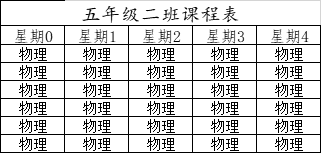
        Sheet sheet = workbook.createSheet("课程表");

        Row row1 = sheet.createRow(0);
        Cell titleCell = row1.createCell(0);
        titleCell.setCellValue("五年级二班课程表");
        CellStyle styleTitle =getStyle(workbook,(short)14,"楷体");
        //标题合并
        CellRangeAddress regionTitle = new CellRangeAddress(0, 0, 0, 4);
        sheet.addMergedRegion(regionTitle);
        titleCell.setCellStyle(styleTitle);
        Row row2 = sheet.createRow(1);
        for (int i = 0; i <5 ; i++) {
            Cell cell = row2.createCell(i);
            cell.setCellValue("星期"+i);
            cell.setCellStyle(getStyle(workbook,(short)12,"仿宋"));
        }

        for (int i = 0; i <6 ; i++) {
            Row row = sheet.createRow(i+2);
            for (int j = 0; j <5 ; j++) {
                Cell cell = row.createCell(j);
                cell.setCellValue("物理");
                cell.setCellStyle(getStyle(workbook,(short)11,"宋体"));
            }
        }

        // 告诉浏览器用什么软件可以打开此文件
        response.setHeader("content-Type", "application/vnd.ms-excel");
        // 下载文件的默认名称
        response.setHeader("Content-Disposition", "attachment;filename=" + URLEncoder.encode("用户数据表","UTF-8") + ".xls");
        //编码
        response.setCharacterEncoding("UTF-8");
        workbook.write(response.getOutputStream());
    }

    /**
     * 设置单元格格式
     * @param workbook
     * @param fontSize
     * @param fontName
     * @return
     */
    private CellStyle getStyle(Workbook workbook,short fontSize,String fontName){
        CellStyle style = workbook.createCellStyle();
        org.apache.poi.ss.usermodel.Font font = workbook.createFont();
        font.setFontHeightInPoints(fontSize);
        font.setFontName(fontName);
        style.setFont(font);
        style.setAlignment(HorizontalAlignment.CENTER);//水平居中
        //设置边框
        style.setBorderTop(BorderStyle.THIN);
        style.setBorderBottom(BorderStyle.THIN);
        style.setBorderLeft(BorderStyle.THIN);
        style.setBorderRight(BorderStyle.THIN);
        return style;
    }


    @GetMapping("getImage")
    public ResponseDTO getImage(HttpServletResponse response) throws IOException {
        response.setContentType("text/html");
        //创建内存图像
        BufferedImage image = new BufferedImage(WIDTH,HEIGHT,BufferedImage.TYPE_INT_RGB);
        //勾勒图像
        Graphics graphics = image.getGraphics();
        //设置背景
        graphics.setColor(Color.black);
        graphics.fillRect(0, 0, WIDTH, HEIGHT);
        //设置边框
        graphics.setColor(Color.BLUE);
        graphics.drawRect(1, 1, WIDTH-2, HEIGHT-2);
        //画干扰线
        graphics.setColor(Color.PINK);
        for(int i=0;i<80;i++){
            int xStart = new Random().nextInt(WIDTH);
            int yStart = new Random().nextInt(HEIGHT);
            int xEnd = new Random().nextInt(WIDTH);
            int yEnd = new Random().nextInt(HEIGHT);
            if(i%3==0)
            graphics.drawLine(xStart, yStart, xEnd, yEnd);
            graphics.setColor(Color.MAGENTA);
            graphics.drawRect(xStart,yStart,40,40);
            if(i%5==0){
                graphics.setColor(Color.WHITE);
                graphics.setFont(new Font("华文仿宋",Font.BOLD,16));
                graphics.drawString("随机图片",xEnd,yStart);
                graphics.setFont(new Font("",Font.BOLD,24));
                graphics.drawString("teenway",xEnd,yEnd);
            }
            graphics.setColor(Color.CYAN);
            graphics.drawOval(xEnd,yEnd,100,100);
        }
        //写随机数
        graphics.setColor(Color.RED);
        int x = 5;
        for(int i=0;i<4;i++){
            graphics.drawString(new Random().nextInt(9)+"", x, 20);
            x+=30;
        }
        response.setContentType("image/jpeg");//设置响应格式
        ImageIO.write(image, "jpeg", response.getOutputStream());

        return ResponseDTO.success("生成图片成功");
    }

    public static void main(String[] args) throws IOException {
        List<TUser> tUsers = new ArrayList<>();
        tUsers.add(null);
    }

}
浏览器输入http://localhost:8081/export获得
浏览器输入http://localhost:8081/getImage 获得





 扫一扫
扫一扫


 3757
3757

 被折叠的 条评论
为什么被折叠?
被折叠的 条评论
为什么被折叠?
 到【灌水乐园】发言





