



在游戏中,尤其是类魂,弹幕,格斗这种一个像素点都要争夺的游戏中,制作手感良好的移动算法至关重要。
一·什么是手感良好的移动算法?
一个手感良好的移动算法,要包括移动的方向,加速,最高速度,减速,一定的操作(比如冲刺)。
所以这套算法里应该包括:
加速部分
我们应当从0开始,每帧都对速度进行一定的增加。最高到限制的最大速度为止。
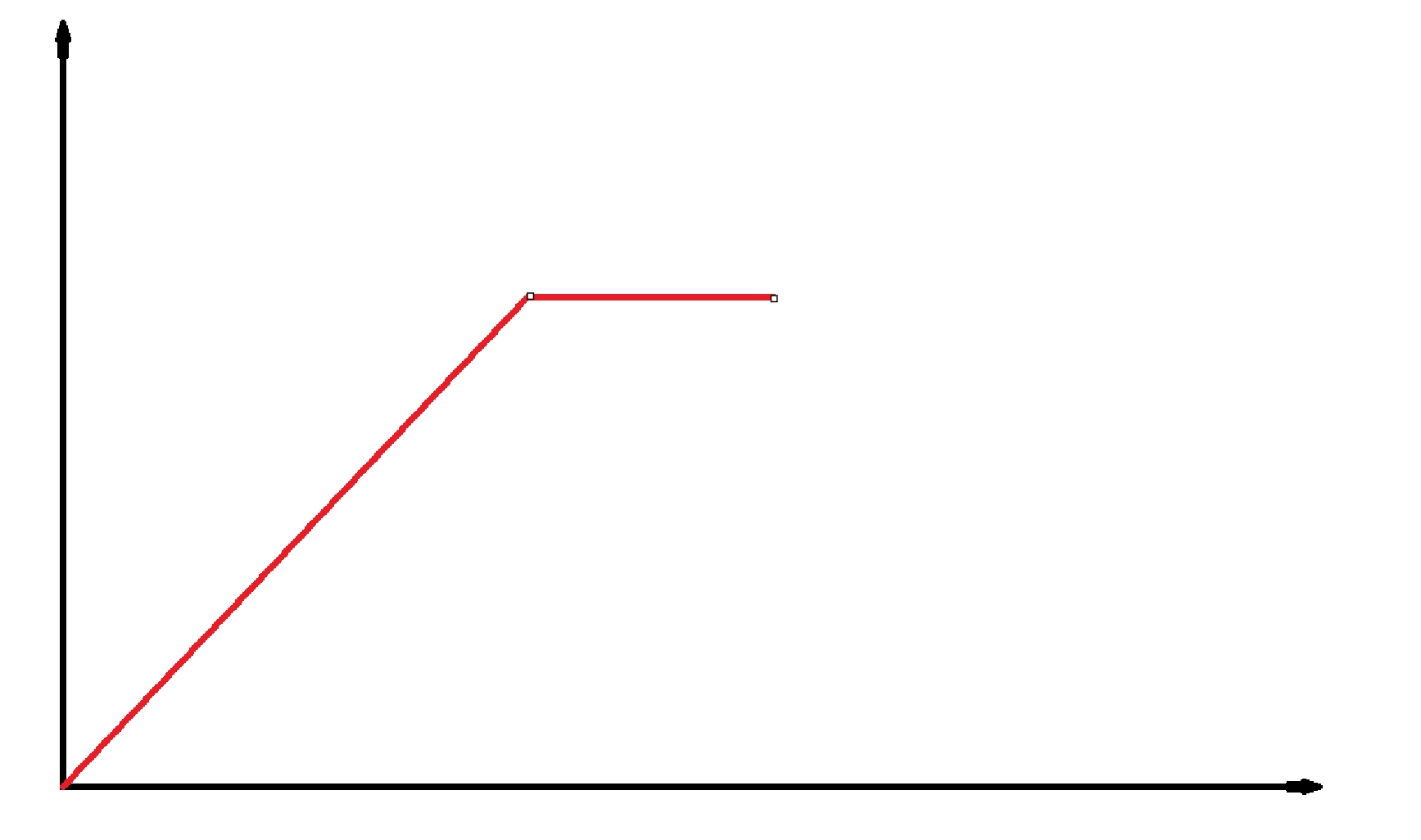
应当接近于这个状态。
减速部分
和上边那张图反过来,但关键点在:最后应该直接把速度按到0。这样不会有最后因为速度的取整而出现失真的状况。
冲刺部分
把既定的Speed和Acceration都加一定的倍数,实现“同等坐标系下走得更快”的效果。
碰撞
碰撞是一种艺术。很多时候,不同的碰撞算法额能带来更美妙的操作上限。
二·漫谈游戏中的速度与移动
我们常玩的游戏,只要涉及到人物需要移动,就一定会涉及到算法。
其中有一些游戏非常典型。
我们用他们来佐证我刚才的讲解。
示例
go的“急停”,就是这个游戏的“减速部分做的较大的一个展示和解决办法。go要是纵容它使用正常的方式停下,半个身位都让出去了。

第五人格又是另一个极端。由于及其精细的博弈,很多时候我怀疑这游戏根本没有加速和减速过程,直接开始移动碰撞箱。但是第五人格只要不开最低画质,碰撞箱和场景就永远不一致。这导致在移动过程中出现了大量大量的”卡脚“”建模吸刀气“等问题。
小小梦魇啊,inside啊,limbo啊,这种恐怖游戏,是不是都感觉起跑时候有一个很强的”起步“动作?这一小细节创造了”拔腿就跑“这个感觉。
什么样的游戏配什么样的移动
你要是制作一款正常操作的游戏,你甚至可以选择不加加速,摩擦等内容。
但是操作越”硬核“越应该重视手感问题。
手感通过更改全局变量(速度,加速度,碰撞箱,郊狼时间)等等实现。
三·动作的优先级与改变
在游戏中,尤其是竞争性较强的游戏里,动作的优先级无疑是一个至关重要的概念。你想想,谁能在敌人进攻时,不用空中急停来保命呢?如果你不熟悉这种技巧,你能在关键时刻做出最佳反应吗?当然,这不仅仅是“空中急停”一个技巧,任何一种你使用的动作都有其优先级,关键看你如何设计和应对复杂局面。
首先,动作的优先级如何定义?这就是一个关于“时机”的问题。每个游戏角色都有一个独特的动作系统,这些动作通过某些输入进行触发。在移动游戏中,玩家往往通过组合各种动作来达到快速反应的效果。但不是所有的动作都能同时执行,你难道没有遇到过在按下闪避的同时却被敌人的技能打中?这就是因为某些动作的优先级高于其他动作。
那你该如何设计这些优先级?首先,必须明确哪些动作是“生死攸关”的,哪些动作则是“附加价值”的。例如,在大多数游戏中,角色的基础移动动作和攻击动作往往是优先级最低的。这是因为它们通常不会在关键时刻决定战斗的胜负,而是更多的起到辅助性作用。相反,防御、闪避、空中急停等动作通常具有更高的优先级,因为它们关乎生死,甚至能改变一场战斗的走向。
但为什么很多玩家会使用“机哥脚步”这种技能来增加生存能力?不就是因为机哥脚步这种技能能够在关键时刻帮助玩家绕过敌人攻击、提升机动性、或是帮助玩家快速反应吗?这种技能往往会在敌人攻击的瞬间让玩家处于“无敌”状态,它能让玩家避免受到致命伤害。所以,如何判断动作的优先级,就需要玩家根据自己的需求和场景做出权衡。
如果所有动作的优先级都一样,那么你的反应会不会显得有些迟钝?如果攻击和防御能在同一时间完成,你会不会觉得自己可以用更加“强势”的方式去消灭敌人?但现实中,不可能所有动作都拥有同等优先级。就像在游戏中的“连招”,你是不是也发现过,连招中的某些动作是无法被打断的,而某些动作却会因为敌人的攻击而被中断?
如果一个动作的优先级比其他动作高,那么它就会优先执行。那么问题来了,这样的设计会不会导致玩家过度依赖某些强力技能?你是否遇到过那种一直依赖空中急停或其他技能的玩家呢?这种设计是否会限制玩家的创造性,或者会使战斗变得过于单一?
再看一个更复杂的场景:假如你同时按下了多个移动、攻击或技能按钮,游戏的优先级系统如何决策?是不是要通过先后顺序,或者通过某种复杂的算法来确定动作执行的顺序?这就需要你理解,不同动作之间的关系是如何被编排和计算的。你觉得这种优先级设计应该如何平衡?会不会有些玩家觉得自己的输入没能完全得到反映,从而产生不满?
其实,优先级的设计并不是一成不变的。随着游戏的发展和玩家的需求,优先级系统也可以根据情况进行调整。那这种调整会不会导致玩家适应性降低?如果游戏本身没有很好的反馈机制,玩家怎么知道自己做对了?动作执行顺序是否要由系统自动优化,还是让玩家根据自己的经验来调整?
最终,设计动作的优先级系统,意味着你需要了解玩家的需求,知道什么样的动作能带来最好的战斗体验。你是否曾思考过,在复杂的战斗场景中,如何让玩家在极短的时间内判断出最优的动作组合?这是每个游戏设计者都要面对的问题。
四·模拟器
这是一个java速度模拟器,任何数据都可以手动填充。大家可以自己找找手感。
import javax.swing.*;
import java.awt.*;
import java.awt.event.*;
import java.util.HashMap;
import java.util.Map;

public class AcceSpeedDemo extends JFrame {
    private GamePanel gamePanel;
    private JTextField vField, aField, boostVField, boostAField, frictionField, bounceField;

    public AcceSpeedDemo() {
        setTitle("小球运动控制演示 - 完全可配置版");
        setDefaultCloseOperation(JFrame.EXIT_ON_CLOSE);
        setLayout(new BorderLayout());

        // 创建输入面板,用于设置所有参数
        JPanel inputPanel = new JPanel(new GridLayout(2, 7, 5, 5));

        // 第一行参数
        inputPanel.add(new JLabel("基础速度:"));
        vField = new JTextField(5);
        vField.setText("5");
        inputPanel.add(vField);

        inputPanel.add(new JLabel("基础加速度:"));
        aField = new JTextField(5);
        aField.setText("0.2");
        inputPanel.add(aField);

        inputPanel.add(new JLabel("冲刺速度:"));
        boostVField = new JTextField(5);
        boostVField.setText("7.5");
        inputPanel.add(boostVField);

        inputPanel.add(new JLabel("冲刺加速度:"));
        boostAField = new JTextField(5);
        boostAField.setText("0.3");
        inputPanel.add(boostAField);

        // 第二行参数
        inputPanel.add(new JLabel("摩擦力:"));
        frictionField = new JTextField(5);
        frictionField.setText("0.95");
        inputPanel.add(frictionField);

        inputPanel.add(new JLabel("反弹削减:"));
        bounceField = new JTextField(5);
        bounceField.setText("0.8");
        inputPanel.add(bounceField);

        JButton startButton = new JButton("开始");
        startButton.addActionListener(e -> startGame());
        inputPanel.add(startButton);

        add(inputPanel, BorderLayout.NORTH);

        // 创建游戏面板
        gamePanel = new GamePanel();
        add(gamePanel, BorderLayout.CENTER);

        pack();
        setLocationRelativeTo(null); // 居中显示
        setVisible(true);
    }

    // 开始游戏,初始化所有参数
    private void startGame() {
        try {
            double maxSpeed = Double.parseDouble(vField.getText());
            double acceleration = Double.parseDouble(aField.getText());
            double boostMaxSpeed = Double.parseDouble(boostVField.getText());
            double boostAcceleration = Double.parseDouble(boostAField.getText());
            double friction = Double.parseDouble(frictionField.getText());
            double bounceFactor = Double.parseDouble(bounceField.getText());

            gamePanel.initGame(maxSpeed, acceleration, boostMaxSpeed, boostAcceleration, friction, bounceFactor);
        } catch (NumberFormatException ex) {
            JOptionPane.showMessageDialog(this, "请输入有效的数字", "输入错误", JOptionPane.ERROR_MESSAGE);
        }
    }

    public static void main(String[] args) {
        // 在EDT线程中启动UI
        SwingUtilities.invokeLater(AcceSpeedDemo::new);
    }

    // 游戏面板,负责绘制和处理小球运动
    class GamePanel extends JPanel implements ActionListener {
        private static final int PANEL_WIDTH = 800;
        private static final int PANEL_HEIGHT = 600;
        private static final int BALL_SIZE = 20;
        private static final Color BALL_COLOR = new Color(75, 0, 130); // 靛青色

        private Ball ball;
        private Timer timer;
        private double baseMaxSpeed; // 基础最大速度
        private double baseAcceleration; // 基础加速度
        private double boostMaxSpeed; // 冲刺最大速度
        private double boostAcceleration; // 冲刺加速度
        private double friction; // 摩擦力系数
        private double bounceFactor; // 反弹削减比例

        private Map<Integer, Boolean> keyStates = new HashMap<>();
        private boolean isBoosting; // 是否正在冲刺
        private int currentDirection; // 0: 上, 1: 右, 2: 下, 3: 左
        private long lastUpdateTime;
        private double deltaTime;

        public GamePanel() {
            setPreferredSize(new Dimension(PANEL_WIDTH, PANEL_HEIGHT));
            setBackground(Color.WHITE);
            setFocusable(true);

            // 设置键位映射
            setupKeyBindings();

            // 创建定时器,控制动画帧率
            timer = new Timer(16, this); // 约60 FPS
            lastUpdateTime = System.nanoTime();
        }

        // 设置键位映射
        private void setupKeyBindings() {
            InputMap inputMap = getInputMap(WHEN_IN_FOCUSED_WINDOW);
            ActionMap actionMap = getActionMap();

            // 定义按键映射
            int[] keys = {KeyEvent.VK_W, KeyEvent.VK_S, KeyEvent.VK_A, KeyEvent.VK_D,
                    KeyEvent.VK_UP, KeyEvent.VK_DOWN, KeyEvent.VK_LEFT, KeyEvent.VK_RIGHT,
                    KeyEvent.VK_1, KeyEvent.VK_SEMICOLON};

            for (int key : keys) {
                inputMap.put(KeyStroke.getKeyStroke(key, 0, false), "pressed_" + key);
                inputMap.put(KeyStroke.getKeyStroke(key, 0, true), "released_" + key);

                actionMap.put("pressed_" + key, new AbstractAction() {
                    @Override
                    public void actionPerformed(ActionEvent e) {
                        keyStates.put(key, true);
                    }
                });

                actionMap.put("released_" + key, new AbstractAction() {
                    @Override
                    public void actionPerformed(ActionEvent e) {
                        keyStates.put(key, false);
                    }
                });
            }
        }

        // 初始化游戏参数
        public void initGame(double maxSpeed, double acceleration,
                             double boostMaxSpeed, double boostAcceleration,
                             double friction, double bounceFactor) {
            this.baseMaxSpeed = maxSpeed;
            this.baseAcceleration = acceleration;
            this.boostMaxSpeed = boostMaxSpeed;
            this.boostAcceleration = boostAcceleration;
            this.friction = friction;
            this.bounceFactor = bounceFactor;

            // 初始化小球在面板中心
            ball = new Ball(PANEL_WIDTH / 2, PANEL_HEIGHT / 2);
            timer.start();
            requestFocusInWindow(); // 获取焦点,确保键盘事件能被捕获
        }

        @Override
        protected void paintComponent(Graphics g) {
            super.paintComponent(g);
            Graphics2D g2d = (Graphics2D) g;
            g2d.setRenderingHint(RenderingHints.KEY_ANTIALIASING, RenderingHints.VALUE_ANTIALIAS_ON);

            if (ball != null) {
                // 绘制小球阴影
                g2d.setColor(new Color(0, 0, 0, 50));
                g2d.fillOval((int)ball.x - BALL_SIZE / 2 + 2,
                        (int)ball.y - BALL_SIZE / 2 + 2,
                        BALL_SIZE, BALL_SIZE);

                // 绘制小球
                g2d.setColor(BALL_COLOR);
                g2d.fillOval((int)ball.x - BALL_SIZE / 2,
                        (int)ball.y - BALL_SIZE / 2,
                        BALL_SIZE, BALL_SIZE);

                // 绘制小球高光
                g2d.setColor(new Color(255, 255, 255, 100));
                g2d.fillOval((int)ball.x - BALL_SIZE / 2 + 3,
                        (int)ball.y - BALL_SIZE / 2 + 3,
                        BALL_SIZE / 3, BALL_SIZE / 3);
            }

            // 绘制操作说明
            g2d.setColor(Color.BLACK);
            g2d.drawString("控制: WASD或方向键移动, 1冲刺, ;瞬移", 10, 20);

            // 绘制当前速度信息
            if (ball != null) {
                double speed = Math.sqrt(ball.vx * ball.vx + ball.vy * ball.vy);
                g2d.drawString(String.format("速度: %.2f px/frame", speed), 10, 40);
                g2d.drawString(String.format("方向: %s", getDirectionName(currentDirection)), 10, 60);

                // 显示冲刺状态
                if (isBoosting) {
                    g2d.setColor(Color.RED);
                    g2d.drawString("冲刺中!", 10, 80);
                }

                // 显示当前参数
                g2d.setColor(Color.DARK_GRAY);
                g2d.drawString(String.format("摩擦力: %.2f 反弹: %.2f", friction, bounceFactor), 10, 100);
            }
        }

        private String getDirectionName(int direction) {
            switch (direction) {
                case 0: return "上";
                case 1: return "右";
                case 2: return "下";
                case 3: return "左";
                default: return "无";
            }
        }

        @Override
        public void actionPerformed(ActionEvent e) {
            if (ball == null) return;

            // 计算时间差
            long currentTime = System.nanoTime();
            deltaTime = (currentTime - lastUpdateTime) / 1_000_000_000.0; // 转换为秒
            lastUpdateTime = currentTime;

            // 标准化时间差,防止卡顿导致异常
            deltaTime = Math.min(deltaTime, 0.1);

            // 更新按键状态
            updateKeyStates();

            // 更新速度
            updateVelocity();

            // 更新位置
            ball.x += ball.vx * deltaTime * 60; // 乘以60使速度单位与原来一致
            ball.y += ball.vy * deltaTime * 60;

            // 边界检查,防止小球移出屏幕
            checkBounds();

            repaint();
        }

        // 更新按键状态
        private void updateKeyStates() {
            // 上下方向
            if (isKeyPressed(KeyEvent.VK_W) || isKeyPressed(KeyEvent.VK_UP)) {
                currentDirection = 0;
            } else if (isKeyPressed(KeyEvent.VK_S) || isKeyPressed(KeyEvent.VK_DOWN)) {
                currentDirection = 2;
            }

            // 左右方向
            if (isKeyPressed(KeyEvent.VK_A) || isKeyPressed(KeyEvent.VK_LEFT)) {
                currentDirection = 3;
            } else if (isKeyPressed(KeyEvent.VK_D) || isKeyPressed(KeyEvent.VK_RIGHT)) {
                currentDirection = 1;
            }

            // 冲刺键
            isBoosting = isKeyPressed(KeyEvent.VK_1);

            // 瞬移键
            if (isKeyPressed(KeyEvent.VK_SEMICOLON)) {
                teleport();
                keyStates.put(KeyEvent.VK_SEMICOLON, false); // 防止连续瞬移
            }
        }

        private boolean isKeyPressed(int keyCode) {
            return keyStates.getOrDefault(keyCode, false);
        }

        // 获取当前有效加速度(考虑是否冲刺)
        private double getEffectiveAcceleration() {
            return isBoosting ? boostAcceleration : baseAcceleration;
        }

        // 获取当前有效最大速度(考虑是否冲刺)
        private double getEffectiveMaxSpeed() {
            return isBoosting ? boostMaxSpeed : baseMaxSpeed;
        }

        // 更新小球速度
        private void updateVelocity() {
            double effectiveAcceleration = getEffectiveAcceleration() * deltaTime * 60; // 标准化加速度

            // 根据按键更新速度
            if (isKeyPressed(KeyEvent.VK_W) || isKeyPressed(KeyEvent.VK_UP)) {
                ball.vy = Math.max(ball.vy - effectiveAcceleration, -getEffectiveMaxSpeed());
            } else if (isKeyPressed(KeyEvent.VK_S) || isKeyPressed(KeyEvent.VK_DOWN)) {
                ball.vy = Math.min(ball.vy + effectiveAcceleration, getEffectiveMaxSpeed());
            } else {
                // 没有上下按键时应用摩擦力
                ball.vy *= friction;
                if (Math.abs(ball.vy) < 0.1) ball.vy = 0;
            }

            if (isKeyPressed(KeyEvent.VK_A) || isKeyPressed(KeyEvent.VK_LEFT)) {
                ball.vx = Math.max(ball.vx - effectiveAcceleration, -getEffectiveMaxSpeed());
            } else if (isKeyPressed(KeyEvent.VK_D) || isKeyPressed(KeyEvent.VK_RIGHT)) {
                ball.vx = Math.min(ball.vx + effectiveAcceleration, getEffectiveMaxSpeed());
            } else {
                // 没有左右按键时应用摩擦力
                ball.vx *= friction;
                if (Math.abs(ball.vx) < 0.1) ball.vx = 0;
            }

            // 限制最大速度
            double currentSpeed = Math.sqrt(ball.vx * ball.vx + ball.vy * ball.vy);
            if (currentSpeed > getEffectiveMaxSpeed()) {
                double ratio = getEffectiveMaxSpeed() / currentSpeed;
                ball.vx *= ratio;
                ball.vy *= ratio;
            }
        }

        // 边界检查
        private void checkBounds() {
            ball.x = Math.max(BALL_SIZE / 2, Math.min(ball.x, PANEL_WIDTH - BALL_SIZE / 2));
            ball.y = Math.max(BALL_SIZE / 2, Math.min(ball.y, PANEL_HEIGHT - BALL_SIZE / 2));

            // 边界反弹
            if (ball.x <= BALL_SIZE / 2 || ball.x >= PANEL_WIDTH - BALL_SIZE / 2) {
                ball.vx *= -bounceFactor; // 反弹并损失一些能量
            }
            if (ball.y <= BALL_SIZE / 2 || ball.y >= PANEL_HEIGHT - BALL_SIZE / 2) {
                ball.vy *= -bounceFactor; // 反弹并损失一些能量
            }
        }

        // 瞬移功能
        private void teleport() {
            if (ball == null) return;

            // 向当前方向瞬移一段距离(约为3倍基础最大速度)
            double teleportDistance = baseMaxSpeed * 3;
            switch (currentDirection) {
                case 0: // 上
                    ball.y = Math.max(BALL_SIZE / 2, ball.y - teleportDistance);
                    break;
                case 1: // 右
                    ball.x = Math.min(PANEL_WIDTH - BALL_SIZE / 2, ball.x + teleportDistance);
                    break;
                case 2: // 下
                    ball.y = Math.min(PANEL_HEIGHT - BALL_SIZE / 2, ball.y + teleportDistance);
                    break;
                case 3: // 左
                    ball.x = Math.max(BALL_SIZE / 2, ball.x - teleportDistance);
                    break;
            }

            // 瞬移后速度清零
            ball.vx = 0;
            ball.vy = 0;
        }

        // 小球类,存储位置和速度信息
        class Ball {
            double x, y;
            double vx, vy;

            public Ball(double x, double y) {
                this.x = x;
                this.y = y;
                this.vx = 0;
                this.vy = 0;
            }
        }
    }
}





 扫一扫
扫一扫


 325
325

 被折叠的 条评论
为什么被折叠?
被折叠的 条评论
为什么被折叠?
 到【灌水乐园】发言





