



不多说,直接上代码实例,细节部分如果有时间再完善,没有时间宝子们就自己官网看一看。
实现:scroll组件基础横向和竖向滚动
图片
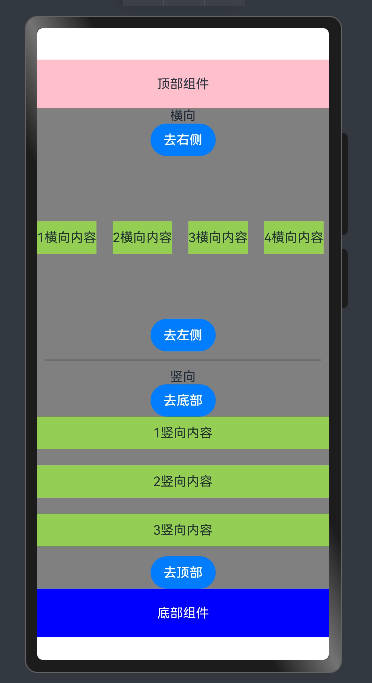
视频演示
harmonyOS Scroll横向和竖向滚动
代码
@Entry
@Component
struct ScrollExample {
  @State message: string = 'Hello World';

  build() {
    Column() {
      ScrollTop()
      ScrollMainHorizontal() // 横向
      ScrollMainVertical() // 竖向
      ScrollBottom()
    }
    .height('100%')
    .width('100%')
  }
}


// 组件在同一个文件中时不用导出、导入
@Component
struct ScrollTop {
  build() {
    Row() {
      Text('顶部组件')
    }
    .width("100%")
    .height(60)
    .justifyContent(FlexAlign.Center)
    .alignItems(VerticalAlign.Center)
    .backgroundColor(Color.Pink)
  }
}

@Component
struct ScrollMainHorizontal {
  arr: Array<number> =
    [1, 2, 3, 4, 5, 6, 7, 8, 9, 10, 11, 12, 13, 14, 15, 16, 17, 18, 19, 20, 21, 22, 23, 24, 25, 26, 27, 28, 29, 30]
  scroller: Scroller = new Scroller() // 滚动控制器

  build() {
    // Scroll 滚动组件
    Column() {
      Text("横向")
      Button('去右侧')
        .onClick(() => {
          // 滚动到底部
          this.scroller.scrollEdge(Edge.Bottom)
        })


      // 滚动区域
      Scroll(this.scroller) {
        Row({ space: 20 }) {
          ForEach(this.arr, (item: number) => {
            Row() {
              // 自定义展示:图片、视频、组件...
              Text(item + '横向内容')
            }
            .height(40)
            .justifyContent(FlexAlign.Center)
            .backgroundColor("#94ce53")

          })
        }
      }
      .height(200)
      .scrollable(ScrollDirection.Horizontal)

      Button('去左侧').onClick(() => {
        // 滚动到顶部
        this.scroller.scrollEdge(Edge.Top)
      })

    }
    .width("100%")
    .height(300)
    .backgroundColor(Color.Grey)
    .justifyContent(FlexAlign.SpaceBetween)

  }
}


@Component
struct ScrollMainVertical {
  arr: Array<number> =
    [1, 2, 3, 4, 5, 6, 7, 8, 9, 10, 11, 12, 13, 14, 15, 16, 17, 18, 19, 20, 21, 22, 23, 24, 25, 26, 27, 18, 19, 30]
  scroller: Scroller = new Scroller() // 滚动控制器

  build() {
    // Scroll 滚动组件
    Column() {
      Divider().strokeWidth(2).margin(10)
      Text("竖向")
      Button('去底部')
        .onClick(() => {
          // 滚动到底部
          this.scroller.scrollEdge(Edge.Bottom)
        })


      // 滚动区域
      Scroll(this.scroller) {
        Column({ space: 20 }) {
          ForEach(this.arr, (item: number) => {
            Row() {
              // 自定义展示:图片、视频、组件...
              Text(item + '竖向内容')
            }
            .width("100%")
            .height(40)
            .justifyContent(FlexAlign.Center)
            .backgroundColor("#94ce53")

          })
        }
      }
      .layoutWeight(1)

      Button('去顶部').onClick(() => {
        // 滚动到顶部
        this.scroller.scrollEdge(Edge.Top)
      })

    }
    .width("100%")
    .layoutWeight(1)
    .backgroundColor(Color.Grey)
    .justifyContent(FlexAlign.SpaceBetween)

  }
}


@Component
struct ScrollBottom {
  build() {
    Row() {
      Text('底部组件')
        .fontColor(Color.White)
    }
    .width("100%")
    .height(60)
    .justifyContent(FlexAlign.Center)
    .alignItems(VerticalAlign.Center)
    .backgroundColor(Color.Blue)

  }
}
完





 扫一扫
扫一扫


 2888
2888

 被折叠的 条评论
为什么被折叠?
被折叠的 条评论
为什么被折叠?
 到【灌水乐园】发言





