






 本文介绍如何解决在使用UmiJS时遇到的关于JSX转换的警告信息,主要涉及更新tsconfig.json配置文件中的jsx选项,并提供具体步骤指导。
使用 umiJS 时出现的终端警告:
WARN [WARN] update jsx: "react" into jsx: "react-jsx" to suport the new JSX transform in React 17 in tsconfig.json

解决方法:
确保 typescript 的依赖安装完成,随便打开一个提示错误的 .tsx 文件。
macOS 使用 command + shift + p,Windows 貌似是 ctrl + shift + p。
然后输入 TypeScript ,不出意外的话你会看到 Select Typescript Version 选项。
选择 node_modules 下的那个版本(一般来说都会比较新)。
一般来说就没有问题了。
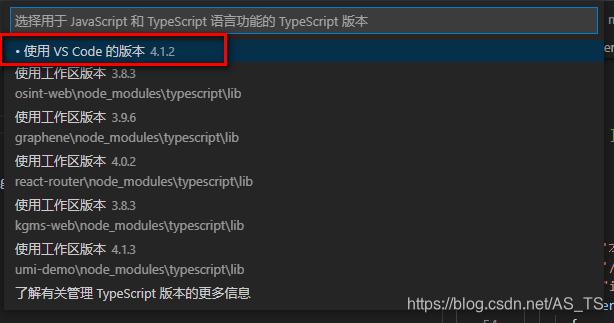
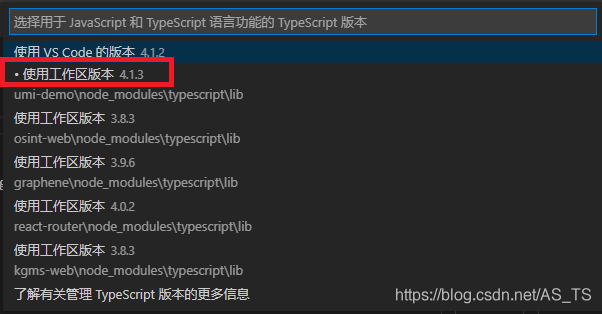
tsconfig.json 文件
{
  "compilerOptions": {
    "target": "esnext",
    "module": "esnext",
    "moduleResolution": "node",
    "importHelpers": true,
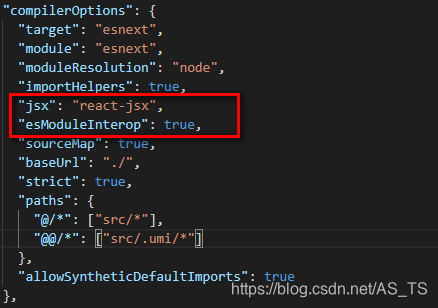
    "jsx": "react-jsx",
    "esModuleInterop": true,
    "sourceMap": true,
    "baseUrl": "./",
    "strict": true,
    "paths": {
      "@/*": ["src/*"],
      "@@/*": ["src/.umi/*"]
    },
    "allowSyntheticDefaultImports": true
  },
  "include": [
    "mock/**/*",
    "src/**/*",
    "config/**/*",
    ".umirc.ts",
    "typings.d.ts"
  ],
  "exclude": [
    "node_modules",
    "lib",
    "es",
    "dist",
    "typings",
    "**/__test__",
    "test",
    "docs",
    "tests"
  ]
}






 扫一扫
扫一扫


 3786
3786


 到【灌水乐园】发言



