


爬取实战案例—(某电商网站爬取)
4.1 网站分析
这是一个海外电商平台,今天我想要获取下面图中一些信息,这里选取的关键词是:IPhone 16
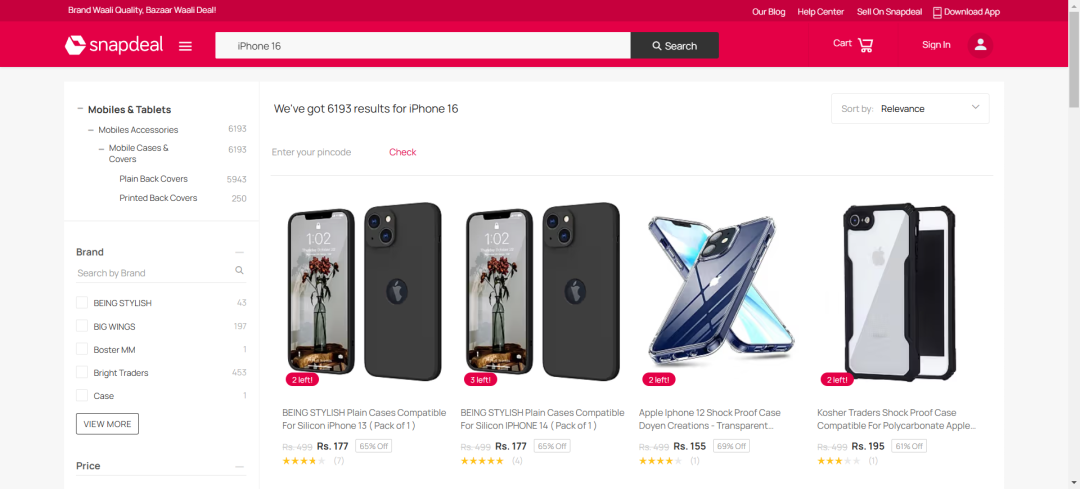
接下来我们想要获取商品的:title、price、link,如何获取呢,我们可以选择点击键盘上的F12,之后我们就可以按照下面的示例,进行选中对应的块了
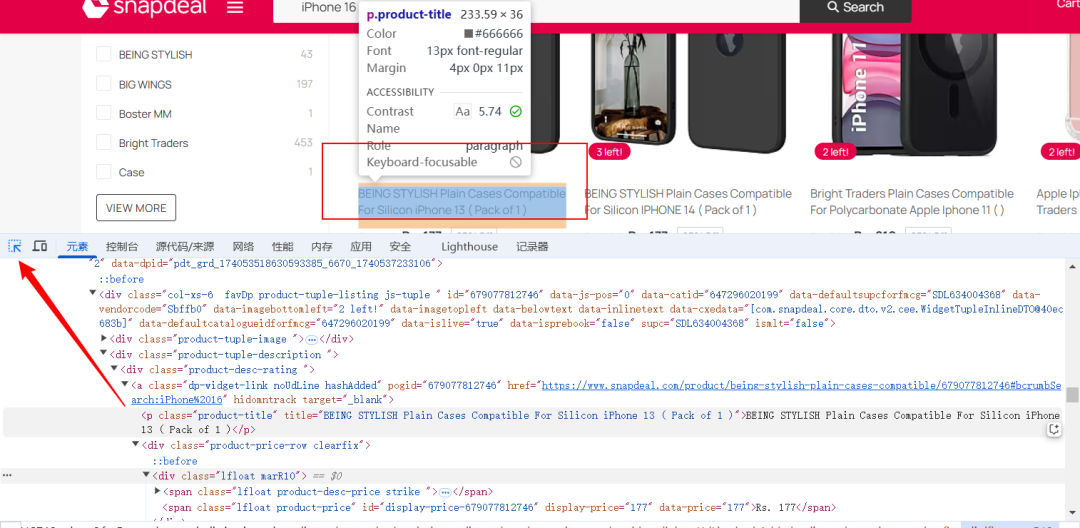
这里我们选择通过soup.find_all(‘div’, class_=‘product-tuple-listing’)来查找所有的商品块
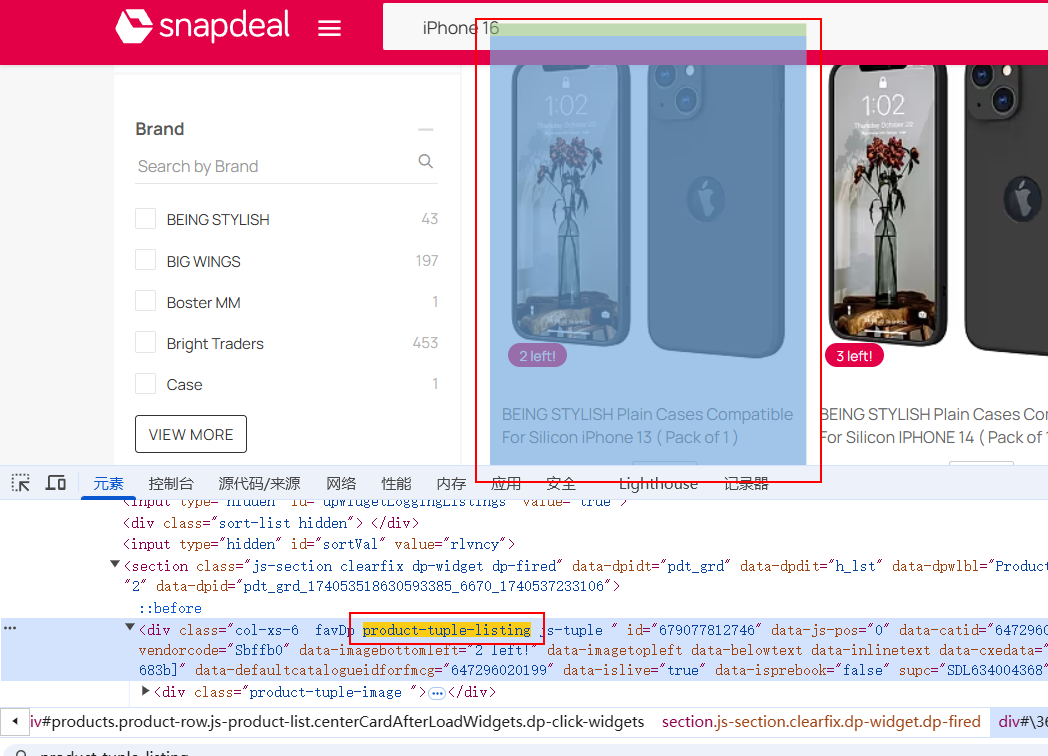
每个商品块包含了:
-
商品名称:位于 <p class="product-title"> 标签中。
-
商品价格:位于 <span class="lfloat product-price"> 标签中。
-
商品链接:位于 <a> 标签中,包含 href 属性。
上面是简单的网站结构分析,下面我们进行实战
4.2 编写代码
1、首先我们需要导入库,这里我们导入requests和bs4,这两种库
-
requests 是 Python 中一个简洁且功能强大的 HTTP 库,用于发送各种 HTTP 请求,使得在 Python 中进行网络请求变得非常容易。
-
bs4 即 BeautifulSoup 4,是一个用于解析 HTML 和 XML 文档的 Python 库,能够从网页中提取所需的数据。
import requestsfrom bs4 import BeautifulSoup
2、其次设置请求头,如下
headers = {'User-Agent': 'Mozilla/5.0 (Windows NT 10.0; Win64; x64) AppleWebKit/537.36 (KHTML, like Gecko) Chrome/91.0.4472.124 Safari/537.36',}
3、模拟浏览器请求。很多网站会根据请求头来判断请求是否来自浏览器,以防止自动化脚本等的访问。这里你也可以选择多设置几个

4、之后我们确定目标 URL,这里是可以变动的,但是如果变动过大的话,后面对应的结构也得变动
5、获取页面的内容,requests.get(url, headers=headers):发送 GET 请求到 Snapdeal 网站,获取网页内容。
response.text:获取返回的 HTML 内容。BeautifulSoup(response.text, ‘html.parser’):使用 BeautifulSoup 解析 HTML 内容。'html.parser' 是解析器,BeautifulSoup 会将 HTML 内容转换成一个可以通过 Python 代码进行操作的对象。
response = requests.get(url, headers=headers) soup = BeautifulSoup(response.text, 'html.parser')
6、定义提取商品信息的函数,这里使用find_all函数
def extract_product_info():products = []product_elements = soup.find_all('div', class_='product-tuple-listing')
这里设置products = []:初始化一个空列表,用来存储商品信息。
soup.find_all('div', class_='product-tuple-listing'):通过 BeautifulSoup 找到所有符合条件的 div 元素,这些 div 元素是每个商品的容器。根据页面的结构,每个商品信息都被包含在一个 div 标签中,其类名为 product-tuple-listing。
7、接下来就是for循环遍历了
import requestsfrom bs4 import BeautifulSoup# 设置请求头模仿浏览器headers = {'User-Agent': 'Mozilla/5.0 (Windows NT 10.0; Win64; x64) AppleWebKit/537.36 (KHTML, like Gecko) Chrome/91.0.4472.124 Safari/537.36',}# 指定 URL,这里用的是你提供的 iPhone 16 搜索页面链接url = 'https://www.snapdeal.com/search?keyword=iPhone%2016&santizedKeyword=Sony&catId=0&categoryId=0&suggested=false&vertical=p&noOfResults=20&searchState=&clickSrc=go_header&lastKeyword=&prodCatId=&changeBackToAll=false&foundInAll=false&categoryIdSearched=&cityPageUrl=&categoryUrl=&url=&utmContent=&dealDetail=&sort=rlvncy'# 获取页面内容response = requests.get(url, headers=headers)soup = BeautifulSoup(response.text, 'html.parser')# 提取商品的名称、价格、URL等def extract_product_info():products = []# 找到包含产品的所有元素product_elements = soup.find_all('div', class_='product-tuple-listing')for product in product_elements:title = product.find('p', class_='product-title').text.strip() if product.find('p',class_='product-title') else Noneprice = product.find('span', class_='lfloat product-price').text.strip() if product.find('span',class_='lfloat product-price') else Nonelink = product.find('a', href=True)['href'] if product.find('a', href=True) else None# 仅当所有必要的字段都有时才记录if title and price and link:product_info = {'title': title,'price': price,'link': f'https://www.snapdeal.com{link}',}products.append(product_info)return products# 获取并打印产品信息products = extract_product_info()for product in products:print(f"Title: {product['title']}")print(f"Price: {product['price']}")print(f"Link: {product['link']}")print("-" * 40)
上面就是整个代码的核心步骤,下面我给出完整的代码
import requestsfrom bs4 import BeautifulSoup# 设置请求头模仿浏览器headers = {'User-Agent': 'Mozilla/5.0 (Windows NT 10.0; Win64; x64) AppleWebKit/537.36 (KHTML, like Gecko) Chrome/91.0.4472.124 Safari/537.36',}# 指定 URL,这里用的是你提供的 iPhone 16 搜索页面链接url = 'https://www.snapdeal.com/search?keyword=iPhone%2016&santizedKeyword=Sony&catId=0&categoryId=0&suggested=false&vertical=p&noOfResults=20&searchState=&clickSrc=go_header&lastKeyword=&prodCatId=&changeBackToAll=false&foundInAll=false&categoryIdSearched=&cityPageUrl=&categoryUrl=&url=&utmContent=&dealDetail=&sort=rlvncy'# 获取页面内容response = requests.get(url, headers=headers)soup = BeautifulSoup(response.text, 'html.parser')# 提取商品的名称、价格、URL等def extract_product_info():products = []# 找到包含产品的所有元素product_elements = soup.find_all('div', class_='product-tuple-listing')for product in product_elements:title = product.find('p', class_='product-title').text.strip() if product.find('p',class_='product-title') else Noneprice = product.find('span', class_='lfloat product-price').text.strip() if product.find('span',class_='lfloat product-price') else Nonelink = product.find('a', href=True)['href'] if product.find('a', href=True) else None# 仅当所有必要的字段都有时才记录if title and price and link:product_info = {'title': title,'price': price,'link': f'https://www.snapdeal.com{link}',}products.append(product_info)return products# 获取并打印产品信息products = extract_product_info()for product in products:print(f"Title: {product['title']}")print(f"Price: {product['price']}")print(f"Link: {product['link']}")print("-" * 40)
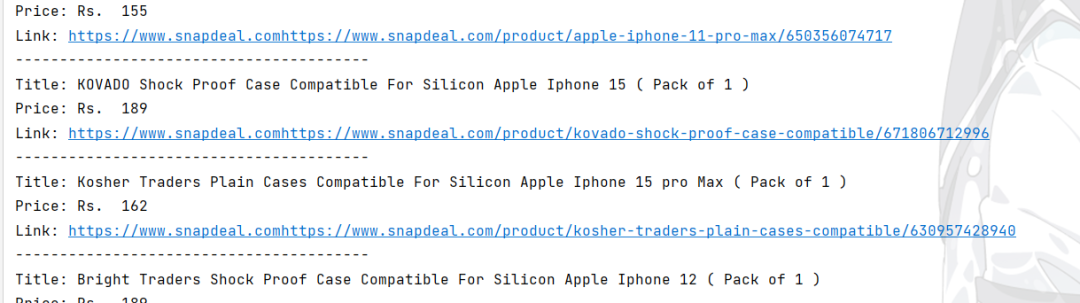
下面是运行的结果:
4.3 优化代码
接下来我们使用代理再试试,下面是官方为我们提供的关于Demo示例,从代码来看,还是十分简洁明了的
import requestsif __name__ == '__main__':proxyip = "http://username_custom_zone_US:password@us.ipwo.net:7878"url = "http://ipinfo.io"proxies = {'http': proxyip,}data = requests.get(url=url, proxies=proxies)print(data.text)
接下来我们再根据提供的代码示例,从而优化我们的代码,下面是完整的代码阐述
import requestsfrom bs4 import BeautifulSoup# 设置请求头模仿浏览器headers = {'User-Agent': 'Mozilla/5.0 (Windows NT 10.0; Win64; x64) AppleWebKit/537.36 (KHTML, like Gecko) Chrome/91.0.4472.124 Safari/537.36',}# 设置代理proxyip = " " # 替换为你自己的ip信息proxies = {'http': proxyip,}# 指定 URL,这里用的是你提供的 iPhone 16 搜索页面链接url = 'https://www.snapdeal.com/search?keyword=iPhone%2016&santizedKeyword=Sony&catId=0&categoryId=0&suggested=false&vertical=p&noOfResults=20&searchState=&clickSrc=go_header&lastKeyword=&prodCatId=&changeBackToAll=false&foundInAll=false&categoryIdSearched=&cityPageUrl=&categoryUrl=&url=&utmContent=&dealDetail=&sort=rlvncy'# 获取页面内容,使用代理,禁用 SSL 验证response = requests.get(url, headers=headers, proxies=proxies, verify=False) # verify=False 关闭 SSL 验证soup = BeautifulSoup(response.text, 'html.parser')# 提取商品的名称、价格、URL等def extract_product_info():products = []# 找到包含产品的所有元素product_elements = soup.find_all('div', class_='product-tuple-listing')for product in product_elements:title = product.find('p', class_='product-title').text.strip() if product.find('p', class_='product-title') else Noneprice = product.find('span', class_='lfloat product-price').text.strip() if product.find('span', class_='lfloat product-price') else Nonelink = product.find('a', href=True)['href'] if product.find('a', href=True) else None# 仅当所有必要的字段都有时才记录if title and price and link:product_info = {'title': title,'price': price,'link': f'https://www.snapdeal.com{link}',}products.append(product_info)return products# 获取并打印产品信息products = extract_product_info()for product in products:print(f"Title: {product['title']}")print(f"Price: {product['price']}")print(f"Link: {product['link']}")print("-" * 40)
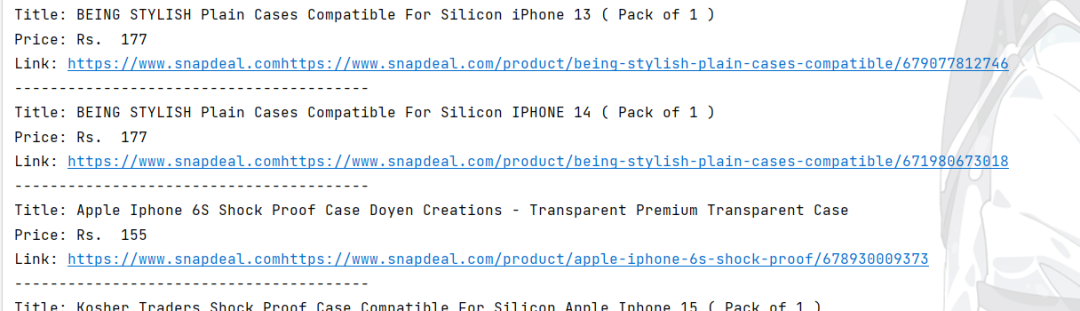
下面是运行结果:
5 总结
通过本文的介绍,我们可以清楚的了解并认识到代理在网络数据采集是十分重要的,针对snapdeal电商平台的商品数据采集,发现了IPWO的强大之处,使我们进行网络数据采集的时候,效率大大的提高~






 扫一扫
扫一扫


 1672
1672

 被折叠的 条评论
为什么被折叠?
被折叠的 条评论
为什么被折叠?
 到【灌水乐园】发言





