



认识
· 初步认识
qemu:一个硬件模拟器,用于模拟CPU和计算机
xv6:一个MIT研发的使用C语言编写的类UNIX系统的小型操作系统
分离用户和内核:内核(kernal)具有特殊的操作权限,能够直接使用系统硬件资源
难点:想要操作系统功能强大,但简单可移植;给予应用程序更多灵活,但不失安全。
所有参考为引用格式。
https://mit-public-courses-cn-translatio.gitbook.io/mit6-s081/
· 打开系统
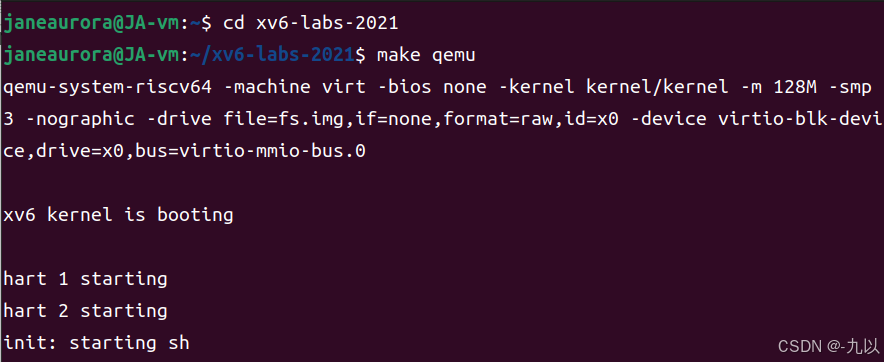
终端输入
cd xv6-labs-2021
make qemu
· 文件位置
主要修改和使用的代码位于user文件夹中,grade-lab-util为测试文件,调用时在终端(不是xv6里)输入
./grade-lab-util 测试的函数名

· 文件描述符
-
标准输入:0
-
标准输出:1
-
标准错误:2
·结束命令
结束进程(函数调用)
Ctrl+D
结束xv6(退至qemu)
Ctrl+A C
结束qemu(退至终端)
Ctrl+A X
· copy
新建copy实现复制。
1.在user文件夹中新建文件copy.c,代码如下
#include "kernel/types.h" // 包含系统调用的封装
#include "user/user.h" // 包含用户态库函数
int
main()
{
char buf[64];
while(1){
//从console读取输入,通过system call的read函数实现
int n = read(0, buf, sizeof(buf)); // 0表示标准输入,返回读取的字节数
//无输入结束程序
if(n <= 0)
break;
//将console输入输出到控制台,通过system call的write函数实现
write(1, buf, n); // 1表示标准输出,n表示输出的字节数
}
exit(0);
}copy.c是在用户态下编写的函数,用到read、write和exit三个系统调用。
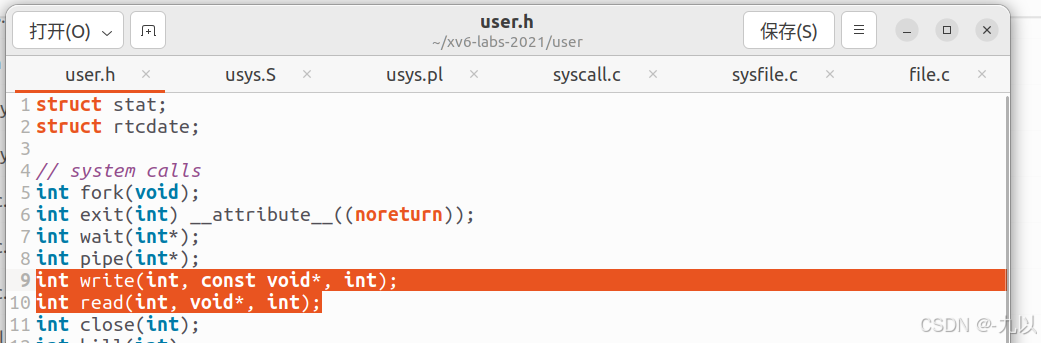
以下以read和write为例,溯源调用。
系统调用在user.h中声明:
在usys.S中可以看到用户空间调用系统调用的汇编代码。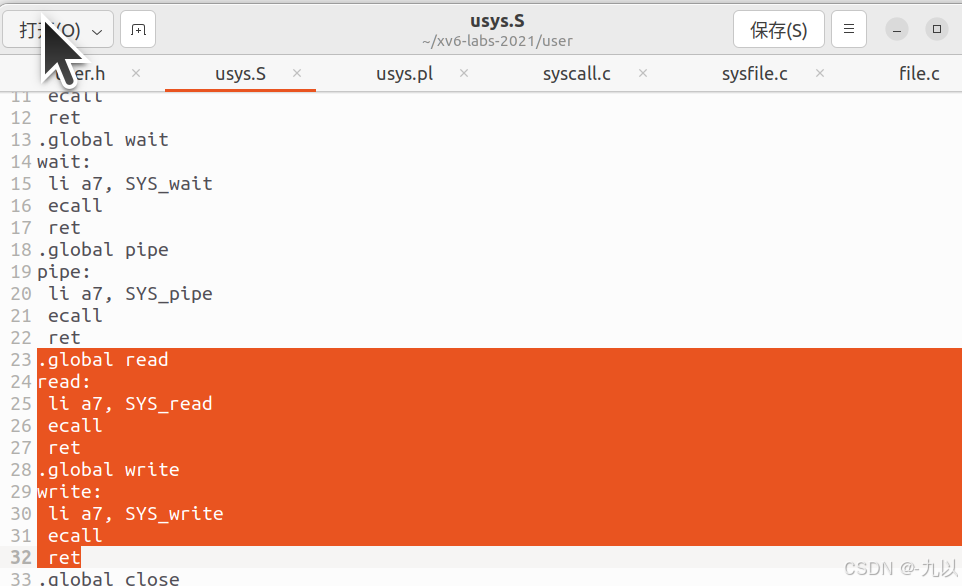
SYS_read、SYS_write为read、write系统调用的编号。
ecall触发环境调用,即从用户模式切换到系统模式,升级权限。
转入内核(kernel文件夹),
先由syscall执行调用的命令,在sysfile.c中可以看到文件系统的相关系统调用函数定义
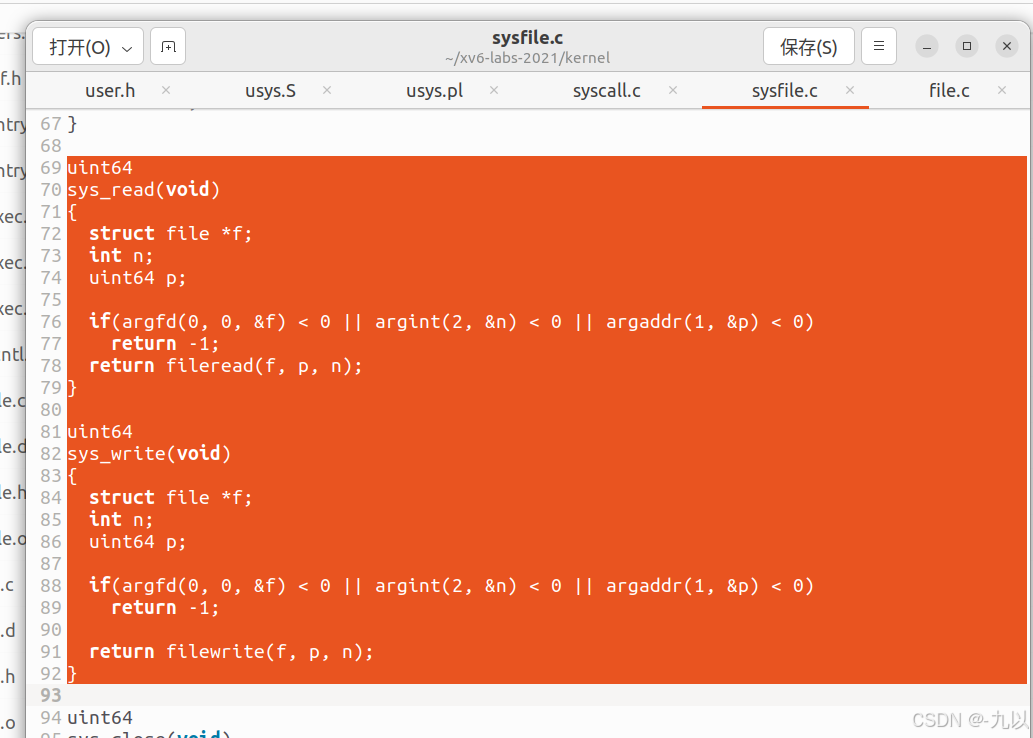
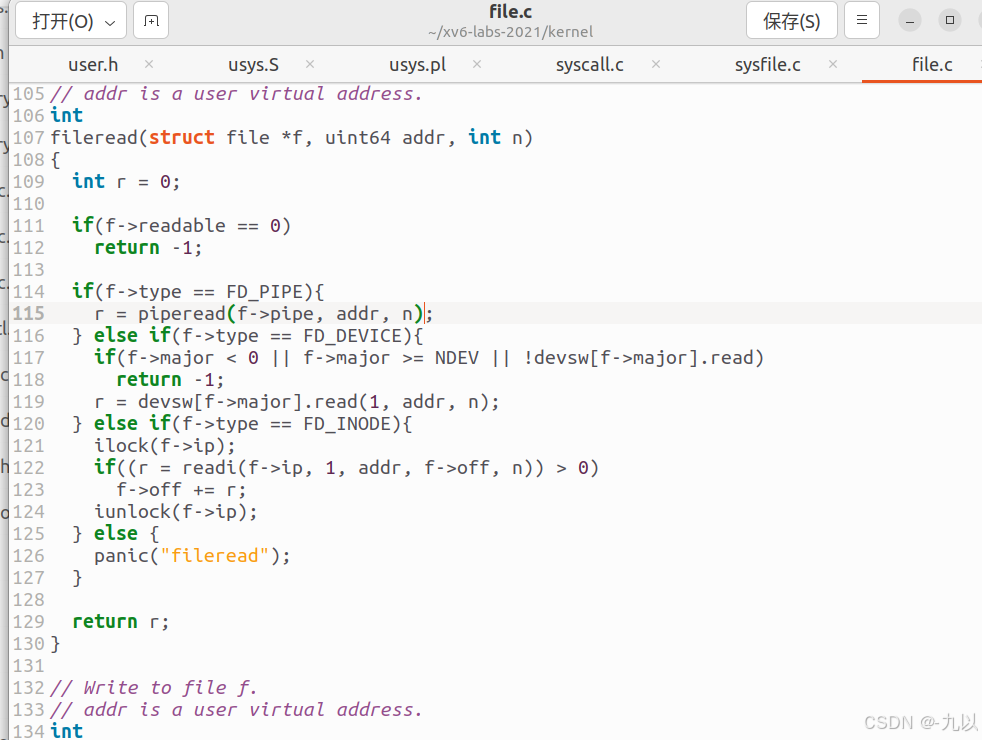
获取从用户空间传的参数,fileread函数来完成实际的读取操作,fileread函数可以在file.c文件中查看具体代码:
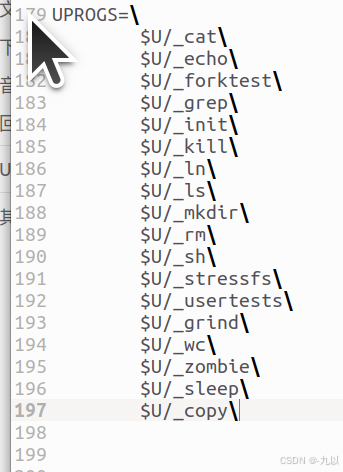
2.在Makefile文件中找到UPROGS,按格式键入新编写的文件名,注意不要有多余符号空格等。
$U/_copy\
makefile文件:
Makefile 文件描述了 Linux 系统下 C/C++ 工程的编译规则,它用来自动化编译 C/C++ 项目。一旦写编写好 Makefile 文件,只需要一个 make 命令,整个工程就开始自动编译,不再需要手动执行 GCC 命令。一个中大型 C/C++ 工程的源文件有成百上千个,它们按照功能、模块、类型分别放在不同的目录中,Makefile 文件定义了一系列规则,指明了源文件的编译顺序、依赖关系、是否需要重新编译等。
浅显易懂 Makefile 入门 (01)— 什么是Makefile、为什么要用Makefile、Makefile规则、Makefile流程如何实现增量编译_makefile是干什么的-优快云博客
UPROGS 通常用于定义用户程序(User Programs)的相关信息。
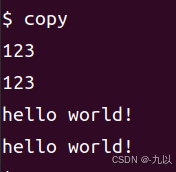
完成后重新编译make qemu,即可使用copy。
· open
// open.c : create a file, write to it
#include "kernel/types.h"
#include "user/user.h"
#include "kernel/fcntl.h" // 包含文件操作的常量
int main() {
int fd = open("output.txt", O_WRONLY | O_CREATE);
write(fd, "hello world\n", 12);
close(fd); // 写完后应该关闭文件
exit(0);
}方法同上,user中创建open.c文件,在Makefile文件中插入
此处注意,open创建的文件是在xv6系统中的,当前调用open后ls、cat可以查看,而你的主文件夹是没有的。退出虚拟机后再次看也是看不到的。
管道
· 定义
-
本质上是内核的一块缓存,通常用作把一个进程的输出连接到另一个进程的输入。
-
管道是单向的,要么读要么写,不可以又读又写——创建两个管道。
-
当进程退出时,管道随之释放,保持同步。
#include <kernel/types.h>
#include <user/user.h>
int main()
{
// p1:p->c
// p2:p<-c
int p1[2], p2[2];
pipe(p1);
pipe(p2);
char buf[] = {"."};
if (fork() == 0){ // c
close(p1[1]);
close(p2[0]);
if(read(p1[0], buf, 1) < 0) {
fprintf(2, "childread is error\n");
}
printf("%d: received ping\n", getpid());
if(write(p2[1], buf, 1) < 0) {
fprintf(2, "childwrite is error\n");
}
exit(0);
} else { // p
close(p1[0]);
close(p2[1]);
if(write(p1[1], buf, 1) < 0){
fprintf(2, "parentwrite is error\n");
}
wait((int *)0);
if(read(p2[0], buf, 1) < 0){
fprintf(2, "parentread is error\n");
}
printf("%d: received pong\n", getpid());
}
exit(0);
}· read函数的阻塞特性
在使用管道进行进程间通信时,read 函数具有阻塞特性。当调用 read 函数从管道的读端读取数据时,如果管道中没有数据,read 函数会将当前进程阻塞,使其暂停执行,直到满足以下两个条件之一:
-
有数据被写入到管道中。
-
管道的写端被关闭:如果管道的所有写端都被关闭,意味着不会再有数据写入,此时
read函数会返回 0,表示已经读取到文件末尾(EOF)。
所以在上述代码中,假设子进程先运行,read时p1内还未有数据,会先阻塞,等到父进程写入后再读取。同时,父进程也会wait子进程结束,保证p2内有数据再进行读取。
primes:筛法求素数
· 基本思想
把从2到N的一组数据从小到大按顺序排列,依次删除2的倍数、3的倍数……直到根号N的倍数为止,剩余的数字即为2-N之间的素数。
#include "kernel/types.h"
#include "kernel/stat.h"
#include "user/user.h"

#define READ 0
#define WRITE 1

void function(int num[], int size){
    if(size == 0) return;
    int p[2];
    pipe(p);
    if(fork() > 0){ // p
        close(p[READ]);
        for(int i = 0; i<size; i++){
            write(p[WRITE], &num[i], sizeof(num[i]));
        }
        close(p[WRITE]);
        wait(0);
    }else{ // c
        close(p[WRITE]);
        int numc[size];
        int index = 0;
        int tmp, min;
        while(read(p[READ], &tmp, sizeof(tmp))){
            if(index == 0){ // min
                min = tmp;
                printf("prime %d\n", min);
                index++; // 1
            }
            if(tmp % min != 0){ // save new from index = 0
                numc[index-1] = tmp;
                index++;
            }
        }
        close(p[READ]);
        function(numc, index-1);
        exit(0);
    }
}

int main(int argc, char *argv[])
{
    int num[34];
    int index = 0;
    for(int i = 2; i<=35; i++){
        num[index++] = i;
    }
    function(num, 34);
    return 0;
}
挺好理解的。
利用实验文档中的提示:
首先定义mapping函数,实现文件描述符的重定位。在主函数中创建一个管道,在子函数中,将管道的写端映射到标准输入1,关闭管道读端,创建2-35的顺序数组写入到管道,关闭标准输入;在父进程关闭管道的写端,将管道的读端映射到标准输出0,调用primes函数。primes函数内创建一个管道,首先从标准输出读取第一个数first,并由此判断后续的循环终止条件。在子进程中,将管道的读端映射到标准输出0,关闭写端,循环调用primes函数;在父进程关闭管道的读端,循环读取标准输出,并筛去对first取模为0的值,将剩余部分写入管道,传递给下层管道。
这样primes函数递归创建子进程,每个子进程筛选一个素数除去其倍数,直到管道为空。
#include "kernel/types.h"
#include "kernel/stat.h"
#include "user/user.h"

void mapping(int oldfd, int newfd) {
    close(newfd);
    dup(oldfd);
    close(oldfd);
}

void primes() {
    int p[2];
    int num, first;
    if (read(0, &first, sizeof(int)) == 0) {
        return;
    }
    printf("prime %d\n", first);
    pipe(p);
    if (fork() == 0) {
        mapping(p[0], 0);
        close(p[1]);
        primes();
        exit(0);
    } else {
        close(p[0]);
        while (read(0, &num, sizeof(int)) > 0) {
            if (num % first != 0) {
                write(p[1], &num, sizeof(int));
            }
        }
        close(p[1]);
        wait(0);
    }
}

int main() {
    int p[2];
    pipe(p);
    if (fork() == 0) {
        mapping(p[1], 1);
        close(p[0]);
        for (int i = 2; i <= 35; i++) {
            write(1, &i, sizeof(int));
        }
        close(1);
        exit(0);
    } else {
        close(p[1]);
        mapping(p[0], 0);
        primes();
        wait(0);
    }
    exit(0);
}
find
· ls
显示当前文件/当前目录下所有文件/指定目录下所有文件
#include "kernel/types.h"
#include "kernel/stat.h"
#include "user/user.h"
#include "kernel/fs.h"
char*
fmtname(char *path)
{
static char buf[DIRSIZ+1];
char *p;
// 从右向左找到第一个'/'后
for(p=path+strlen(path); p >= path && *p != '/'; p--)
;
p++;
// Return blank-padded name.
if(strlen(p) >= DIRSIZ)
//p为文件名
return p;
//将提取出的文件名复制到buf后
memmove(buf, p, strlen(p));
//从buf+strlen(p)开始填充DIRSIZ-strlen(p)个空格
memset(buf+strlen(p), ' ', DIRSIZ-strlen(p));
//buf为文件名+可能有的空格
return buf;
}
void
ls(char *path)
{
char buf[512], *p;
int fd;
struct dirent de;
struct stat st;
if((fd = open(path, 0)) < 0){ //读取path信息
fprintf(2, "ls: cannot open %s\n", path);
return;
}
if(fstat(fd, &st) < 0){ //将信息存储到st结构体中
fprintf(2, "ls: cannot stat %s\n", path);
close(fd); // 关闭文件描述符
return;
}
switch(st.type){ //判断类型
case T_FILE: // 如果是文件,则直接输出st信息
printf("%s %d %d %l\n", fmtname(path), st.type, st.ino, st.size);
break;
case T_DIR: //如果是目录
//当前path的长度+'/'+最大文件名长度+'\0'(字符串结束符)
if(strlen(path) + 1 + DIRSIZ + 1 > sizeof buf){
printf("ls: path too long\n");
break;
}
strcpy(buf, path); // 复制路径到buf数组
p = buf+strlen(buf); //移动指针指向路径末尾
*p++ = '/'; //路径末尾添加'/'
//循环读取目录(fd指向path),每次以目录项的大小读
//目录是一个包含一系列目录项结构体的文件
while(read(fd, &de, sizeof(de)) == sizeof(de)){
//表示一块已初始化且可创建文件或目录的位置,ls操作忽略这块
if(de.inum == 0)
continue;
//拼接每次读取的de.name到buf的结尾
memmove(p, de.name, DIRSIZ);
p[DIRSIZ] = 0;// 设置文件名结束符
// 读取buf信息到st结构体,此时buf为完整的一个path下文件信息
if(stat(buf, &st) < 0){
printf("ls: cannot stat %s\n", buf);
continue;
}
//输出相关信息
printf("%s %d %d %d\n", fmtname(buf), st.type, st.ino, st.size);
}
break;
}
close(fd);
}
int
main(int argc, char *argv[])
{
int i;
if(argc < 2){ //如果只有一个参数(即ls),则默认为当前文件夹即'.'
ls(".");
exit(0);
}
for(i=1; i<argc; i++) //按照参数个数将ls后的每个输入都过一遍函数
ls(argv[i]);
exit(0);
}· dirent结构体
kernel/fs.h
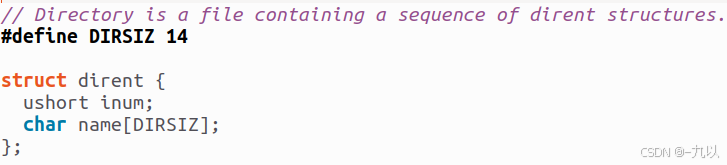
dirent是在xv6中是一个简化的目录项结构体,存储:
-
inum索引节点号
-
文件名(最长14)
· stat结构体:
kernel/stat.h
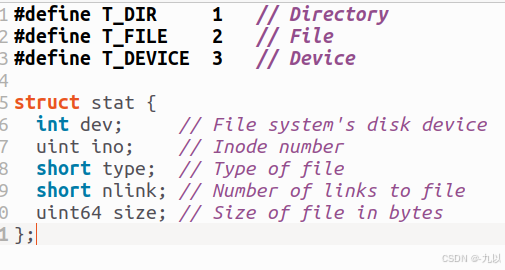
stat是一个文件信息的存储结构,存储:
-
文件系统的磁盘设备
-
Inode编号(底层存储文件的索引编号,系统据此找到存储位置)
-
文件类型(1目录,2文件,3设备)
-
指向文件的链接数(指向同一个文件的不同的命名为不同的链接)
只有当文件链接数为0且没有文件描述符引用时,文件的inode和包含其内容的磁盘空间才会被释放。
-
文件的字节数
【Linux系统编程】Linux 文件系统探究:深入理解 struct dirent、DIR 和 struct stat结构-优快云博客
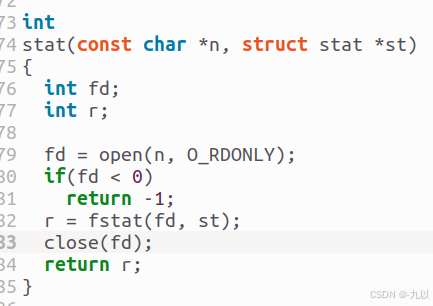
· stat函数:
user/ulib.c
获得已存在文件的模式,并复制给st。
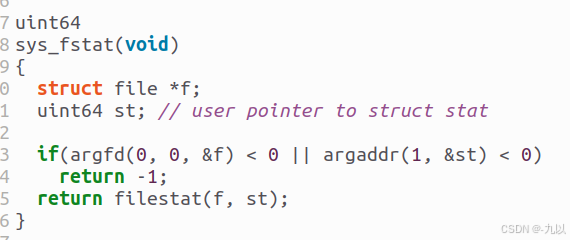
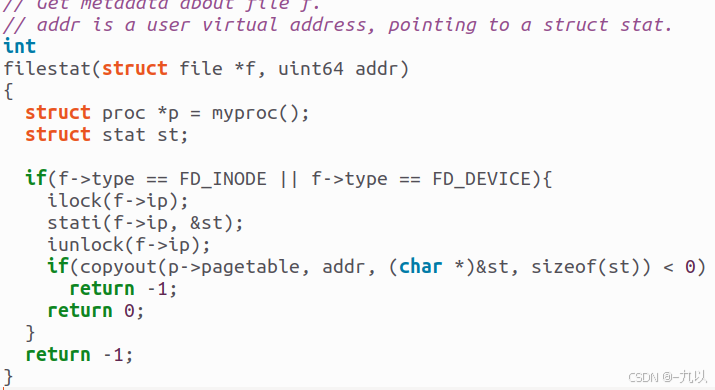
· fstat函数:
kernel/file.c 、kernel/sysfile.c
获得已存在文件的模式。以文件描述符作为参数。
操作系统实验Lab 1:Xv6 and Unix utilities(MIT 6.S081 FALL 2020)_git checkout util-优快云博客
· 基于ls编写find
#include "kernel/types.h"
#include "kernel/stat.h"
#include "user/user.h"
#include "kernel/fs.h"
void find(char *path, char *target) {
char buf[512], *p;
int fd;
struct dirent de;
struct stat st;
if((fd = open(path, 0)) < 0){
fprintf(2, "find: cannot open %s\n", path);
return;
}
if(fstat(fd, &st) < 0){
fprintf(2, "find: cannot stat %s\n", path);
close(fd);
return;
}
if(st.type != T_DIR){
// 类型不是目录错误
fprintf(2, "find: %s is not a directory\n", path);
close(fd);
return;
}
if(strlen(path) + 1 + DIRSIZ + 1 > sizeof buf)
{
fprintf(2, "find: path too long\n");
close(fd);
return;
}
strcpy(buf, path);
p = buf+strlen(buf);
*p++ = '/';
while(read(fd, &de, sizeof(de)) == sizeof(de)){
if(de.inum == 0)
continue;
// 不递归 '.' 和 '..'
if (!strcmp(de.name, ".") || !strcmp(de.name, ".."))
continue;
memmove(p, de.name, DIRSIZ);
p[DIRSIZ] = 0;
if(stat(buf, &st) < 0){
printf("find: cannot stat %s\n", buf);
continue;
}
if(st.type == T_DIR) {
find(buf, target); // 递归查找
}
else if (st.type == T_FILE && !strcmp(de.name, target)){
printf("%s\n", buf);
}
}
close(fd);
}
int main(int argc, char *argv[])
{
if(argc != 3){
fprintf(2, "usage: find dirName fileName\n");
exit(1);
}
find(argv[1], argv[2]);
exit(0);
}xargs
· 作用
用于将标准输入转换为命令行参数,并将其传递给其他的命令。常与管道一起使用,来处理那些不支持管道传递参数的命令。
· 代码
# include<kernel/types.h>
# include<user/user.h>
# include<kernel/param.h>
//从标准输入读取一行字符并存到buf中
char *my_gets(char *buf, int max){
int i, n;
char ch;
for(i = 0; i < max - 1;){
//0表示标准输入
n = read(0, &ch, 1);
if(n < 1) break;
if(ch == '\n' || ch == '\r') break;
buf[i ++] = ch;
}
buf[i] = '\0';//补充字符的结束符
return buf;
}
// 清空buf缓冲区残留数据
int my_getcmd(char *buf, int nbuf){
memset(buf, 0, nbuf); // 将buf清零
my_gets(buf, nbuf);//从标准输入读取数据
if(buf[0] == 0) {//buf为空
return -1;
}
return 0;
}
int main(int argc, char *argv[]){
if(argc < 2){
fprintf(2, "usage: xargs command\n");
exit(1);
}
char *_argv[MAXARG];
int _argc = argc - 1; //参数的数量(除去命令)
//将参数复制到_argv数组中
memcpy(_argv, argv + 1, _argc * sizeof(char *));
char buf[512];
//循环读取用户输入
while(my_getcmd(buf, sizeof(buf)) != -1){
if(fork() == 0){ // c
_argv[_argc] = buf;
_argc ++;
exec(_argv[0], _argv);//执行命令
fprintf(2, "exec %s failed!\n", _argv[0]);
exit(0);
} else { // p
wait(0);
}
}
exit(0);
}





 扫一扫
扫一扫


 3214
3214

 被折叠的 条评论
为什么被折叠?
被折叠的 条评论
为什么被折叠?
 到【灌水乐园】发言





