



JavaScript:一种运行在浏览器的编程语言
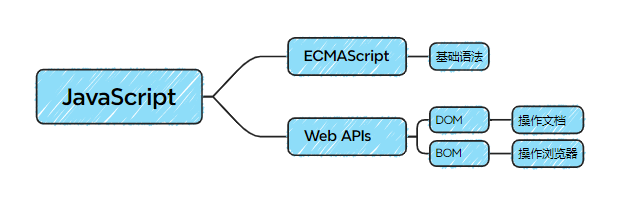
组成:
---------------------------------------------------------------------------------------------------------------------------------
此前学过几种编程语言,故相通的不再记录
---------------------------------------------------------------------------------------------------------------------------------
1、输入输出语法
1)输出语法
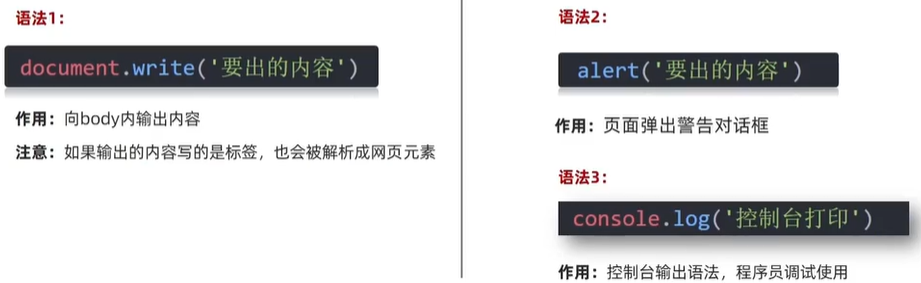
  <script>
    // 文档输出内容
    document.write('Hello World !')
    document.write('<h1>Hello World !</h1>')
    // 控制台打印输出给程序员
    console.log('0')
  </script>
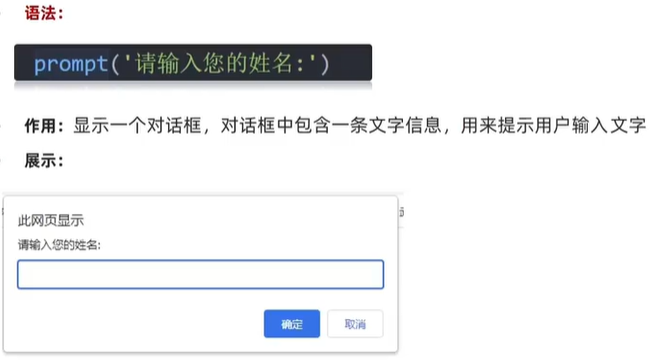
2)输入语法
3)JavaScript代码执行顺序

2、基础知识
1)模板字符串
  <script>
    let age = 18
    document.write(`我今年` + age + `岁了`)
    // 模板字符串,必须使用反引号`` 用 ${} 使用变量
    document.write(`我今年${age}岁了`)
  </script>
2)typeof关键字检测数据类型
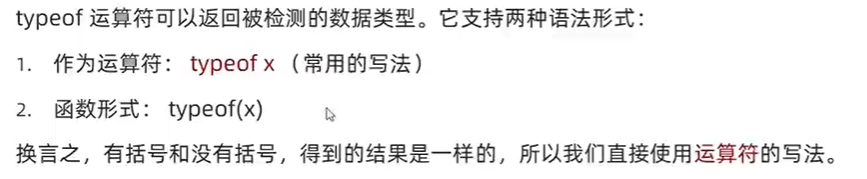
  <script>
    let age = 18
    console.log(typeof num)
  </script>
3)强制类型转换
(1)隐式转换
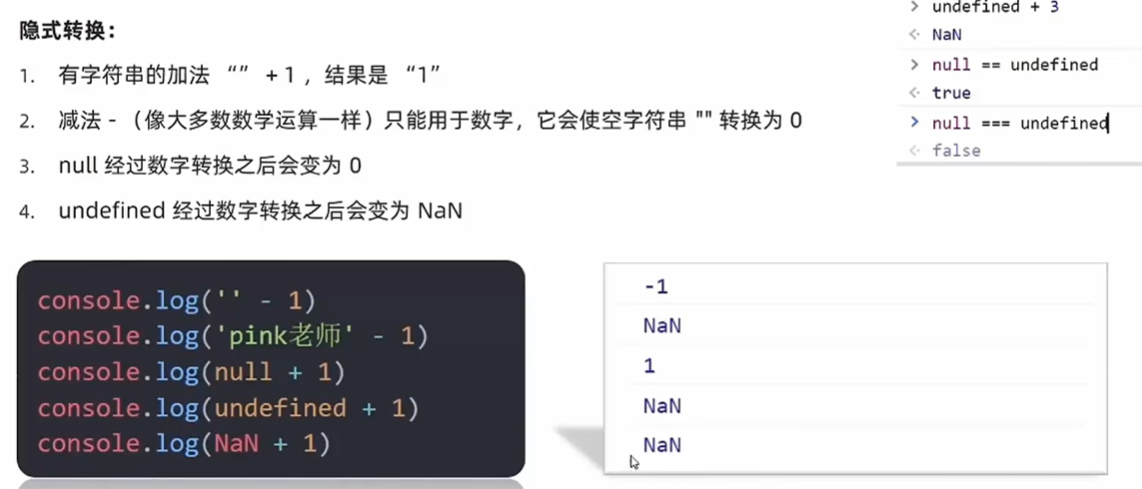

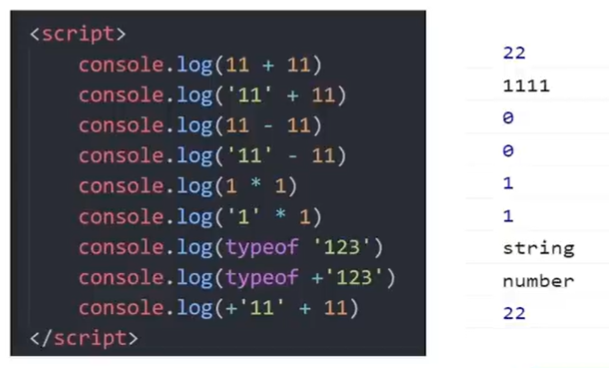
(2)显式转换


  <script>
    let str = '123'
    // 转数字
    console.log(Number(str))
    let num = Number(str)
    // 只保留整数 数字在中间不能取 aaa12.22
    console.log(prrseInt('12px'))
    console.log(prrseInt('12.22px'))
    // 可以保留小数
    console.log(prrseFloat('12.33px'))
    console.log(prrseFloat('12.22px'))
  </script>
案例:
  <script>
    let num1 = +prompt('请输入第一个数字:')    //转换为数字型
    let num2 = +prompt('请输入第二个数字:')
    alert(`两个数相加的和是:${num1 + num2}`)
  </script>
(3)综合案例
  <style>
    h2 {
      text-align: center;
    }

    table {
      border-collapse: collapse;
      height: 80px;
    }

    table,
    th,
    td {
      margin: 0 auto;
      border: 1px solid #000;
      text-align: center;
    }

    th {
      padding: 5px 20px;
    }
  </style>
<h2>订单确认</h2>
  <script>
    let price = +prompt('请输入商品价格:')
    let num = +prompt('请输入商品数量:')
    let address = prompt('请输入收货地址:')
    let total = price * num
    document.write(`
        <table>
        <tr>
          <th>商品名称</th>
          <th>商品价格</th>
          <th>商品数量</th>
          <th>总价</th>
          <th>收货地址</th>
        </tr>
        <tr>
          <td>荣耀X50i</td>
          <td>${price}元</td>
          <td>${num}</td>
          <td>${total}元</td>
          <td>${address}</td>
        </tr>
      </table>
    `)
  </script>
3、运算符
1)比较运算符
比较运算符有隐式转换,转换为Number型进行比较
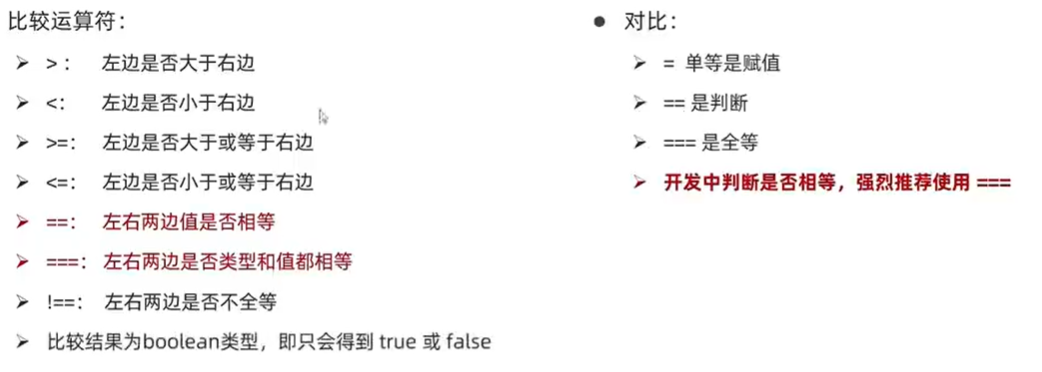
undefined和null使用==,是true,使用===,是false
NaN不等于任何人,包括它自己,undefined除了拼接字符串,加任何东西都是NaN
尽量不要比较小数,因为小数有精度问题
2)逻辑运算符
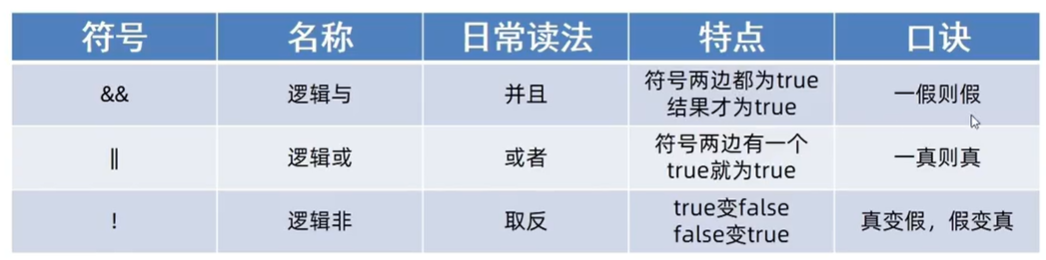
3)优先级
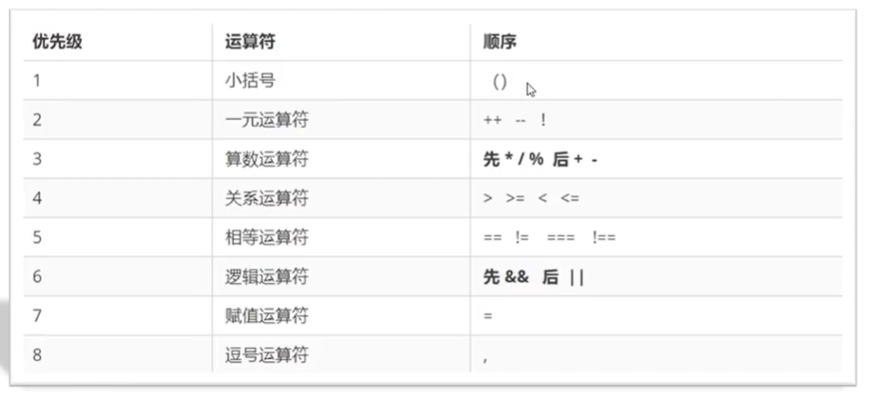
4、数组
1)操作数组-新增
数组.push()方法将一个或多个元素添加到数组的末尾,并返回该数组的新长度
arr.push(元素1, ..., 元素n)
arr.unshift()方法将一个或多个元素添加到数组的开头,并返回该数组的新长度
arr.unshift(元素1, ..., 元素n)
2)操作数组-删除
arr.pop()方法从数组中删除最后一个元素,并返回该元素的值
arr.pop()
arr.shift()方法从数组中删除第一个元素,并返回该元素的值
arr.shift()
arr.splice()方法删除指定元素,第二个参数若不写,默认从起始位置删完
arr.splice(起始位置,删除几个元素)
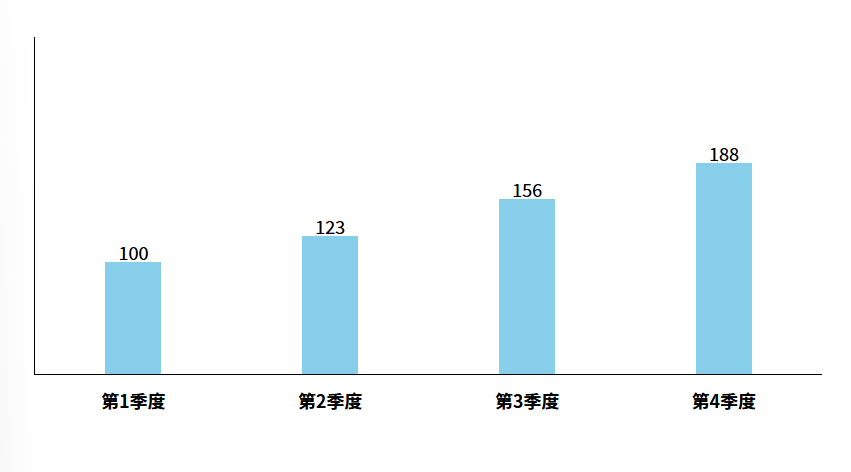
5、综合案例:渲染柱形图案
效果:
  <style>
    * {
      margin: 0;
      padding: 0;
    }

    .box {
      display: flex;
      width: 700px;
      height: 300px;
      border-left: 1px solid black;
      border-bottom: 1px solid black;
      margin: 100px auto;
      justify-content: space-around;
      align-items: flex-end;
      text-align: center;
    }

    .box>div {
      display: flex;
      width: 50px;
      background-color: skyblue;
      flex-direction: column;
      justify-content: space-between;
    }

    .box div span {
      margin-top: -20px;
    }

    .box div h4 {
      margin-bottom: -35px;
      width: 70px;
      margin-left: -10px;
    }
  </style>
<script>
    let arr = []
    for (let i = 1; i <= 4; i++) {
      arr.push(+prompt(`请输入第${i}季度的数据:`))
    }
    document.write(`<div class="box">`)
    for (let i = 0; i < 4; i++) {
      document.write(`
        <div style="height: ${arr[i]}px;">
          <span>${arr[i]}</span>
          <h4>第${i + 1}季度</h4>
        </div>
    `)
    }
    document.write(`</div>`)
  </script>
6、函数
1)函数声明
function 函数名() {
    函数体
}
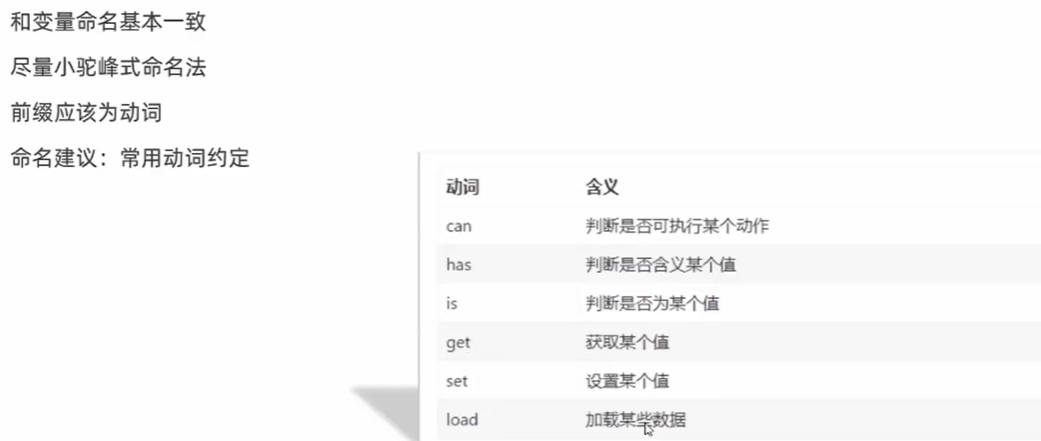
2)函数名命名规范
3)函数的参数
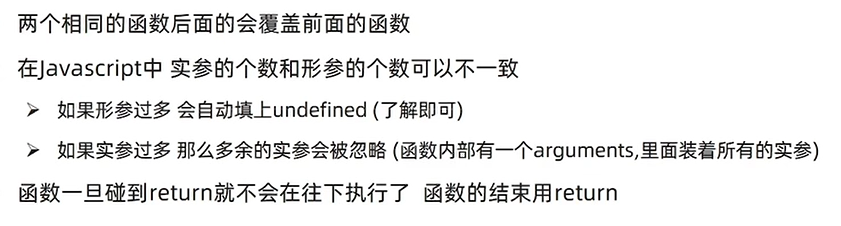
我们声明函数时,可以给形参默认值,如果调用函数时形参数量=实参数量,则优先使用形参;反之,没有实参传入的形参使用默认值。
4)函数返回值
返回多个数据
return [max,min] //返回的是一个数组
5)补充
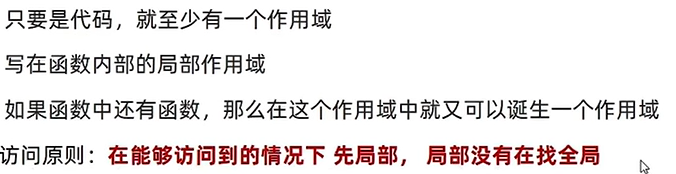
6)变量访问原则
7)匿名函数
  <script>
    let fn = function (x, y) {
      console.log(x + y)
    }
    fn(1, 2)
  </script>
具名函数的调用可以写到任何位置,但是函数表达式必须先声明表达式,后调用。
8)立即执行函数(自执行函数)
多个立即执行函数之间必须写分号,可以写在前面,,也可以写在后面。函数不需要额外调用。
//第一种写法
  <script>
    (function (){

    })();
  </script>
///////////////////////////
  <script>
    ;(function (){

    })()
  </script>
///////////////////////////
  <script>
    ;(function (x, y){    //形参

    })(1, 2)        //实参
  </script>

//第二种写法
///////////////////////////
  <script>
    ;(function (x, y){

    }(1, 2))
  </script>
7、逻辑中断
  <script>
    console.log(11 && 22);  //都为真,则返回最后一个真值

    let age = 0;
    console.log(false && age++);
    console.log(age);       //age=0,逻辑中断,一假则假,后边的不再执行

    console.log(true && age++);
    console.log(age);       //同上,逻辑中断

    console.log(11 || 22);//都为真,则返回第一个真值

  </script>
8、对象(object)
---无序的数据集合,用来描述某个事物
1)对象使用
声明对象语法:
  <script>
    // 第一种
    let 对象名 = {}
    // 第二种
    let 对象名 = new Object()
  </script>
对象有属性和方法组成(属性名可以加引号)
    let 对象名 = {
      属性名: 属性值,
      方法名: 函数
    }
对象的操作---查
console.log(obj.address)    //对象名.属性名

------------------------------------------
//第二种方法
    let obj = {
      user_name: '张三'
    }
    console.log(obj['user_name']);
对象的操作---改:直接赋值
obj.uname = '张三'
对象的操作---增
obj.新属性 = 新属性值
2)对象的方法
多个方法之间用逗号隔开
  <script>
    let obj = {
      user_name: '张三',
      song: function () {
        console.log('xxx')
      }
    }
    obj.song()
  </script>
3)遍历对象
对象里面是无序的键值对,没有规律,不像数组里面有规律的下标。
4)数组对象
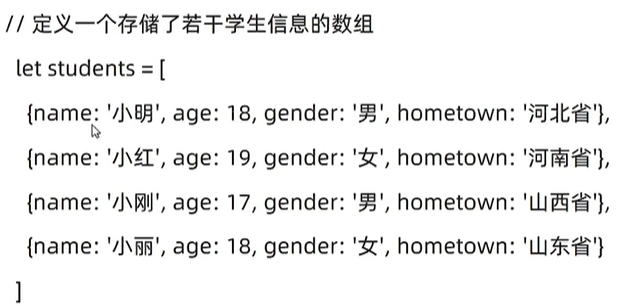
遍历数组对象:
for (let i = 0; i < students.length; i++) {
      console.log(i)    //下标索引号
      console.log(students[i]); //每个对象
      console.log(students[i].name);  //每个对象的name
    }
5)案例:渲染学生信息
<!DOCTYPE html>
<html lang="en">

<head>
  <meta charset="UTF-8">
  <meta name="viewport" content="width=device-width, initial-scale=1.0">
  <title>Document</title>
  <style>
    table {
      width: 600px;
      text-align: center;
    }

    table,
    th,
    td {
      border: 1px solid #ccc;
      border-collapse: collapse;
    }

    caption {
      font-size: 18px;
      margin-bottom: 10px;
      font-weight: 700;
    }

    tr {
      height: 40px;
      cursor: pointer;
    }

    table tr:nth-child(1) {
      background-color: #ddd;
    }

    table tr:not(:first-child):hover {
      background-color: #eee;
    }
  </style>
</head>

<body>
  <h2>学生信息</h2>
  <p>将数据渲染到页面中...</p>

  <table>
    <caption>学生列表</caption>
    <tr>
      <th>序号</th>
      <th>姓名</th>
      <th>年龄</th>
      <th>性别</th>
      <th>家乡</th>
    </tr>
    <script>
      // 1. 数据准备
      let students = [
        { name: '小明', age: 18, gender: '男', hometown: '河北省' },
        { name: '小红', age: 19, gender: '女', hometown: '河南省' },
        { name: '小刚', age: 17, gender: '男', hometown: '山西省' },
        { name: '小丽', age: 18, gender: '女', hometown: '山东省' },
        { name: '晓强', age: 16, gender: '女', hometown: '蓝翔技校' }
      ]
      // 2. 渲染页面
      for (let i = 0; i < students.length; i++) {
        document.write(`
                <tr>
                    <td>${i + 1}</td>
                    <td>${students[i].name}</td>
                    <td>${students[i].age}</td>
                    <td>${students[i].gender}</td>
                    <td>${students[i].hometown}</td>
                </tr>
                `)
      }
    </script>
  </table>

</body>


</html>
6)内置对象
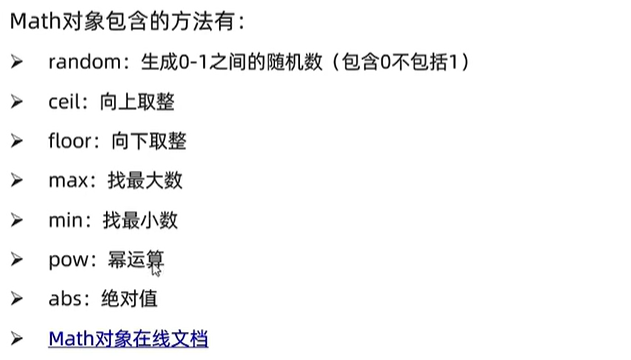
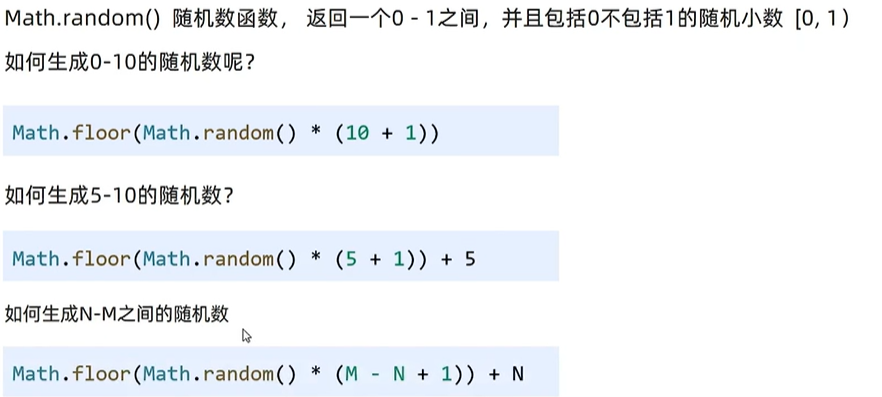
7)random 随机数
Math.random():左闭右开
生成0 - 10的随机数
Math.floor(Math.random() * (10 + 1))
(1)案例:随机点名
  <script>
    let arr = ['弈星', '小乔', '大乔', '貂蝉', '朵利亚', '蔡文姬', '甄姬']
    let random = Math.floor(Math.random() * arr.lenth)
    document.write(arr[random])
    arr.splice(random, 1)
    console.log(arr);

  </script>
(2)案例:猜数字游戏
  <script>
    let random = Math.floor(Math.random() * 101) + 1
    let res = 0;
    while (true) {
      let num = +prompt("请输入一个数字:")
      res++;
      if (num === random) {
        alert(`恭喜你猜了${res}次就猜对了!`)
        break
      } else if (num > random) {
        alert('您猜大了')
      } else {
        alert('您猜小了')
      }
    }

  </script>
(3)案例:生成随机颜色
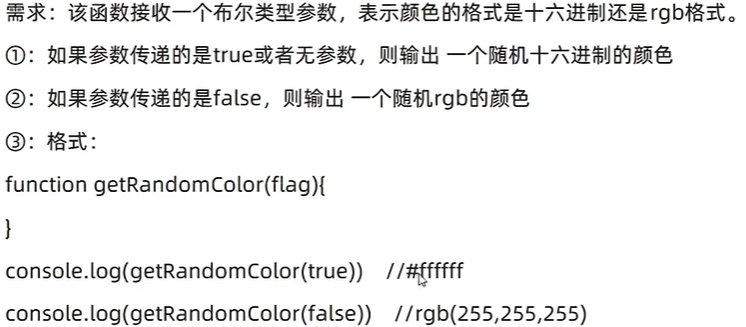
  <script>
    function getRandomColor(flag = true) {
      if (flag) {
        let str = '#'
        let arr = ['0', '1', '2', '3', '4', '5', '6', '7', '8', '9', 'a', 'b', 'c', 'd', 'e', 'f']
        for (let i = 1; i <= 6; i++) {
          let random = Math.floor(Math.random() * arr.length)
          str = str + random
        }
        return str
      } else {
        let r = Math.floor(Math.random() * 256)
        let g = Math.floor(Math.random() * 256)
        let b = Math.floor(Math.random() * 256)
        return `rgb(${r},${g},${b})`
      }
    }
    console.log(getRandomColor(true));
    console.log(getRandomColor(false));
  </script>
9、补充知识
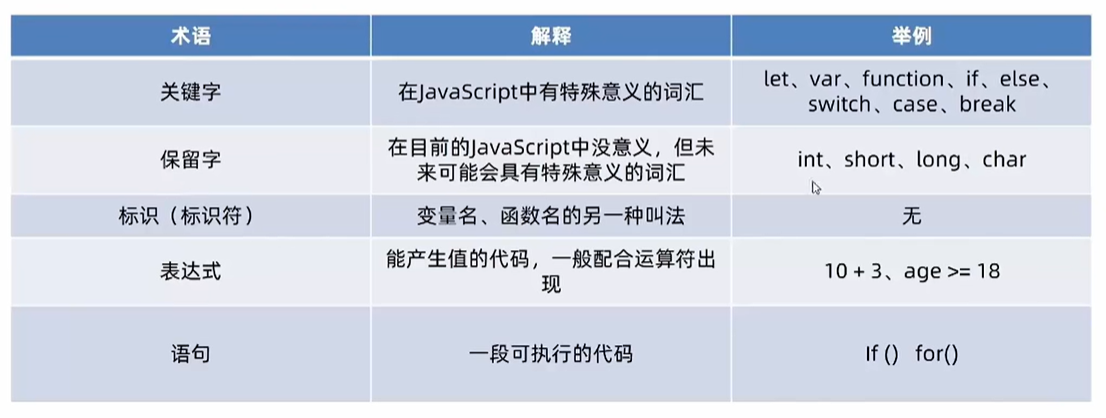
1)基本数据类型和引用数据类型

2)堆栈空间分配区别

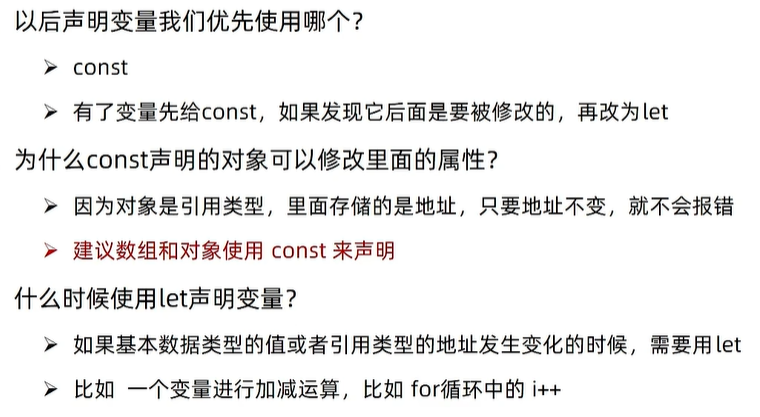
10、let命令
let命令仅在块级作用域内有效、不存在变量提升、不允许在相同作用域内,重复声明同一个变量、不会污染全局变量。
在let声明变量前,对变量赋值会报错。
var tmp = 123;

if (true) {
  tmp = 'abc'; // ReferenceError
  let tmp;
}
ES6 明确规定,如果区块中存在let和const命令,这个区块对这些命令声明的变量,从一开始就形成了封闭作用域。凡是在声明之前就使用这些变量,就会报错。在代码块内,使用let命令声明变量之前,该变量都是不可用的。
if (true) {
  // 暂时性死区(TDZ)开始
  tmp = 'abc'; // ReferenceError
  console.log(tmp); // ReferenceError

  let tmp; // TDZ结束
  console.log(tmp); // undefined

  tmp = 123;
  console.log(tmp); // 123
}
11、块级作用域
内层作用域可以定义外层作用域的同名变量。
{{{{
  let insane = 'Hello World';
  {let insane = 'Hello World'}
}}}};
ES6 引入了块级作用域,明确允许在块级作用域之中声明函数。ES6 规定,块级作用域之中,函数声明语句的行为类似于let,在块级作用域之外不可引用。
ES6 的块级作用域必须有大括号,如果没有大括号,JavaScript 引擎就认为不存在块级作用域。
// 第一种写法,报错
if (true) let x = 1;

// 第二种写法,不报错
if (true) {
  let x = 1;
}
12、const命令
const声明一个只读的常量。一旦声明,常量的值就不能改变。对于const来说,只声明不赋值,就会报错
const的作用域与let命令相同:只在声明所在的块级作用域内有效。const命令声明的常量也是不提升,同样存在暂时性死区,只能在声明的位置后面使用。const声明的常量,也与let一样不可重复声明。
    const obj = {
      name: '张三'
    }
    obj.name = '李四'
    //下面的代码会报错
    // obj = {
    //   name: '李四'
    // }
注意:
const实际上保证的,并不是变量的值不得改动,而是变量指向的那个内存地址所保存的数据不得改动。对于简单类型的数据(数值、字符串、布尔值),值就保存在变量指向的那个内存地址,因此等同于常量。但对于复合类型的数据(主要是对象和数组),变量指向的内存地址,保存的只是一个指向实际数据的指针,const只能保证这个指针是固定的(即总是指向另一个固定的地址),至于它指向的数据结构是不是可变的,就完全不能控制了。





 扫一扫
扫一扫


 被折叠的 条评论
为什么被折叠?
被折叠的 条评论
为什么被折叠?
 到【灌水乐园】发言





