


 本文介绍了Spring Cloud Function中的拒绝服务漏洞(CVE-2022-22979),该漏洞可能导致框架用户遭遇DoS攻击,影响3.2.5及旧版本。建议用户升级到3.2.6以修复。同时,微软6月发布了55个安全漏洞补丁,涉及Office、Windows等多个组件,包括影响广泛的产品,如.NET、Azure、Windows等,部分已被野战利用。用户应尽快安装官方发布的安全补丁进行防护。
Spring Cloud Function拒绝服务漏洞
1.基础信息
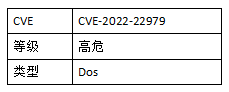
2.漏洞详情
Spring Cloud Function 是基于 Spring Boot 的函数计算框架,它抽象出所有传输细节和基础架构,允许开发人员保留所有熟悉的工具和流程,并专注于业务逻辑。
6月15日,VMware发布安全公告,修复了Spring Cloud Function中的一个拒绝服务漏洞(CVE-2022-22979),该漏洞的CVSSv3评分为7.5。
在Spring Cloud Function 3.2.5 和不受支持的旧版本中,由于框架中Function Catalog组件的缓存问题,直接与框架提供的查找功能交互(如通过spring-cloud-function-web模块进行交互)的用户可能导致拒绝服务。
3.影响范围
Spring Cloud Function
3.2.5以及不受支持的旧版本。
4.安全建议
目前此漏洞已经修复,受影响用户可以升级到Spring Cloud Function 3.2.6。
下载链接:https://github.com/spring-cloud/spring-cloud-function/tags
5.参考链接
https://spring.io/blog/2022/06/15/cve-report-published-for-spring-cloud-function
微软6月多个安全漏洞
1.基础信息
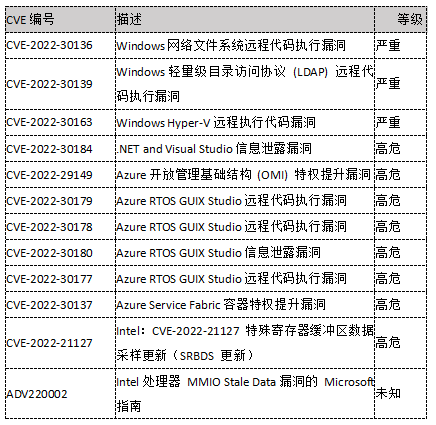
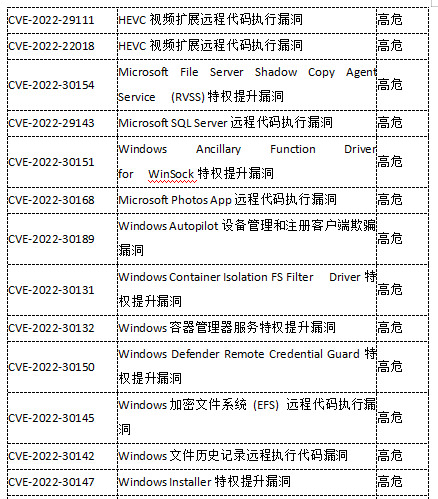
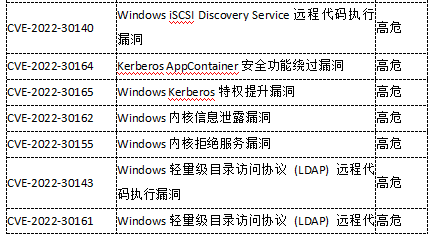
2022年6月14日,微软发布了6月份的安全更新,其中包含了Microsoft Office,Windows LDAP ,Windows Network File System 等多个组件的55个CVE的漏洞补丁,有3个被微软官方标记为"Critical(严重)",51个被标记为为"Important(重要)",其中CVE-2022-30190为微软5月份公布的影响Microsoft Windows 支持诊断工具 (MSDT)组件的代码执行漏洞,且已发现针对该漏洞的在野利用行为。涉及Windows、Microsoft Office、SQL Server、.NET framework、HEVC Video Extensions等广泛使用的产品,其中包括权限提升、远程代码执行等高危漏洞类型。
2.影响范围
.NET and Visual Studio
Azure OMI
Azure Real Time Operating System
Azure Service Fabric Container
Intel
Microsoft Edge (Chromium-based)
Microsoft Office
Microsoft Office Excel
Microsoft Office SharePoint
Microsoft Windows ALPC
Microsoft Windows Codecs Library
Remote Volume Shadow Copy Service (RVSS)
Role: Windows Hyper-V
SQL Server
Windows Ancillary Function Driver for WinSock
Windows App Store
Windows Autopilot
Windows Container Isolation FS Filter Driver
Windows Container Manager Service
Windows Defender
Windows Encrypting File System (EFS)
Windows File History Service
Windows Installer
Windows iSCSI
Windows Kerberos
Windows Kernel
Windows LDAP - Lightweight Directory Access Protocol
Windows Local Security Authority Subsystem Service
Windows Media
Windows Network Address Translation (NAT)
Windows Network File System
Windows PowerShell
Windows SMB
3.安全建议
目前微软官方已针对受支持的产品版本发布了修复以上漏洞的安全补丁,强烈建议受影响用户尽快安装补丁进行防护,建议受影响用户使用Windows Update进行自动更新,或者通过以下链接索引漏洞相关影响平台和更新补丁进行手动更新:
https://msrc.microsoft.com/update-guide/zh-cn
配置自动更新的方式:
通过Windows 操作系统中的自动更新功能进行更新:
若要自己打开“自动更新”,请按照以下步骤操作:
1.单击“开始”,单击“运行”,键入 wscui.cpl,然后单击“确定”。
2.单击“自动更新”。
3.选择自动更新选项:
自动(推荐) - 此选项可让您选择自动下载和安装更新的日期和时间。这可以是每天,或是特定的日期和时间。
4.参考链接
https://msrc.microsoft.com/update-guide/zh-cn
https://msrc.microsoft.com/update-guide/releaseNote/2022-Jun






 扫一扫
扫一扫


 1381
1381

 被折叠的 条评论
为什么被折叠?
被折叠的 条评论
为什么被折叠?
 到【灌水乐园】发言





