


本教程将创建一个前后端分离的 Web 应用,前端使用 Bootstrap 4.x 和 jQuery,后端使用 Spring Boot 2.x,通过 JWT 实现身份认证和跨域访问。前端未使用VUE等框架,主要是考虑很多中小企业有很多的老项目采用的是Bootstrap+jquery等前端,如果全部替换为VUE类框架,成本高,需要增加额外的开发人员;本教程前端采用的Alpine2.8.x,可以实现类似的Vue操作,又可以不动原来的html架构,快速实现前后端分离,又无需增加额外开发人员的需求。
技术栈概览
- 前端:Bootstrap 4.x、jQuery、Alpine2.8.x
- 后端:Spring Boot 2.x
- 认证方式:JWT (JSON Web Token)
- 跨域处理:CORS (Cross-Origin Resource Sharing)
后端实现 (Spring Boot 2.x)
1. 创建 Spring Boot 项目并添加依赖
在pom.xml中添加以下核心依赖:
<dependencies>
        <dependency>
            <groupId>org.springframework.boot</groupId>
            <artifactId>spring-boot-starter</artifactId>
        </dependency>

        <dependency>
            <groupId>org.springframework.boot</groupId>
            <artifactId>spring-boot-starter-web</artifactId>
        </dependency>

        <dependency>
            <groupId>org.projectlombok</groupId>
            <artifactId>lombok</artifactId>
            <version>1.18.16</version>
        </dependency>

        <dependency>
            <groupId>com.alibaba.fastjson2</groupId>
            <artifactId>fastjson2</artifactId>
            <version>2.0.43</version>
        </dependency>

    </dependencies>
2. JWT 工具类实现
创建 JWT 工具类用于生成和验证令牌:
import javax.crypto.Mac;
import javax.crypto.spec.SecretKeySpec;

import com.alibaba.fastjson2.JSON;
import com.alibaba.fastjson2.JSONObject;
import com.lashen.utils.PropertyUtils;
import com.lashen.utils.Result;

import java.nio.charset.StandardCharsets;
import java.util.Base64;

/**
 * @description: Implementation of the JWT protocol.
 * @author: sam
 * @Date: 2025-09-15 17:36:27
 */
public class JWTUtils {
    //Expiration time: 3600 seconds (1 hour).
    private static long expTime = Long.parseLong(PropertyUtils.getProperty("JWT_EXPIRATION", "3600"));

    /*  Payload ********
    {
        "sub": "1234567890",  // user ID
        "name": "John Doe",   // Custom claims.
        "iat": 1516239022,    // Issued time.
        "exp": 1516242622     // Expiration time (1 hour later).
      }
    **********/

    /**
     * @description: Generate the JSON text for the header.
     * @return {String} json text
     * @author: sam
     * @Date: 2025-03-04 15:36:23
     */
    private static String header(){
        return "{\"alg\":\"HS256\",\"typ\":\"JWT\"}";
    }

    /**
     * @description: Generate the JSON text for the payload.
     * @param {String} jsonText - the JSON text data of the user.
     * @return {String} json text
     * @author: sam
     * @Date: 2025-03-04 15:35:41
     */
    private static String payload(String jsonText){
        //签发时间
        long iat =System.currentTimeMillis()/1000;
        JSONObject jo = JSON.parseObject(jsonText);
        jo.put("iat", iat);
        return jo.toJSONString();
    }

    /**
     * @description: Calculate HMAC SHA256.
     * @param {String} data Data to be signed.
     * @param {String} key  secret
     * @return {String} `null` indicates failure; otherwise: the Base64-encoded string of the signed data.
     * @author: sam
     * @Date: 2025-03-04 15:34:40
     */
    private static String hmacSHA256(String data, String key) {
        try {
            // Create an HMAC-SHA256 key specification.
            SecretKeySpec secretKeySpec = new SecretKeySpec(key.getBytes(StandardCharsets.UTF_8), "HmacSHA256");

            // Get a Mac instance.
            Mac mac = Mac.getInstance("HmacSHA256");

            //Initialize the Mac instance.
            mac.init(secretKeySpec);

            // Calculate HMAC
            byte[] hmacBytes = mac.doFinal(data.getBytes(StandardCharsets.UTF_8));

            // Convert the HMAC value to a Base64-encoded string.
            return Base64.getUrlEncoder().withoutPadding().encodeToString(hmacBytes);
        } catch (Exception e) {
           e.printStackTrace();
        }
        return null;
    }

    /**
     * @description: Perform JWT signing.
     * @param {String} base64Header Base64-encoded header.
     * @param {String} base64Payload Base64-encoded payload.
     * @param {String} secret key
     * @return {String} `null` indicates failure; otherwise: the Base64-encoded string after signing.
     * @author: sam
     * @Date: 2025-03-04 15:34:34
     */
    private static String signature(String base64Header,String base64Payload,String secret){
        //Perform HMAC-SHA256 signing.
        String signData = hmacSHA256(base64Header+"."+base64Payload,secret);
        return signData;
    }

    /**
     * @description: Generate a JWT.
     * @param {jwtUser} jwtUser user
     * @param {String} secret key
     * @return {String} `null` indicates failure; otherwise: the generated JWT text.
     * @author: sam
     * @Date: 2025-03-04 15:54:13
     */
    public static String createJWT(JwtUser jwtUser,String secret){
        return createJWT(JSON.toJSONString(jwtUser),secret);
    }
    /**
     * @description: Generate a JWT.
     * @param {String} json json text
     * @param {String} secret key
     * @return {String} `null` indicates failure; otherwise: the generated JWT text.
     * @author: sam
     * @Date: 2025-03-04 15:54:13
     */
    private static String createJWT(String json,String secret){
        Base64.Encoder encoder = Base64.getUrlEncoder().withoutPadding();

        //Base64-encoded header.
        String base64Header = encoder.encodeToString(header().getBytes());
        //Base64-encoded payload.
        String base64Payload = encoder.encodeToString(payload(json).getBytes());
        //Perform JWT signing.
        String signData = signature(base64Header,base64Payload,secret);
        if(signData == null){
            return null;
        }
        //Concatenate the JWT.
        String jwt = base64Header+"."+base64Payload+"."+signData;
        return jwt;
    }

    /**
     * @description: Validate the protocol header.
     * @param {String} base64Header
     * @return {boolean} `true` indicates success, `false` indicates failure.
     * @author: sam
     * @Date: 2025-09-16 10:09:47
     */
    private static boolean checkHeader(String base64Header){
        byte[] headerBytes = Base64.getUrlDecoder().decode(base64Header);
        String header = new String(headerBytes);
        JSONObject joHeader = JSON.parseObject(header);
        if("HS256".equals(joHeader.getString("alg")) == false){
            return false;
        }
        if("JWT".equals(joHeader.getString("typ")) == false){
            return false;
        }
        return true;
    }
    /**
     * @description: refresh jwt
     * @param {String} jwt
     * @param {String} secret
     * @return {String} `null` indicates failure; otherwise: the refreshed JWT string.
     * @author: sam
     * @Date: 2025-09-15 15:31:39
     */
    public static String refreshJWT(String jwt,String secret){
        try{
            if(jwt == null || jwt.length() < 1){
                return null;
            }
            String[] arr = jwt.split("\\.");
            if(arr.length != 3){
                return null;
            }

            //Base64-decode the header.
            String base64Header = arr[0];
            //Validate the protocol header.
            if(checkHeader(base64Header) == false){
                return null;
            }

            //Base64-decode the payload.
            String base64Payload = arr[1];
            byte[] payloadBytes = Base64.getUrlDecoder().decode(base64Payload);
            String payload = new String(payloadBytes);
            //Perform JWT signing.
            String signData = signature(base64Header,base64Payload,secret);
            if(signData == null){
                return null;
            }
            //Verify the signature.
            if(signData.equals(arr[2]) == false){
                return null;
            }

            //JWT timeout validation.
            JSONObject jo = JSON.parseObject(payload);
            long et = System.currentTimeMillis()/1000;
            if((et - jo.getLongValue("iat"))>expTime){//Exceed the set expiration seconds.
                return null;
            }

            //Generate a new JWT.
            return createJWT(payload,secret);

        }catch(Exception e){
            e.printStackTrace();
        }

        return null;
    }

    /**
     * @description: Verify the correctness and integrity of the JWT data, and automatically refresh the JWT.
     * @param {String} jwt token
     * @param {String} secret key
     * @return {Result} If successful, return the new JWT saved as a string in `Result.data`.
     * @author: sam
     * @Date: 2025-09-04 16:20:19
     */
    public static Result verifyJWT(String jwt,String secret){
        try{
            if(jwt == null || jwt.length() < 1){
                return Result.error("The JWT cannot be null.");
            }
            String[] arr = jwt.split("\\.");
            if(arr.length != 3){
                return Result.error("The JWT format is incorrect.");
            }

            //Base64-decode the header.
            String base64Header = arr[0];
            //Validate the protocol header.
            if(checkHeader(base64Header) == false){
                return Result.error("The JWT protocol header is incorrect.");
            }

            //Base64-decode the payload.
            String base64Payload = arr[1];
            byte[] payloadBytes = Base64.getUrlDecoder().decode(base64Payload);
            String payload = new String(payloadBytes);
            //Perform JWT signing.
            String signData = signature(base64Header,base64Payload,secret);
            if(signData == null){
                return Result.error("Signature failure.");
            }
            //Verify the signature.
            if(signData.equals(arr[2]) == false){
                return Result.error("Signature error.");
            }

            //JWT timeout validation.
            JSONObject jo = JSON.parseObject(payload);
            long et = System.currentTimeMillis()/1000;
            if((et - jo.getLongValue("iat"))>expTime){//Exceed the set expiration seconds.
                return Result.error("The session has expired.");
            }

            //Generate a new JWT.
            return Result.success(createJWT(payload,secret));

        }catch(Exception e){
            e.printStackTrace();
        }

        return Result.error("JWT verification failed.");
    }


    /**
     * @description: Obtain jwtUser.
     * @param {String} jwt string
     * @param {String} secret key
     * @return {JwtUser} `null` indicates failure; otherwise: success.
     * @author: sam
     * @Date: 2025-09-16 16:35:54
     */
    public static JwtUser getJwtUser(String jwt,String secret){
        try{
            if(jwt == null || jwt.length() < 1){
                return null;
            }
            String[] arr = jwt.split("\\.");
            if(arr.length != 3){
                return null;
            }

            //Base64-decode the header.
            String base64Header = arr[0];
            //Validate the protocol header.
            if(checkHeader(base64Header) == false){
                return null;
            }

            //Base64-decode the payload.
            String base64Payload = arr[1];
            byte[] payloadBytes = Base64.getUrlDecoder().decode(base64Payload);
            String payload = new String(payloadBytes);
            //Perform JWT signing.
            String signData = signature(base64Header,base64Payload,secret);
            if(signData == null){
                return null;
            }
            //Verify the signature.
            if(signData.equals(arr[2]) == false){
                return null;
            }

            //JWT timeout validation.
            JSONObject jo = JSON.parseObject(payload);

            long et = System.currentTimeMillis()/1000;
            if((et - jo.getLongValue("iat"))>expTime){//Exceed the set expiration seconds.
                return null;
            }

            //return  JwtUser
            return JSON.parseObject(payload, JwtUser.class);

        }catch(Exception e){
            e.printStackTrace();
        }

        return null;
    }
}
3. 配置跨域和登录拦截
创建AppWebConfig类配置Springboot各相关策略:
import org.springframework.context.annotation.Configuration;
import org.springframework.web.servlet.config.annotation.CorsRegistry;
import org.springframework.web.servlet.config.annotation.InterceptorRegistry;
import org.springframework.web.servlet.config.annotation.ResourceHandlerRegistry;
import org.springframework.web.servlet.config.annotation.WebMvcConfigurer;

import com.lashen.interceptor.LoginInterceptor;

/**
 * The configuration class of the app intercepts logins and specifies the resource directories.
 * @author sam
 * @since 2025-09-16
 */
@Configuration
public class AppWebConfig implements WebMvcConfigurer {

    @Override
    public void addCorsMappings(CorsRegistry registry) {
        registry.addMapping("/**")                         // Match all APIs
                .allowedOriginPatterns("*")                // Spring 5.3+ Recommended allowedOriginPatterns
                .allowedMethods("*")                        // GET/POST/PUT/DELETE/OPTIONS
                .allowedHeaders("*")                        // Allow all headers
                .allowCredentials(true)               // Front have cookie
                .exposedHeaders("Authorization","X-My-Flag");/* Any custom header ; We store the JWT in the request and response headers, under the Authorization field
                                                                            Therefore, when handling cross-origin requests, it is necessary to expose the Authorization field in the
                                                                            request and response headers. Otherwise, the value of the Authorization field in the request and response
                                                                            headers cannot be obtained during cross-origin access.
                                                                        */


    }

    /**
     * Add resource paths
     */
    @Override
    public void addResourceHandlers(ResourceHandlerRegistry registry) {
        //Add static resource paths
        registry.addResourceHandler("/static/**").addResourceLocations("classpath:/static/");
    }

    /**
     * Add Interceptor
     */
    @Override
    public void addInterceptors(InterceptorRegistry registry) {

        //Intercept all accesses to /api and its sub-paths for login.
        registry.addInterceptor(new LoginInterceptor()).addPathPatterns("/api/**");
    }


}
4. JWT相关拦截器
创建LoginInterceptor处理 JWT 验证:
import org.springframework.util.StringUtils;
import org.springframework.web.servlet.HandlerInterceptor;

import com.lashen.utils.PropertyUtils;
import com.lashen.utils.Result;
import com.lashen.utils.jwt.JWTUtils;

import javax.servlet.http.HttpServletRequest;
import javax.servlet.http.HttpServletResponse;

/**
 * Login Interceptor
 * @author sam
 * @Date: 2025-09-16 09:29:55
 */
public class LoginInterceptor implements  HandlerInterceptor  {


    //jwt token secret
    private String jwtSecret = PropertyUtils.getProperty("JWT_SECRET");

    //session exp status code
    private final Integer sessionExpStatus = 401;

    @Override
    public boolean preHandle(HttpServletRequest request, HttpServletResponse response, Object handler) throws Exception {

        // Directly allow preflight requests.
        if ("OPTIONS".equalsIgnoreCase(request.getMethod())) {
            return true;
        }

        //check login
        Result rt = checkJWT(request.getHeader("Authorization"));
        if(rt.isSuccess() == true){
            //return lastest jwt
            response.setHeader("Authorization", "Bearer "+rt.getData().toString());
            return true;
        }

        //return 401 Unauthorized
        response.sendError(sessionExpStatus);
        return false;

    }

    //check login
    private Result checkJWT(String authorization){
        if(StringUtils.hasText(authorization) == false){
            return Result.error("Unauthorized");
        }
        if(authorization.indexOf(" ")<=0){
            return Result.error("Unauthorized");
        }
        String token = authorization.split(" ")[1];
        return JWTUtils.verifyJWT(token,jwtSecret);
    }

}
5. 创建JWT不拦截控制器和JWT拦截业务控制器
JWT不拦截控制器:
import javax.servlet.http.HttpServletRequest;
import javax.servlet.http.HttpServletResponse;
import org.springframework.beans.factory.annotation.Autowired;
import org.springframework.web.bind.annotation.RequestMapping;
import org.springframework.web.bind.annotation.RestController;

import com.lashen.service.UserService;
import com.lashen.utils.PropertyUtils;
import com.lashen.utils.Result;
import com.lashen.utils.jwt.JWTUtils;
import com.lashen.utils.jwt.JwtUser;


/*
 * @Description: This controller does not perform login interception.
 * @Author: sam
 * @Date: 2025-03-04 14:42:55
 */
@RestController
@RequestMapping("")
public class HomeController {


    @Autowired
    private UserService userService;

    /**
    * @description: login api
    * @return {Result}
    * @author: sam
    * @Date: 2025-09-16 14:58:00
    */
    @RequestMapping("login")
    //@CrossOrigin(originPatterns = "*",allowCredentials = "true",exposedHeaders = {"Authorization", "X-Total-Count", "X-My-Flag"} )// ★ Expose custom headers.
    public Result login(HttpServletRequest request,HttpServletResponse response,String username,String password){

        // Query the user based on the username and password.
        JwtUser jwtUser = userService.login(username, password);
        if(jwtUser == null){
            return Result.error("Invalid username and password.");
        }

        // Create jwt
        String jwt = JWTUtils.createJWT(jwtUser,PropertyUtils.getProperty("JWT_SECRET"));
        // Place the JWT in the Authorization field of the response header.
        response.setHeader("Authorization", "Bearer "+jwt);

        // return success
        return Result.success();
    }


}
JWT拦截业务控制器:
import javax.servlet.http.HttpServletRequest;
import javax.servlet.http.HttpServletResponse;

import org.springframework.beans.factory.annotation.Autowired;
import org.springframework.util.StringUtils;
import org.springframework.web.bind.annotation.CrossOrigin;
import org.springframework.web.bind.annotation.RequestMapping;
import org.springframework.web.bind.annotation.RestController;

import com.lashen.entity.UserDetail;
import com.lashen.service.UserService;
import com.lashen.utils.PropertyUtils;
import com.lashen.utils.Result;
import com.lashen.utils.jwt.JWTUtils;
import com.lashen.utils.jwt.JwtUser;

/*
 * @Description: All cross-origin API interfaces.
 *               This controller will perform login interception.
 * @Author: sam
 * @Date: 2025-09-15 09:39:51
 */
@RestController
@RequestMapping("/api")
//@CrossOrigin(originPatterns = "*",allowCredentials = "true",exposedHeaders = {"Authorization", "X-Total-Count", "X-My-Flag"} )// ★ Expose custom headers.
public class APIController extends BaseController{

    @Autowired
    private UserService userService;

    /**
    * @description: Get JwtUser from request's headers
    * @param {HttpServletRequest} req
    * @return {JwtUser} null:fail, others: success
    * @author: sam
    * @Date: 2025-09-16 15:00:09
    */
    public JwtUser getJwtUser(HttpServletRequest req){
        String jwt = req.getHeader("Authorization");
        if(StringUtils.hasText(jwt) == false){
            return null;
        }

        String token = jwt.split(" ")[1];
        return JWTUtils.getJwtUser(token, PropertyUtils.getProperty("JWT_SECRET"));
    }

    //Get user details
    @RequestMapping("/user/detail")
    public Result userDetail(HttpServletRequest request){

        //1. Get jwtUser from request's headers
        JwtUser jwtUser = this.getJwtUser(request);
        if(jwtUser == null){
            return Result.error("The session has expired.");
        }

        //2. Get UserDetail based on jwtuser.
        UserDetail userDetail = userService.getUserDetailByJwtUser(jwtUser);
        if(userDetail == null){
            return Result.error("System exception.");
        }

        //3. return success
        return Result.success(userDetail);
    }

    //Save user information.
    @RequestMapping("/user/save")
    public Result userSave(HttpServletRequest request,String name,String tel,String address){
        //1. Get jwtUser from request's headers
        JwtUser jwtUser = this.getJwtUser(request);
        if(jwtUser == null){
            return Result.error("The session has expired.");
        }

        //2. Save user's infomation to db.
        if(userService.userSave(jwtUser.getUserid(), name, tel, address) == false){
            return Result.error("Failed to save information.");
        }

        //3. Return success
        String msg = "name="+name+",tel="+tel+",address="+address;
        return Result.success(msg);
    }
}
业务实现类:
import org.springframework.stereotype.Service;

import com.lashen.entity.UserDetail;
import com.lashen.utils.jwt.JwtUser;

/*
 * @Description: user detail service
 * @Author: sam
 * @Date: 2025-09-16 14:40:26
 */
@Service
public class UserService extends BaseService{


    /**
     * @description: login user
     * @param {String} username
     * @param {String} password
     * @return {JwtUser}
     * @author: sam
     * @Date: 2025-09-16 14:48:50
     */
    public JwtUser login(String username,String password){

        if("sam".equals(username) == true && "123456".equals(password)==true){
            JwtUser jwtUser = new JwtUser();
            jwtUser.setUserid(12313l);
            jwtUser.setNickname("mikode.john");
            jwtUser.setSex(true);
            jwtUser.setUsername(username);
            return jwtUser;
        }

        return null;
    }

    /**
     * @description: get UserDetail javabean
     * @param {JwtUser} jwtUser
     * @return {UserDetail}
     * @author: sam
     * @Date: 2025-09-16 14:42:14
     */
    public UserDetail getUserDetailByJwtUser(JwtUser jwtUser){
        UserDetail user = new UserDetail();
        user.setName("Jack.Smith");
        user.setId(123);
        user.setTel("13761689950");
        user.setAddress("Room 1206, Building 2 No.365 Bayi Street Wuzhong District, Suzhou, Jiangsu China");
        return user;
    }

    /**
     * @description: Update user information based on userid.
     * @param {Long} userId
     * @param {String} name
     * @param {String} tel
     * @param {String} address
     * @return {boolean} true: success,false:fail
     * @author: sam
     * @Date: 2025-09-16 15:12:30
     */
    public boolean userSave(Long userId,String name,String tel,String address){

        return true;
    }
}
6. 数据模型类和工具类
import lombok.Data;

@Data
public class UserDetail {
    private Integer id;
    private String name;
    private String tel;
    private String address;


}
import lombok.Data;

/*
 * @Description: The payload in the JWT can be used as a user session, and the fields can be added or removed as needed.
 * @Author: sam
 * @Date: 2025-09-15 10:24:25
 */
@Data
public class JwtUser {
    //userid
    private Long userid;
    //username
    private String username;
    //Nickname.
    private String nickname;
    //Gender.
    private Boolean sex;

    //others more ...

}
/**
 * @description: General result return.
 * @author: sam
 * @Date: 2022-07-05 15:32:08
 */
public class Result {
    //Return value.
    private Integer code;   //Generally, `code=1` indicates success, while other values indicate failure or custom status.
    //Return message.
    private String message;
    //Return data object.
    private Object data;

    //Default success value.
    private static final int success_value = 1;
    //Default failure value.
    private static final int error_value = -1;

    public Result(){

    }
    public Result(Integer code,String message){
        setCode(code);
        setMessage(message);
    }
    public Result(Integer code,String message,Object data){
        setCode(code);
        setMessage(message);
        setData(data);
    }

    /**
     * @Description: Directly return success.Result(code=0,message=success)
     * @param {*}
     * @return {*}
     * @Author: sam
     * @Date: 2021-09-18 14:30:48
     */
    public static Result success(){
        return new Result(success_value,"success");
    }
    /**
     * @Description: Directly return success.Result
     * @param {Integer} code Specify the return code.
     * @param {String} message Specify the return message.
     * @return {*}
     * @Author: sam
     * @Date: 2021-09-18 14:31:12
     */
    public static Result success(Integer code,String message){
        return new Result(code,message);
    }
    /**
     * @Description: Directly return success.Result(code=0,message=success)
     * @param {Object} data Specify the return object.
     * @return {*}
     * @Author: sam
     * @Date: 2021-09-18 14:31:31
     */
    public static Result success(Object data){
        return new Result(success_value,"success",data);
    }
    /**
     * @Description: Directly return success.Result
     * @param {Integer} code Specify the return code.
     * @param {String} message Specify the return message.
     * @param {Object} data Specify the return object.
     * @return {*}
     * @Author: sam
     * @Date: 2021-09-18 14:32:22
     */
    public static Result success(Integer code,String message,Object data){
        return new Result(code,message,data);
    }

    /**
     * @Description: Directly return failure.Result
     * @param {String} message Specify the return message.
     * @return {*}
     * @Author: sam
     * @Date: 2021-09-18 14:32:46
     */
    public static Result error(String message){
        return new Result(error_value,message);
    }
    /**
     * @Description: Directly return failure.Result
     * @param {Integer} code Specify the return code.
     * @param {String} message Specify the return message.
     * @return {*}
     * @Author: sam
     * @Date: 2021-09-18 14:32:46
     */
    public static Result error(Integer code,String message){
        return new Result(code,message);
    }
    /**
     * @Description: Directly return failure.Result
     * @param {Integer} code Specify the return code.
     * @param {String} message Specify the return message.
     * @param {Object} data Specify the return object.
     * @return {*}
     * @Author: sam
     * @Date: 2021-09-18 14:33:07
     */
    public static Result error(Integer code,String message,Object data){
        return new Result(code,message,data);
    }

    /**
     * @description: Check if the return is successful (Note: This function determines success by checking if the code is success_value. If the code is success_value, it is considered successful; otherwise, it is not successful).
     * @param {*}
     * @return {boolean} `true` indicates success, `false` indicates failure.
     * @author: sam
     * @Date: 2021-12-17 14:29:36
     */
    public boolean isSuccess(){
        if(this.code == null){
            return false;
        }
        if(this.code.intValue() == success_value){
            return true;
        }
        return false;
    }
    public void setCode(Integer code){
        this.code = code;
    }
    public Integer getCode(){
        return this.code;
    }

    public void setMessage(String message){
        this.message = message;
    }
    public String getMessage(){
        return this.message;
    }

    public void setData(Object data){
        this.data = data;
    }
    public Object getData(){
        return this.data;
    }


}
import java.io.InputStream;
import java.util.Properties;

/*
 * @description:
 * @author: sam
 * @Date: 2022-07-05 15:04:44
 */
public class PropertyUtils {

    private static final String configFileName = "config.properties";
    private static Properties p = null;

    static
    {
        p = new Properties();
        try
        {
            InputStream is = Thread.currentThread().getContextClassLoader().getResourceAsStream(configFileName);
            p.load(is);
            is.close();
        }
        catch (Exception e)
        {
            e.printStackTrace();
        }
    }

    public static Properties load(String fileName)
    {
        Properties properties = new Properties();
        try
        {
            InputStream is = Thread.currentThread().getContextClassLoader().getResourceAsStream(fileName);
            properties.load(is);
            is.close();
        }
        catch (Exception e)
        {
            e.printStackTrace();
        }
        return properties;
    }


    public static String getProperty(String key)
    {
        return p.getProperty(key);
    }
    public static String getProperty(String key, String defaultVal)
    {
        return p.getProperty(key,defaultVal);
    }

}
7. 应用配置及文件目录结构图
在application.properties中添加配置:
# web port
server.port=8080
在config.properties中添加配置:
# jwt token
JWT_SECRET=Q335rgergerg.h1.t589tH34v3tfvuLNfK9ERJ8K3UFHLMf0hP94ir9QAgNl9wi
# jwt expiration time  seconds
JWT_EXPIRATION=3600
config.propertie文件放置在application.properties同目录即可。
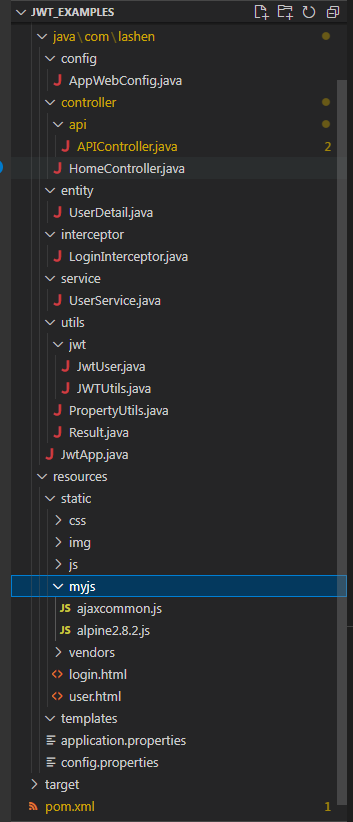
Springboot工程文件目录结构:
前端实现 (Bootstrap 4.x + jQuery)
1. 创建基本 HTML 结构
创建login.html作为登录页面:网页为了美观,采用了开源的CoreUI。
<!DOCTYPE html>
<!--
* CoreUI - Free Bootstrap Admin Template
* @version v2.0.0
* @link https://coreui.io
* Copyright (c) 2018 creativeLabs Łukasz Holeczek
* Licensed under MIT (https://coreui.io/license)
-->

<html lang="en">
  <head>
    <meta charset="utf-8">
    <meta http-equiv="X-UA-Compatible" content="IE=edge">
    <meta name="viewport" content="width=device-width, initial-scale=1.0, shrink-to-fit=no">
    <meta name="description" content="CoreUI - Open Source Bootstrap Admin Template">
    <meta name="author" content="Łukasz Holeczek">
    <meta name="keyword" content="Bootstrap,Admin,Template,Open,Source,jQuery,CSS,HTML,RWD,Dashboard">
    <title>JWT demonstration</title>
    <!-- Icons-->
    <link href="vendors/@coreui/icons/css/coreui-icons.min.css" rel="stylesheet">
    <link href="vendors/flag-icon-css/css/flag-icon.min.css" rel="stylesheet">
    <link href="vendors/font-awesome/css/font-awesome.min.css" rel="stylesheet">
    <link href="vendors/simple-line-icons/css/simple-line-icons.css" rel="stylesheet">
    <!-- Main styles for this application-->
    <link href="css/style.css" rel="stylesheet">
    <link href="vendors/pace-progress/css/pace.min.css" rel="stylesheet">


  </head>
  <body class="app flex-row align-items-center">
    <div class="container" x-data="logindata()" x-init="init()">
      <div class="row justify-content-center">
        <div class="col-md-8">
          <div class="card-group">
            <div class="card p-4">
              <div class="card-body">
                <h1>Login</h1>
                <p class="text-muted">Login your account</p>
                <div class="input-group mb-3">
                  <div class="input-group-prepend">
                    <span class="input-group-text">
                      <i class="icon-user"></i>
                    </span>
                  </div>
                  <input type="text" class="form-control" placeholder="username" x-model="username">
                </div>
                <div class="input-group mb-4">
                  <div class="input-group-prepend">
                    <span class="input-group-text">
                      <i class="icon-lock"></i>
                    </span>
                  </div>
                  <input type="password" class="form-control" placeholder="password" x-model="password">
                </div>
                    <div class="alert alert-danger" role="alert" x-show="isShowMsg()" x-on:click.away="hideMsg()" x-text="errormsg">

                    </div>
                <div class="row">
                  <div class="col-6">
                    <button type="button" class="btn btn-primary px-4" x-on:click="doLogin()">Login</button>
                  </div>
                  <div class="col-6 text-right">
                    <button type="button" class="btn btn-link px-0">Forgot password ?</button>
                  </div>
                </div>
              </div>
            </div>
            <div class="card text-white bg-primary py-5 d-md-down-none" style="width:44%">
              <div class="card-body text-center">
                <div>
                  <h2>Sign up</h2>
                  <p>Lorem ipsum dolor sit amet, consectetur adipisicing elit, sed do eiusmod tempor incididunt ut labore et dolore magna aliqua.</p>
                  <button type="button" class="btn btn-primary active mt-3">Register now !</button>
                </div>
              </div>

            </div>

          </div>
        </div>
      </div>

    </div>

    <!-- Bootstrap and necessary plugins-->
    <script src="vendors/jquery/js/jquery.min.js"></script>
    <script src="vendors/popper.js/js/popper.min.js"></script>
    <script src="vendors/bootstrap/js/bootstrap.min.js"></script>
    <script src="vendors/pace-progress/js/pace.min.js"></script>
    <script src="vendors/perfect-scrollbar/js/perfect-scrollbar.min.js"></script>
    <script src="vendors/@coreui/coreui/js/coreui.min.js"></script>

    <script src="myjs/ajaxcommon.js"></script>
    <script src="myjs/alpine2.8.2.js"></script>

  <script>

  localStorage.clear();

    function logindata(){
      return {
        username:'',
        password:'',
        errormsg:'',
        tables:'',
        init(){

        },
        isShowMsg(){
          if(this.errormsg.length>0){
            return true;
          }
          return false;
        },
        hideMsg(){
          this.errormsg = '';
        },
        doLogin(){
            let alpine = this;
            //Perform jquery AJAX login.
            $.ajax({
              url:"login",
              type:"POST",
              data:{
                username:this.username,
                password:this.password
              },
              success:function(resp,textStatus, xhr){
                console.log(resp);
                if(resp.code == 1){
                  location.href='user.html';
                }else{
                  alpine.errormsg = resp.message;
                }
              }
            });

        }
      }
    }


  </script>

  </body>
</html>
创建user.html作为用户详情和信息编辑页面:网页为了美观,采用了开源的CoreUI。
<!DOCTYPE html>
<!--
* CoreUI - Free Bootstrap Admin Template
* @version v2.0.0
* @link https://coreui.io
* Copyright (c) 2018 creativeLabs Łukasz Holeczek
* Licensed under MIT (https://coreui.io/license)
-->

<html lang="en">
  <head>
    <meta charset="utf-8">
    <meta http-equiv="X-UA-Compatible" content="IE=edge">
    <meta name="viewport" content="width=device-width, initial-scale=1.0, shrink-to-fit=no">
    <meta name="description" content="CoreUI - Open Source Bootstrap Admin Template">
    <meta name="author" content="Łukasz Holeczek">
    <meta name="keyword" content="Bootstrap,Admin,Template,Open,Source,jQuery,CSS,HTML,RWD,Dashboard">
    <title>User center.</title>
    <!-- Icons-->
    <link href="vendors/@coreui/icons/css/coreui-icons.min.css" rel="stylesheet">
    <link href="vendors/flag-icon-css/css/flag-icon.min.css" rel="stylesheet">
    <link href="vendors/font-awesome/css/font-awesome.min.css" rel="stylesheet">
    <link href="vendors/simple-line-icons/css/simple-line-icons.css" rel="stylesheet">
    <!-- Main styles for this application-->
    <link href="css/style.css" rel="stylesheet">
    <link href="vendors/pace-progress/css/pace.min.css" rel="stylesheet">

  </head>
  <body class="app flex-row align-items-center" x-data="initdata()" x-init="init()">
    <div class="container"  >
      <div class="row justify-content-center">
        <div class="col-md-6">
          <div class="card mx-4">
            <div class="card-body p-4">
              <h1>User details.</h1>
              <p class="text-muted"> </p>
              <div class="input-group mb-3">
                <div class="input-group-prepend">
                  <span class="input-group-text">
                    <i class="icon-user"></i>
                  </span>
                </div>
                <input type="text" class="form-control" placeholder="username" x-model="username" x-bind:readOnly="readOnly">
              </div>

              <div class="input-group mb-3">
                <div class="input-group-prepend">
                  <span class="input-group-text">@</span>
                </div>
                <input type="text" class="form-control" placeholder="Phone" x-model="tel" x-bind:readOnly="readOnly">
              </div>

              <div class="input-group mb-3">
                <div class="input-group-prepend">
                  <span class="input-group-text">
                    <i class="icon-lock"></i>
                  </span>
                </div>
                <input type="text" class="form-control" placeholder="address" x-model="address" x-bind:readOnly="readOnly">
              </div>

              <button type="button" class="btn btn-block btn-success" x-on:click="doEdit()" x-show="!editMode">Edit</button>
              <button type="button" class="btn btn-block btn-primary" x-on:click="doSave()" x-show="editMode">Save</button>
            </div>
            <div class="card-footer p-4">
              <div class="row">
                <div class="col-6">
                  <button class="btn btn-block btn-facebook" type="button" x-on:click="goBack()">
                    <span>Back</span>
                  </button>
                </div>
                <div class="col-6">
                  <button class="btn btn-block btn-twitter" type="button" x-on:click="logout()">
                    <span>Logout</span>
                  </button>
                </div>
              </div>
            </div>
          </div>
        </div>
      </div>
    </div>

    <div class="modal fade" id="myModal" tabindex="-1" role="dialog" aria-labelledby="myModalLabel"  aria-hidden="true">
      <div class="modal-dialog" role="document">
        <div class="modal-content">
          <div class="modal-header">
            <h4 class="modal-title">Prompt</h4>
            <button type="button" class="close" data-dismiss="modal" aria-label="Close">
              <span aria-hidden="true">×</span>
            </button>
          </div>
          <div class="modal-body" x-html="textbody">
            <p></p>
          <div>
        </div>
        <img src="">
      </div>
      <div class="modal-footer">
            <button type="button" class="btn btn-secondary" data-dismiss="modal">Close</button>
      </div>
      </div>
        <!-- /.modal-content -->
      </div>
      <!-- /.modal-dialog -->
    </div>

    <!-- Bootstrap and necessary plugins-->
    <script src="vendors/jquery/js/jquery.min.js"></script>
    <script src="vendors/popper.js/js/popper.min.js"></script>
    <script src="vendors/bootstrap/js/bootstrap.min.js"></script>
    <script src="vendors/pace-progress/js/pace.min.js"></script>
    <script src="vendors/perfect-scrollbar/js/perfect-scrollbar.min.js"></script>
    <script src="vendors/@coreui/coreui/js/coreui.min.js"></script>

    <script src="myjs/ajaxcommon.js"></script>
    <script src="myjs/alpine2.8.2.js"></script>


    <script>

        function initdata(){
          return {
            editMode:false,
            readOnly:true,
            username:'',
            tel:'',
            address:'',
            textbody:'please',
            init(){
                    let alpine = this;
                    //Perform jquery AJAX get user details.
                    $.ajax({
                      url:"api/user/detail",
                      type:"GET",
                      data:{
                      },
                      success:function(resp,textStatus, xhr){
                        console.log(resp);
                        if(resp.code == 1){
                          var user = resp.data;
                          alpine.username = user.name;
                          alpine.tel = user.tel;
                          alpine.address = user.address;
                        }else{
                          alert(resp.message);
                        }
                      }
                    });
            },
            goBack(){
              location.href='login.html';
            },
            logout(){
              localStorage.clear();
              this.textbody = "Logout successful.";
              $('#myModal').modal('show');
            },
            doEdit(){
              this.readOnly = false;
              this.editMode = true;
            },
            doSave(){

                    let alpine = this;
                    //Perform jquery AJAX save user details.
                    $.ajax({
                      url:"api/user/save",
                      type:"POST",
                      data:{
                        name:alpine.username,
                        tel:alpine.tel,
                        address:alpine.address
                      },
                      success:function(resp){
                        console.log(resp);
                        if(resp.code == 1){
                          alpine.readOnly = true;
                          alpine.editMode = false;
                          alpine.textbody = resp.data;
                          $('#myModal').modal('show');
                        }else{
                          alpine.textbody = resp.message;
                          $('#myModal').modal('show');
                        }
                      }
                    });

            },
          }

        }

    </script>

  </body>
</html>
2. 创建 JavaScript 逻辑
创建ajaxcommon.js处理前端和后端JWT传递逻辑:
let baseHost = "http://127.0.0.1:8080/";

function initAjax(){

    // 1. Request successful (status code 2xx/3xx).
    $(document).ajaxSuccess(function (evt, xhr, opts) {
      // Unified JWT acquisition and storage.
      let jwt = xhr.getResponseHeader('Authorization');
      if(jwt){
        var token = jwt.split(" ")[1];
        localStorage.setItem("jwt",token);
        console.log("ajaxSuccess:"+token);
      }

    });


    //2. Perform operations before sending AJAX.
    $.ajaxSetup({
      beforeSend: function (xhr,opts) {
        const token = localStorage.getItem('jwt');
        console.log("beforeSend:"+token);
        if (token){
          xhr.setRequestHeader('Authorization', 'Bearer ' + token);
        }

        //Check if there is `http` or `https`; if not, add the default `baseHost`.
        const hasHttp = /https?:\/\//i.test(opts.url);
        if(!hasHttp){
          if(opts.url.startsWith('/')){
            opts.url = opts.url.slice(1);
          }
          opts.url = baseHost+opts.url;
        }

      }
    });


    //3. Request failed (4xx/5xx, network error).
    $(document).ajaxError(function (evt, xhr, opts, err) {
      //console.log('[ajaxError]', opts.url, xhr.status, err);
      // 401 - Unified redirect to login.
      if (xhr.status === 401) {
        localStorage.clear();
        location.href = 'login.html';
      }
    });

  }

  initAjax();
跨域实现详解
在本教程中,跨域 (CORS) 是通过 Spring Boot 后端配置实现的,主要包含以下关键部分:
- AppWebConfig中的 CORS 配置:
- 我们重载了addCorsMappings(CorsRegistry registry)函数,详细配置了跨域规则
- addMapping("/**") // Match all APIs
- allowedOriginPatterns("*") //允许所有来源访问
- allowedMethods("*") // GET/POST/PUT/DELETE/OPTIONS
- allowedHeaders("*") // Allow all headers
- allowCredentials(true) // Front have cookie
- exposedHeaders("Authorization") //暴露 头中Authorization字段
- 允许包含认证信息的请求头,特别是Authorization头用于传递 JWT
- 允许前端获取特定的响应头
- 启用凭证支持,这对于包含 cookie 或认证信息的请求是必要的
- JWT 与 CORS 的配合:
- JWT 通过Authorization请求头传递,这个头在 CORS 配置中明确允许
- 前端使用 jQuery 的$.ajaxSetup全局配置,在所有请求发送前自动添加 JWT
- 后端通过LoginInterceptor拦截请求并验证 JWT 的有效性
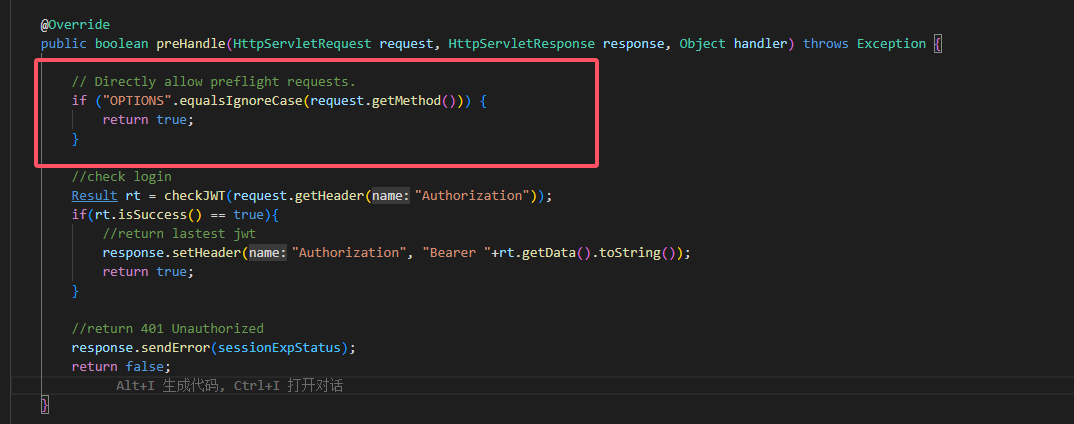
- 预检请求 (Preflight Request) 处理:
- LoginInterceptor拦截器中的拦截到request的方法是OPTIONS方法时,全部返回true。
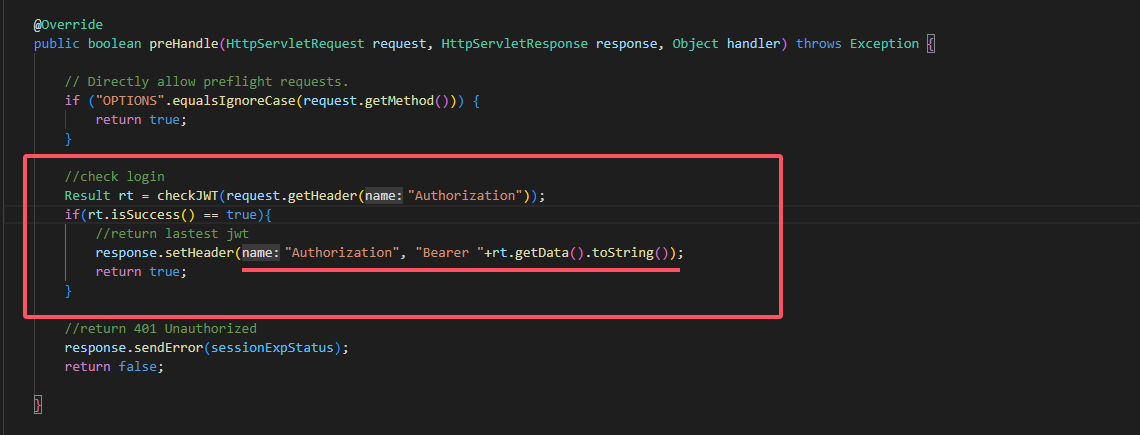
- LoginInterceptor拦截器中对认证通过的JWT进行自动刷新并返回给客户端。
运行和测试
总结
本教程实现了一个完整的前后端分离应用,使用 JWT 进行身份认证,并正确配置了跨域访问。关键点包括:
- 后端使用 Spring Boot 2.x 和 JWT 实现无状态认证
- 详细的 CORS 配置确保前后端可以安全通信
- 前端使用 jQuery 处理 AJAX 请求,并在请求头中添加 JWT
- 使用 localStorage 存储 JWT 令牌
- 实现了基本的权限控制
这种架构适合构建现代的 Web 应用,前后端可以独立开发和部署,同时保持良好的安全性。
- 启动后端:运行 Spring Boot 应用,默认端口 8080
- 启动前端:可以把resources/static目录下的所有文件复制到tomcat或者nginx下作为静态网页在 8081或者其他端口运行前端文件。
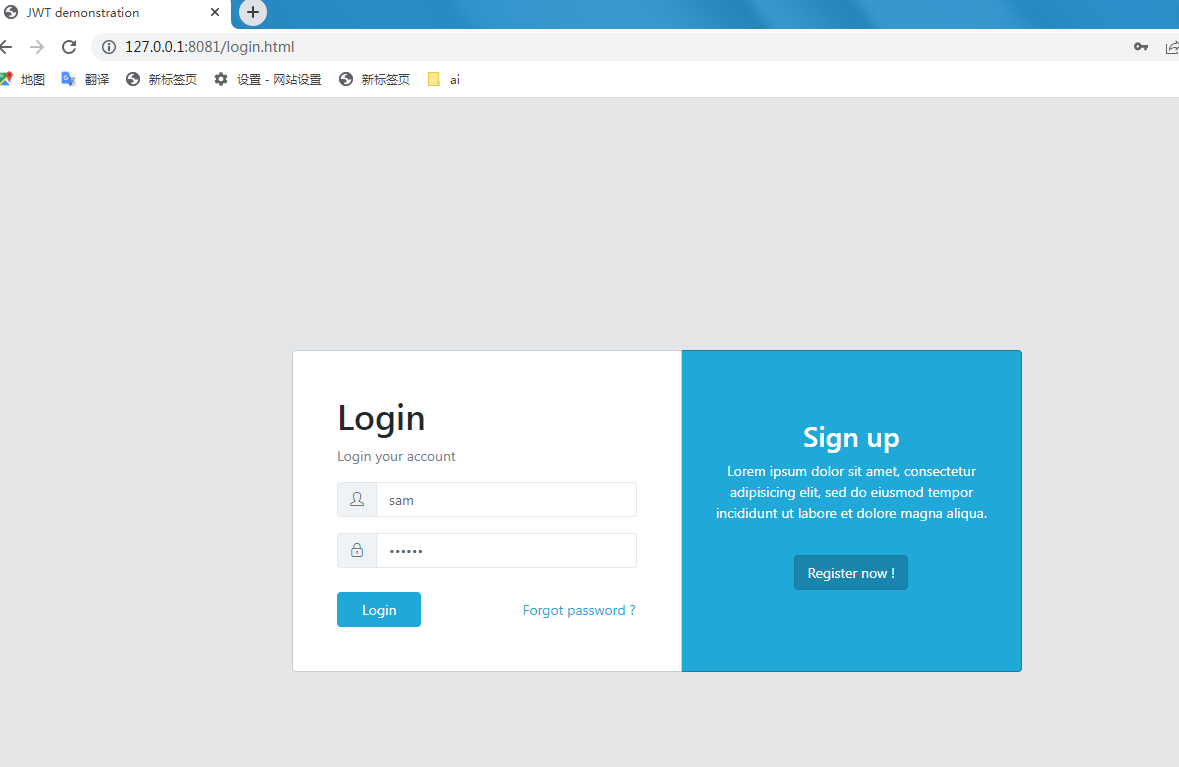
- 测试流程:
- 访问http://127.0.0.1:8081/login.html
- 点击 "登录" 按钮,输入用户名:sam ; 密码:123456
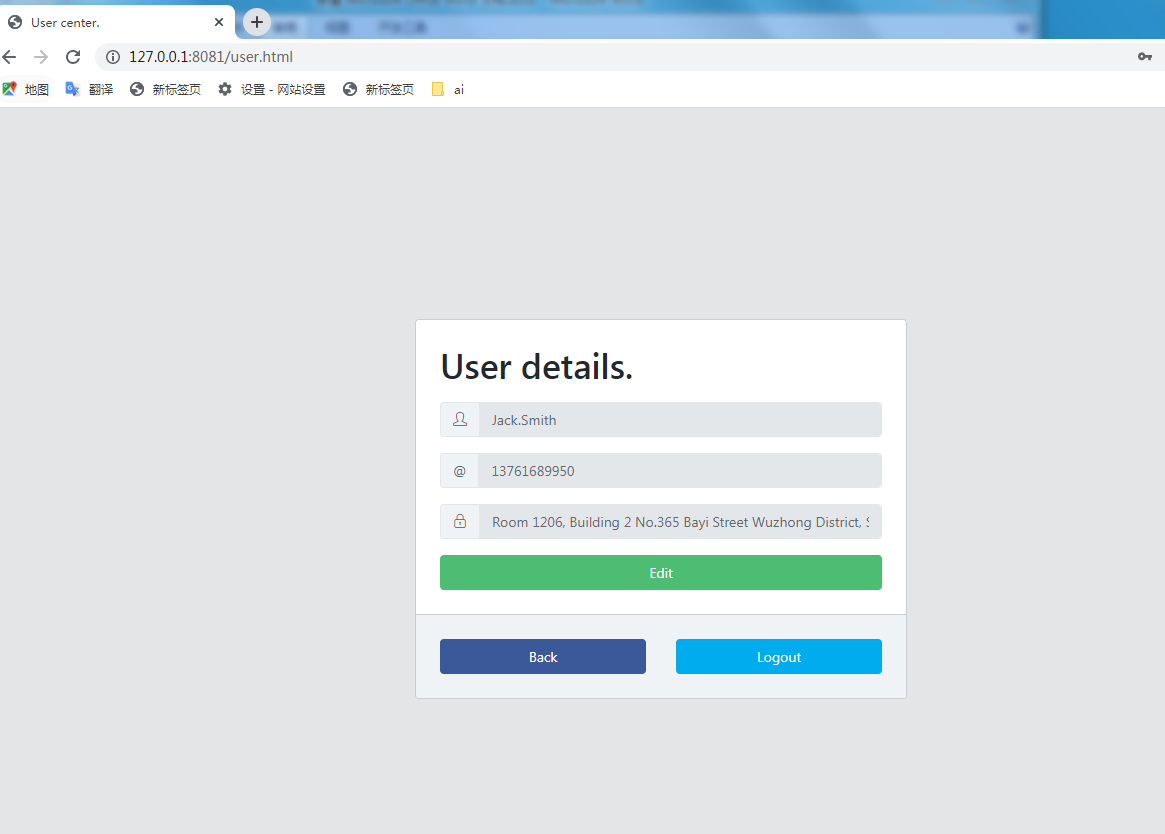
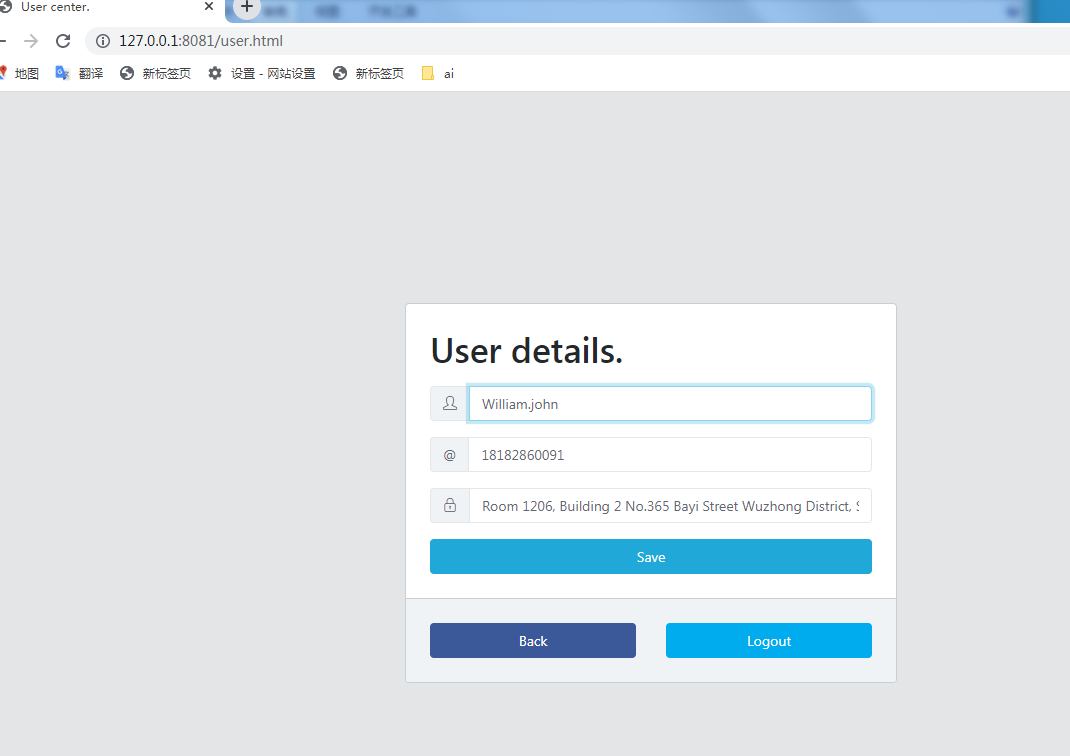
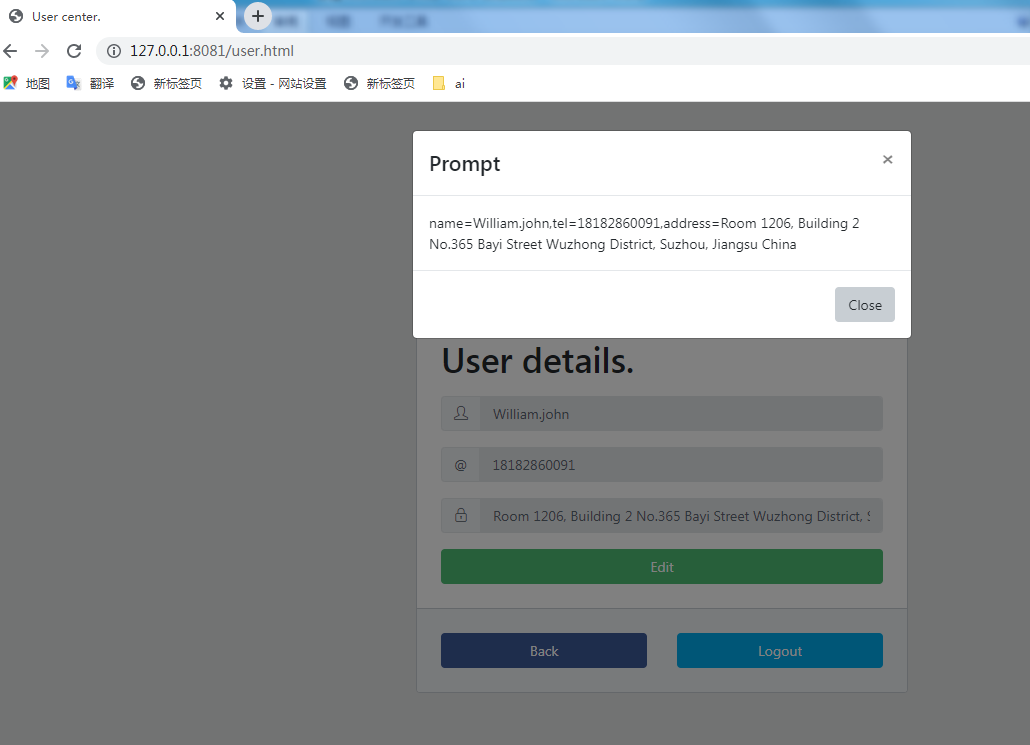
- 登录成功后,可以访问受保护的资源
- 检查浏览器的 localStorage,可以看到保存的 JWT 令牌
- 退出登录后,JWT 被清除,无法访问受保护资源
- 后端使用 Spring Boot 2.x 和 JWT 实现无状态认证
- 详细的 CORS 配置确保前后端可以安全通信
- 前端使用 jQuery 处理 AJAX 请求,并在请求头中添加 JWT
- 使用 localStorage 存储 JWT 令牌
- 实现了基本的权限控制





 扫一扫
扫一扫


 2万+
2万+

 被折叠的 条评论
为什么被折叠?
被折叠的 条评论
为什么被折叠?
 到【灌水乐园】发言





