






银河麒麟(Kylin) - V10 SP2高级服务器操作系统ARM64编译VSCode失败日志
原因
项目需求:需要在飞腾2000+的服务器上安装VSCode,WPS,office办公套件等等软件。查看VSCode官网有安装版本,安装完成(未报错)发现软件无法打开,点击安装程序没有反应,由于时间比较短,VSCode没有测试更多的版本,在此总结编译失败的原因。
测试环境
服务器配置
型号:飞龙RM5000-F
CPU:飞腾FT2000+ (64核、2.2GHz)
内存:256G、DDR4
硬盘:2T SSD、10T机械
系统:银河麒麟高级服务器系统V10
平台架构:ARM
准备工作
1、尝试使用VSCode官网安装方法安装软件
VSCode官网:https://code.visualstudio.com/
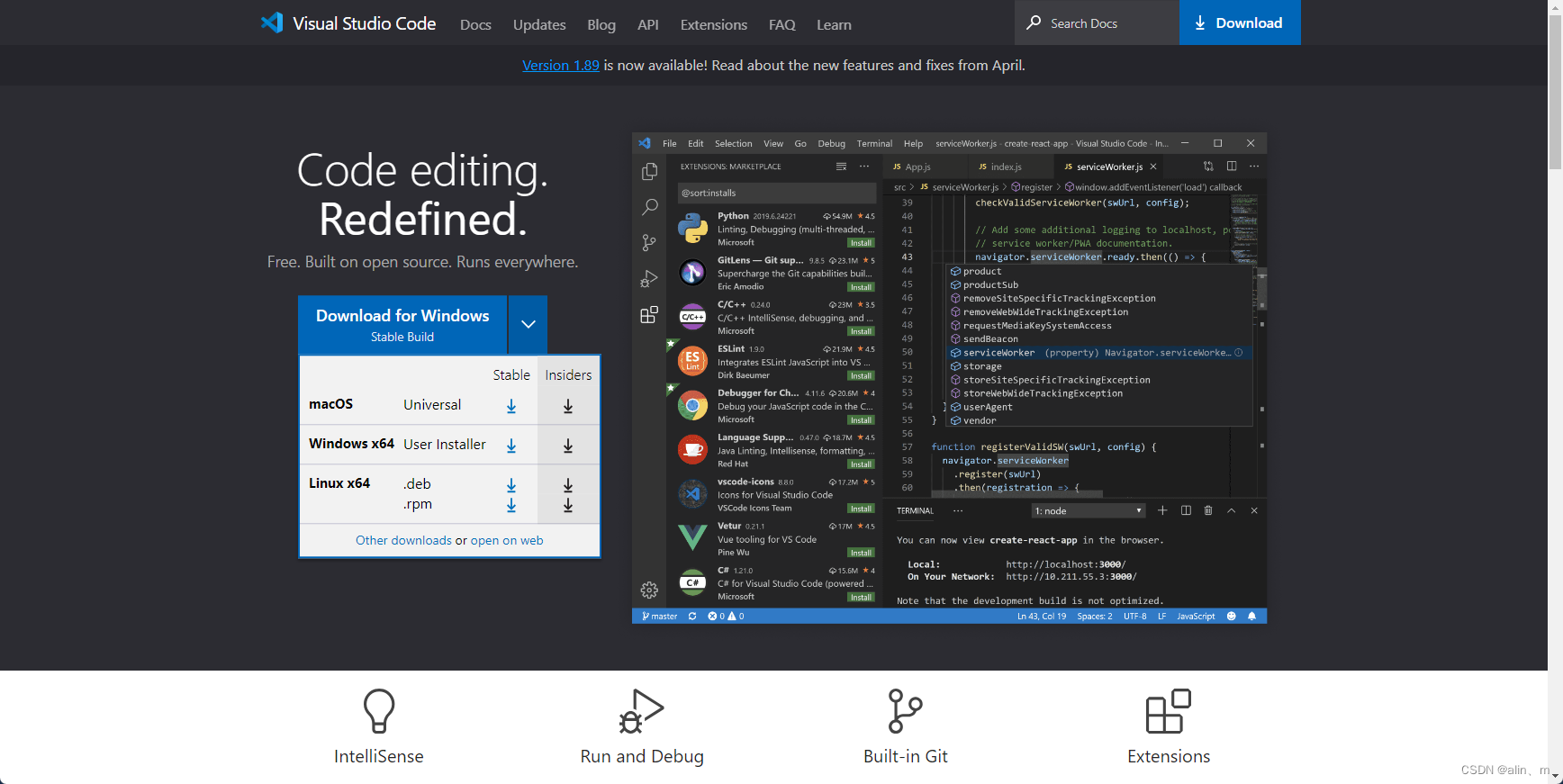
下图是银河麒麟服务器,点击.rmp下载
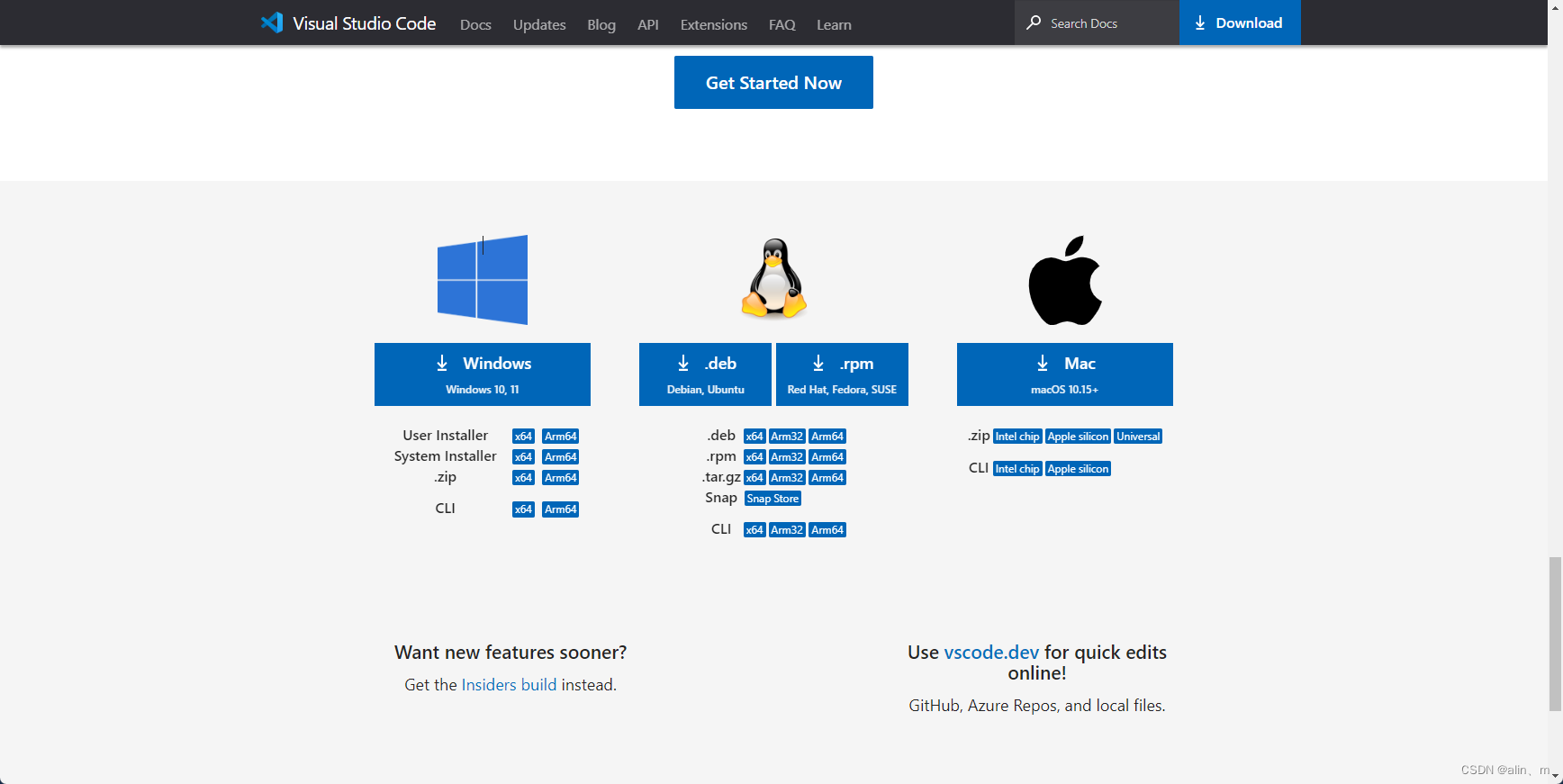
在终端输入官方安装命令安装
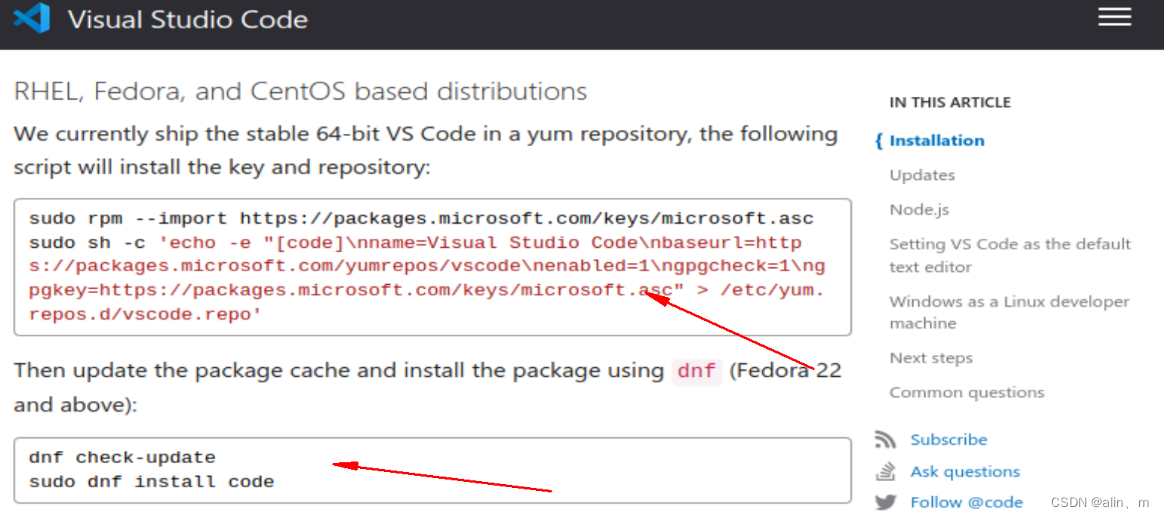
联网会自动下载VSCode软件包和依赖包
安装完成会在系统工具显示

我发现打不开,正常安装,没有报错。(版本Version 1.89)
看来只能编译了。
确认预git 和 python 版本
编译安装node.js或者非编译安装node.js
下载安装编译工具及依赖环境
sudo dnf install python gcc-c++ make
下载源码:https://github.com/nodejs/node/releases/tag/v12.19.1
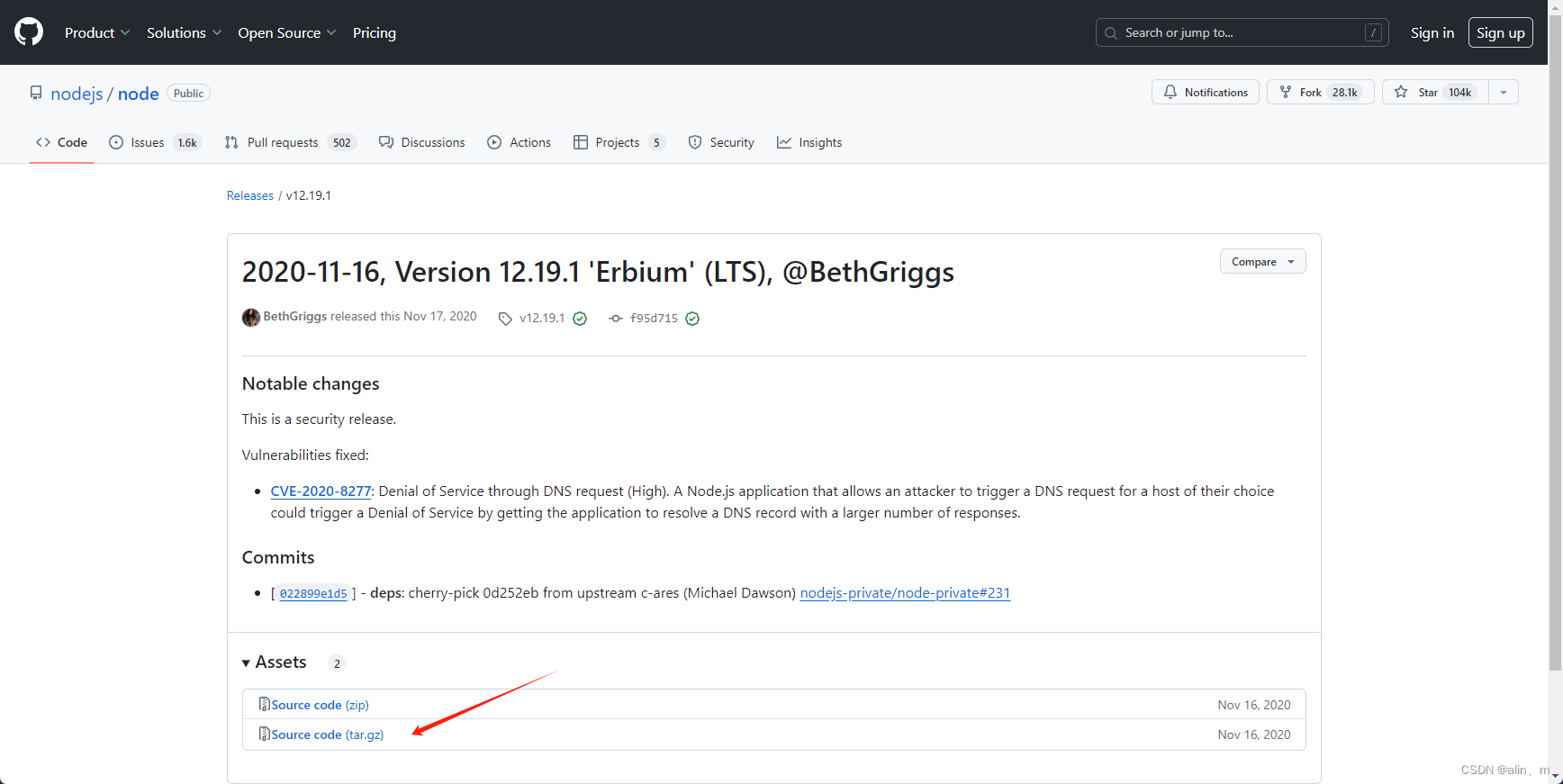
执行命令:
cd ~
tar -vxf ~/root/node-12.19.1.tar.gz
cd node-12.19.1
./configure --prefix=/usr
make -j32
sudo make install
注意
node释放目录不能存在中文字符,因此到~目录(即:/home/zhang)
node安装后,非root用户无执行权限,需要手动调整权限
sudo chmod 755 /usr/bin/node

sudo chmod 755 /usr/lib/node_modules -R
或者去node.js官网下载ARM版本
下载官网:https://nodejs.org/en/download/prebuilt-binaries
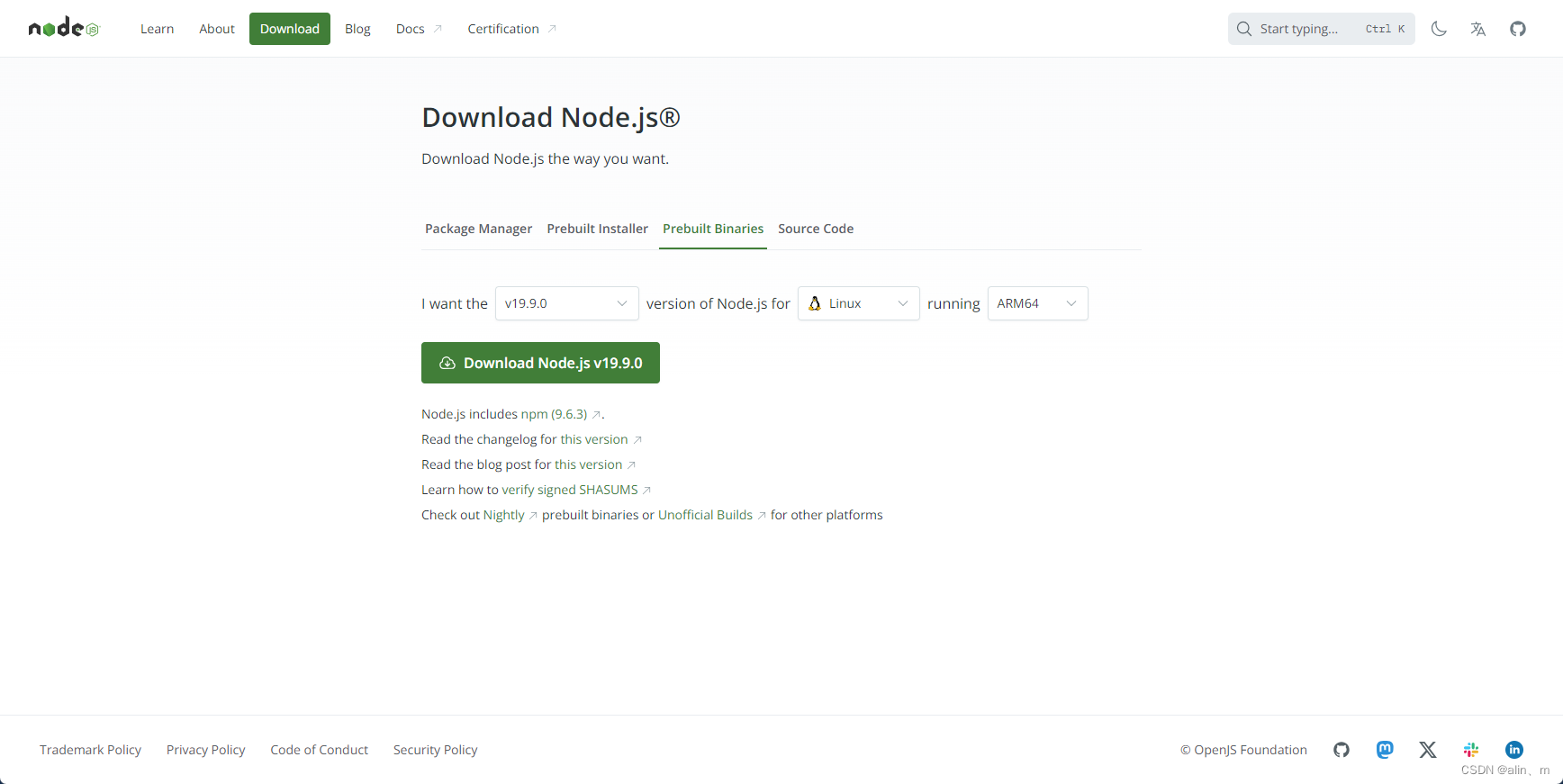
node.js的版本选择是根据编译VSCode版本决定的,否则会报版本不匹配的错误。

下载完成node-v19.9.0-linux-arm64.tar.xz
解压node-v19.9.0-linux-arm64.tar.xz
进入node-v19.9.0-linux-arm64文件夹
查看node-v19.9.0-linux-arm64路径
创建软连接
采用创建软链接的方法,使得在任意目录下都可以直接使用node和npm命令
查看node 版本
查看npm 版本
cd ~
tar -vxf ~/root/node-v19.9.0-linux-arm64.tar.xz
cd node-v19.9.0-linux-arm64
pwd     #路径

ln -s /root/node-v19.9.0-linux-arm64/bin/node /usr/local/bin/node
ln -s /root/node-v19.9.0-linux-arm64/bin/npm /usr/local/bin/npm

node -V   #查看版本号
npm  -V   #查看版本号
2、安装yarn编译工具
npm install --global yarn

如果安装不了,手动安装yarn
源码地址:https://github.com/yarnpkg/yarn/releases/tag/v1.22.10
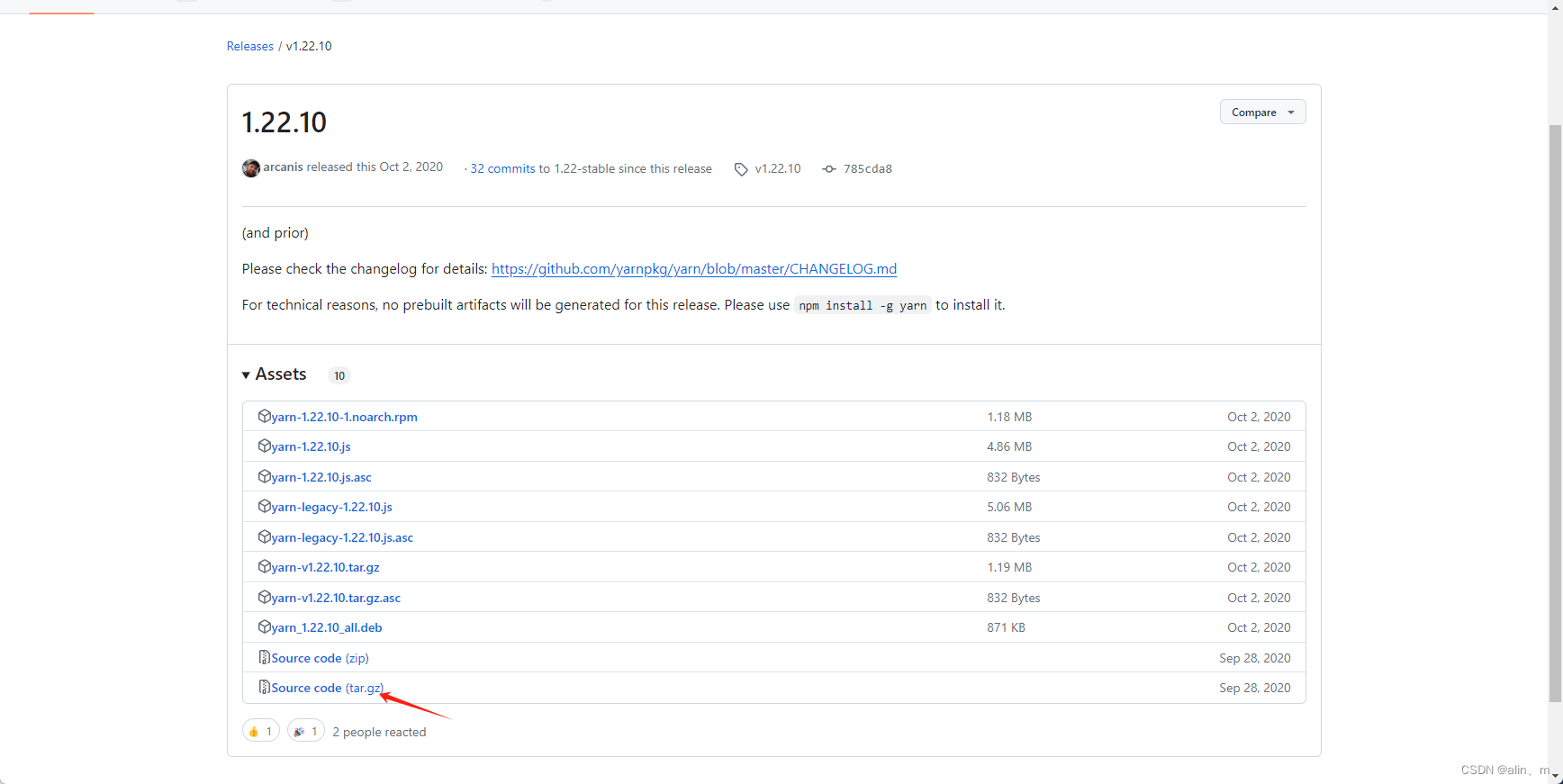
编译
下载VSCode源码:
git clone https://github.com/microsoft/vscode.git
cd vscode

yarn   #进行编译
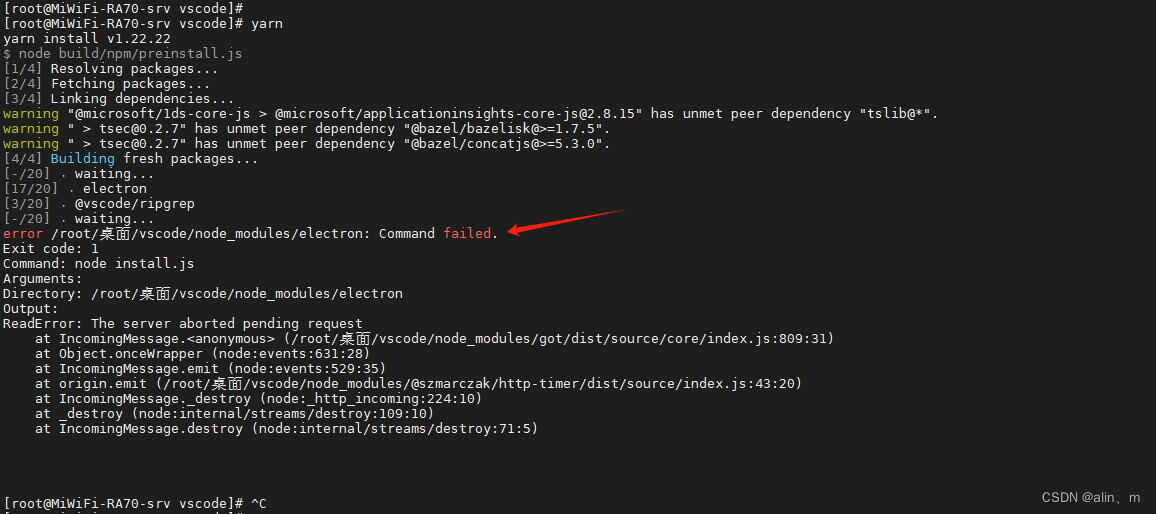
出现报错
electron 没有这个依赖包
安装 electron 依赖包
npm install electron --save-dev
使用npm安装electron报错404
百度一下说是源的问题
更改淘宝源
set ELECTRON_MIRROR=http://npm.taobao.org/mirrors/electron/&& npm install electron --save-dev
依旧报npm安装electron报错404
淘宝源不能使用
继续更改源
更改其他相似命令:
set ELECTRON_MIRROR=https://repo.huaweicloud.com/electron/&& npm install
其他镜像:
阿里镜像
npm --registry https://registry.npmmirror.com --save-dev install electron
华为镜像
npm --registry https://mirrors.huaweicloud.com/repository/npm/ --save-dev install electron
腾讯镜像
npm --registry http://mirrors.cloud.tencent.com/npm/ --save-dev install electron
中科大镜像
npm --registry https://npmreg.proxy.ustclug.org/ --save-dev install electron
浙江大学镜像
npm --registry https://mirrors.zju.edu.cn/npm --save-dev install electron
换成腾讯的镜像 electron 下载 完成,在安装过程中报错
准备更换VSCode版本
下载VSCode -1.64.0 源码
更改node.js 版本
更改为node-v16.20.2-linux-arm64
更改node.js版本的方法如下:
使用 unlink 命令取消原有的node.js软连接
在使用 ln -s 命令软连接node-v16.20.2-linux-arm64
查看 node.js 版本 是否改变
进入vscode-1.64.0目录
使用 yarn 命令编译
下面是报错结果:
[root@MiWiFi-RA70-srv ~]#
[root@MiWiFi-RA70-srv ~]# cd vscode-1.64.0/
[root@MiWiFi-RA70-srv vscode-1.64.0]# ls
build            cgmanifest.json  extensions   LICENSE.txt   package.json  README.md  resources  SECURITY.md  test                   tsfmt.json
cglicenses.json  CONTRIBUTING.md  gulpfile.js  node_modules  product.json  remote     scripts    src          ThirdPartyNotices.txt  yarn.lock
[root@MiWiFi-RA70-srv vscode-1.64.0]#
[root@MiWiFi-RA70-srv vscode-1.64.0]#
[root@MiWiFi-RA70-srv vscode-1.64.0]#
[root@MiWiFi-RA70-srv vscode-1.64.0]#
[root@MiWiFi-RA70-srv vscode-1.64.0]# yarn
yarn install v1.22.22
$ node build/npm/preinstall.js
[1/4] Resolving packages...
[2/4] Fetching packages...
[3/4] Linking dependencies...
warning " > css-loader@3.2.0" has incorrect peer dependency "webpack@^4.0.0".
warning " > eslint-plugin-jsdoc@19.1.0" has incorrect peer dependency "eslint@^5.0.0 || ^6.0.0".
warning " > file-loader@4.2.0" has incorrect peer dependency "webpack@^4.0.0".
warning " > gulp-postcss@9.0.0" has unmet peer dependency "postcss@^8.0.0".
warning " > gulp-tsb@4.0.6" has incorrect peer dependency "typescript@^3.0.0".
warning " > sinon-test@3.1.0" has incorrect peer dependency "sinon@2.x - 10.x".
warning " > style-loader@1.0.0" has incorrect peer dependency "webpack@^4.0.0".
[4/4] Building fresh packages...
[1/15] ? @parcel/watcher
[6/15] ? native-keymap
[3/15] ? @vscode/sqlite3
[4/15] ? keytar
error /root/vscode-1.64.0/node_modules/@vscode/sqlite3: Command failed.
Exit code: 1
Command: node-gyp rebuild
Arguments:
Directory: /root/vscode-1.64.0/node_modules/@vscode/sqlite3
Output:
gyp info it worked if it ends with ok
gyp info using node-gyp@9.1.0
gyp info using node@16.20.2 | linux | arm64
gyp info find Python using Python version 3.7.9 found at "/usr/bin/python3"
gyp info spawn /usr/bin/python3
gyp info spawn args [
gyp info spawn args   '/opt/node-v16.20.2-linux-arm64/lib/node_modules/npm/node_modules/node-gyp/gyp/gyp_main.py',
gyp info spawn args   'binding.gyp',
gyp info spawn args   '-f',
gyp info spawn args   'make',
gyp info spawn args   '-I',
gyp info spawn args   '/root/vscode-1.64.0/node_modules/@vscode/sqlite3/build/config.gypi',
gyp info spawn args   '-I',
gyp info spawn args   '/opt/node-v16.20.2-linux-arm64/lib/node_modules/npm/node_modules/node-gyp/addon.gypi',
gyp info spawn args   '-I',
gyp info spawn args   '/root/.cache/node-gyp/13.5.2/include/node/common.gypi',
gyp info spawn args   '-Dlibrary=shared_library',
gyp info spawn args   '-Dvisibility=default',
gyp info spawn args   '-Dnode_root_dir=/root/.cache/node-gyp/13.5.2',
gyp info spawn args   '-Dnode_gyp_dir=/opt/node-v16.20.2-linux-arm64/lib/node_modules/npm/node_modules/node-gyp',
gyp info spawn args   '-Dnode_lib_file=/root/.cache/node-gyp/13.5.2/<(target_arch)/node.lib',
gyp info spawn args   '-Dmodule_root_dir=/root/vscode-1.64.0/node_modules/@vscode/sqlite3',
gyp info spawn args   '-Dnode_engine=v8',
gyp info spawn args   '--depth=.',
gyp info spawn args   '--no-parallel',
gyp info spawn args   '--generator-output',
gyp info spawn args   'build',
gyp info spawn args   '-Goutput_dir=.'
gyp info spawn args ]
gyp: name 'openssl_fips' is not defined while evaluating condition 'openssl_fips != ""' in binding.gyp while trying to load binding.gyp
gyp ERR! configure error
gyp ERR! stack Error: `gyp` failed with exit code: 1
gyp ERR! stack     at ChildProcess.onCpExit (/opt/node-v16.20.2-linux-arm64/lib/node_modules/npm/node_modules/node-gyp/lib/configure.js:284:16)
gyp ERR! stack     at ChildProcess.emit (node:events:513:28)
gyp ERR! stack     at Process.ChildProcess._handle.onexit (node:internal/child_process:293:12)
gyp ERR! System Linux 4.19.90-24.4.v2101.ky10.aarch64
gyp ERR! command "/opt/node-v16.20.2-linux-arm64/bin/node" "/opt/node-v16.20.2-linux-arm64/lib/node_modules/npm/node_modules/node-gyp/bin/node-gyp.js" "rebuild"
gyp ERR! cwd /root/vscode-1.64.0/node_modules/@vscode/sqlite3
报错需要安装sqlite3这个软件包
安装sqlite3
yum install sqlite-devel
安装过程结果:
[root@MiWiFi-RA70-srv vscode-1.64.0]# yum install sqlite-devel
上次元数据过期检查:2:33:59 前,执行于 2024年05月08日 星期三 07时13分34秒。
软件包 sqlite-devel-3.32.3-2.ky10.aarch64 已安装。
依赖关系解决。
=================================================================================================================================================
 Package                           Architecture                 Version                              Repository                             Size
=================================================================================================================================================
升级:
 sqlite                            aarch64                      3.32.3-6.ky10                        ks10-adv-updates                      1.1 M
 sqlite-devel                      aarch64                      3.32.3-6.ky10                        ks10-adv-updates                      148 k

事务概要
=================================================================================================================================================
升级  2 软件包

总下载:1.2 M
确定吗?[y/N]: y
下载软件包:
(1/2): sqlite-devel-3.32.3-6.ky10.aarch64.rpm                                                                    4.2 kB/s | 148 kB     00:35
(2/2): sqlite-3.32.3-6.ky10.aarch64.rpm                                                                           31 kB/s | 1.1 MB     00:35
-------------------------------------------------------------------------------------------------------------------------------------------------
总计                                                                                                              36 kB/s | 1.2 MB     00:35
运行事务检查
事务检查成功。
运行事务测试
事务测试成功。
运行事务
  准备中  :                                                                                                                                  1/1
  升级    : sqlite-3.32.3-6.ky10.aarch64                                                                                                     1/4
  升级    : sqlite-devel-3.32.3-6.ky10.aarch64                                                                                               2/4
  清理    : sqlite-devel-3.32.3-2.ky10.aarch64                                                                                               3/4
  清理    : sqlite-3.32.3-2.ky10.aarch64                                                                                                     4/4
  运行脚本: sqlite-3.32.3-2.ky10.aarch64                                                                                                     4/4
/sbin/ldconfig: /usr/lib64/libLLVM-7.so 不是符号链接


/sbin/ldconfig: /usr/lib64/libLLVM-7.so 不是符号链接


  验证    : sqlite-3.32.3-6.ky10.aarch64                                                                                                     1/4
  验证    : sqlite-3.32.3-2.ky10.aarch64                                                                                                     2/4
  验证    : sqlite-devel-3.32.3-6.ky10.aarch64                                                                                               3/4
  验证    : sqlite-devel-3.32.3-2.ky10.aarch64                                                                                               4/4

已升级:
  sqlite-3.32.3-6.ky10.aarch64                                         sqlite-devel-3.32.3-6.ky10.aarch64

完毕!
清空yarn缓存
重新yarn
清除结果:
[root@MiWiFi-RA70-srv vscode-1.64.0]# yarn cache clean
yarn cache v1.22.22
success Cleared cache.
Done in 0.11s.
[root@MiWiFi-RA70-srv vscode-1.64.0]# yarn
yarn install v1.22.22
$ node build/npm/preinstall.js
[1/4] Resolving packages...
[2/4] Fetching packages...
[3/4] Linking dependencies...
warning " > css-loader@3.2.0" has incorrect peer dependency "webpack@^4.0.0".
warning " > eslint-plugin-jsdoc@19.1.0" has incorrect peer dependency "eslint@^5.0.0 || ^6.0.0".
warning " > file-loader@4.2.0" has incorrect peer dependency "webpack@^4.0.0".
warning " > gulp-postcss@9.0.0" has unmet peer dependency "postcss@^8.0.0".
warning " > gulp-tsb@4.0.6" has incorrect peer dependency "typescript@^3.0.0".
warning " > sinon-test@3.1.0" has incorrect peer dependency "sinon@2.x - 10.x".
warning " > style-loader@1.0.0" has incorrect peer dependency "webpack@^4.0.0".
[4/4] Building fresh packages...
[14/15] ? electron
[-/15] ? waiting...
[3/15] ? @vscode/sqlite3
[11/15] ? playwright
error /root/vscode-1.64.0/node_modules/electron: Command failed.
Exit code: 1
Command: node install.js
Arguments:
Directory: /root/vscode-1.64.0/node_modules/electron
Output:
RequestError: certificate has expired
    at ClientRequest.<anonymous> (/root/vscode-1.64.0/node_modules/got/source/request-as-event-emitter.js:178:14)
    at Object.onceWrapper (events.js:520:26)
    at ClientRequest.emit (events.js:412:35)
    at ClientRequest.origin.emit (/root/vscode-1.64.0/node_modules/@szmarczak/http-timer/source/index.js:37:11)
    at TLSSocket.socketErrorListener (_http_client.js:475:9)
    at TLSSocket.emit (events.js:400:28)
缺失electron
更改腾讯镜像试一下
npm --registry http://mirrors.cloud.tencent.com/npm/ --save-dev install electron
更改腾讯镜像结果:
[root@MiWiFi-RA70-srv vscode-1.64.0]# yarn cache clean
yarn cache v1.22.22
success Cleared cache.
Done in 4.90s.
[root@MiWiFi-RA70-srv vscode-1.64.0]# npm --registry http://mirrors.cloud.tencent.com/npm/ --save-dev install electron
npm WARN deprecated @babel/plugin-proposal-dynamic-import@7.16.7: This proposal has been merged to the ECMAScript standard and thus this plugin is no longer maintained. Please use @babel/plugin-transform-dynamic-import instead.
npm WARN deprecated @babel/plugin-proposal-numeric-separator@7.16.7: This proposal has been merged to the ECMAScript standard and thus this plugin is no longer maintained. Please use @babel/plugin-transform-numeric-separator instead.
npm WARN deprecated @babel/plugin-proposal-class-properties@7.16.7: This proposal has been merged to the ECMAScript standard and thus this plugin is no longer maintained. Please use @babel/plugin-transform-class-properties instead.
npm WARN deprecated @babel/plugin-proposal-export-namespace-from@7.16.7: This proposal has been merged to the ECMAScript standard and thus this plugin is no longer maintained. Please use @babel/plugin-transform-export-namespace-from instead.
npm WARN deprecated @babel/plugin-proposal-private-methods@7.16.7: This proposal has been merged to the ECMAScript standard and thus this plugin is no longer maintained. Please use @babel/plugin-transform-private-methods instead.
npm WARN deprecated @babel/plugin-proposal-nullish-coalescing-operator@7.16.7: This proposal has been merged to the ECMAScript standard and thus this plugin is no longer maintained. Please use @babel/plugin-transform-nullish-coalescing-operator instead.
npm WARN deprecated @babel/plugin-proposal-optional-chaining@7.16.7: This proposal has been merged to the ECMAScript standard and thus this plugin is no longer maintained. Please use @babel/plugin-transform-optional-chaining instead.
npm WARN deprecated @babel/plugin-proposal-private-property-in-object@7.16.7: This proposal has been merged to the ECMAScript standard and thus this plugin is no longer maintained. Please use @babel/plugin-transform-private-property-in-object instead.
npm WARN deprecated @babel/plugin-proposal-logical-assignment-operators@7.16.7: This proposal has been merged to the ECMAScript standard and thus this plugin is no longer maintained. Please use @babel/plugin-transform-logical-assignment-operators instead.
npm WARN deprecated @types/anymatch@3.0.0: This is a stub types definition. anymatch provides its own type definitions, so you do not need this installed.
npm WARN deprecated source-map-resolve@0.5.3: See https://github.com/lydell/source-map-resolve#deprecated
npm WARN deprecated source-map-url@0.4.1: See https://github.com/lydell/source-map-url#deprecated
npm WARN deprecated urix@0.1.0: Please see https://github.com/lydell/urix#deprecated
npm WARN deprecated resolve-url@0.2.1: https://github.com/lydell/resolve-url#deprecated
npm WARN deprecated vscode-ripgrep@1.13.2: This package has been renamed to @vscode/ripgrep, please update to the new name
npm WARN deprecated @koa/router@10.1.1: **IMPORTANT 10x+ PERFORMANCE UPGRADE**: Please upgrade to v12.0.1+ as we have fixed an issue with debuglog causing 10x slower router benchmark performance, see https://github.com/koajs/router/pull/173
npm WARN deprecated @npmcli/move-file@1.0.1: This functionality has been moved to @npmcli/fs
npm WARN deprecated fsevents@1.2.13: The v1 package contains DANGEROUS / INSECURE binaries. Upgrade to safe fsevents v2
npm WARN deprecated @npmcli/move-file@1.1.2: This functionality has been moved to @npmcli/fs
npm WARN deprecated coffee-script@1.12.7: CoffeeScript on NPM has moved to "coffeescript" (no hyphen)
npm WARN deprecated source-map-resolve@0.6.0: See https://github.com/lydell/source-map-resolve#deprecated
npm WARN deprecated svgo@1.3.2: This SVGO version is no longer supported. Upgrade to v2.x.x.
npm WARN deprecated stable@0.1.8: Modern JS already guarantees Array#sort() is a stable sort, so this library is deprecated. See the compatibility table on MDN: https://developer.mozilla.org/en-US/docs/Web/JavaScript/Reference/Global_Objects/Array/sort#browser_compatibility
npm WARN deprecated @types/commander@2.12.2: This is a stub types definition for commander (https://github.com/tj/commander.js). commander provides its own type definitions, so you don't need @types/commander installed!
npm WARN deprecated debug@4.1.1: Debug versions >=3.2.0 <3.2.7 || >=4 <4.3.1 have a low-severity ReDos regression when used in a Node.js environment. It is recommended you upgrade to 3.2.7 or 4.3.1. (https://github.com/visionmedia/debug/issues/797)
npm WARN deprecated chokidar@2.1.8: Chokidar 2 does not receive security updates since 2019. Upgrade to chokidar 3 with 15x fewer dependencies
npm WARN deprecated core-js@3.8.3: core-js@<3.23.3 is no longer maintained and not recommended for usage due to the number of issues. Because of the V8 engine whims, feature detection in old core-js versions could cause a slowdown up to 100x even if nothing is polyfilled. Some versions have web compatibility issues. Please, upgrade your dependencies to the actual version of core-js.
npm WARN deprecated gulp-vinyl-zip@2.1.2: Package no longer supported. Contact Support at https://www.npmjs.com/support for more info.
npm WARN deprecated request@2.88.2: request has been deprecated, see https://github.com/request/request/issues/3142
npm WARN deprecated har-validator@5.1.5: this library is no longer supported
npm WARN deprecated uuid@3.4.0: Please upgrade  to version 7 or higher.  Older versions may use Math.random() in certain circumstances, which is known to be problematic.  See https://v8.dev/blog/math-random for details.
npm WARN deprecated debug@3.2.6: Debug versions >=3.2.0 <3.2.7 || >=4 <4.3.1 have a low-severity ReDos regression when used in a Node.js environment. It is recommended you upgrade to 3.2.7 or 4.3.1. (https://github.com/visionmedia/debug/issues/797)
npm WARN deprecated debug@4.2.0: Debug versions >=3.2.0 <3.2.7 || >=4 <4.3.1 have a low-severity ReDos regression when used in a Node.js environment. It is recommended you upgrade to 3.2.7 or 4.3.1. (https://github.com/visionmedia/debug/issues/797)
npm WARN deprecated fsevents@2.1.3: "Please update to latest v2.3 or v2.2"
npm WARN deprecated querystring@0.2.0: The querystring API is considered Legacy. new code should use the URLSearchParams API instead.
npm WARN deprecated vscode-windows-ca-certs@0.3.0: Package no longer supported. Contact Support at https://www.npmjs.com/support for more info.
npm WARN deprecated figgy-pudding@3.5.2: This module is no longer supported.
npm WARN rm not removing /root/vscode-1.64.0/node_modules/.bin/playwright as it wasn't installed by /root/vscode-1.64.0/node_modules/playwright-core
npm WARN rm not removing /root/vscode-1.64.0/node_modules/.bin/extract-zip as it wasn't installed by /root/vscode-1.64.0/node_modules/extract-zip
npm WARN rm not removing /root/vscode-1.64.0/node_modules/.bin/uuid as it wasn't installed by /root/vscode-1.64.0/node_modules/uuid
npm WARN rm not removing /root/vscode-1.64.0/node_modules/.bin/browserslist as it wasn't installed by /root/vscode-1.64.0/node_modules/browserslist
npm WARN rm not removing /root/vscode-1.64.0/node_modules/.bin/svgo as it wasn't installed by /root/vscode-1.64.0/node_modules/svgo
npm WARN rm not removing /root/vscode-1.64.0/node_modules/.bin/js-yaml as it wasn't installed by /root/vscode-1.64.0/node_modules/js-yaml
npm WARN rm not removing /root/vscode-1.64.0/node_modules/.bin/semver as it wasn't installed by /root/vscode-1.64.0/node_modules/semver
npm WARN rm not removing /root/vscode-1.64.0/node_modules/.bin/playwright as it wasn't installed by /root/vscode-1.64.0/node_modules/playwright
npm WARN rm not removing /root/vscode-1.64.0/node_modules/.bin/nanoid as it wasn't installed by /root/vscode-1.64.0/node_modules/nanoid
npm WARN rm not removing /root/vscode-1.64.0/node_modules/.bin/json5 as it wasn't installed by /root/vscode-1.64.0/node_modules/json5
npm WARN rm not removing /root/vscode-1.64.0/node_modules/.bin/gulp as it wasn't installed by /root/vscode-1.64.0/node_modules/gulp-cli
npm WARN rm not removing /root/vscode-1.64.0/node_modules/.bin/parser as it wasn't installed by /root/vscode-1.64.0/node_modules/@babel/parser

> playwright@1.14.1 install /root/vscode-1.64.0/node_modules/@vscode/test-web/node_modules/playwright
> node install.js


> core-js@3.37.0 postinstall /root/vscode-1.64.0/node_modules/core-js
> node -e "try{require('./postinstall')}catch(e){}"

Thank you for using core-js ( https://github.com/zloirock/core-js ) for polyfilling JavaScript standard library!

The project needs your help! Please consider supporting core-js:
> https://opencollective.com/core-js
> https://patreon.com/zloirock
> https://boosty.to/zloirock
> bitcoin: bc1qlea7544qtsmj2rayg0lthvza9fau63ux0fstcz

I highly recommend reading this: https://github.com/zloirock/core-js/blob/master/docs/2023-02-14-so-whats-next.md


> es5-ext@0.10.64 postinstall /root/vscode-1.64.0/node_modules/es5-ext
>  node -e "try{require('./_postinstall')}catch(e){}" || exit 0


> vscode-ripgrep@1.13.2 postinstall /root/vscode-1.64.0/node_modules/vscode-ripgrep
> node ./lib/postinstall.js

Finding release for v13.0.0-4
GET https://api.github.com/repos/microsoft/ripgrep-prebuilt/releases/tags/v13.0.0-4
Downloading from https://api.github.com/repos/microsoft/ripgrep-prebuilt/releases/assets/47921330
Downloading to /root/vscode-1.64.0/node_modules/vscode-ripgrep/vscode-ripgrep-cache-1.13.2/ripgrep-v13.0.0-4-aarch64-unknown-linux-gnu.tar.gz
Download options: {"headers":{"user-agent":"vscode-ripgrep","accept":"application/octet-stream"}}
statusCode: 302
Following redirect to: https://objects.githubusercontent.com/github-production-release-asset-2e65be/194786020/d3f2cd58-a22c-4680-87d2-eedacc97e8b3?X-Amz-Algorithm=AWS4-HMAC-SHA256&X-Amz-Credential=AKIAVCODYLSA53PQK4ZA%2F20240508%2Fus-east-1%2Fs3%2Faws4_request&X-Amz-Date=20240508T032735Z&X-Amz-Expires=300&X-Amz-Signature=ecdf6d633248782a9a37bcda9dfe1bc161a078dd9dec4ddf121b936680fb1998&X-Amz-SignedHeaders=host&actor_id=0&key_id=0&repo_id=194786020&response-content-disposition=attachment%3B%20filename%3Dripgrep-v13.0.0-4-aarch64-unknown-linux-gnu.tar.gz&response-content-type=application%2Foctet-stream
Download options: {"headers":{"user-agent":"vscode-ripgrep","accept":"application/octet-stream"}}
statusCode: 200


Unzipping to /root/vscode-1.64.0/node_modules/vscode-ripgrep/bin
rg
tar xvf exited with 0

> electron@13.5.1 postinstall /root/vscode-1.64.0/node_modules/electron
> node install.js

RequestError: Hostname/IP does not match certificate's altnames: Host: npm.taobao.org. is not in the cert's altnames: DNS:*.tbcdn.cn, DNS:*.taobao.com, DNS:*.alicdn.com, DNS:*.cmos.greencompute.org, DNS:cmos.greencompute.org, DNS:m.intl.taobao.com, DNS:*.mobgslb.tbcache.com, DNS:*.alikunlun.com, DNS:alikunlun.com, DNS:*.django.t.taobao.com, DNS:alicdn.com, DNS:*.tbcache.com, DNS:*.tmall.com, DNS:*.1688.com, DNS:*.3c.tmall.com, DNS:*.alibaba.com, DNS:*.aliexpress.com, DNS:*.aliqin.tmall.com, DNS:*.alitrip.com, DNS:*.aliyun.com, DNS:*.cainiao.com, DNS:*.cainiao.com.cn, DNS:*.chi.taobao.com, DNS:*.chi.tmall.com, DNS:*.china.taobao.com, DNS:*.dingtalk.com, DNS:*.etao.com, DNS:*.feizhu.cn, DNS:*.feizhu.com, DNS:*.fliggy.com, DNS:*.fliggy.hk, DNS:*.food.tmall.com, DNS:*.jia.taobao.com, DNS:*.jia.tmall.com, DNS:*.ju.taobao.com, DNS:*.juhuasuan.com, DNS:*.lw.aliimg.com, DNS:*.m.1688.com, DNS:*.m.alibaba.com, DNS:*.m.alitrip.com, DNS:*.m.cainiao.com, DNS:*.m.etao.com, DNS:*.m.taobao.com, DNS:*.m.taopiaopiao.com, DNS:*.m.tmall.com, DNS:*.m.tmall.hk, DNS:*.mei.com, DNS:*.taopiaopiao.com, DNS:*.tmall.hk, DNS:*.trip.taobao.com, DNS:*.xiami.com, DNS:1688.com, DNS:alibaba.com, DNS:aliexpress.com, DNS:alitrip.com, DNS:aliyun.com, DNS:cainiao.com, DNS:cainiao.com.cn, DNS:dingtalk.com, DNS:etao.com, DNS:feizhu.cn, DNS:feizhu.com, DNS:fliggy.com, DNS:fliggy.hk, DNS:juhuasuan.com, DNS:mei.com, DNS:taobao.com, DNS:taopiaopiao.com, DNS:tmall.hk, DNS:xiami.com, DNS:tmall.com, DNS:*.cloudvideocdn.taobao.com, DNS:cloudvideocdn.taobao.com, DNS:tbcdn.cn
    at ClientRequest.<anonymous> (/root/vscode-1.64.0/node_modules/got/source/request-as-event-emitter.js:178:14)
    at Object.onceWrapper (events.js:520:26)
    at ClientRequest.emit (events.js:412:35)
    at ClientRequest.origin.emit (/root/vscode-1.64.0/node_modules/@szmarczak/http-timer/source/index.js:37:11)
    at TLSSocket.socketErrorListener (_http_client.js:475:9)
    at TLSSocket.emit (events.js:400:28)
    at emitErrorNT (internal/streams/destroy.js:106:8)
    at emitErrorCloseNT (internal/streams/destroy.js:74:3)
    at processTicksAndRejections (internal/process/task_queues.js:82:21)
npm WARN notsup Unsupported engine for @azure/logger@1.1.2: wanted: {"node":">=18.0.0"} (current: {"node":"14.21.3","npm":"6.14.18"})
npm WARN notsup Not compatible with your version of node/npm: @azure/logger@1.1.2
npm WARN notsup Unsupported engine for @azure/core-auth@1.7.2: wanted: {"node":">=18.0.0"} (current: {"node":"14.21.3","npm":"6.14.18"})
npm WARN notsup Not compatible with your version of node/npm: @azure/core-auth@1.7.2
npm WARN notsup Unsupported engine for @azure/abort-controller@2.1.2: wanted: {"node":">=18.0.0"} (current: {"node":"14.21.3","npm":"6.14.18"})
npm WARN notsup Not compatible with your version of node/npm: @azure/abort-controller@2.1.2
npm WARN notsup Unsupported engine for @azure/core-util@1.9.0: wanted: {"node":">=18.0.0"} (current: {"node":"14.21.3","npm":"6.14.18"})
npm WARN notsup Not compatible with your version of node/npm: @azure/core-util@1.9.0
npm WARN notsup Unsupported engine for @azure/abort-controller@2.1.2: wanted: {"node":">=18.0.0"} (current: {"node":"14.21.3","npm":"6.14.18"})
npm WARN notsup Not compatible with your version of node/npm: @azure/abort-controller@2.1.2
npm WARN optional SKIPPING OPTIONAL DEPENDENCY: fsevents@^1.2.7 (node_modules/chokidar/node_modules/fsevents):
npm WARN notsup SKIPPING OPTIONAL DEPENDENCY: Unsupported platform for fsevents@1.2.13: wanted {"os":"darwin","arch":"any"} (current: {"os":"linux","arch":"arm64"})
npm WARN optional SKIPPING OPTIONAL DEPENDENCY: fsevents@^1.2.7 (node_modules/chokidar/node_modules/fsevents):
npm WARN notsup SKIPPING OPTIONAL DEPENDENCY: Unsupported platform for fsevents@1.2.13: wanted {"os":"darwin","arch":"any"} (current: {"os":"linux","arch":"arm64"})
npm WARN optional SKIPPING OPTIONAL DEPENDENCY: fsevents@^1.2.7 (node_modules/chokidar/node_modules/fsevents):
npm WARN notsup SKIPPING OPTIONAL DEPENDENCY: Unsupported platform for fsevents@1.2.13: wanted {"os":"darwin","arch":"any"} (current: {"os":"linux","arch":"arm64"})
npm WARN optional SKIPPING OPTIONAL DEPENDENCY: fsevents@~2.3.1 (node_modules/gulp-symdest/node_modules/chokidar/node_modules/fsevents):
npm WARN notsup SKIPPING OPTIONAL DEPENDENCY: Unsupported platform for fsevents@2.3.3: wanted {"os":"darwin","arch":"any"} (current: {"os":"linux","arch":"arm64"})
npm WARN notsup Unsupported engine for @azure/logger@1.1.2: wanted: {"node":">=18.0.0"} (current: {"node":"14.21.3","npm":"6.14.18"})
npm WARN notsup Not compatible with your version of node/npm: @azure/logger@1.1.2
npm WARN notsup Unsupported engine for @azure/core-lro@2.7.2: wanted: {"node":">=18.0.0"} (current: {"node":"14.21.3","npm":"6.14.18"})
npm WARN notsup Not compatible with your version of node/npm: @azure/core-lro@2.7.2
npm WARN notsup Unsupported engine for @azure/core-paging@1.6.2: wanted: {"node":">=18.0.0"} (current: {"node":"14.21.3","npm":"6.14.18"})
npm WARN notsup Not compatible with your version of node/npm: @azure/core-paging@1.6.2
npm WARN notsup Unsupported engine for @azure/core-auth@1.7.2: wanted: {"node":">=18.0.0"} (current: {"node":"14.21.3","npm":"6.14.18"})
npm WARN notsup Not compatible with your version of node/npm: @azure/core-auth@1.7.2
npm WARN notsup Unsupported engine for @azure/core-util@1.9.0: wanted: {"node":">=18.0.0"} (current: {"node":"14.21.3","npm":"6.14.18"})
npm WARN notsup Not compatible with your version of node/npm: @azure/core-util@1.9.0
npm WARN notsup Unsupported engine for @azure/abort-controller@2.1.2: wanted: {"node":">=18.0.0"} (current: {"node":"14.21.3","npm":"6.14.18"})
npm WARN notsup Not compatible with your version of node/npm: @azure/abort-controller@2.1.2
npm WARN notsup Unsupported engine for @azure/abort-controller@2.1.2: wanted: {"node":">=18.0.0"} (current: {"node":"14.21.3","npm":"6.14.18"})
npm WARN notsup Not compatible with your version of node/npm: @azure/abort-controller@2.1.2
npm WARN notsup Unsupported engine for @azure/abort-controller@2.1.2: wanted: {"node":">=18.0.0"} (current: {"node":"14.21.3","npm":"6.14.18"})
npm WARN notsup Not compatible with your version of node/npm: @azure/abort-controller@2.1.2
npm WARN optional SKIPPING OPTIONAL DEPENDENCY: fsevents@~2.1.2 (node_modules/mocha/node_modules/chokidar/node_modules/fsevents):
npm WARN notsup SKIPPING OPTIONAL DEPENDENCY: Unsupported platform for fsevents@2.1.3: wanted {"os":"darwin","arch":"any"} (current: {"os":"linux","arch":"arm64"})
npm WARN optional SKIPPING OPTIONAL DEPENDENCY: vscode-windows-ca-certs@^0.3.0 (node_modules/vscode-proxy-agent/node_modules/vscode-windows-ca-certs):
npm WARN notsup SKIPPING OPTIONAL DEPENDENCY: Unsupported platform for vscode-windows-ca-certs@0.3.0: wanted {"os":"win32","arch":"any"} (current: {"os":"linux","arch":"arm64"})
npm WARN optional SKIPPING OPTIONAL DEPENDENCY: fsevents@~2.3.2 (node_modules/webpack-stream/node_modules/chokidar/node_modules/fsevents):
npm WARN notsup SKIPPING OPTIONAL DEPENDENCY: Unsupported platform for fsevents@2.3.3: wanted {"os":"darwin","arch":"any"} (current: {"os":"linux","arch":"arm64"})
npm WARN optional SKIPPING OPTIONAL DEPENDENCY: fsevents@^1.2.7 (node_modules/webpack-stream/node_modules/watchpack/node_modules/watchpack-chokidar2/node_modules/chokidar/node_modules/fsevents):
npm WARN notsup SKIPPING OPTIONAL DEPENDENCY: Unsupported platform for fsevents@1.2.13: wanted {"os":"darwin","arch":"any"} (current: {"os":"linux","arch":"arm64"})
npm WARN css-loader@3.2.0 requires a peer of webpack@^4.0.0 but none is installed. You must install peer dependencies yourself.
npm WARN eslint-plugin-jsdoc@19.1.0 requires a peer of eslint@^5.0.0 || ^6.0.0 but none is installed. You must install peer dependencies yourself.
npm WARN file-loader@4.2.0 requires a peer of webpack@^4.0.0 but none is installed. You must install peer dependencies yourself.
npm WARN gulp-postcss@9.0.0 requires a peer of postcss@^8.0.0 but none is installed. You must install peer dependencies yourself.
npm WARN gulp-tsb@4.0.6 requires a peer of typescript@^3.0.0 but none is installed. You must install peer dependencies yourself.
npm WARN sinon-test@3.1.0 requires a peer of sinon@2.x - 10.x but none is installed. You must install peer dependencies yourself.
npm WARN style-loader@1.0.0 requires a peer of webpack@^4.0.0 but none is installed. You must install peer dependencies yourself.
npm WARN tsec@0.1.4 requires a peer of typescript@>=3.9.2 but none is installed. You must install peer dependencies yourself.
npm WARN typescript-formatter@7.1.0 requires a peer of typescript@^2.1.6 || >=2.5.0-dev || >=2.6.0-dev || >=2.7.0-dev but none is installed. You must install peer dependencies yourself.
npm WARN xterm-addon-search@0.9.0-beta.8 requires a peer of xterm@^4.0.0 but none is installed. You must install peer dependencies yourself.
npm WARN xterm-addon-serialize@0.7.0-beta.6 requires a peer of xterm@^4.0.0 but none is installed. You must install peer dependencies yourself.
npm WARN xterm-addon-unicode11@0.4.0-beta.1 requires a peer of xterm@^4.0.0 but none is installed. You must install peer dependencies yourself.
npm WARN xterm-addon-webgl@0.12.0-beta.21 requires a peer of xterm@^4.0.0 but none is installed. You must install peer dependencies yourself.
npm WARN tsutils@3.21.0 requires a peer of typescript@>=2.8.0 || >= 3.2.0-dev || >= 3.3.0-dev || >= 3.4.0-dev || >= 3.5.0-dev || >= 3.6.0-dev || >= 3.6.0-beta || >= 3.7.0-dev || >= 3.7.0-beta but none is installed. You must install peer dependencies yourself.
npm WARN The package minimist is included as both a dev and production dependency.

npm ERR! code ELIFECYCLE
npm ERR! errno 1
npm ERR! electron@13.5.1 postinstall: `node install.js`
npm ERR! Exit status 1
npm ERR!
npm ERR! Failed at the electron@13.5.1 postinstall script.
npm ERR! This is probably not a problem with npm. There is likely additional logging output above.

npm ERR! A complete log of this run can be found in:
npm ERR!     /root/.npm/_logs/2024-05-08T03_40_41_595Z-debug.log
尝试使用yarn命令安装electron
yarn命令运行结果:
[root@MiWiFi-RA70-srv vscode-1.64.0]# yarn cache clean
yarn cache v1.22.22
success Cleared cache.
Done in 0.34s.
[root@MiWiFi-RA70-srv vscode-1.64.0]# yarn global add electron --prefix /usr/local
yarn global v1.22.22
[1/4] Resolving packages...
[2/4] Fetching packages...
[3/4] Linking dependencies...
[4/4] Building fresh packages...
error /usr/local/share/.config/yarn/global/node_modules/electron: Command failed.
Exit code: 1
Command: node install.js
Arguments:
Directory: /usr/local/share/.config/yarn/global/node_modules/electron
Output:
RequestError: certificate has expired
    at ClientRequest.<anonymous> (/usr/local/share/.config/yarn/global/node_modules/got/dist/source/core/index.js:970:111)
    at Object.onceWrapper (events.js:520:26)
    at ClientRequest.emit (events.js:412:35)
    at ClientRequest.origin.emit (/usr/local/share/.config/yarn/global/node_modules/@szmarczak/http-timer/dist/source/index.js:43:20)
    at TLSSocket.socketErrorListener (_http_client.js:475:9)
    at TLSSocket.emit (events.js:400:28)
    at emitErrorNT (internal/streams/destroy.js:106:8)
    at emitErrorCloseNT (internal/streams/destroy.js:74:3)
    at processTicksAndRejections (internal/process/task_queues.js:82:21)
    at TLSSocket.onConnectSecure (_tls_wrap.js:1515:34)
    at TLSSocket.emit (events.js:400:28)
    at TLSSocket._finishInit (_tls_wrap.js:937:8)
    at TLSWrap.ssl.onhandshakedone (_tls_wrap.js:709:12)
info Visit https://yarnpkg.com/en/docs/cli/global for documentation about this command.
依旧是electron问题、(╯°□°)╯︵ ┻━┻
继续尝试换更低版本VSCode,能否跳过electron问题
vscode-1.52.0
结果:
[root@MiWiFi-RA70-srv ~]# cd vscode-1.52.0/
[root@MiWiFi-RA70-srv vscode-1.52.0]# ls
azure-pipelines.yml  cglicenses.json  CONTRIBUTING.md  gulpfile.js  package.json  README.md  resources  src   ThirdPartyNotices.txt  yarn.lock
build                cgmanifest.json  extensions       LICENSE.txt  product.json  remote     scripts    test  tsfmt.json
[root@MiWiFi-RA70-srv vscode-1.52.0]#
[root@MiWiFi-RA70-srv vscode-1.52.0]#
[root@MiWiFi-RA70-srv vscode-1.52.0]# yarn
yarn install v1.22.22
$ node build/npm/preinstall.js
[1/4] Resolving packages...
[2/4] Fetching packages...
error Error: https://registry.yarnpkg.com/github-releases-ms/-/github-releases-ms-0.5.0.tgz: Request failed "404 Not Found"
    at ResponseError.ExtendableBuiltin (/usr/local/lib/node_modules/yarn/lib/cli.js:696:66)
    at new ResponseError (/usr/local/lib/node_modules/yarn/lib/cli.js:802:124)
    at Request.<anonymous> (/usr/local/lib/node_modules/yarn/lib/cli.js:66750:16)
    at Request.emit (events.js:314:20)
    at Request.module.exports.Request.onRequestResponse (/usr/local/lib/node_modules/yarn/lib/cli.js:142287:10)
    at ClientRequest.emit (events.js:314:20)
    at HTTPParser.parserOnIncomingClient (_http_client.js:602:27)
    at HTTPParser.parserOnHeadersComplete (_http_common.js:122:17)
    at TLSSocket.socketOnData (_http_client.js:475:22)
    at TLSSocket.emit (events.js:314:20)
info Visit https://yarnpkg.com/en/docs/cli/install for documentation about this command.
问题:404 无法连到github 上下载依赖资源
总结:连接外网下载相应的依赖资源,应该可以完成VSCode编译
现在手上没有设备了,没有办法继续尝试其他方法,等手上有设备了,继续尝试、(┬┬﹏┬┬)
源码:vscode源码文件






 扫一扫
扫一扫


 92
92


 到【灌水乐园】发言



