



文章目录
前言
微信更新4.0后原来设置的双开脚本失效
原文章:《win10设置微信双开电脑登录多个微信,超级详细教程,win10微信多开》
根本原因是安装路径及程序名称发生了变化,故借助AI编程,写了一个微信多开助手,以此记录项目流程。
一、创建项目文件目录
1.创建项目文件夹
mkdir wxdk
cd wxdk
2. 创建虚拟环境
python -m venv venv
3. 激活虚拟环境(每次启动服务前需执行)
venv\Scripts\activate
4. 安装依赖包
pip install ttkbootstrap
二、编码步骤
1.引入库
import os
import shutil
import sys
import subprocess
import argparse
import winreg
import tkinter as tk
from tkinter import filedialog
import ttkbootstrap as ttk
from ttkbootstrap.dialogs import Messagebox
import platform
import tempfile
from datetime import datetime
2.创建类及功能方法
class WeChatMultiOpen:
    def __init__(self):
        # 初始化时不检测路径,仅设置初始值
        self.wechat_path = None
        self.system = platform.system()

    def detect_wechat_path(self):
        """独立的微信路径检测方法,供界面加载后调用"""
        try:
            # 尝试从注册表获取微信路径
            try:
                key = winreg.OpenKey(winreg.HKEY_CURRENT_USER, r"Software\Tencent\Weixin")
                value, _ = winreg.QueryValueEx(key, "InstallPath")
                winreg.CloseKey(key)
                wechat_exe = os.path.join(value, "Weixin.exe")
            except FileNotFoundError:
                key = winreg.OpenKey(winreg.HKEY_CURRENT_USER, r"Software\Tencent\WeChat")
                value, _ = winreg.QueryValueEx(key, "InstallPath")
                winreg.CloseKey(key)
                wechat_exe = os.path.join(value, "WeChat.exe")

            if os.path.exists(wechat_exe):
                self.wechat_path = wechat_exe
                return wechat_exe
        except Exception:
            pass

        # 尝试常见路径
        common_paths = [
            r"C:\Program Files\Tencent\WeChat\WeChat.exe",
            r"D:\Program Files\Tencent\WeChat\WeChat.exe",
            r"C:\Program Files (x86)\Tencent\WeChat\WeChat.exe",
            r"D:\Program Files (x86)\Tencent\WeChat\WeChat.exe",
            r"C:\Program Files\Tencent\Weixin\Weixin.exe",
            r"D:\Program Files\Tencent\Weixin\Weixin.exe",
            r"C:\Program Files (x86)\Tencent\Weixin\Weixin.exe",
            r"D:\Program Files (x86)\Tencent\Weixin\Weixin.exe",
        ]

        for path in common_paths:
            if os.path.exists(path):
                self.wechat_path = path
                return path

        # 未找到路径时保持None
        return None

    def open_wechat(self, count=1, new_instance=True):
        """打开指定数量的微信实例"""
        if not self.wechat_path:
            Messagebox.show_warning("提示", "未找到微信安装路径,请通过【浏览...】手动指定")
            return False

        if self.system != "Windows":
            Messagebox.show_error("错误", "此程序仅支持Windows系统")
            return False

        try:
            for _ in range(count):
                if new_instance:
                    subprocess.Popen(f'start /b "" "{self.wechat_path}"',
                                     shell=True,
                                     stdout=subprocess.PIPE,
                                     stderr=subprocess.PIPE)
                else:
                    subprocess.Popen([self.wechat_path],
                                     stdout=subprocess.PIPE,
                                     stderr=subprocess.PIPE)
            return True
        except Exception as e:
            Messagebox.show_error("错误", f"启动微信实例失败: {e}")
            return False

    def set_wechat_path(self, path):
        """手动设置微信路径"""
        if os.path.exists(path) and os.path.basename(path).lower() in ["wechat.exe", "weixin.exe"]:
            self.wechat_path = path
            return True
        else:
            return False
2.创建UI界面类
class WeChatMultiOpenGUI:
    def __init__(self, root):
        self.root = root
        self.root.overrideredirect(True)  # 去除标题栏和边框
        self.root.geometry("500x420")
        self.root.resizable(False, False)

        # 配置消息框样式
        self._configure_messagebox_style()

        # 设置中文字体
        self.root.option_add("*Font", "宋体")

        self.wechat_app = WeChatMultiOpen()
        self.count_var = ttk.StringVar(value="2个")
        self.new_instance_var = ttk.BooleanVar(value=False)
        self.current_theme = "litera"  # 默认主题改为litera

        # 添加拖动相关变量
        self.x = 0
        self.y = 0

        # 交替显示相关变量
        self.display_texts = []  # 存储所有要显示的文本
        self.current_text_index = 0  # 当前显示文本的索引
        self._create_widgets()

        # 绑定主框架的鼠标事件实现拖动
        main_frame = self.root.winfo_children()[0]  # 获取主框架
        main_frame.bind("<Button-1>", self._start_drag)  # 鼠标按下
        main_frame.bind("<B1-Motion>", self._on_drag_motion)  # 鼠标拖动

        # 窗口居中逻辑
        self.root.update_idletasks()  # 刷新窗口信息
        width = self.root.winfo_width()
        height = self.root.winfo_height()
        x = (self.root.winfo_screenwidth() // 2) - (width // 2)
        y = (self.root.winfo_screenheight() // 2) - (height // 2)
        self.root.geometry(f"+{x}+{y}")

        # 关键修改:界面加载完成后,延迟执行路径检测(确保界面先显示)
        self.root.after(100, self._delayed_detect_path)

    def _delayed_detect_path(self):
        """界面显示后延迟检测微信路径"""
        detected_path = self.wechat_app.detect_wechat_path()
        # 更新路径显示
        self.path_text.config(state=tk.NORMAL)
        self.path_text.delete(1.0, tk.END)
        self.path_text.insert(tk.END, detected_path or "未找到微信路径,请手动指定")
        self.path_text.config(state=tk.DISABLED)
        # 更新提示框内容
        self.path_tooltip.text = detected_path or "未找到微信路径,请手动指定"

    def _start_drag(self, event):
        """记录拖动开始时的鼠标位置"""
        self.x = event.x
        self.y = event.y

    def _on_drag_motion(self, event):
        """拖动窗口时更新位置"""
        x = self.root.winfo_x() + event.x - self.x
        y = self.root.winfo_y() + event.y - self.y
        self.root.geometry(f"+{x}+{y}")

    def _configure_messagebox_style(self):
        """配置消息框样式"""
        style = self.root.style
        window_bg = getattr(style.colors, 'window_bg', None) or getattr(style.colors, 'window', '#ffffff')

        style.configure('Messagebox.TLabel', font=('宋体', 10), wraplength=500)
        style.configure('Messagebox.TButton', font=('宋体', 10), padding=5)
        style.configure('Messagebox.TFrame', background=window_bg)

    def _show_path_tooltip(self, event):
        """显示路径提示框"""
        current_path = self.wechat_app.wechat_path or "未找到微信路径"
        self.path_tooltip.text = current_path
        self.path_tooltip.showtip()

    def _hide_path_tooltip(self, event):
        """隐藏路径提示框"""
        self.path_tooltip.hidetip()

    def _toggle_label_text(self):
        """交替切换版本标签的显示文字,包含当前时间"""
        if self.version_label:
            # 获取当前日期时间并格式化
            weekday_map = ["一", "二", "三", "四", "五", "六", "日"]
            now = datetime.now()
            # 格式化时间字符串:2024年09月08日  星期二  11:20:30
            time_str = now.strftime(f"%Y年%m月%d日 星期{weekday_map[now.weekday()]} %H:%M:%S")

            # 定义所有要显示的文本,包含时间
            self.display_texts = [
                "微信多开助手v1.06 @ csdn zxbackspace",
                "请选择数量后点击【打开】按钮运行微信~",
                f"{time_str}"
            ]

            # 更新索引并循环显示
            self.current_text_index = (self.current_text_index + 1) % len(self.display_texts)
            self.version_label.config(text=self.display_texts[self.current_text_index])

            # 2秒后再次调用自身(保持原有的轮播间隔)
            self.toggle_after_id = self.root.after(2000, self._toggle_label_text)

    def _apply_path_text_style(self):
        """应用路径显示框的样式(背景色和文字颜色)"""
        # 使用ttkbootstrap的颜色变量,支持主题切换
        if self.current_theme == "darkly":
            # 暗色主题下的样式
            self.path_text.configure(
                bg="#1e293b",  # 暗色背景
                fg="#f8fafc"  # 亮色文字
            )
        else:
            # 亮色主题下的样式
            self.path_text.configure(
                bg="#f3f4f6",  # 亮色背景
                fg="#1e293b"  # 暗色文字
            )

    def _toggle_theme(self):
        """切换主题(litera <-> darkly)"""
        if self.current_theme == "litera":
            self.current_theme = "darkly"
            self.theme_button.config(text=" ☀️")
        else:
            self.current_theme = "litera"
            self.theme_button.config(text="🌙")

        # 应用主题
        self.root.style.theme_use(self.current_theme)

        # 更新路径显示框的样式
        self._apply_path_text_style()

    def _create_widgets(self):
        # 主框架
        main_frame = ttk.Frame(
            self.root,
            padding="20",
            # 仅在 litera 主题下使用自定义样式
            style="Litera.Body.TFrame" if self.current_theme == "litera" else ""
        )
        main_frame.pack(fill="both", expand=True)

        # 顶部标题和主题切换按钮
        title_frame = ttk.Frame(main_frame)
        title_frame.pack(fill="x", pady=(0, 15))

        # 标题
        ttk.Label(title_frame, text="微信多开助手", font=('宋体', 16, 'bold')).pack(side="left")

        # 主题切换按钮(默认显示🌙,表示当前是亮色主题)
        self.theme_button = ttk.Button(
            title_frame,
            text="🌙",
            width=3,
            command=self._toggle_theme,
            bootstyle="success"
        )
        self.theme_button.pack(side="right", padx=5)

        # 微信路径显示
        path_frame = ttk.Frame(main_frame)
        path_frame.pack(fill="x", pady=10)

        ttk.Label(path_frame, text="微信路径:").pack(side="left", padx=5, pady=5)

        # 创建只读Text组件显示路径
        self.path_text = tk.Text(
            path_frame,
            height=1,
            width=40,
            wrap=tk.WORD,
            font=('宋体', 9),
            relief=tk.FLAT,
        )
        self.path_text.pack(side="left", fill="x", expand=True, padx=5, pady=5)
        # 初始显示占位文本,等待检测结果
        self.path_text.insert(tk.END, "正在检测微信路径...")
        self.path_text.config(state=tk.DISABLED)

        # 应用初始样式(根据当前主题)
        self._apply_path_text_style()

        # 创建路径提示框并绑定事件
        self.path_tooltip = Tooltip(
            self.path_text,
            "正在检测微信路径...",  # 初始提示
            parent=self.root
        )
        self.path_text.bind("<Enter>", self._show_path_tooltip)
        self.path_text.bind("<Leave>", self._hide_path_tooltip)

        ttk.Button(
            path_frame,
            text="浏览...",
            command=self._browse_wechat_path,
            padding=(10, 2),
            bootstyle="primary"
        ).pack(side="right", pady=5)

        # 打开数量和按钮组合
        count_frame = ttk.Frame(main_frame)
        count_frame.pack(fill="x", pady=15)

        # 左侧打开微信按钮
        ttk.Button(
            count_frame,
            text="打开",
            command=self._open_wechat,
            bootstyle="success"
        ).pack(side="left", padx=(0, 0))

        # 数量选择
        count_combo = ttk.Combobox(
            count_frame,
            textvariable=self.count_var,
            values=[f"{i}个" for i in range(1, 11)],
            width=4,
            state="readonly",
            justify="center",
        )
        count_combo.pack(side="left", padx=1)

        # 右侧打开微信按钮
        ttk.Button(
            count_frame,
            text="微信",
            command='',
            bootstyle="success"
        ).pack(side="left", padx=(0, 0))

        # 生成桌面快速打开图标按钮(添加悬浮提示)
        self.create_shortcut_btn = ttk.Button(
            count_frame,
            text="生成桌面快速打开图标(推荐)",
            command=self._create_desktop_shortcut,
            bootstyle="info"
        )
        self.create_shortcut_btn.pack(side="right", padx=(5, 0))
        # 为按钮创建悬浮提示
        self.shortcut_tooltip = Tooltip(
            self.create_shortcut_btn,
            text="此功能根据所选数量生成,生成后可直接使用快捷方式启动,无须再次启动本软件",
            parent=self.root
        )
        # 绑定鼠标进入/离开事件
        self.create_shortcut_btn.bind("<Enter>", lambda e: self.shortcut_tooltip.showtip())
        self.create_shortcut_btn.bind("<Leave>", lambda e: self.shortcut_tooltip.hidetip())

        # 选项设置
        options_frame = ttk.LabelFrame(main_frame, text="选项")
        options_frame.pack(fill="x", pady=10)

        ttk.Checkbutton(
            options_frame,
            text="强制新实例(无法启动时勾选)",
            variable=self.new_instance_var
        ).pack(anchor="w", padx=5, pady=5)

        # 快捷按钮区域
        quick_buttons_frame = ttk.LabelFrame(main_frame, text="快捷操作")
        quick_buttons_frame.pack(fill="x", pady=10)

        quick_buttons = ttk.Frame(quick_buttons_frame)
        quick_buttons.pack(fill="x", padx=5, pady=5)

        ttk.Button(
            quick_buttons,
            text="打开3个微信",
            command=lambda: self._open_specific_count(3),
            bootstyle="success"
        ).pack(side="left", padx=3, fill="x", expand=True)

        ttk.Button(
            quick_buttons,
            text="打开4个微信",
            command=lambda: self._open_specific_count(4),
            bootstyle="success"
        ).pack(side="left", padx=3, fill="x", expand=True)

        ttk.Button(
            quick_buttons,
            text="打开5个微信",
            command=lambda: self._open_specific_count(5),
            bootstyle="success"
        ).pack(side="left", padx=3, fill="x", expand=True)

        ttk.Button(
            quick_buttons,
            text="关闭所有",
            command=self._close_all_wechat,
            bootstyle="danger"
        ).pack(side="left", padx=3, fill="x", expand=True)

        # 底部按钮区域
        button_frame = ttk.Frame(main_frame)
        button_frame.pack(fill="x", pady=15)

        # 左侧版本信息(支持交替显示)
        self.version_label = ttk.Label(
            button_frame,
            text="微信多开助手 v1.5",  # 初始文字
            font=("宋体", 9),
            foreground="gray"
        )
        self.version_label.pack(side="left", padx=5)

        # 启动交替显示
        self._toggle_label_text()

        ttk.Button(
            button_frame,
            text="退出",
            command=self.root.quit,
            width=8
        ).pack(side="right", padx=5)

    def _toggle_theme(self):
        """切换主题(litera <-> darkly)"""
        if self.current_theme == "litera":
            self.current_theme = "darkly"
            self.theme_button.config(text=" ☀️")
        else:
            self.current_theme = "litera"
            self.theme_button.config(text="🌙")

        # 应用主题
        self.root.style.theme_use(self.current_theme)

    def _browse_wechat_path(self):
        """浏览并选择微信路径"""
        path = filedialog.askopenfilename(
            title="选择微信可执行文件",
            filetypes=[("可执行文件", "*.exe"), ("所有文件", "*.*")]
        )

        if path:
            if self.wechat_app.set_wechat_path(path):
                self.path_text.config(state=tk.NORMAL)
                self.path_text.delete(1.0, tk.END)
                self.path_text.insert(tk.END, path)
                self.path_text.config(state=tk.DISABLED)
                # 更新提示框内容
                self.path_tooltip.text = path
                Messagebox.ok("成功", "微信路径设置成功")
            else:
                Messagebox.show_error("错误", "无效的微信路径")

    def _open_wechat(self):
        """执行微信多开操作"""
        count_text = self.count_var.get()
        try:
            count = int(count_text.replace("个", ""))
        except ValueError:
            Messagebox.show_error("错误", "无效的数量选择")
            return

        new_instance = self.new_instance_var.get()
        if self.wechat_app.open_wechat(count, new_instance):
            # 创建自定义提示框并设置2秒后自动关闭
            msg_window = tk.Toplevel(self.root)
            msg_window.title("成功")

            # 添加图标设置
            try:
                icon_path = "icon.ico"  # 确保该文件与程序在同一目录
                msg_window.wm_iconbitmap(icon_path)
            except Exception:
                pass

            msg_window.geometry("300x120")
            msg_window.resizable(False, False)

            # 窗口居中
            msg_window.update_idletasks()
            width = msg_window.winfo_width()
            height = msg_window.winfo_height()
            x = (self.root.winfo_screenwidth() // 2) - (width // 2)
            y = (self.root.winfo_screenheight() // 2) - (height // 2)
            msg_window.geometry(f"+{x}+{y}")

            # 设置提示框内容
            ttk.Label(
                msg_window,
                text=f"已成功启动( {count} )个微信实例!",
                font=('宋体', 12)
            ).pack(expand=True, fill="both", padx=20, pady=20)

            # 2秒后自动关闭窗口
            msg_window.after(2000, msg_window.destroy)

    def _open_specific_count(self, count):
        """打开指定数量的微信实例"""
        self.count_var.set(f"{count}个")
        self._open_wechat()

    def _close_all_wechat(self):
        """关闭所有微信实例,弹出的提示框2秒后自动关闭"""
        try:
            # 关闭所有微信实例
            subprocess.run("taskkill /F /IM Weixin.exe", shell=True, stdout=subprocess.PIPE, stderr=subprocess.PIPE)
            subprocess.run("taskkill /F /IM WeChat.exe", shell=True, stdout=subprocess.PIPE, stderr=subprocess.PIPE)

            # 创建自定义提示框(2秒后自动关闭)
            msg_window = tk.Toplevel(self.root)
            msg_window.title("操作成功")

            # 添加图标设置
            try:
                icon_path = "icon.ico"
                msg_window.wm_iconbitmap(icon_path)
            except Exception:
                pass

            msg_window.geometry("300x120")
            msg_window.resizable(False, False)

            # 提示框居中显示
            msg_window.update_idletasks()
            width = msg_window.winfo_width()
            height = msg_window.winfo_height()
            x = (self.root.winfo_screenwidth() // 2) - (width // 2)
            y = (self.root.winfo_screenheight() // 2) - (height // 2)
            msg_window.geometry(f"+{x}+{y}")

            # 设置提示框内容
            ttk.Label(
                msg_window,
                text="已关闭所有微信实例!!",
                font=('宋体', 12)
            ).pack(expand=True, fill="both", padx=20, pady=20)

            # 2秒后自动关闭提示框
            msg_window.after(1000, msg_window.destroy)

        except Exception as e:
            Messagebox.show_error("错误", f"关闭微信实例失败: {e}")

    def _create_desktop_shortcut(self):
        """创建桌面快捷方式"""
        if not self.wechat_app.wechat_path:
            Messagebox.show_error("错误", "未找到微信安装路径,请先设置微信路径")
            return

        try:
            # 获取桌面路径
            desktop = os.path.join(os.path.expanduser("~"), "Desktop")

            # 获取当前程序目录
            app_dir = os.path.dirname(os.path.abspath(sys.argv[0]))

            # 确保bat文件目录存在
            bat_dir = os.path.join(app_dir, "scripts")
            os.makedirs(bat_dir, exist_ok=True)

            # 生成bat文件路径
            bat_path = os.path.join(bat_dir, "wechat_multi_open.bat")

            # 获取当前选择的数量
            count_text = self.count_var.get()
            try:
                count = int(count_text.replace("个", ""))
            except ValueError:
                count = 2  # 默认2个

            # 构建bat文件内容
            bat_content = "@echo off\n"
            bat_content += "echo 正在关闭所有微信实例...\n"
            bat_content += "taskkill /F /IM Weixin.exe >nul 2>nul\n"
            bat_content += "taskkill /F /IM WeChat.exe >nul 2>nul\n"
            bat_content += "echo 正在启动微信实例...\n"

            # 根据选择的数量添加启动命令
            for _ in range(count):
                bat_content += f'start "" "{self.wechat_app.wechat_path}"\n'

            bat_content += "echo 已成功启动微信实例!\n"
            bat_content += "timeout /t 2 >nul\n"

            # 写入bat文件
            with open(bat_path, "w", encoding="ansi") as f:
                f.write(bat_content)

            # 创建快捷方式路径
            shortcut_path = os.path.join(desktop, "微信快速多开.lnk")

            # 创建VBS脚本临时文件来创建快捷方式
            vbs_temp = tempfile.NamedTemporaryFile(mode='w', suffix='.vbs', delete=False, encoding='ansi')
            vbs_path = vbs_temp.name

            vbs_content = f'''
Set WshShell = CreateObject("WScript.Shell")
Set Shortcut = WshShell.CreateShortcut("{shortcut_path}")
Shortcut.TargetPath = "{bat_path}"
Shortcut.WorkingDirectory = "{app_dir}"
Shortcut.IconLocation = "{self.wechat_app.wechat_path},0"
Shortcut.Save
'''
            vbs_temp.write(vbs_content)
            vbs_temp.close()

            # 执行VBS脚本创建快捷方式
            subprocess.run(["cscript", "/nologo", vbs_path], shell=True, check=True)

            # 删除临时VBS文件
            os.unlink(vbs_path)

            # 创建自定义居中的成功提示框
            msg_window = tk.Toplevel(self.root)
            msg_window.title("成功")
            try:
                icon_path = "icon.ico"
                msg_window.wm_iconbitmap(icon_path)
            except Exception:
                pass

            msg_window.geometry("300x120")
            msg_window.resizable(False, False)

            # 窗口居中逻辑
            msg_window.update_idletasks()
            width = msg_window.winfo_width()
            height = msg_window.winfo_height()
            x = self.root.winfo_x() + (self.root.winfo_width() // 2) - (width // 2)
            y = self.root.winfo_y() + (self.root.winfo_height() // 2) - (height // 2)
            msg_window.geometry(f"+{x}+{y}")

            # 设置提示框内容
            ttk.Label(
                msg_window,
                text="成功!请从桌面双击启动~",
                font=('宋体', 12)
            ).pack(expand=True, fill="both", padx=20, pady=20)

            # 添加确认按钮
            ttk.Button(
                msg_window,
                text="确定",
                command=msg_window.destroy,
                bootstyle="success",
                width=20
            ).pack(pady=10)

        except Exception as e:
            Messagebox.show_error("错误", f"创建桌面快捷方式失败: {e}")
4.提示框的类
class Tooltip:
    """创建浮动提示框"""

    def __init__(self, widget, text='widget info', parent=None):
        self.widget = widget
        self.text = text
        self.parent = parent or widget  # 获取父窗口(用于获取主题信息)
        self.tipwindow = None
        self.id = None
        self.x = self.y = 0

    def showtip(self, text=None):
        """显示提示框"""
        if text:
            self.text = text
        if self.tipwindow or not self.text:
            return

        # 获取提示框位置
        x, y, cx, cy = self.widget.bbox("insert")
        x = x + self.widget.winfo_rootx() + 27
        y = y + cy + self.widget.winfo_rooty() + 27

        # 创建提示窗口
        self.tipwindow = tw = tk.Toplevel(self.widget)
        tw.wm_overrideredirect(1)  # 无边框
        tw.wm_geometry("+%d+%d" % (x, y))

        # 获取当前主题
        parent = self.parent
        while not hasattr(parent, 'style') and parent.master:
            parent = parent.master

        if hasattr(parent, 'style'):
            current_theme = parent.style.theme_use()
            is_dark = current_theme in ["darkly", "cyborg", "superhero"]  # 深色主题列表
        else:
            is_dark = False

        # 根据主题设置不同的文字颜色
        text_color = "#ffffff" if is_dark else "#000000"

        # 设置提示框样式
        label = ttk.Label(
            tw,
            text=self.text,
            justify=tk.LEFT,
            padding=(5, 3),
            font=("宋体", 9),
            foreground=text_color,  # 根据主题设置文字颜色
            bootstyle="dark"
        )
        label.pack(ipadx=1)

    def hidetip(self):
        """隐藏提示框"""
        tw = self.tipwindow
        self.tipwindow = None
        if tw:
            tw.destroy()
5.Main方法
def main():
    """主函数"""
    parser = argparse.ArgumentParser(description="微信多开助手")
    parser.add_argument("-c", "--count", type=int, default=1, help="要打开的微信实例数量")
    parser.add_argument("-p", "--path", help="微信安装路径")
    parser.add_argument("--no-gui", action="store_true", help="不使用图形界面")
    parser.add_argument("--new-instance", action="store_true", help="强制创建新实例")

    args = parser.parse_args()

    wechat_app = WeChatMultiOpen()

    if args.path:
        if not wechat_app.set_wechat_path(args.path):
            print("错误: 无效的微信路径")
            sys.exit(1)

    # 命令行模式下才需要提前检测路径,GUI模式路径检测延迟到界面加载后
    if args.no_gui:
        if not wechat_app.wechat_path:
            wechat_app.detect_wechat_path()

        if not wechat_app.wechat_path:
            print("错误: 未找到微信安装路径,请手动指定")
            sys.exit(1)

        # 命令行模式执行
        if wechat_app.open_wechat(args.count, args.new_instance):
            print(f"成功启动 {args.count} 个微信实例")
    else:
        # GUI模式,主题设置为litera,界面加载后会自动检测路径
        root = ttk.Window(themename="litera")
        app = WeChatMultiOpenGUI(root)
        root.mainloop()


if __name__ == "__main__":
    main()
三、打包运行界面
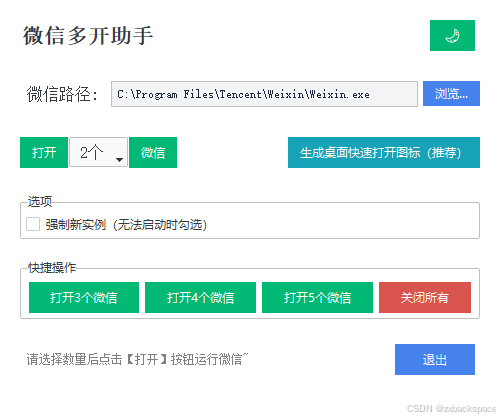
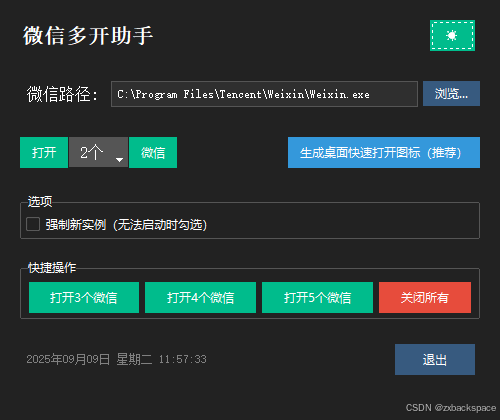
四、下载地址
注意:如果无法创建桌面快捷方式,请右键使用管理员身份运行程序即可!
来自123云盘的分享:微信多开助手.exe
链 接:https://www.123684.com/s/RtztVv-DVNk3?pwd=back
提取码:back





 扫一扫
扫一扫


 1121
1121

 被折叠的 条评论
为什么被折叠?
被折叠的 条评论
为什么被折叠?
 到【灌水乐园】发言





