



 教程介绍了如何在Windows环境下将Gitbash设置为Visual Studio Code(VScode)的默认终端。通过修改VScode的设置JSON文件,注释掉原有配置,并添加新的`gitBash`配置项,指定bash.exe的路径,然后重启VScode即可实现。
VScode配置Gitbash为终端
一、VScode配置Gitbash为终端
按“ctrl” 和 “,” 组合键盘,进入设置:

在“搜索设置”输入:“terminal.integrated.profiles.windows”,进入json编辑:

将原来的选中,按“/”注释掉,然后输入:
{
    "window.zoomLevel": 3,
    "remote.SSH.remotePlatform": {
        "Unbantu": "linux"
    },
    "typescript.disableAutomaticTypeAcquisition": true,
    "C_Cpp.errorSquiggles": "Enabled",
    "cmake.configureOnOpen": true,
    "terminal.integrated.profiles.windows": {
        "gitBash": {
            "path": "D:\\Git\\bin\\bash.exe",
        }
    }
}
如图:
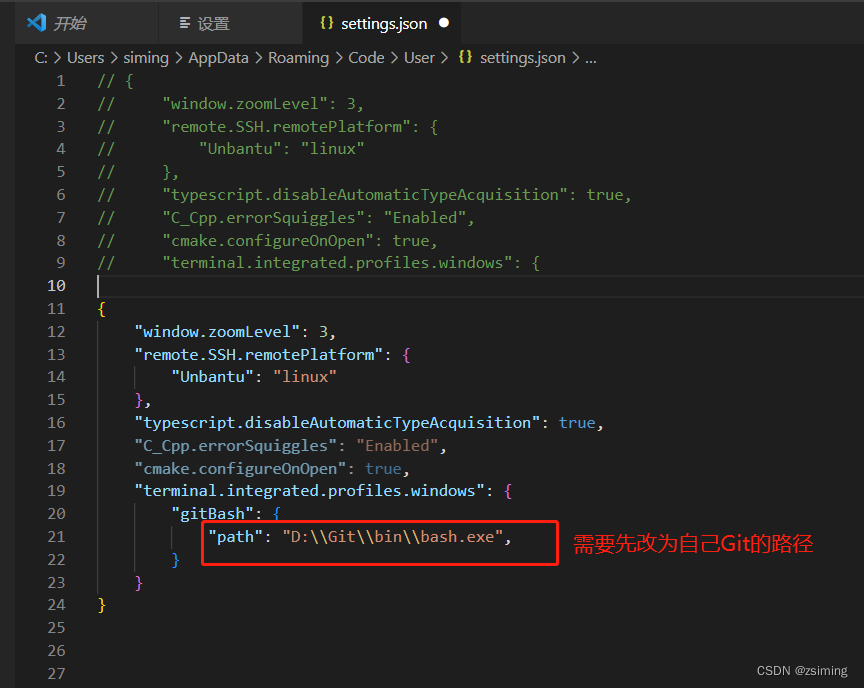
重启VScode即可在终端发现Gitbash。





 扫一扫
扫一扫


 3072
3072

 被折叠的 条评论
为什么被折叠?
被折叠的 条评论
为什么被折叠?
 到【灌水乐园】发言





