



目录:
一、LangGraph简介
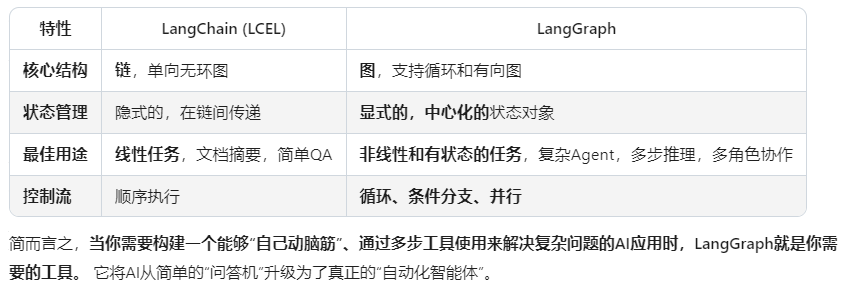
LangGraph是一个非常强大的框架,它专门用来构建有状态的、多环节的AI应用,尤其是那些涉及循环和控制流的复杂Agent工作流。
你可以把它想象成AI应用的“工作流引擎”或“神经系统”。如果说LangChain帮你组装了零件,那么LangGraph就帮你设计了整个机器的运转蓝图。
二、案例分析
案例一:技术支持工单自动分配与处理系统
这是一个经典的多Agent协作场景,非常适合用LangGraph。
🎯 业务场景
用户提交技术支持请求,系统需要:
- 分类问题类型(计费、技术、账户)
- 路由给相应专家Agent
- 收集解决方案
- 必要时升级到人工
📝 LangGraph实现代码
import operator
from typing import Annotated, TypedDict
from langgraph.graph import StateGraph, END
import json

# 1. 定义状态 - 记录整个工单的生命周期信息
class SupportTicketState(TypedDict):
    user_query: str           # 用户原始问题
    problem_type: str         # 问题分类
    specialist_response: str  # 专家回复
    needs_human: bool         # 是否需要人工介入
    resolution: str          # 最终解决方案

# 2. 定义各个节点的功能
def classify_problem_node(state: SupportTicketState):
    """分类节点:确定问题类型"""
    from openai import OpenAI
    client = OpenAI()

    response = client.chat.completions.create(
        model="gpt-4",
        messages=[{
            "role": "system",
            "content": "你将收到用户的技术支持请求,请分类为:billing(计费)、technical(技术)、account(账户)"
        }, {
            "role": "user",
            "content": state["user_query"]
        }]
    )

    classification = response.choices[0].message.content.lower()
    state["problem_type"] = classification
    return state

def route_to_specialist_node(state: SupportTicketState):
    """路由节点:根据问题类型决定下一步流向"""
    problem_type = state["problem_type"]

    if "billing" in problem_type:
        return "billing_specialist"
    elif "technical" in problem_type:
        return "technical_specialist"
    elif "account" in problem_type:
        return "account_specialist"
    else:
        return "general_support"

def billing_specialist_node(state: SupportTicketState):
    """计费专家Agent"""
    print(">>> 计费专家正在处理问题...")
    # 这里可以集成计费系统的API
    state["specialist_response"] = f"已处理您的{state['problem_type']}问题。我们已经检查了您的账单详情..."
    return state

def technical_specialist_node(state: SupportTicketState):
    """技术专家Agent"""
    print(">>> 技术专家正在诊断问题...")
    # 可以调用技术文档库、日志系统等
    state["specialist_response"] = f"技术团队已收到您的{state['problem_type']}问题。建议您..."
    return state

def account_specialist_node(state: SupportTicketState):
    """账户专家Agent"""
    print(">>> 账户专员正在核实信息...")
    state["specialist_response"] = f"账户相关问题已处理。关于关于您的{state['problem_type']}需求..."
    return state

def general_support_node(state: SupportTicketState):
    """通用支持Agent"""
    print(">>> 通用支持正在协助您...")
    state["specialist_response"] = "我们已了解您的问题,正在为您寻找最佳解决方案..."
    return state

def escalation_check_node(state: SupportTicketState):
    """升级检查:判断是否需要人工介入"""
    user_query = state["user_query"].lower()

    # 简单的关键词检测 - 实际中可以更复杂
    urgent_keywords = ['紧急', 'urgent', '立刻', '马上', '投诉']
    if any(keyword in user_query for keyword in urgent_keys in user_query for keyword in urgent_keywords):
        state["needs_human"] = True
        state["resolution"] = "问题已被标记为紧急,我们的客服人员将立即联系您。"
   "
    else:
        state["needs_human"] = False
        state["resolution"] = state["specialist_response"]

    return state

# 3. 构建工作流图
def create_support_graph():
    builder = StateGraph(SupportTicketState)

    # 添加所有节点
    builder.add_node("classify_problem", classify_problem_node)
    builder.add_node("billing_specialist", billing_specialist_node)
    builder.add_node("technical_specialist", technical_specialist_node)
    builder.add_node("account_specialist", account_specialist_node)
    def account_specialist_node(state: SupportTicketState):
    """账户专家Agent"""
    print(">>> 账户专员正在核实信息...")
    state["specialist_response"] = f"账户相关问题已处理。关于您的{state['problem_type']}需求..."
    return state

def general_support_node(state: SupportTicketState):
    """通用支持Agent"""
    print(">>> 通用支持正在协助您...")
    state["specialist_response"] = "我们已了解您的问题,正在为您寻找最佳解决方案..."
    return state

def escalation_check_node(state: SupportTicketState):
    """升级检查:判断是否需要人工介入"""
    user_query = state["user_query"].lower()

    # 简单的关键词检测 - 实际中可以更复杂
    urgent_keywords = ['紧急', 'urgent', '立刻', '马上', '投诉']
    if any(keyword in user_query for keyword in urgent_keywords):
        state["needs_human"] = True
        state["resolution"] = "问题已被标记为紧急,我们的客服人员将立即联系您。"
    else:
        state["needs_human"] = False
        state["resolution"] = state["specialist_response"]

    return state

# 3. 构建工作流图
def create_support_graph():
    builder = StateGraph(SupportTicketState)

    # 添加所有节点
    builder.add_node("classify_problem", classify_problem_node)
    builder.add_node("billing_specialist", billing_specialist_node)
    builder.add_node("technical_specialist", technical_specialist_node)
    builder.add_node("account_specialist", account_specialist_node)
    builder.add_node("general_support", general_support_node)
    builder.add_node("escalation_check", escalation_check_node)

    # 设置工作流起点
    builder.set_entry_point("classify_problem")

    # 从分类节点连接到路由逻辑
    builder.add_conditional_edges(
        "classify_problem",
        lambda state: state["problem_type"],
        {
            "billing": "billing_specialist",
            "technical": "technical_specialist",
            "account": "account_specialist"
        }
    )

    # 从各个专家节点连接到升级检查
    builder.add_edge("billing_specialist", "escalation_check")
    builder.add_edge("technical_specialist", "escalation_check")
    builder.add_edge("account_specialist", "escalation_check")
    builder.add_edge("general_support", "escalation_check")

    # 升级检查后结束
    builder.add_edge("escalation_check", END)

    return builder.compile()

# 4. 使用示例
if __name__ == "__main__":
    graph = create_support_graph()

    # 测试不同场景
    test_cases = [
        "我的信用卡本月扣款金额不对,请帮我核查",  # 计费问题
        "网站登录时一直显示密码错误,但我确定密码是正确的",  # 技术问题
        "我想注销我的账号,请问怎么操作",  # 账户问题
        "紧急!系统完全无法使用了,我要投诉!"  # 紧急情况
    ]

    for i, query in enumerate(test_cases, 1):
        print(f"\n{'='*50}")
        print(f"用例 {i}: {query}")
        print(f"{'='*50}")

        initial_state = {"user_query": query}
        result = graph.invoke(initial_state)

        print(f"问题分类: {result['problem_type']}")
        print(f"解决方案: {result['resolution']}")
        print(f"需要人工: {result['needs_human']}")
🌟 LangGraph的核心使用场景总结:
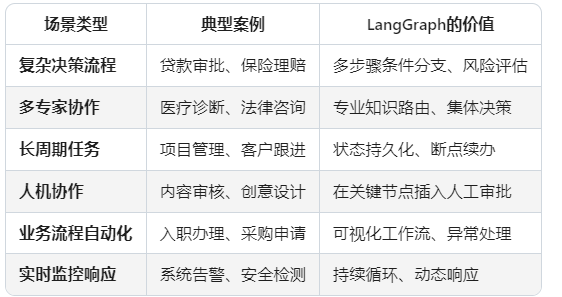
🔧 什么时候应该选择LangGraph?
选择选择LangGraph当你的需求符合以下特征:
✅ 需要超过3个步骤才能完成的任务
✅ 过程中需要根据中间结果做出不同决策
✅ 需要多个不同专业的AI代理协作
✅ 业务流程可能持续很长时间且需要保存进度
✅ 需要在AI自动处理和人工干预之间灵活切换
不需要LangGraph的情况:
❌ 简单的单次问答(直接用ChatGPT API)
❌ 线性的文档处理(用LangChain LCEL足够)
三、代码解析
🏗️ 整体架构思路
这个技术支持系统本质上是一个决策树+专家路由的系统:
用户提问 → 分类问题 → 路由给对应专家 → 检查是否需要升级 → 结束
🔍 第一步:定义状态(State)
class SupportTicketState(TypedDict):
    user_query: str           # 用户原始问题
    problem_type: str         # 问题分类
    specialist_response: str  # 专家回复
    needs_human: bool         # 是否需要人工介入
    resolution: str          # 最终解决方案
🤔 为什么这样设计?
- TypedDict的作用:确保状态对象的类型安全,IDE会有更好的提示
- 共享内存理念:所有节点都读写同一个状态对象,就像团队共用一块白板
- 字段设计的逻辑:
- user_query:保留原始信息,避免传递过程中的信息丢失
- problem_type:分类结果是后续路由的关键依据
- specialist_response:专家的初步答复
- needs_human:决定工作流终点的标志
- resolution:给用户的最终答案
⚙️ 第二步:构建节点(Nodes)
节点1:问题分类器
def classify_problem_node(state: SupportTicketState):
    """分类节点:确定问题类型"""
    from openai import OpenAI
    client = OpenAI()

    response = client.chat.completions.create(
        model="gpt-4",
4",
        messages=[{
            "role": "system",
            "content": "你将收到用户的技术支持请求,请分类为:billing(计费)、technical(技术)、account(账户)"
        }, {
            "role": "user",
            "content": state["user_query"]
        }]
    )

    classification = response.choices[0].message.content.lower()
    state["problem_type"] = classification  # ✅ 更新状态
    return state  # ✅ 返回更新后的状态
🤔 为什么这样设计?
- 专用分类器:用一个专门的LLM调用来确保分类准确
- 系统提示词:明确指导模型按预设类别分类
- 状态更新:将分类结果写入共享状态,供后续节点使用
节点2:路由器
def route_to_specialist_node(state: SupportTicketState):
    """路由节点:根据问题类型决定下一步流向"""
    problem_type = state["problem_type"]

    if "billing" in problem_type:
        return "billing_specialist"  # 🎯 返回下一个节点的名称
    elif "technical" in problem_type:
        return "technical_specialist"
    elif "account" in problem_type:
        return "account_specialist"
    else:
        return "general_support"  # 🛡️ 兜底方案
🤔 为什么这样设计?
- 纯逻辑节点:不调用LLM,只是基于规则的判断
- 字符串匹配:用in操作符进行宽松匹配,提高容错性
- 返回值特殊:返回的是下一个节点的名称,而不是更新状态
🔗 第三步:构建图形(Graph Building)
这是最关键的部分,让我们一步步来看:
3.1 初始化构建器
builder = StateGraph(SupportTicketState)
这行代码创建了一个空的图形框架,并指定了这个图形要处理的数据结构类型。
3.2 注册 注册所有节点
builder.add_node("classify_problem", classify_problem_node)
builder.add_node("billing_specialist", billing_specialist_node)
# ... 其他节点
相当于:给每个团队成员分配座位和职责。
3.3 设置入口点
builder.set_entry_point("classify_problem")
指定工作流的起点是谁。
3.4 建立 建立连接关系 - 最关键!
连接1:分类 → 路由(条件边)
builder.add_conditional_edges(
    "classify_problem",      # 从哪里出发
    lambda state: state["problem_type"],  # 🧠 决策大脑:用什么来判断
    {                        # 🗺️ 路线地图:各种可能性
        "billing": "billing_specialist",
        "technical": "technical_specialist",
        "account": "account_specialist"
    }
)
这里的魔法在于:
- lambda state:
state[“problem_type”]:这个函数告诉LangGraph「请查看当前状态中的problem_type字段」 - 字典映射:根据problem_type的值,决定去哪个节点
连接2:专家 → 升级检查(普通边)
builder.add_edge("billing_specialist", "escalation_check")
builder.add_edge("technical_specialist", "escalation_check")
# ...
相当于:不管哪位专家处理完问题,都要送到质检员那里检查。
3.5 编译图形
graph = builder.compile()
这一步把所有的定义和配置「固化」成一个可执行的工作流对象。
🚀 第四步:执行工作流
初始状态设置
initial_state = {"user_query": "我的信用卡本月扣款金额不对"}
创建一个初始的「白板」,上面只有用户的问题。
启动工作流
result = graph.invoke(initial_state)
这个过程会:
- 开始于 classify_problem 节点
- 读取 user_query: “我的信用卡本月扣款金额不对”
- 调用LLM进行分类 → 得到 problem_type: “billing”
- 路由逻辑:看到"billing",决定前往 billing_specialist
- 执行专家节点:计费专家处理问题
- 前往升级检查:检查是否需要人工介入
- 到达终点 END
🎯 完整执行流程演示
让我们跟踪一个具体案例的执行过程:
输入:
Json
{
  "user_query": "我的信用卡本月扣款金额不对"
}
第1步:分类节点
- 输入状态:{“user_query”: “我的信用卡…”, 其他字段为空}
- 处理后状态:{“user_query”: “…”, “problem_type”: “billing”}
- 决策:因为值是"billing",所以下一个节点是 billing_specialist
第2步:计费专家节点
- 输入状态:同上
- 处理后状态:增加了 “specialist_response”: “已处理您的billing问题…”
第3步:升级检查节点
- 分析:"我的信用卡…“中没有"紧急”、"投诉"等关键词
- 结果:“needs_human”: false, “resolution”: “已处理您的billing问题…”
最终结果:
Json
{
  "user_query": "我的信用卡本月扣款金额不对",
  "problem_type": "billing",
  "specialist_response": "已处理您的billing问题...",
  "needs_human": false,
  "resolution": "已处理您的billing问题..."
}
❓ ❓ 常见疑问解答
Q: 为什么要用lambda state: state[“problem_type”]?
A: 这是一个决策函数,告诉LangGraph:「请查看当前状态里的problem_type字段值,用它来决定下一步去哪」
Q: 条件边和普通边的区别?
A:
条件边:有多个可能的去向,需要根据条件判断
普通边:只有一个固定的去向
Q: 状态是如何在不同节点间传递的?
A: 每个节点都接收当前状态,可以修改它,然后返回更新后的状态
Q: 为什么每个节点最后都要return state?
A: 这是LangGraph的约定,每个节点必须返回状态对象
💡 核心设计原则总结
- 状态为中心:所有节点围绕同一个状态对象工作
- 职责分离:每个节点只做一件事(分类、路由、处理、检查)
- 条件路由:根据不同情况走不同路径
- 渐进完善:随着工作流推进,状态逐渐丰富直至完成
这样的设计让复杂的工作流变得可视化、可维护、可扩展。如果需要新增一种问题类型,只需要:
- 新增新增一个专家节点
- 在路由逻辑中添加对应的映射关系





 扫一扫
扫一扫


 662
662

 被折叠的 条评论
为什么被折叠?
被折叠的 条评论
为什么被折叠?
 到【灌水乐园】发言





