1、页面布局一
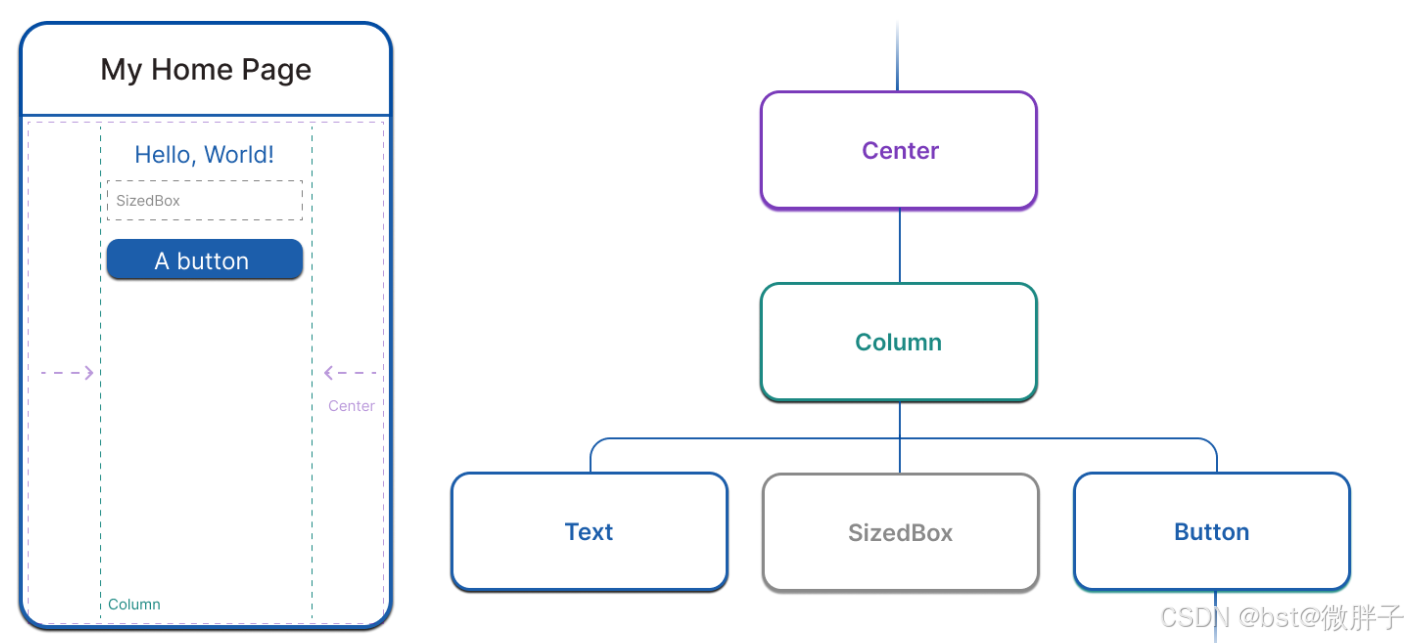
import 'package:flutter/material.dart';
import 'package:flutter/services.dart';
void main() => runApp(const MyApp());
class MyApp extends StatelessWidget {
const MyApp({
super.key});
@override
Widget build(BuildContext context) {
return MaterialApp(
home: Scaffold(
appBar: AppBar(
title: const Text('My Home Page'),
),
body: Center(
child: Builder(
builder: (context) {
return Column(
children: [
const Text('Hello, World!'),
const SizedBox(height: 20),
ElevatedButton(
onPressed: () {
print('Click!');
},
child: const Text('A button'),
),
],
);
},
),
),
),
);
}
}
2、无状态组件StatelessWidget和有状态组件StatefulWidget
2.1、无状态组件示例
import 'package:flutter/material.dart';
import 'package:flutter_haoke/pages/home/info/data.dart';
import 'package:flutter_haoke/pages/home/info/index_widget.dart';

class Info extends StatelessWidget {


  final bool showTitle;
  final List<InfoItem> dataList;

  const Info({

   Key? key, this.showTitle = false, this.dataList = infoData})
      : super(key: key);

  @override
  Widget build(BuildContext context) {


    return Container(
      child: Column(
        children: [
          if (showTitle)
            Container(
              padding: EdgeInsets.all(10),
              alignment: Alignment.centerLeft,
              child: Text(
                "更多资讯",
                style: TextStyle(fontSize: 14.0, fontWeight: FontWeight.w600),
              ),
            ),
          Column(
            children: dataList.map((e) {


              return InfoItemWidget(e);
            }).toList(),
          )
        ],
      ),
    );
  }
}
2.2、有状态组件示例
class CounterWidget extends StatefulWidget {


  @override
  State<CounterWidget> createState() => _CounterWidgetState()



 最低0.47元/天 解锁文章






 扫一扫
扫一扫


 2377
2377

 被折叠的 条评论
为什么被折叠?
被折叠的 条评论
为什么被折叠?
 到【灌水乐园】发言





