


我个人一直以为使用PYTHON和FLEX通过PYAMF通信是BS RIA的王道,不过在JAVA加强了对webservice的支持之后,在我对JAVA不那么偏执之后,我觉得是不是有必要也来看一下JAVA 和FLEX的集成,不管怎么样,这篇文章转给大家
Building a CRUD application using Java 6 Web Services and Flash Builder 4
October 12, 2009 5:29 PM
Java SE 6 has built-in support for web services thanks to JAX-WS 2.0 . Armed with nothing more than JDK 6, you can easily publish or consume a web service. This makes it really easy for a developer to prototype and quickly get started with web services. Using the data-centric features in Flash Builder 4, a web service can be easily introspected and accessed. In this article, I will build an end-to-end simple CRUD application in Java and Flex 4, where the Java methods are exposed as web service operations.
Java 6 Goodness
On the java side, all you need for this article is JDK 6 and optionally the mysql connector JAR if you want to run the final application.
To look at the complete Java code, download BookService.java and Book.java . The sample uses a simple mysql table called Books:
CREATE
 TABLE
 Books


(

   BOOK_ID SMALLINT
 UNSIGNED NOT
 NULL
 AUTO_INCREMENT,

   BOOK_NAME VARCHAR
(400) NOT
 NULL
,

   BOOK_PRICE FLOAT
 NOT
 NULL
,

   BOOK_AUTHOR VARCHAR
(400) NOT
 NULL
,

   PRIMARY
 KEY
 (BOOK_ID)

);


INSERT
 INTO
 Books ( BOOK_NAME, BOOK_PRICE, BOOK_AUTHOR )

       VALUES
 ( 'Midnight''s Children'
, 250, 'Salman Rushdie'
)

INSERT
 INTO
 Books ( BOOK_NAME, BOOK_PRICE, BOOK_AUTHOR )

       VALUES
 ( 'Shame'
, 225, 'Salman Rushdie'
);

INSERT
 INTO
 Books ( BOOK_NAME, BOOK_PRICE, BOOK_AUTHOR )

       VALUES
 ( 'To Kill a Mocking Bird'
, 250, 'Harper Lee'
);

INSERT
 INTO
 Books ( BOOK_NAME, BOOK_PRICE, BOOK_AUTHOR )

       VALUES
 ( 'The Colour of Magic'
, 250, 'Terry Pratchett'
);
To expose your Java class as a web service, simply:
1) Annotate your Java class with @WebService, @WebMethod.
package
 com.sampl
e
;


import
 com
.sample
.Boo
k
;

import
 javax
.jws
.WebServic
e
;

import
 javax
.jws
.WebMetho
d
;

import
 javax
.jws
.soap
.SOAPBindin
g
;

import
 javax
.xml
.ws
.Endpoin
t
;


@WebService

@SOAPBinding(style = SOAPBinding
.Style
.RPC)

public
 class
 BookService

{


    @WebMethod

    public
 int
 addBook(Book
 book
)

    {

        /*
insert book into db
*/


        in
t
 resultCode
 = 0;

        Connectio
n
 connection
 = null;

/*
code omitted for brevity
*/
2) Use the Endpoint class in main()
   public
 static
 voi
d
 main
(String
[] args
)

    {

        //
create and publish an endpoint


        BookServic
e
 bookservice
 = new
 BookService
();

        Endpoin
t
 endpoint
 = Endpoint.publish("http://localhost:8080/books"
, bookservice);

    }
3) Create a directory called generated and run apt (Annotation Processing Tool):
apt -cp .;mysql.jar -d generated com/sample/BookService.java
4) Run your class:
java -cp generated;mysql.jar com.sample.BookService
That's it, you have a web server running on localhost:8080 and you can access the WSDL by navigating to http://localhost:8080/books?wsdl
Flash Builder 4 Magic
Accessing the WSDL in Flash Builder 4 to build a Flex application is a snap.
1) Get Adobe Flash Builder 4 Beta 2 from Adobe Labs if you haven't already.
2) Create a new Flex Project, type in a project name and hit Finish.
3) In the bottom part of Flash Builder, choose the Data/Services tab and click on "Connect to Data/Service".
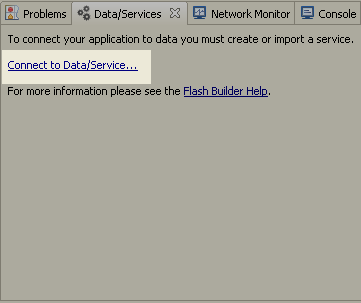
4) Pick Web Service, hit Next.

5) Paste the WSDL URL http://localhost:8080/books?wsdl as the "WSDL URI" and hit Finish.
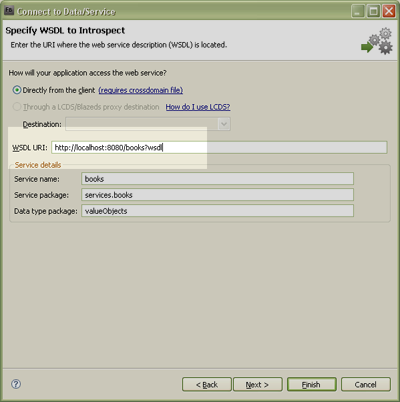
6) Flash Builder 4 will introspect the WSDL and show you a list of operations you can select. Hit Finish.
Wiring it to a Flex UI
1) Start off by replacing your main MXML file with the following code:
<?xml
 version
="1.0"
 encoding
="utf-8"
?>

<s
:Application
 xmlns
:fx
="http://ns.adobe.com/mxml/2009"


	       xmlns
:s
="library://ns.adobe.com/flex/spark"


	       xmlns
:mx
="library://ns.adobe.com/flex/halo"


               minWidth
="1024"
 minHeight
="768"
>

<s
:Panel
 title
="Books"
 x
="61"
 y
="78"
 width
="124"
 height
="387"
>

  <s
:List
 id
="list"
 x
="0"
 y
="10"
 width
="100%"
 height
="100%"


	  borderVisible
="false"
></s
:List
>

</s
:Panel
>

<s
:Panel
 title
="Book Info"
 x
="193"
 y
="78"
 width
="379"
 height
="387"
>

  <mx
:Form
 x
="0"
 y
="10"
 width
="377"
 height
="300"
>

  </mx
:Form
>

  <s
:HGroup
 x
="66"
 y
="309"


	    height
="46"


	    verticalAlign
="middle"


	    contentBackgroundColor
="#938F8F"
>

    <s
:Button
 label
="Add"
 id
="button"
  />

    <s
:Button
 label
="Update"
 id
="button2"
 />

    <s
:Button
 label
="Delete"
 id
="button3"
 />

    <s
:Button
 label
="Get"
 id
="button4"
  />

  </s
:HGroup
>

</s
:Panel
>

</s
:Application
>
You should now have a UI that looks this in design view:
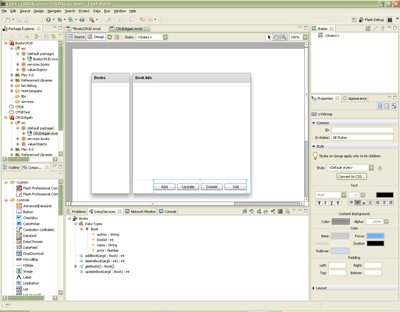
2) Switch to design view. Select the list in the "Books" panel. Right click the list and choose "Bind to Data".

3) Choose "New service call" and select the operation as getBooks() . Choose "Bind to field" as name.
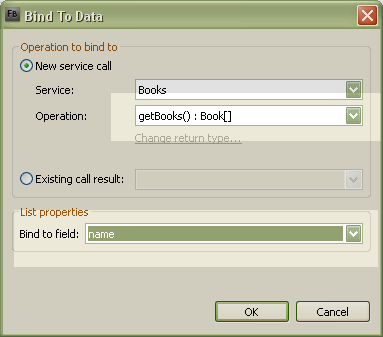
4) Now select the form in the "Book Info" panel, right click it and choose "Bind to Data." Choose "Data type" in the "Generate form for" drop down. Hit Next.
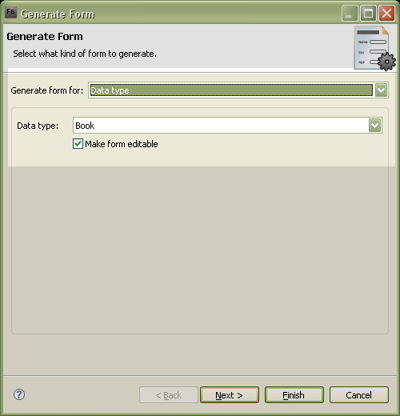
You can choose the ordering of values in the wizard.
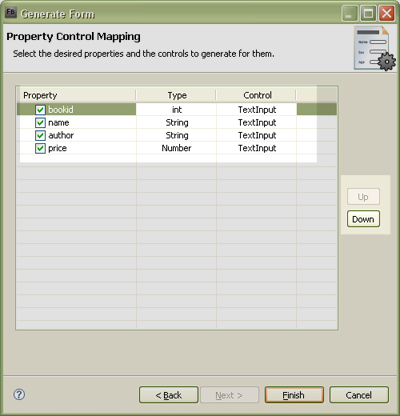
The generated form by default is bound to a value object with name "book."
5) Right click the list in the "Books" panel and choose "Generate Change Handler." The view will shift to source code and type in the following code into the change event handler:
/*
point book to the selected item
*/


book = list.selectedItem as Book
;
This is done so that every time the selected changes in the list, the form on the right is updated. If you run the application now, it should get the list of books from the server.
6) To make sure the first item in the list is selected every time the list is retrieved from the server, add a "result" event handler to the CallResponder that fetches the data in your main MXML file.
<s
:CallResponder
 id
="getBooksResult"
 result
="list.selectedIndex=0"
/>
CRUD
Getting the Add/Update/Delete/Get buttons to work is painless:
1) Select the Add button in design view.
2) Right click, choose "Generate Service Call" and choose the addBook operation.
3) The IDE automatically switches to source view so that you can type in the parameter to the addBook operation. Simply type in book
protected
 functio
n
 button_clickHandler
(event:MouseEvent
):void


{

    addBookResult.token = books.addBook(book);

}

4) Repeat steps 1 - 3 for the update and delete buttons. The delete button uses an integer parameter, book.bookid instead of book .
5) Right click the "Get" button and choose "Generate Click Handler." In the event handler, call the list's creation complete method.
protected
 functio
n
 button4_clickHandler
(event:MouseEvent
):void


{

    list_creationCompleteHandler(null);

}
6) Optionally you could call list_creationCompleteHandler(null) after add, update and delete so that the list on the left is refreshed.
That's it, you have a CRUD app working! You can download the complete MXML file here.

Conclusion
Web services are an easy medium to tap into for both Java and Flex developers. JDK 6 and Flash Builder comes with out-of-the-box support for it and you can quickly have an end-to-end application ready in no time.

 3295


 扫一扫


 被折叠的 条评论
为什么被折叠?
 到【灌水乐园】发言


