【DRCN阅读】Deep Reconstruction-Classification Networks for Unsupervised Domain Adaptation. 论文笔记

1. 基本介绍

  1. 代码: 有Keras和Pytorch两个版本,网址分别是:https://github.com/ghif/drcn https://github.com/fungtion/DRCN
  2. 2016年一篇ECCV的文章
  3. 主要贡献:
    1. 给源域有标签的数据作分类(有监督);
    2. 能够学习到目标域无标签数据的特征表达(无监督)。

2. 方法:

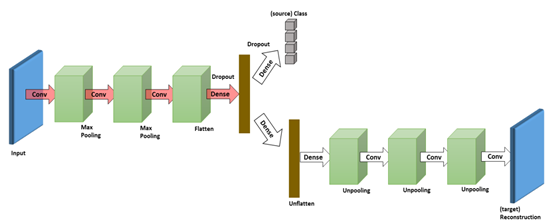
方法流程图

2.1 主要结构

这个网络可以看成有三个部分:

  1. 第一部分就是Encoder部分(左边公用的部分):将图像进行编码,提取图片的特征。
  2. 第二部分就是处理分类任务(右上):对源域的数据进行分类。
  3. 第三部分就是Decoder部分(右下):该部分网络与Encoder部分正好相反,如果Decoder最终的输出和原始Encoder的输入差距很小,我们就可以认为Encoder部分学习到的关于目标域的特征表达是有效的。

论文中是在手写数字集上进行训练的,所以网络结构都不是很深。Encoder部分:conv1-pool1-conv2-pool2-conv3-fc4-fc5。Decoder部分和Encoder部分完全相反。

2.2 具体训练过程:

用source data训练Encodet+Label(用于分类那

在搜索引擎中,`allintitle:` 是一种搜索指令,用于限定搜索结果的标题中必须包含指定的关键词。使用 `allintitle: Unsupervised bidirectional contrastive reconstruction and adaptive fine-grained channel attention networks for image dehazing` 进行搜索,会返回标题中精确包含 “Unsupervised bidirectional contrastive reconstruction and adaptive fine-grained channel attention networks for image dehazing” 的网页、学术论文等资源。 例如在 Google 等搜索引擎中输入该指令,就会按照此规则筛选出相关内容。同时,在学术数据库如 IEEE Xplore、ACM Digital Library、Web of Science、CNKI 等平台,也可以将此指令适当调整后用于搜索标题符合要求的学术文献。 在 Python 中可以利用 `selenium` 库模拟浏览器搜索该指令,示例代码如下: ```python from selenium import webdriver from selenium.webdriver.common.by import By import time # 设置 Chrome 浏览器驱动路径 driver = webdriver.Chrome() # 打开 Google 搜索页面 driver.get('https://www.google.com') # 找到搜索框并输入搜索指令 search_box = driver.find_element(By.NAME, 'q') search_box.send_keys('allintitle: Unsupervised bidirectional contrastive reconstruction and adaptive fine-grained channel attention networks for image dehazing') # 模拟按下回车键进行搜索 search_box.submit() # 等待页面加载 time.sleep(5) # 获取搜索结果 results = driver.find_elements(By.CSS_SELECTOR, 'div.g') for result in results: title = result.find_element(By.TAG_NAME, 'h3').text link = result.find_element(By.TAG_NAME, 'a').get_attribute('href') print(f"标题: {title}") print(f"链接: {link}") print("-" * 50) # 关闭浏览器 driver.quit() ```
评论
添加红包

请填写红包祝福语或标题

红包个数最小为10个

红包金额最低5元

当前余额3.43前往充值 >
需支付:10.00
成就一亿技术人!
领取后你会自动成为博主和红包主的粉丝 规则
hope_wisdom
发出的红包
实付
使用余额支付
点击重新获取
扫码支付
钱包余额 0

抵扣说明:

1.余额是钱包充值的虚拟货币,按照1:1的比例进行支付金额的抵扣。
2.余额无法直接购买下载,可以购买VIP、付费专栏及课程。

余额充值