 MT7988A与MT7987A CPU性能对比


在大家的印象中,有哪些描述一款CPU性能的指标呢?我先列举几个:
-
CPU架构和内核,比如x86酷睿、ARM Cortex-A73、RISC-V等。
-
CPU核心数量,如双核、四核等。
-
CPU缓存容量,比如一级缓存、二级缓存,甚至三级缓存的容量。
-
CPU主频,比如2.0GHz。
以上指标都是固化的数据,对于硬件性能测试而言,目前在嵌入式CPU行业中普遍公认的性能测试指标的标准主要使用以下三种:
-
MIPS/MHz :表示 CPU 在每 1MHz 的运行速度下可以执行多少个MIPS ,如 10MIPS/MHz,表示如果 CPU 运行在 1MHz 的频率下,每秒可执行一千万条指令,如果 CPU 运行在 5MHz 的频率下,每秒可执行五千万条指令。
-
DMIPS:Dhrystone MIPS,并非字面上每秒百万条指令的意思。它是CPU运行一个叫Dhrystone(整数运算)的测试程序时表现出来的相对性能高低的一个单位。当然,它的缺点也很明显,无法体现浮点运算的性能。
-
CoreMark:CoreMark是由EEMBC(Embedded Microprocessor Benchmark Consortium)的Shay Gla-On于2009年提出的一项基准测试程序,CoreMark的主要目标是简化操作,并提供一套测试单核处理器核心的方法。测试标准是在配置参数的组合下单位时间内运行的CoreMark程序次数(单位:CoreMark/MHz),该数字值越大则说明测试的性能越好。
接下来,我们就围绕MTK的两款Wi-Fi 7平台MT7987A和MT7988A来对比介绍CPU性能的测试指标和测试方法。
BogoMIPS
在Linux系统中,还有一个BogoMIPS指标,它是 Linus 本人的独创,Bogo 意思是“假的,伪造的”,MIPS 意思是“Millions of Instructions Per Second”,如果系统启动时,计算出BogoMIPS为 100,可记为 100万条伪指令每秒。之所以叫伪指令,是因为在计算BogoMIPS的值时,CPU 一直在单一的执行 NOP (空操作),而不是随机执行指令集中的任意指令,所以不能以此作为 CPU 的性能指标,仅用作参考。
在OpenWrt系统中,可以通过procfs文件系统查看cpuinfo信息,其中就可以看到有关BogoMIPS的测试结果,
下面是MT7987A的输出结果:
root@OpenWrt:/# cat /proc/cpuinfoprocessor : 0model name : ARMv8 Processor rev 4 (v8l)BogoMIPS : 26.00Features : fp asimd evtstrm aes pmull sha1 sha2 crc32 cpuidCPU implementer : 0x41CPU architecture: 8CPU variant : 0x0CPU part : 0xd03CPU revision : 4processor : 1model name : ARMv8 Processor rev 4 (v8l)BogoMIPS : 26.00Features : fp asimd evtstrm aes pmull sha1 sha2 crc32 cpuidCPU implementer : 0x41CPU architecture: 8CPU variant : 0x0CPU part : 0xd03CPU revision : 4processor : 2model name : ARMv8 Processor rev 4 (v8l)BogoMIPS : 26.00Features : fp asimd evtstrm aes pmull sha1 sha2 crc32 cpuidCPU implementer : 0x41CPU architecture: 8CPU variant : 0x0CPU part : 0xd03CPU revision : 4processor : 3model name : ARMv8 Processor rev 4 (v8l)BogoMIPS : 26.00Features : fp asimd evtstrm aes pmull sha1 sha2 crc32 cpuidCPU implementer : 0x41CPU architecture: 8CPU variant : 0x0CPU part : 0xd03CPU revision : 4
同样,对应的MT7988A的结果如下:
root@TestMode:/# cat /proc/cpuinfoprocessor : 0model name : ARMv8 Processor rev 0 (v8l)BogoMIPS : 26.00Features : fp asimd evtstrm aes pmull sha1 sha2 crc32 cpuidCPU implementer : 0x41CPU architecture: 8CPU variant : 0x1CPU part : 0xd09CPU revision : 0processor : 1model name : ARMv8 Processor rev 0 (v8l)BogoMIPS : 26.00Features : fp asimd evtstrm aes pmull sha1 sha2 crc32 cpuidCPU implementer : 0x41CPU architecture: 8CPU variant : 0x1CPU part : 0xd09CPU revision : 0processor : 2model name : ARMv8 Processor rev 0 (v8l)BogoMIPS : 26.00Features : fp asimd evtstrm aes pmull sha1 sha2 crc32 cpuidCPU implementer : 0x41CPU architecture: 8CPU variant : 0x1CPU part : 0xd09CPU revision : 0processor : 3model name : ARMv8 Processor rev 0 (v8l)BogoMIPS : 26.00Features : fp asimd evtstrm aes pmull sha1 sha2 crc32 cpuidCPU implementer : 0x41CPU architecture: 8CPU variant : 0x1CPU part : 0xd09CPU revision : 0
从这里可以看出,MT7987A和MT7988A两款CPU的BogoMIPS性能都是26,并不能看出两者的差异,我们从该指标的实现原理也不难看出,这个不能作为性能测试的评判依据,仅仅是一个参考。但是不同的硬件平台比较的话,有一个相对大小的概念,比如下面的Ubuntu平台的PC硬件BogoMIPS性能就来到了7585,这跟路由器芯片的26比,差距就很明显了。
ruok@vm:~$ cat /proc/cpuinfoprocessor : 0vendor_id : AuthenticAMDcpu family : 25model : 116model name : AMD Ryzen 7 7840HS w/ Radeon 780M Graphicsstepping : 1cpu MHz : 3792.874cache size : 1024 KBphysical id : 0siblings : 1core id : 0cpu cores : 1apicid : 0initial apicid : 0fpu : yesfpu_exception : yescpuid level : 16wp : yesflags : fpu vme de pse tsc msr pae mce cx8 apic sep mtrr pge mca cmov pat pse36 clflush mmx fxsr sse sse2 syscall nx mmxext fxsr_opt pdpe1gb rdtscp lm constant_tsc rep_good nopl tsc_reliable nonstop_tsc cpuid extd_apicid pni pclmulqdq ssse3 fma cx16 sse4_1 sse4_2 x2apic movbe popcnt aes xsave avx f16c rdrand hypervisor lahf_lm extapic cr8_legacy abm sse4a misalignsse 3dnowprefetch osvw topoext ssbd ibrs ibpb vmmcall fsgsbase bmi1 avx2 smep bmi2 erms invpcid avx512f avx512dq rdseed adx smap avx512ifma clflushopt clwb avx512cd sha_ni avx512bw avx512vl xsaveopt xsavec xgetbv1 xsaves avx512_bf16 clzero wbnoinvd arat avx512vbmi umip pku ospke avx512_vbmi2 gfni vaes vpclmulqdq avx512_vnni avx512_bitalg avx512_vpopcntdq rdpid overflow_recov succor flush_l1dbugs : fxsave_leak sysret_ss_attrs null_seg spectre_v1 spectre_v2 spec_store_bypassbogomips : 7585.74TLB size : 2560 4K pagesclflush size : 64cache_alignment : 64address sizes : 45 bits physical, 48 bits virtualpower management:...
DMIPS
DMIPS这个指标在描述CPU性能时还是比较常见的,比如在MTK的CPU数据手册中,就有该数值的说明:
-
MT7988A:Quad-Core CA73@1.8GHz, 64-bit, 27K DMIPS
-
MT7987A:Quad-Core CA53@2.0GHz, 64-bit, 18.4K DMIPS
这样看起来还是相对直观的,也就是在DMIPS指标方面,MT7988A比现在主流款型MT7987A的性能要高出46.7%。
那么,DMIPS这个数据是怎么得来的呢?一方面可以测试出来,具体算法如下:
DMIPS算力= 核心数 x 频率MHz x DMIPS/MHz
这里的DMIPS/MHz数据我们可以自己写程序计算,不过像ARM这种厂商,一般都提供了不同内核的测试结果数据,例如:
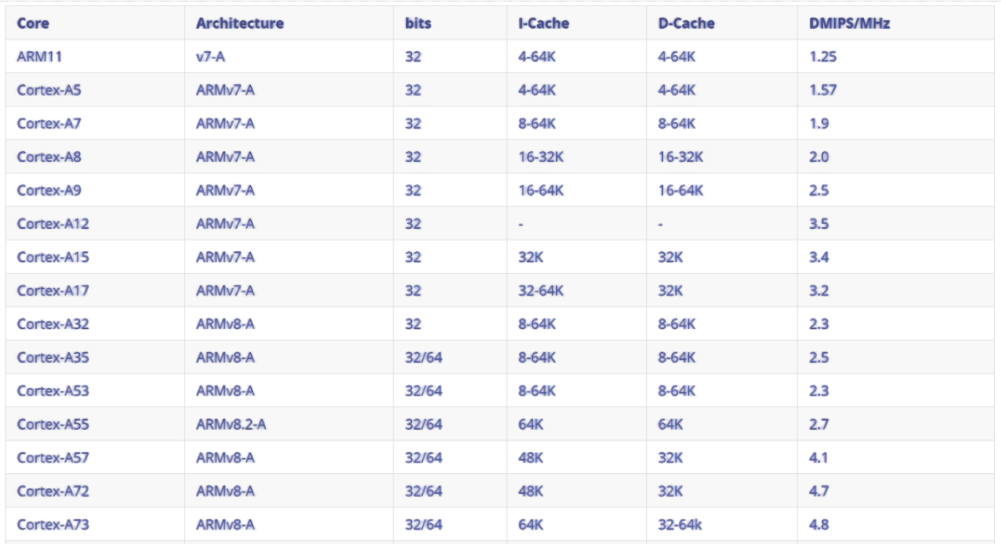
比如,MT7987A DMIPS = 4 x 2000 x 2.3 = 18.4K DMIPS,跟我们前面的数据能够对上。
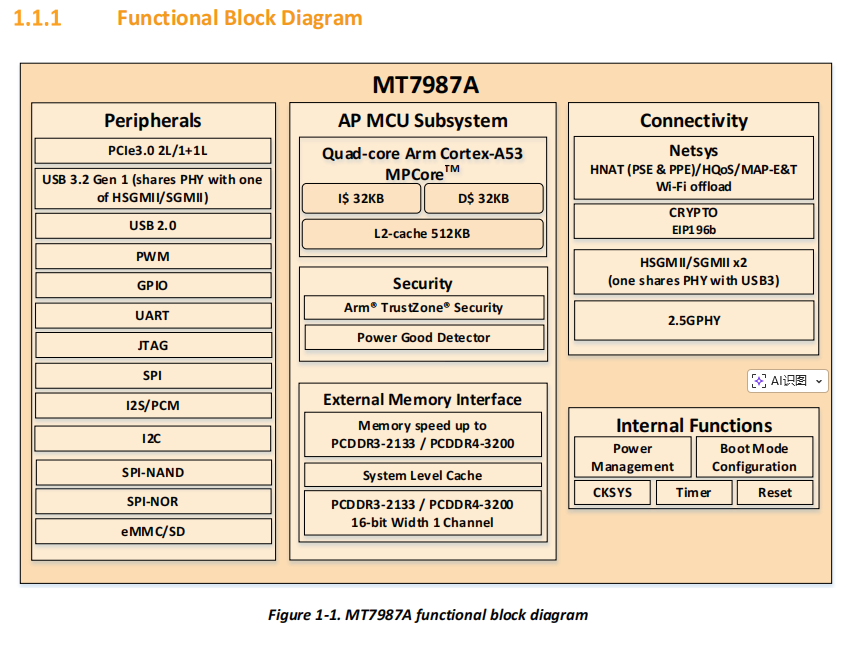
对应的测试程序实现,可以参考ARM官网提供的示例代码:
https://documentation-service.arm.com/static/6331d18bda191e7fe057c931
当然,在路由器领域,有平台专门整理了路由器CPU的性能天梯图,也是基于DMIPS算力的,比如:
https://cpuranklist.com/routercpu.php
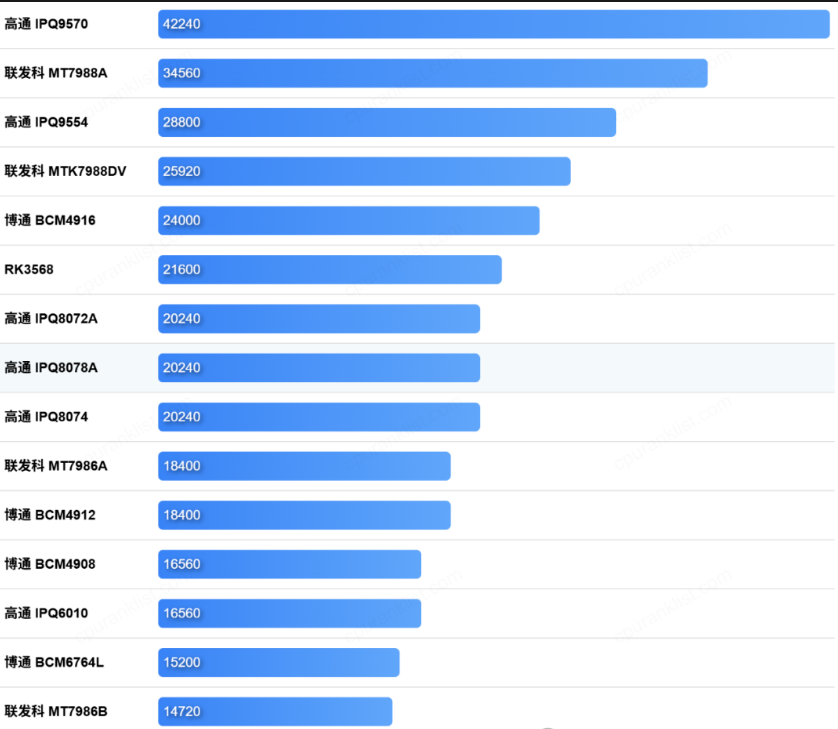
不过发现问题了,这里可以看到上图中的MT7988A DMIPS性能是34560 DMIPS,而我们前面的数据是27K DMIPS,这个数据出自如下位置:
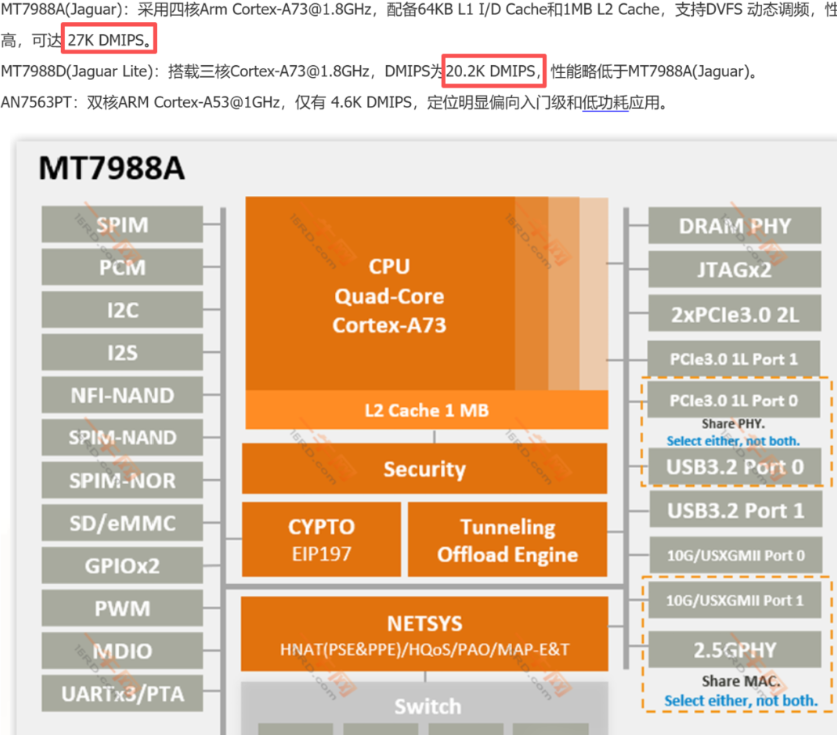
https://www.16rd.com/writings-864871-1.html
如果我们按照公式计算,MT7988A DMIPS = 4 x 1800 x 4.8 = 34560 DMIPS,这个结果跟天梯图的数据一致。所以,各位网友看看哪一个数据是正确的呢?
CoreMark
CoreMark是一套简化的CPU单核性能测试工具。在OpenWrt中默认支持CoreMark软件包,可以执行make menuconfig命令,在弹出的菜单中搜索coremark:
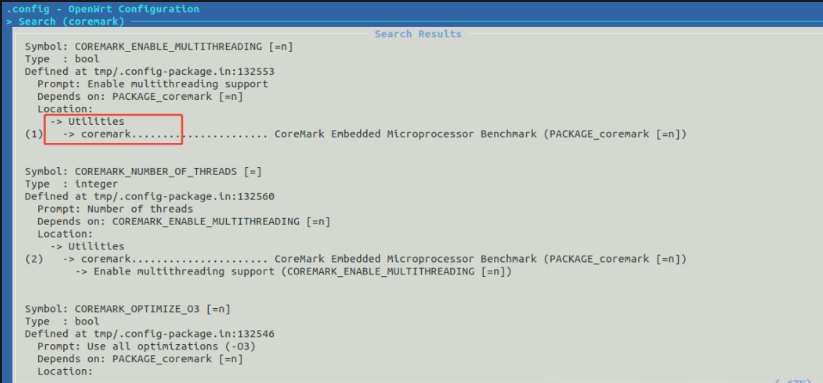
可以在Utilities分类中找到它,如下所示:
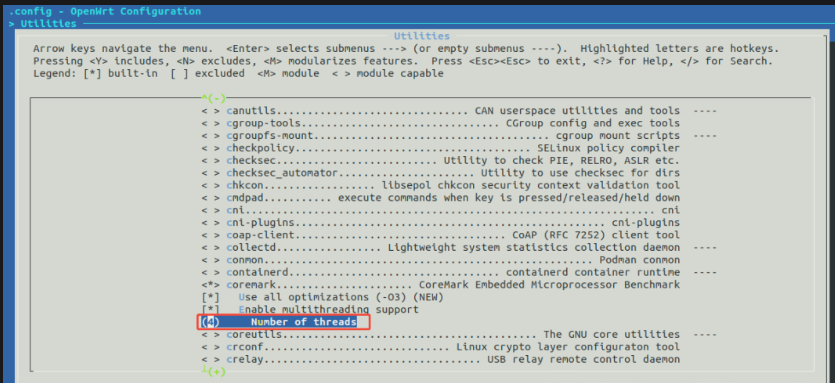
注意,在这里我们可以勾选多线程测试,这里的线程数量选择输入跟CPU的核心数量一致。然后保存配置并退出,重新编译固件,最后升级设备的固件。
比如,在MT7987A上运行coremark命令结果如下:
root@OpenWrt:/# coremark2K performance run parameters for coremark.CoreMark Size : 666Total ticks : 16016Total time (secs): 16.016000Iterations/Sec : 27472.527473Iterations : 440000Compiler version : GCC8.4.0Compiler flags : -pipe -mcpu=cortex-a53 -fno-caller-saves -fno-plt -fhonour-copts -Wno-error=unused-but-set-variable -Wno-error=unused-result -fmacro-prefix-map=/home/ruok/Desktop/openwrt/build_dir/target-aarch64_cortex-a53_musl/coremark-5e0f662ce709f1af8d272bd8d3960034603d3850=coremark-5e0f662ce709f1af8d272bd8d3960034603d3850 -Wformat -Werror=format-security -fstack-protector -D_FORTIFY_SOURCE=1 -Wl,-z,now -Wl,-z,relro -flto -O3 -DMULTITHREAD=4 -DUSE_PTHREAD -lrtParallel PThreads : 4Memory location : Please put data memory location here(e.g. code in flash, data on heap etc)seedcrc : 0xe9f5[0]crclist : 0xe714[1]crclist : 0xe714[2]crclist : 0xe714[3]crclist : 0xe714[0]crcmatrix : 0x1fd7[1]crcmatrix : 0x1fd7[2]crcmatrix : 0x1fd7[3]crcmatrix : 0x1fd7[0]crcstate : 0x8e3a[1]crcstate : 0x8e3a[2]crcstate : 0x8e3a[3]crcstate : 0x8e3a[0]crcfinal : 0x33ff[1]crcfinal : 0x33ff[2]crcfinal : 0x33ff[3]crcfinal : 0x33ffCorrect operation validated. See README.md for run and reporting rules.CoreMark 1.0 : 27472.527473 / GCC8.4.0 -pipe -mcpu=cortex-a53 -fno-caller-saves -fno-plt -fhonour-copts -Wno-error=unused-but-set-variable -Wno-error=unused-result -fmacro-prefix-map=/home/ruok/Desktop/openwrt/build_dir/target-aarch64_cortex-a53_musl/coremark-5e0f662ce709f1af8d272bd8d3960034603d3850=coremark-5e0f662ce709f1af8d272bd8d3960034603d3850 -Wformat -Werror=format-security -fstack-protector -D_FORTIFY_SOURCE=1 -Wl,-z,now -Wl,-z,relro -flto -O3 -DMULTITHREAD=4 -DUSE_PTHREAD -lrt / Heap / 4:PThreads
计算结果参见最后一行:
CoreMark 1.0 : 27472.527473
同理,在MT7988A上运行coremark命令结果如下:
root@TestMode:/# coremark
2K performance run parameters for coremark.CoreMark Size : 666Total ticks : 11048Total time (secs): 11.048000Iterations/Sec : 39826.212889Iterations : 440000Compiler version : GCC8.4.0Compiler flags : -pipe -mcpu=cortex-a53 -fno-caller-saves -fno-plt -fhonour-copts -Wno-error=unused-but-set-variable -Wno-error=unused-result -fmacro-prefix-map=/home/ruok/Desktop/openwrt/build_dir/target-aarch64_cortex-a53_musl/coremark-5e0f662ce709f1af8d272bd8d3960034603d3850=coremark-5e0f662ce709f1af8d272bd8d3960034603d3850 -Wformat -Werror=format-security -fstack-protector -D_FORTIFY_SOURCE=1 -Wl,-z,now -Wl,-z,relro -flto -O3 -DMULTITHREAD=4 -DUSE_PTHREAD -lrtParallel PThreads : 4Memory location : Please put data memory location here(e.g. code in flash, data on heap etc)seedcrc : 0xe9f5[0]crclist : 0xe714[1]crclist : 0xe714[2]crclist : 0xe714[3]crclist : 0xe714[0]crcmatrix : 0x1fd7[1]crcmatrix : 0x1fd7[2]crcmatrix : 0x1fd7[3]crcmatrix : 0x1fd7[0]crcstate : 0x8e3a[1]crcstate : 0x8e3a[2]crcstate : 0x8e3a[3]crcstate : 0x8e3a[0]crcfinal : 0x33ff[1]crcfinal : 0x33ff[2]crcfinal : 0x33ff[3]crcfinal : 0x33ffCorrect operation validated. See README.md for run and reporting rules.CoreMark 1.0 : 39826.212889 / GCC8.4.0 -pipe -mcpu=cortex-a53 -fno-caller-saves -fno-plt -fhonour-copts -Wno-error=unused-but-set-variable -Wno-error=unused-result -fmacro-prefix-map=/home/ruok/Desktop/openwrt/build_dir/target-aarch64_cortex-a53_musl/coremark-5e0f662ce709f1af8d272bd8d3960034603d3850=coremark-5e0f662ce709f1af8d272bd8d3960034603d3850 -Wformat -Werror=format-security -fstack-protector -D_FORTIFY_SOURCE=1 -Wl,-z,now -Wl,-z,relro -flto -O3 -DMULTITHREAD=4 -DUSE_PTHREAD -lrt / Heap / 4:PThreads
计算结果参见最后一行:
CoreMark 1.0 : 39826.212889
所以,在CoreMark单核性能指标方面,MT7987A跑分27472,MT7988A跑分39826,后者高出45%。
总结
本文简单介绍了路由器CPU性能的测试指标和测试方法,比较实用的其实就2个,即DMIPS和CoreMark。其中,DMIPS能够体现多核性能,不过仅限于整数运算性能,如果MT7988A按照34.56K DMIPS计算,则比MT7987A的18.4K DMIPS高出53%;CoreMark体现的是单核性能,包括整数运算、链表处理、逻辑运算、矩阵操作、CRC校验等,最终结论是MT7988A比MA7987A高出45%。
因此,MT7988A在多核性能和单核性能方面都比MT7987A高出约50%左右的性能,两者高下立判。不过,实际项目使用过程,往往还是以“够用”原则下选成本最优的方案,所以不要盲目追求性能最高。






 扫一扫
扫一扫


 609
609

 被折叠的 条评论
为什么被折叠?
被折叠的 条评论
为什么被折叠?
 到【灌水乐园】发言





