



 本文介绍了解决在IntelliJ IDEA中运行项目时遇到的命令行过长错误的方法。通过编辑workspace.xml文件,在PropertiesComponent标签下添加一行代码,设置dynamic.classpath属性为true,即可避免此错误。
在IDEA 运行有时会报:
Error running ‘Application’: Command line is too long. Shorten command line for Application or aalso for Spring Boot default configuration
解决方法:
1)找到项目里面的idea/workspace.xml文件。
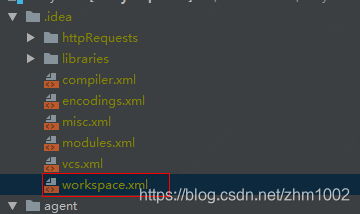
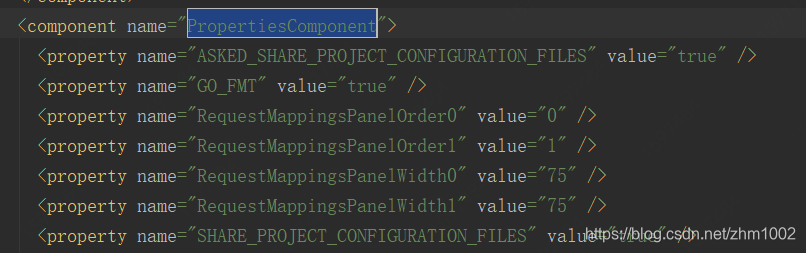
2)再找到<component name="PropertiesComponent"></component >标签。
3)再在component 标签里加一行 <property name="dynamic.classpath" value="true" />
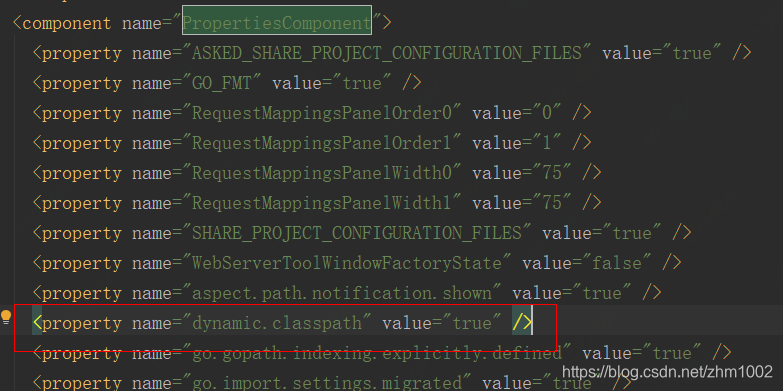
再运行项目就不会报错了







 扫一扫
扫一扫


 5757
5757

 被折叠的 条评论
为什么被折叠?
被折叠的 条评论
为什么被折叠?
 到【灌水乐园】发言





