



 Cerebro是一款开源的Elasticsearch Web管理工具,支持用户通过简洁的界面进行集群管理和数据查询。该工具使用Scala、Play Framework、AngularJS和Bootstrap构建,适用于Java 1.8及更高版本。本文将指导您如何下载、安装和配置Cerebro,并通过权限控制增强安全性。
1.了解cerebro
cerebro是一个开源(MIT许可)elasticsearch web管理工具,使用Scala、Play Framework、AngularJS和Bootstrap构建。cerebro的运行需要java1.8及以上版本。
github访问地址: https://github.com/lmenezes/cerebro
2.下载安装
wget https://github.com/lmenezes/cerebro/releases/download/v0.8.1/cerebro-0.8.1.tgz
tar -zxvf cerebro-0.8.1.tgz
3.启动
[root@iz2ze3oaxtvhn14h3l6we4z cerebro-0.8.1]# ./bin/cerebro &
4.访问,9000端口
http://xxx.xxx:9000/
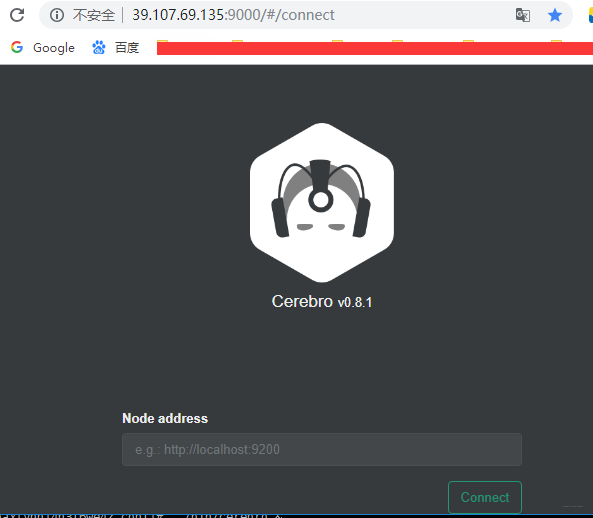
5.权限控制
cerebro的config目录下有application.conf,
# Authentication
auth = {
  # Example of LDAP authentication
  #type: ldap
    #settings: {
      #url = "ldap://host:port"
      #base-dn = "ou=active,ou=Employee"
      # OpenLDAP might be something like
      #base-dn = "ou=People,dc=domain,dc=com"
      # Usually method should be left as simple
      # Otherwise, set it to the SASL mechanisms to try
      #method  = "simple"
      # Usernames in the form of email addresses (containing @) are passed through unchanged
      # Set user-domain to append @user-domain to bare usernames
      #user-domain = "domain.com"
      # Or leave empty to use user-format formatting
      #user-domain = ""
      # user-format executes a string.format() operation where
      # username is passed in first, followed by base-dn
      # Leave username unchanged
      #user-format = "%s"
      # Like setting user-domain
      #user-format = "%s@domain.com"
      # Common for OpenLDAP
      #user-format = "uid=%s,%s"
    #}
  # Example of simple username/password authentication
  type: basic
    settings: {
      # **配置用户名,密码**
      username = "admin"
      password = "1234"
    }
}





 扫一扫
扫一扫


 1727
1727

 被折叠的 条评论
为什么被折叠?
被折叠的 条评论
为什么被折叠?
 到【灌水乐园】发言





