
ROS_kinetic_16.04使用GPS教程——可以举一反三

本文详细介绍了如何在Ubuntu16.04虚拟机中,通过VMware安装并配置GPS设备千寻D300,使用ROS的nmea_navsat_driver解析NMEA数据。步骤包括安装设备,通过串口助手检查连接,修改launch文件设置波特率和设备ID,赋予USB设备权限,最后启动ROS节点并查看话题输出。

一、使用环境
1、VMwar虚拟机安装Ubuntu_kinetic_16.04
2、GPS为千寻位置D300
二、使用流程:
1、按照厂家需求安装配置好GPS设备
2、GPS设备连接电脑
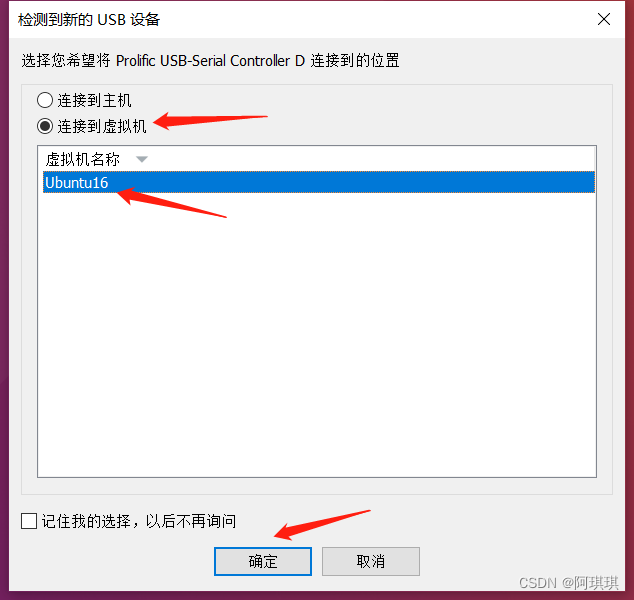
在这里插入图片描述
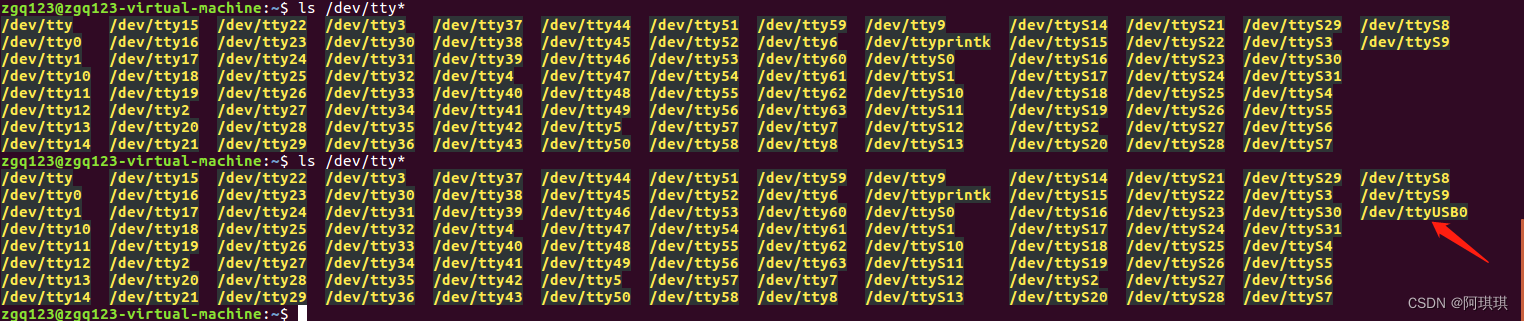
3、设备连接查询:

ls /dev/tty*

查看设备是否正确接入,最简单的方法就是插入前后进行对比(就可以知道设备):
在这里插入图片描述
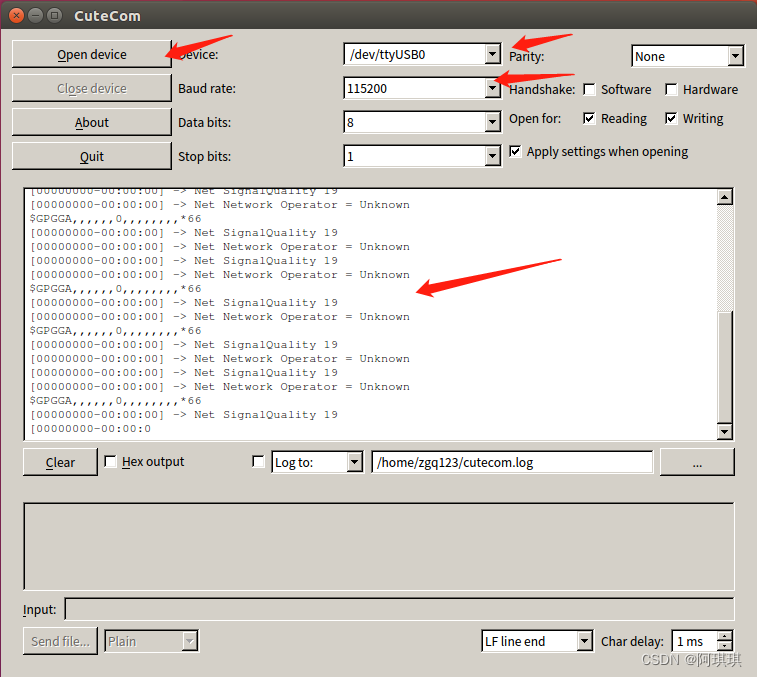
4、使用串口助手读取数据:

sudo apt install cutecom
sudo cutecom
在这里插入图片描述
分别为打开串口、设备串口设备、波特率、数据展示界面(我的是在室内,所以没有数据,以及SIM卡也有警告信号不好)

3、使用ROS功能包mea_navsat_driver用于解析NMEA数据
参考链接:ros wiki: http://wiki.ros.org/nmea_navsat_driver
github源码:https://github.com/ros-drivers/nmea_navsat_driver
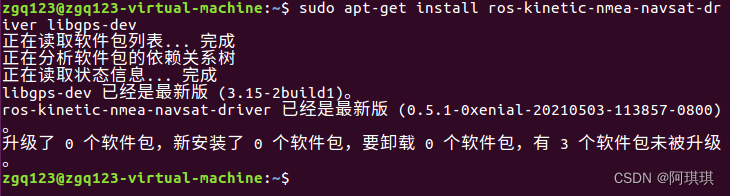
(1)安装mea_navsat_driver
在这里插入图片描述
(2)打开新的终端:

roscore

(3)安装的mea_navsat_driver需要手动配置launch文件(包含设备ID和波特率):

roscd nmea_navsat_driver/launch

在这里插入图片描述

sudo vim nmea_serial_driver.launch

(4)修改USB口和波特率

<launch>
 
  <!-- A simple launch file for the nmea_serial_driver node. -->
 
  <arg name="port" default="/dev/ttyACM0" />
  <arg name="baud" default="9600" />
  <arg name="frame_id" default="gps" />
  <arg name="use_GNSS_time" default="False" />
  <arg name="time_ref_source" default="gps" />
  <arg name="useRMC" default="False" />
 
  <node name="nmea_serial_driver_node" pkg="nmea_navsat_driver" type="nmea_serial_driver" output="screen">
    <param name="port" value="$(arg port)"/>
    <param name="baud" value="$(arg baud)" />
    <param name="frame_id" value="$(arg frame_id)" />
    <param name="use_GNSS_time" value="$(arg use_GNSS_time)" />
    <param name="time_ref_source" value="$(arg time_ref_source)" />
    <param name="useRMC" value="$(arg useRMC)" />
  </node>
  
  </launch>

(5)给USB设备权限(重要,不然读取不到):

sudo chmod 777 /dev/ttyUSB0(自己设备的ID,不要复制我的)

(6)运行nmea_serial_driver 节点:

roslaunch nmea_navsat_driver nmea_serial_driver.launch

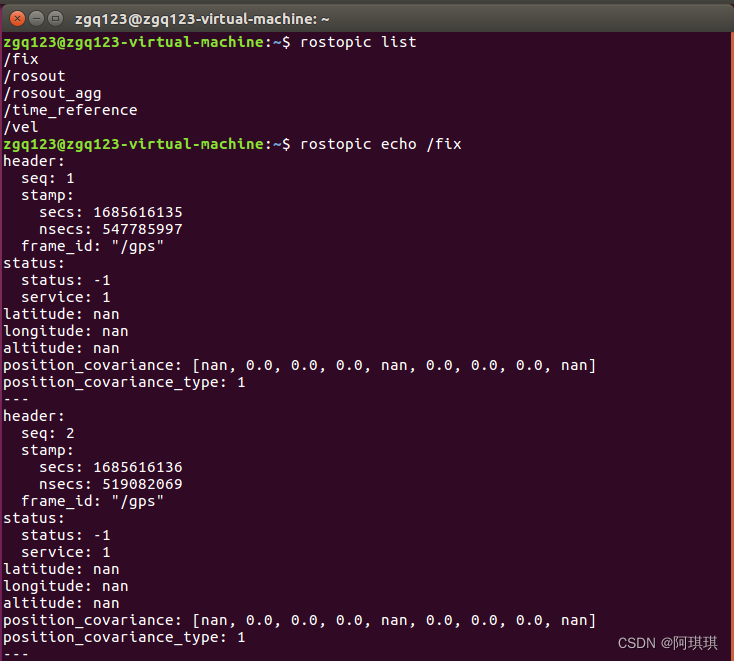
(7)查看话题输出(别看我的全是0,因为我在室内给大家分享的文章):

rostopic echo /fix
在这里插入图片描述
三、大家有问题可以私聊我,我可能只有休息时间回复哦!

### ROS Kinetic Calibration Tutorial and Resources For users interested in calibrating sensors or other components within the ROS Kinetic environment, several tutorials and resources are available. The `pluginlib` package provides an abstract framework for creating and using plugins which might be useful when developing custom calibration nodes[^1]. However, specific to calibration tasks, one of the most comprehensive guides comes from the official ROS wiki documentation. The Camera Calibration tool is part of the image_pipeline suite and allows performing camera intrinsic parameter estimation through a graphical user interface. This process involves capturing images containing a known pattern such as a chessboard grid placed at different orientations relative to the camera lens. After collecting enough samples, running the calibration node will compute focal length, principal point position, distortion coefficients among others parameters necessary for undistorting captured frames during operation. Another important aspect covered by these materials includes extrinsic parameters determination between multiple cameras mounted on robots like TurtleBot where accurate alignment ensures better performance especially while navigating environments based upon visual SLAM algorithms. Instructions provided explain not only theoretical concepts behind each step involved but also practical considerations regarding setup preparation before starting actual measurements. Moreover, integrating self-created maps alongside simulation platforms enhances testing capabilities without requiring physical hardware availability all times thus facilitating development cycles significantly according to explanations found elsewhere concerning Stage integration techniques specifically tailored towards mobile bases equipped with laser scanners capable of generating occupancy grids used later inside Gazebo worlds after proper adjustments made via configuration files following guidelines outlined thereupon too[^3]. Lastly, expanding workspaces beyond base installations enables incorporating specialized libraries supporting advanced functionalities required throughout various stages ranging from data acquisition up until post-processing analysis phases thanks largely due contributions coming directly out-of-the-box once extra dependencies get added properly following instructions laid down hereunder about managing releases efficiently so projects benefit fully from community efforts put forth collectively over time ensuring compatibility across diverse setups encountered regularly nowadays within research labs around globe alike[^5]. ```bash roslaunch camera_calibration cameracalibrator.launch \ image:=<your_image_topic> \ camera_name:=<your_camera_name> \ calib_url:=<path_to_your_calib_file> ```
评论
成就一亿技术人!
拼手气红包6.0元
还能输入1000个字符
 
红包 添加红包
表情包 插入表情
 条评论被折叠 查看
添加红包

请填写红包祝福语或标题

红包个数最小为10个

红包金额最低5元

当前余额3.43前往充值 >
需支付:10.00
成就一亿技术人!
领取后你会自动成为博主和红包主的粉丝 规则
hope_wisdom
发出的红包
实付
使用余额支付
点击重新获取
扫码支付
钱包余额 0

抵扣说明:

1.余额是钱包充值的虚拟货币,按照1:1的比例进行支付金额的抵扣。
2.余额无法直接购买下载,可以购买VIP、付费专栏及课程。

余额充值


