在android开发中地图和定位是很多软件不可或缺的内容,这些特色功能也给人们带来了很多方便。
首先介绍一下地图包中的主要类:
MapController : 主要控制地图移动,伸缩,以某个GPS坐标为中心,控制MapView中的view组件,管理Overlay,提供View的基本功能。使用多种地图模式(地图模式(某些城市可实时对交通状况进行更新),卫星模式,街景模式)来查看Google Map。常用方法:animateTo(GeoPoint point) setCenter(GeoPoint point) setZoom(int zoomLevel) 等。
Mapview : 是用来显示地图的view, 它派生自android.view.ViewGroup。当MapView获得焦点,可以控制地图的移动和缩放。地图可以以不同的形式来显示出来,如街景模式,卫星模式等,通过setSatellite(boolean) setTraffic(boolean), setStreetView(boolean) 方法。
Overlay : 是覆盖到MapView的最上层,可以扩展其ondraw接口,自定义在MapView中显示一些自己的东西。MapView通过MapView.getOverlays()对Overlay进行管理。
Projection :MapView中GPS坐标与设备坐标的转换(GeoPoint和Point)。
定位系统包中的主要类:
LocationManager:本类提供访问定位服务的功能,也提供获取最佳定位提供者的功能。另外,临近警报功能也可以借助该类来实现。
LocationProvider:该类是定位提供者的抽象类。定位提供者具备周期性报告设备地理位置的功能。
LocationListener:提供定位信息发生改变时的回调功能。必须事先在定位管理器中注册监听器对象。
Criteria:该类使得应用能够通过在LocationProvider中设置的属性来选择合适的定位提供者。
Geocoder:用于处理地理编码和反向地理编码的类。地理编码是指将地址或其他描述转变为经度和纬度,反向地理编码则是将经度和纬度转变为地址或描述语言,其中包含了两个构造函数,需要传入经度和纬度的坐标。getFromLocation方法可以得到一组关于地址的数组。
下面开始地图定位实例的开发,在开发地图前需要 获取Android地图 API密钥 网上有很多资料,这里就不再复述。
首先要在manifest.xml中设置全相应的权限和maps库:
02 | android:icon="@drawable/ic_launcher" |
03 | android:label="@string/app_name" > |
05 | android:label="@string/app_name" |
06 | android:name=".MyMapActivity" > |
08 | <action android:name="android.intent.action.MAIN" /> |
10 | <category android:name="android.intent.category.LAUNCHER" /> |
13 | <span style="color:#FF6666;"> |
14 | <uses-library android:name="com.google.android.maps" /></span> |
17 | <span style="color:#FF6666;"> <uses-permission android:name="android.permission.INTERNET" /> |
18 | <uses-permission android:name="android.permission.ACCESS_FINE_LOCATION" /> |
19 | <uses-permission android:name="android.permission.ACCESS_COARSE_LOCATION" /></span> |
在上面我标红的千万不要忘记。
layout下的main.xml:
01 | <?xml version="1.0" encoding="utf-8"?> |
02 | <LinearLayout xmlns:android="http://schemas.android.com/apk/res/android" |
03 | android:layout_width="fill_parent" |
04 | android:layout_height="fill_parent" |
05 | android:orientation="vertical" > |
07 | <com.google.android.maps.MapView |
08 | android:id="@+id/mapview" |
09 | android:layout_width="fill_parent" |
10 | android:layout_height="fill_parent" |
11 | android:apiKey="008uu0x2a7GWlK2LzCW872afBAPLhJ-U2R26Wgw" |
下面是核心代码,重要的地方我做了注释:
001 | public class MyMapActivity extends MapActivity { |
002 | /** Called when the activity is first created. */ |
003 | private MapController mapController; |
004 | private MapView mapView; |
005 | private MyOverLay myOverLay; |
008 | public void onCreate(Bundle savedInstanceState) { |
009 | super.onCreate(savedInstanceState); |
010 | setContentView(R.layout.main); |
012 | LocationManager locationManager=(LocationManager) getSystemService(Context.LOCATION_SERVICE); |
013 | mapView=(MapView) this.findViewById(R.id.mapview); |
015 | mapView.setTraffic(true); |
017 | mapView.setSatellite(false); |
019 | mapView.setStreetView(false); |
021 | mapView.setBuiltInZoomControls(true); |
022 | mapView.setClickable(true); |
023 | mapView.setEnabled(true); |
025 | mapController=mapView.getController(); |
026 | mapController.setZoom(15); |
028 | myOverLay=new MyOverLay(); |
029 | List<Overlay> overLays=mapView.getOverlays(); |
030 | overLays.add(myOverLay); |
032 | Criteria criteria=new Criteria(); |
033 | criteria.setAccuracy(Criteria.ACCURACY_FINE); |
034 | criteria.setAltitudeRequired(false); |
035 | criteria.setBearingRequired(false); |
036 | criteria.setCostAllowed(false); |
037 | criteria.setPowerRequirement(Criteria.POWER_LOW); |
039 | String provider=locationManager.getBestProvider(criteria, true); |
041 | Location location=locationManager.getLastKnownLocation(provider); |
042 | updateWithLocation(location); |
044 | locationManager.requestLocationUpdates(provider, 3000, 0, locationListener); |
048 | public boolean onCreateOptionsMenu(Menu menu) { |
050 | menu.add(0, 1, 1, "交通模式"); |
051 | menu.add(0,2,2,"卫星模式"); |
052 | menu.add(0,3,3,"街景模式"); |
054 | return super.onCreateOptionsMenu(menu); |
057 | public boolean onOptionsItemSelected(MenuItem item) { |
059 | super.onOptionsItemSelected(item); |
060 | switch (item.getItemId()) { |
062 | mapView.setTraffic(true); |
063 | mapView.setSatellite(false); |
064 | mapView.setStreetView(false); |
067 | mapView.setSatellite(true); |
068 | mapView.setStreetView(false); |
069 | mapView.setTraffic(false); |
072 | mapView.setStreetView(true); |
073 | mapView.setTraffic(false); |
074 | mapView.setSatellite(false); |
077 | mapView.setTraffic(true); |
078 | mapView.setSatellite(false); |
079 | mapView.setStreetView(false); |
084 | private void updateWithLocation(Location location){ |
087 | myOverLay.setLocation(location); |
088 | GeoPoint geoPoint=new GeoPoint((int)(location.getLatitude()*1E6), (int)(location.getLongitude()*1E6)); |
090 | mapController.animateTo(geoPoint); |
091 | mapController.setZoom(15); |
094 | private final LocationListener locationListener=new LocationListener() { |
097 | public void onStatusChanged(String provider, int status, Bundle extras) { |
103 | public void onProviderEnabled(String provider) { |
109 | public void onProviderDisabled(String provider) { |
115 | public void onLocationChanged(Location location) { |
117 | updateWithLocation(location); |
120 | class MyOverLay extends Overlay{ |
122 | private Location location; |
123 | public void setLocation(Location location){ |
124 | this.location=location; |
128 | public boolean draw(Canvas canvas, MapView mapView, boolean shadow, |
131 | super.draw(canvas, mapView, shadow); |
132 | Paint paint=new Paint(); |
133 | Point myScreen=new Point(); |
135 | GeoPoint geoPoint=new GeoPoint((int)(location.getLatitude()*1E6), (int)(location.getLongitude()*1E6)); |
136 | mapView.getProjection().toPixels(geoPoint, myScreen); |
137 | paint.setStrokeWidth(1); |
138 | paint.setARGB(255, 255, 0, 0); |
139 | paint.setStyle(Paint.Style.STROKE); |
140 | Bitmap bmp=BitmapFactory.decodeResource(getResources(), R.drawable.mypicture); |
142 | canvas.drawBitmap(bmp, myScreen.x, myScreen.y,paint); |
143 | canvas.drawText("天堂没有路", myScreen.x, myScreen.y, paint); |
149 | protected boolean isRouteDisplayed() { |
154 | public boolean onKeyDown(int keyCode, KeyEvent event) { |
157 | if (keyCode == KeyEvent.KEYCODE_BACK) { |
158 | AlertDialog.Builder builder = new AlertDialog.Builder(this); |
159 | builder.setMessage("你确定退出吗?") |
160 | .setCancelable(false) |
161 | .setPositiveButton("确定", |
162 | new DialogInterface.OnClickListener() { |
163 | public void onClick(DialogInterface dialog, |
165 | MyMapActivity.this.finish(); |
167 | .killProcess(android.os.Process |
169 | android.os.Process.killProcess(android.os.Process.myTid()); |
170 | android.os.Process.killProcess(android.os.Process.myUid()); |
173 | .setNegativeButton("返回", |
174 | new DialogInterface.OnClickListener() { |
175 | public void onClick(DialogInterface dialog, |
180 | AlertDialog alert = builder.create(); |
185 | return super.onKeyDown(keyCode, event); |
接下来看一下运行后效果:
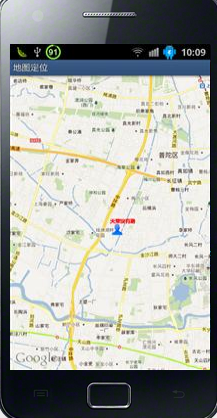
可以放大缩小:

可是使用menu键,切换不同的模式:

上面是切换到了卫星模式。由于地图需要耗费大量的网络资源,如果网络比较慢的话会等待很长时间。








 扫一扫
扫一扫


 1万+
1万+

 被折叠的 条评论
为什么被折叠?
被折叠的 条评论
为什么被折叠?
 到【灌水乐园】发言





