


因为element-ui组件没有开发季度选择的组件,但是我们在项目开发中会经常用到,所以我把我在开发中用到这个组件的一些问题进行了归纳,如下:
效果图: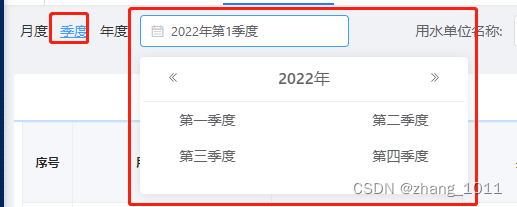
代码:
<div>
  <mark
   style="position:fixed;top:0;bottom:0;left:0;right:0;background:rgba(0,0,0,0);z-index:999;"
    v-show="showSeason"
    @click.stop="showSeason=false"
  ></mark>
  <el-input placeholder="请选择季度" v-model="showSeason" style="width:209px;"
            @focus="showSeason=true">
    <i slot="prefix" class="el-input__icon el-icon-date"></i>
  </el-input>
  <el-card
    class="box-card"
    style="width:322px;padding: 0 3px 20px;margin-top:10px;position:fixed;z-index:9999;background-color: white !important;"
    v-show="showSeason"
  >
    <div slot="header" class="clearfix" style="text-align:center;padding:0">
      <button
        type="button"
        aria-label="前一年"
        class="el-picker-panel__icon-btn el-date-picker__prev-btn el-icon-d-arrow-left"
        @click="prev"
      ></button>
      <span role="button" class="el-date-picker__header-label">{{ year }}年</span>
      <button
        type="button"
        aria-label="后一年"
        @click="next"
        class="el-picker-panel__icon-btn el-date-picker__next-btn el-icon-d-arrow-right"
      ></button>
    </div>
    <div class="text item" style="text-align:center;">
      <el-button
        type="text"
        size="medium"
        style="width:40%;color: #606266;float:left;"
        @click="selectSeason(0)"
      >第一季度
      </el-button>
      <el-button
        type="text"
        size="medium"
        style="float:right;width:40%;color: #606266;"
        @click="selectSeason(1)"
      >第二季度
      </el-button>
    </div>
    <div class="text item" style="text-align:center;">
      <el-button
        type="text"
        size="medium"
        style="width:40%;color: #606266;float:left;"
        @click="selectSeason(2)"
      >第三季度
      </el-button>
      <el-button
        type="text"
        size="medium"
        style="float:right;width:40%;color: #606266;"
        @click="selectSeason(3)"
      >第四季度
      </el-button>
    </div>
  </el-card>
</div>
export default {
  data() {
    return {
      valueArr: ['-01', '-02', '-03', '-04'],//接口接受的格式(一个季度传一个整体时间)
      //valueArr: ['01-02-03', '04-05-06', '07-08-09', '10-11-12'],//接口接受的格式(一个季度传一个每个的时间,一个季度三个月)
      showSeason: false,
      season: '',
      year: new Date().getFullYear(),
    };
  },
methods: {prev() { this.year = this.year - 1 }, next() { this.year = this.year + 1 },selectSeason(i) { this.season = i + 1 this.showSeason = `${this.year}` + this.valueArr[i] // let arr = this.valueArr[i].split('-') // arr.forEach(item => { // this.showSeason += `${this.year}` + "-" + item + "," // }) // // 截取最后一个字符之前的字符 // this.showSeason = this.showSeason.slice(0, this.showSeason.length - 1) this.showSeason = false this.showSeason = `${this.year}年第${this.season}季度` },}





 扫一扫
扫一扫


 3030
3030


 到【灌水乐园】发言



