记录world引用文献时有中、英文时还没到页边就换行问题

这篇博客介绍了如何处理Word文档中西文在单词内部换行的问题。当引用的文献在页边距前换行且删除键无效时,可以通过点击'开始',进入段落选项,选择'中文板式',然后勾选'允许西文在单词中换行'来解决。此方法适用于遇到类似问题的Word用户。

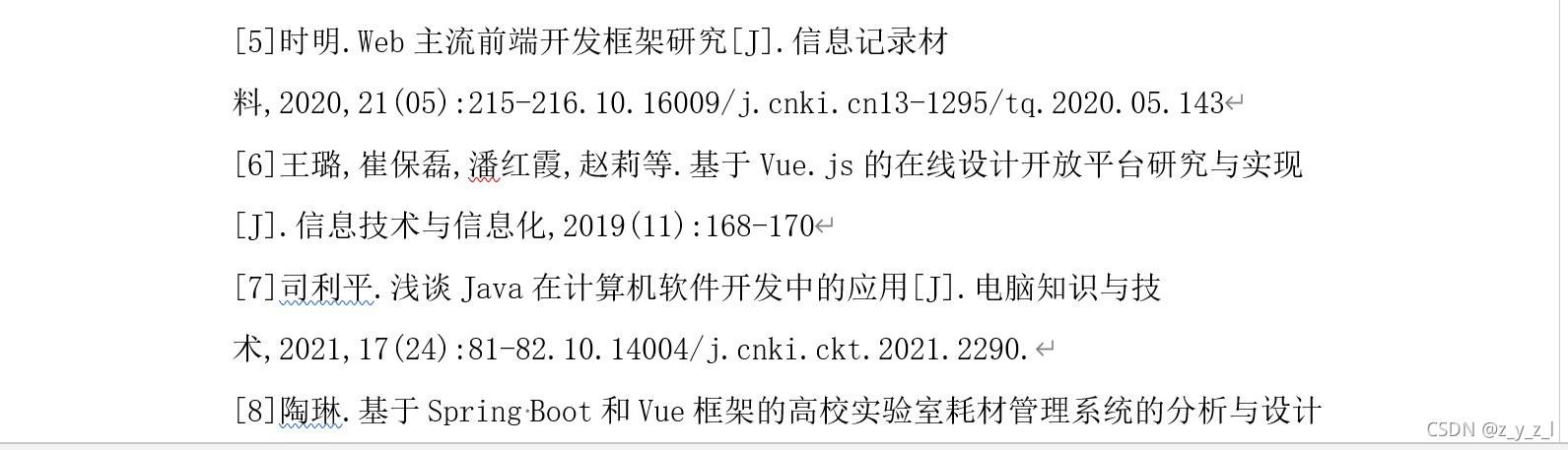
如图所示

引用的文献[5]还没到页边距就换行了,最恶心的是删除键没有用
在这里插入图片描述

解决办法

  1. 点击到‘开始’
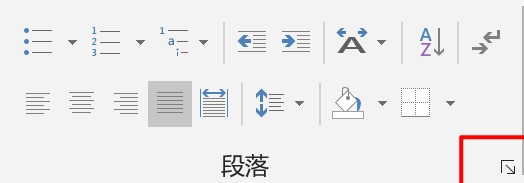
  2. 点击段落选项卡中红色框中的箭头
    在这里插入图片描述
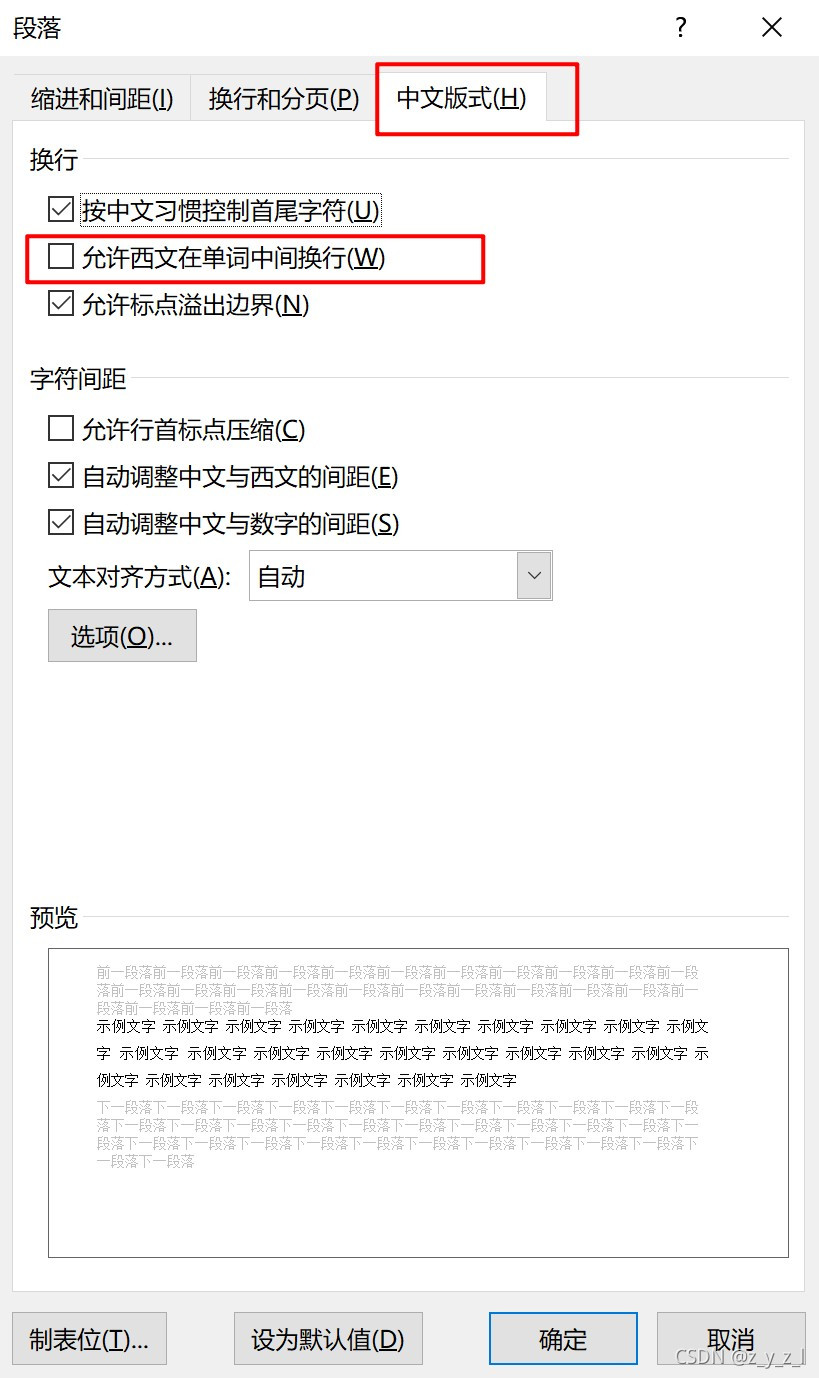
    3.选择‘中文板式’
    4.勾选 ‘允许西文在单词中换行’在这里插入图片描述
你提到的“**中英文会有差异,英文换行不对**”,是 `textarea` 自适应高度中最常见、最棘手的问题之一。 --- ## ✅ 问题本质 > **英文单词(尤其是长单词)在 `div` 和 `textarea` 中的换行行为不一致**,导致: > > - `div` 提前断行 ✅ > - 实际 `textarea` 不断行 ❌ > - 结果:自适应高度多出一行 → “换行错误” --- ### 🔍 典型场景复现 ```text 输入内容:"supercalifragilisticexpialidocious hello world" 容器宽度:刚好能放下这个单词但不断行 ``` | 元素 | 行为 | |------|------| | `textarea` | 默认允许长英文单词溢出或整体换行(取决于 `white-space`) | | `div` + `word-wrap: break-word` | 可能在字母间断开(如 `super...`) | 👉 导致测量高度 > 实际所需高度 → **误判换行** --- ## ✅ 根本原因分析 | 原因 | 说明 | |------|------| | 📌 `textarea` 的换行策略由浏览器实现控制 | 并非所有样式都能通过 CSS 模拟 | | 📌 英文单词是否可断开?取决于 `hyphens`, `word-break`, `overflow-wrap` | 默认情况下 `textarea` **不会在字母中间断开英文单词** | | 📌 `div` 使用 `word-wrap: break-word` 会在任意位置断开 | 导致提前换行 | | 📌 字体微小差异或 sub-pixel 渲染 | 造成字符实际占用宽度不同 | --- ## ✅ 解决方案:精准模拟 `textarea` 换行行为 我们需要让 `tempDiv` 的文本布局行为 **尽可能接近原生 `textarea`**。 ### ✅ 最佳实践配置如下: ```css tempDiv.style.cssText = ` position: absolute; top: -9999px; left: -9999px; visibility: hidden; /* 👇 关键:匹配 textarea 的默认文本行为 */ white-space: pre-wrap; /* 保留空格和换行,自动换行 */ overflow-wrap: break-word; /* 只有无法断词才在字母间断开(现代标准) */ word-break: normal; /* 禁止 break-all 强制断开 */ /* 👇 字体完全一致 */ font-family: ${computedStyle.fontFamily}; font-size: ${computedStyle.fontSize}; font-weight: ${computedStyle.fontWeight}; font-style: ${computedStyle.fontStyle}; line-height: ${computedStyle.lineHeight}; letter-spacing: ${computedStyle.letterSpacing}; /* 👇 精确宽度:仅文本内容区 */ width: ${contentWidth}px; padding: 0; margin: 0; border: none; box-sizing: content-box; `; ``` ### ✅ 特别注意点 #### ✅ 1. `overflow-wrap: break-word` vs `word-break: break-all` - ✅ `overflow-wrap: break-word` → 长单词只有放不下才在中间断开(更接近 `textarea`) - ❌ `word-break: break-all` → 强制在任意字符间断开(中文 OK,英文会提前断) > ⚠️ 所以你应该用: > ```js > tempDiv.style.overflowWrap = 'break-word'; > tempDiv.style.wordBreak = 'normal'; > ``` #### ✅ 2. 计算 `contentWidth` 必须精确 ```js const paddingLeft = parseFloat(computedStyle.paddingLeft) || 0; const paddingRight = parseFloat(computedStyle.paddingRight) || 0; const borderLeft = parseFloat(computedStyle.borderLeftWidth) || 0; const borderRight = parseFloat(computedStyle.borderRightWidth) || 0; const contentWidth = textarea.clientWidth - paddingLeft - paddingRight - borderLeft - borderRight; ``` > ✅ 确保 `tempDiv` 的宽度等于 `textarea` 内部文本可用宽度 #### ✅ 3. 使用 `pre-wrap` 而不是 `pre-line` 或 `normal` - `white-space: pre-wrap` → 保留空格和换行符,且自动换行 ✅(与 `textarea` 一致) --- ## ✅ 完整修复后的 `resize` 函数(支持中英文正确换行) ```js const resize = () => { setTimeout(() => { const textarea = el.querySelector('.el-textarea__inner'); if (!textarea) return; textarea.style.height = 'auto'; const computedStyle = window.getComputedStyle(textarea); // 计算真实文本区域宽度 const paddingLeft = parseFloat(computedStyle.paddingLeft) || 0; const paddingRight = parseFloat(computedStyle.paddingRight) || 0; const borderLeft = parseFloat(computedStyle.borderLeftWidth) || 0; const borderRight = parseFloat(computedStyle.borderRightWidth) || 0; const contentWidth = textarea.clientWidth - paddingLeft - paddingRight - borderLeft - borderRight; // 创建临 div const tempDiv = document.createElement('div'); tempDiv.style.cssText = ` position: absolute; top: -9999px; left: -9999px; visibility: hidden; white-space: pre-wrap; overflow-wrap: break-word; word-break: normal; font-family: ${computedStyle.fontFamily}; font-size: ${computedStyle.fontSize}; font-weight: ${computedStyle.fontWeight}; font-style: ${computedStyle.fontStyle}; line-height: ${computedStyle.lineHeight}; letter-spacing: ${computedStyle.letterSpacing}; text-transform: ${computedStyle.textTransform}; width: ${contentWidth}px; padding: 0; margin: 0; border: none; box-sizing: content-box; `; // 设置内容(空值用零宽字符占位) tempDiv.textContent = textarea.value || '\u200B'; document.body.appendChild(tempDiv); // 获取测量高度 let height = tempDiv.offsetHeight; // 单行高度估算 const fontSize = parseFloat(computedStyle.fontSize); const lineHeight = computedStyle.lineHeight; const singleLineHeight = isNaN(parseFloat(lineHeight)) ? fontSize * 1.2 : parseFloat(lineHeight); if (!textarea.value) { height = singleLineHeight; } // 应用高度(向上取整避免亚像素误差) textarea.style.height = Math.ceil(height) + 'px'; document.body.removeChild(tempDiv); }, 0); }; ``` --- ## ✅ 验证测试建议 ### 测试用例 1:长英文单词 ```text supercalifragilisticexpialidocious ``` - 在 `textarea` 中应整体换行或滚动(不断开) - `tempDiv` 也不应在字母中间断开 ### 测试用例 2:混合中英文 ```text 这是一个 longEnglishWord 测试 ``` - 中文正常换行 - 英文单词作为一个整体参与换行判断 ### 测试用例 3:连续空格或换行符 ```text hello\n\nworld ``` - `pre-wrap` 会保留换行符 → 正确换行 --- ## ✅ 进阶优化建议(可选) ### ✅ 添加 `font-variant` 和 `text-indent` ```js font-variant: ${computedStyle.fontVariant}; text-indent: ${computedStyle.textIndent}; ``` ### ✅ 监听 `compositionstart` / `compositionend`(中文输入法防抖) 防止在拼音输入过程中频繁计算高度: ```js let isComposing = false; textarea.addEventListener('compositionstart', () => { isComposing = true; }); textarea.addEventListener('compositionend', () => { isComposing = false; resize(); }); textarea.addEventListener('input', () => { if (!isComposing) resize(); }); ``` --- ## ✅ 总结 | 问题 | 解决方案 | |------|----------| | 英文换行提前 | 改用 `overflow-wrap: break-word` + `word-break: normal` | | 宽度不一致 | 精确计算 `contentWidth = clientWidth - padding - border` | | 中英文差异 | 使用 `pre-wrap` 保留空白和换行 | | 空内容塌陷 | 使用 `\u200B` 占位 | | 输入法跳动 | 监听 `composition` 事件 | 现在你的自适应指令应该能 **准确反映中英文混合文本的真实换行行为**,不再“提前换行”。 ---
评论
添加红包

请填写红包祝福语或标题

红包个数最小为10个

红包金额最低5元

当前余额3.43前往充值 >
需支付:10.00
成就一亿技术人!
领取后你会自动成为博主和红包主的粉丝 规则
hope_wisdom
发出的红包
实付
使用余额支付
点击重新获取
扫码支付
钱包余额 0

抵扣说明:

1.余额是钱包充值的虚拟货币,按照1:1的比例进行支付金额的抵扣。
2.余额无法直接购买下载,可以购买VIP、付费专栏及课程。

余额充值