
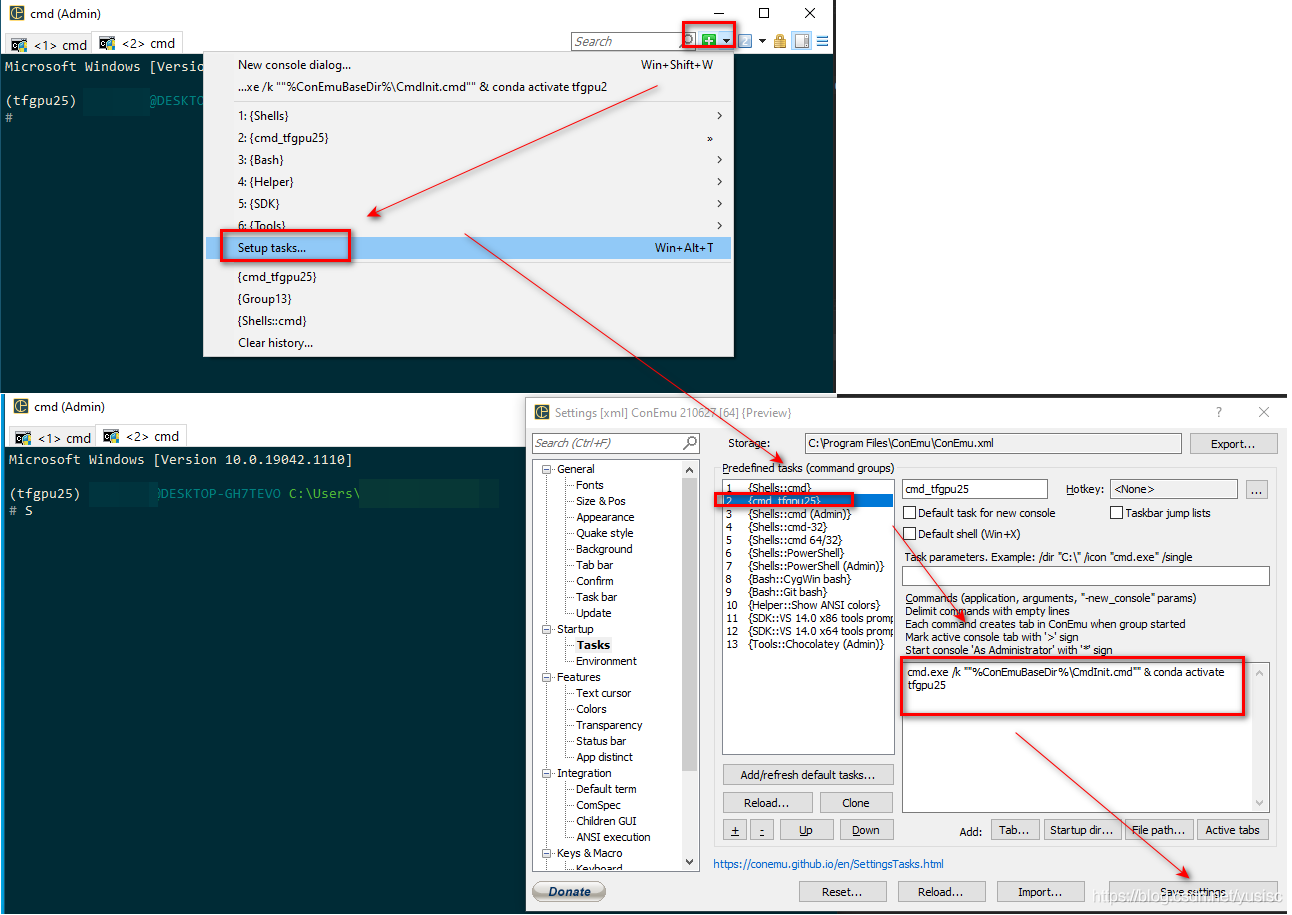
conemu activates conda env while open new terminal

这篇博客介绍了如何通过cmd.exe命令行与ConEmu集成,激活名为'tfgpu25'的conda环境,从而在Windows系统下方便地进行GPU支持的TensorFlow开发。
部署运行你感兴趣的模型镜像

在这里插入图片描述

cmd.exe /k ""%ConEmuBaseDir%\CmdInit.cmd"" & conda activate tfgpu25

您可能感兴趣的与本文相关的镜像

Python3.8

Python3.8

Conda
Python

Python 是一种高级、解释型、通用的编程语言,以其简洁易读的语法而闻名,适用于广泛的应用,包括Web开发、数据分析、人工智能和自动化脚本

<think>We are going to write a Unity script that enables dual monitor or multiple display support. In Unity, we can use the `Display` class to handle multiple displays. Steps: 1. Check the number of available displays. 2. If there are at least two displays, activate the second display (index 1) and set it to use the full screen. 3. We might also want to create a camera for the second display and render its view to that display. Note: Unity supports up to 8 displays, but we are focusing on dual monitors. We'll write a script that activates all available displays and then sets up two cameras: one for the main display and one for the secondary display. Example script: We'll attach this script to a GameObject in the scene, probably at the start (in the Awake or Start method). Important: The secondary display must be activated by setting `Display.displays[index].Activate()`. Also, we will create two cameras: one for display 0 and one for display 1. Alternatively, we can have one camera that renders to both displays? Actually, each display can be set to render from a specific camera. But usually, we assign a camera to a specific target display. Let's create a script that: - Activates all available displays (if there are more than one). - Then, we create two cameras: one for the primary display (Display 0) and one for the secondary display (Display 1). However, note that the main camera by default is set to target Display 1 in the editor? Actually, it's set to target the first display. We need to set the camera's `targetDisplay` property. Steps in script: 1. In Start() or Awake(), activate each display beyond the first one. 2. Then, we can create a second camera and set its targetDisplay to 1 (which is the second display, index 1). Alternatively, if we already have two cameras in the scene, we can set one to display 0 and the other to display 1. Let's write the script accordingly. </think>以下是在Unity中启用双显示器或多显示器支持的脚本实现: ```csharp using UnityEngine; public class MultiDisplaySetup : MonoBehaviour { void Start() { // 检查可用显示器数量 Debug.Log("Displays connected: " + Display.displays.Length); // 激活所有可用显示器 for (int i = 1; i < Display.displays.Length; i++) { Display.displays[i].Activate(); Debug.Log("Activated display: " + i); } // 创建主显示器相机 GameObject mainCamera = new GameObject("MainCamera"); Camera cam1 = mainCamera.AddComponent<Camera>(); cam1.targetDisplay = 0; // 主显示器索引 // 创建副显示器相机 GameObject secondCamera = new GameObject("SecondCamera"); Camera cam2 = secondCamera.AddComponent<Camera>(); cam2.targetDisplay = 1; // 副显示器索引 } } ``` ### 使用说明: 1. **显示器激活**:脚本会自动检测并激活所有连接的显示器 2. **相机设置**: - 主相机绑定到显示器0(默认主显示器) - 第二相机绑定到显示器1(扩展显示器) 3. **扩展支持**:如需更多显示器,可增加相机并设置`targetDisplay = 2,3...` 4. **运行要求**: - Unity 2019+ 版本 - 操作系统需连接物理多显示器 - 在Player Settings中启用"Fullscreen Mode" ### 注意事项: - 显示器索引从0开始(0=主显示器) - 必须连接物理显示器才能激活 - 编辑器模式下无法预览多显示器效果 - 不同显示器分辨率可能导致画面拉伸
评论
添加红包

请填写红包祝福语或标题

红包个数最小为10个

红包金额最低5元

当前余额3.43前往充值 >
需支付:10.00
成就一亿技术人!
领取后你会自动成为博主和红包主的粉丝 规则
hope_wisdom
发出的红包
实付
使用余额支付
点击重新获取
扫码支付
钱包余额 0

抵扣说明:

1.余额是钱包充值的虚拟货币,按照1:1的比例进行支付金额的抵扣。
2.余额无法直接购买下载,可以购买VIP、付费专栏及课程。

余额充值


