


 本文深入解析了Android系统中广播发送的详细流程,包括广播的发送方式、系统处理过程、广播队列管理及接收者处理逻辑。涉及广播类型如普通、有序、粘性广播及其发送方法,以及AMS如何调度和分发广播给静态与动态注册的接收者。
Android广播发送流程
1. 广播发送流程
这次我们讲一下广播发送的流程,老规矩先上大概的流程图
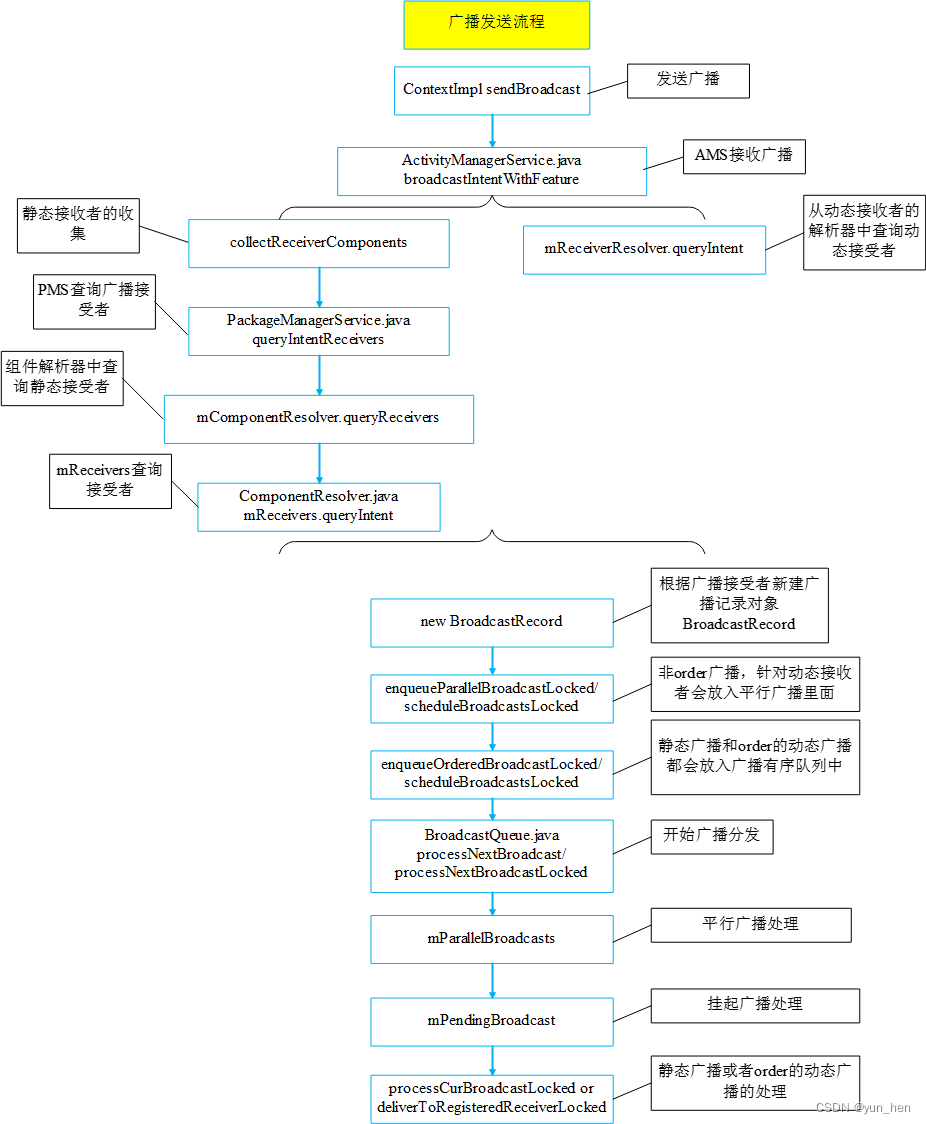
2. 广播发送
- 常见的通过ContextImpl.java发送广播的方法有下面几种
=> sendBroadcast/sendBroadcastAsUser :普通的广播发送,默认是当前userId,带有“AsUser”的是发送给特定的user
=> sendBroadcastMultiplePermissions/sendBroadcastAsUserMultiplePermissions :带有多个权限的广播发送
=> sendOrderedBroadcast/sendOrderedBroadcastAsUser :发送order有序的广播(order广播是一个接收完成下一个才能接收,接收者一个个按顺序接收)
=> sendStickyBroadcast/sendStickyBroadcastAsUser :发送粘性广播,粘性广播的意思是注册者注册了就马上能收到该类型(之前已经发送的粘性广播)的广播,
接收者的注册不需要在发送者的前面
=> sendStickyOrderedBroadcast/sendStickyOrderedBroadcastAsUser :发送粘性而且是顺序order的广播
它们都是调用AMS的broadcastIntentWithFeature来发送广播
如下面是最简单的只有一个Intent的广播发送
//ContextImpl.java
    @Override
    public void sendBroadcast(Intent intent) {


        warnIfCallingFromSystemProcess();
        String resolvedType = intent.resolveTypeIfNeeded(getContentResolver());
        try {


            intent.prepareToLeaveProcess(this);
            //调用的是AMS的broadcastIntentWithFeature来发送广播
            ActivityManager.getService().broadcastIntentWithFeature(
                    mMainThread.getApplicationThread(), getAttributionTag(), intent, resolvedType,
                    null, Activity.RESULT_OK, null, null, null, null /*excludedPermissions=*/,
                    AppOpsManager.OP_NONE, null, false, false, getUserId());
        } catch (RemoteException e) {


            throw e.rethrowFromSystemServer();
        }
    }
- 还是以亮屏SCREEN_ON的广播继续讲解其发送流程
其调用方法是sendOrderedBroadcastAsUser(ContextImpl.java)->broadcastIntentWithFeature(ActivityManagerService.java)
//Notifier.java
    private final Intent mScreenOnIntent;
	//新建一个Intent,它的action是ACTION_SCREEN_ON,
	//注意此处增加了
	//FLAG_RECEIVER_REGISTERED_ONLY: 只允许动态注册的接收者接受
	//FLAG_RECEIVER_FOREGROUND: 前台接收,也就是前台广播(10s超时)的队列
	//FLAG_RECEIVER_VISIBLE_TO_INSTANT_APPS: 可以被即时app接收
	mScreenOnIntent = new Intent(Intent.ACTION_SCREEN_ON);
	mScreenOnIntent.addFlags(
			Intent.FLAG_RECEIVER_REGISTERED_ONLY | Intent.FLAG_RECEIVER_FOREGROUND
			| Intent.FLAG_RECEIVER_VISIBLE_TO_INSTANT_APPS);

    //亮屏广播发送完成后才调用的
    private final BroadcastReceiver mWakeUpBroadcastDone = new BroadcastReceiver() {


        @Override
        public void onReceive(Context context, Intent intent) {


            //开始发送广播之前会打印类似“power_screen_broadcast_send: 1”的日志
            //这里会在event log中打印类似“power_screen_broadcast_done: [1,125,1]“的日志
			//里面包含了发送亮屏广播的时间,此处是“125 ms”
            EventLog.writeEvent(EventLogTags.POWER_SCREEN_BROADCAST_DONE, 1,
                    SystemClock.uptimeMillis() - mBroadcastStartTime, 1);
            sendNextBroadcast();
        }
    };

   private void sendWakeUpBroadcast() {


        if (DEBUG) {


            Slog.d(TAG, "Sending wake up broadcast.");
        }

        if (mActivityManagerInternal.isSystemReady()) {


            //调用的是ContextImpl的sendOrderedBroadcastAsUser去发送广播
			//mScreenOnIntent是发送的亮屏广播
			//mHandler是PowerManagerService.java的主线程,用来运行mWakeUpBroadcastDone
			//mWakeUpBroadcastDone是亮屏广播发送完成后
            mContext.sendOrderedBroadcastAsUser(mScreenOnIntent, UserHandle.ALL, null,
                    mWakeUpBroadcastDone, mHandler, 0, null, null);
        } else {


            EventLog.writeEvent(EventLogTags.POWER_SCREEN_BROADCAST_STOP, 2, 1);
            sendNextBroadcast();
        }
    }

//ContextImpl.java
    public void sendOrderedBroadcastAsUser(Intent intent, UserHandle user,
            String receiverPermission, BroadcastReceiver resultReceiver, Handler scheduler,
            int initialCode, String initialData, Bundle initialExtras) {


		//多带了appOp=OP_NONE、options=null的参数
        sendOrderedBroadcastAsUser(intent, user, receiverPermission, AppOpsManager.OP_NONE,
                null, resultReceiver, scheduler, initialCode, initialData, initialExtras);
    }

    public void sendOrderedBroadcastAsUser(Intent intent, UserHandle user,
            String receiverPermission, int appOp, Bundle options, BroadcastReceiver resultReceiver,
            Handler scheduler, int initialCode, String initialData, Bundle initialExtras) {


        IIntentReceiver rd = null;
        if (resultReceiver != null) {


            if (mPackageInfo != null) {


                if (scheduler == null) {


                    //由于传入了scheduler(mHandler),所以这里是不会进来的
                    scheduler = mMainThread.getHandler();
                }
				//进入的是这里获取IIntentReceiver rd(通过mPackageInfo、resultReceiver、scheduler构建)
                rd = mPackageInfo.getReceiverDispatcher(
                    resultReceiver, getOuterContext(), scheduler,
                    mMainThread.getInstrumentation(), false);
            } else {


                if (scheduler == null) {


                    scheduler = mMainThread.getHandler();
                }
                rd = new LoadedApk.ReceiverDispatcher(resultReceiver, getOuterContext(),
                        scheduler, null, false).getIIntentReceiver();
            }
        }
        String resolvedType = intent.resolveTypeIfNeeded(getContentResolver());
        String[] receiverPermissions = receiverPermission == null ? null
                : new String[] {

   receiverPermission};
        try {


            intent.prepareToLeaveProcess(this);
			//实际是调用的AMS的broadcastIntentWithFeature方法
            ActivityManager.getService().broadcastIntentWithFeature(
                    mMainThread.getApplicationThread(), getAttributionTag(), intent, resolvedType,
                    rd, initialCode, initialData, initialExtras, receiverPermissions,
                    null /*excludedPermissions=*/, appOp, options, true, false,
                    user.getIdentifier());
        } catch (RemoteException e) {


            throw e.rethrowFromSystemServer();
        }
    }
3. 系统处理广播发送
3.1 AMS接收广播的请求
系统AMS通过broadcastIntentWithFeature接收广播的请求
//ActivityManagerService.java
    //从context过来的都走的这个broadcastIntentWithFeature方法,带特性的发送广播
    public final int broadcastIntentWithFeature(IApplicationThread caller, String callingFeatureId,
            Intent intent, String resolvedType, IIntentReceiver resultTo,
            int resultCode, String resultData, Bundle resultExtras,
            String[] requiredPermissions, String[] excludedPermissions, int appOp, Bundle bOptions,
            boolean serialized, boolean sticky, int userId) {


        enforceNotIsolatedCaller("broadcastIntent");
        synchronized(this) {


            intent = verifyBroadcastLocked(intent);

			//通过IApplicationThread获取调用者ProcessRecord callerApp
            final ProcessRecord callerApp = getRecordForAppLOSP(caller);
            final int callingPid = Binder.getCallingPid();
            final int callingUid = Binder.getCallingUid();

            final long origId = Binder.clearCallingIdentity();
            try {


                //获取callerApp、callingPid、callingUid用于广播发送参数传入
                return broadcastIntentLocked(callerApp,
                        callerApp != null ? callerApp.info.packageName : null, callingFeatureId,
                        intent, resolvedType, resultTo, resultCode, resultData, resultExtras,
                        requiredPermissions, excludedPermissions, appOp, bOptions, serialized,
                        sticky, callingPid, callingUid, callingUid, callingPid, userId);
            } finally {


                Binder.restoreCallingIdentity(origId);
            }
        }
    }

    final int broadcastIntentLocked(ProcessRecord callerApp,
            String callerPackage, String callerFeatureId, Intent intent, String resolvedType,
            IIntentReceiver resultTo, int resultCode, String resultData,
            Bundle resultExtras, String[] requiredPermissions, String[] excludedPermissions,
            int appOp, Bundle bOptions, boolean ordered, boolean sticky, int callingPid,
            int callingUid, int realCallingUid, int realCallingPid, int userId) {


        //这里再次增加了3个参数allowBackgroundActivityStarts=false,tokenNeededForBackgroundActivityStarts=false
		//broadcastAllowList=null
        return broadcastIntentLocked(callerApp, callerPackage, callerFeatureId, intent,
                resolvedType, resultTo, resultCode, resultData, resultExtras, requiredPermissions,
                excludedPermissions, appOp, bOptions, ordered, sticky, callingPid, callingUid,
                realCallingUid, realCallingPid, userId, false /* allowBackgroundActivityStarts */,
                null /* tokenNeededForBackgroundActivityStarts */, null /* broadcastAllowList */);
    }
3.2 修改增加默认flag解析可选广播参数BroadcastOptions
- 如默认会增加 FLAG_EXCLUDE_STOPPED_PACKAGES ,不让stop(如通过forcestop会设置)的三方app接收静态广播
- 根据是否粘性广播输出类似的日志:Broadcast (sticky) intent ordered=(true/false) userid=(userId)
- 解析BroadcastOptions brOptions广播可选参数
    @GuardedBy("this")
    final int broadcastIntentLocked(ProcessRecord callerApp, String callerPackage,
                                    @Nullable String callerFeatureId, Intent intent, String resolvedType,
                                    IIntentReceiver resultTo, int resultCode, String resultData,
                                    Bundle resultExtras, String[] requiredPermissions,
                                    String[] excludedPermissions, int appOp, Bundle bOptions,
                                    boolean ordered, boolean sticky, int callingPid, int callingUid,
                                    int realCallingUid, int realCallingPid, int userId,
                                    boolean allowBackgroundActivityStarts,
                                    @Nullable IBinder backgroundActivityStartsToken,
                                    @Nullable int[] broadcastAllowList) {


        intent = new Intent(intent);
        //调用者是否即时app
        final boolean callerInstantApp = isInstantApp(callerApp, callerPackage, callingUid);
        // Instant Apps cannot use FLAG_RECEIVER_VISIBLE_TO_INSTANT_APPS
        //如果调用者是即时app,不能添加FLAG_RECEIVER_VISIBLE_TO_INSTANT_APPS,可以让即时app接收的flag
        if (callerInstantApp) {


            intent.setFlags(intent.getFlags() & ~Intent.FLAG_RECEIVER_VISIBLE_TO_INSTANT_APPS);
        }

        // broadcastAllowList: 允许接收该广播uid的列表;一般包信息改变的时候才会传入,通过ContextImpl发送广播是不带这个参数的
        // broadcastAllowList目前只在PMS的doSendBroadcast发送package相关广播的时候才可能使用到
        // PackageManagerService.sendPackageBroadcast/sendMyPackageSuspendedOrUnsuspended->doSendBroadcast->
        // ActivityManagerService.LocalService.broadcastIntent
        if (userId == UserHandle.USER_ALL && broadcastAllowList != null) {


            Slog.e(TAG, "broadcastAllowList only applies when sending to individual users. "
                    + "Assuming restrictive whitelist.");
            broadcastAllowList = new int[]{

   };
        }

        // By default broadcasts do not go to stopped apps.
        //默认广播是不发送给stop的应用的,类似于安装后进程从未启动过,或者给强行停止的应用,
        //是无法通过接收静态注册的广播来启动的(具体在IntentResolver.java的buildResolveList会使用)
        intent.addFlags(Intent.FLAG_EXCLUDE_STOPPED_PACKAGES);

        // If we have not finished booting, don't allow this to launch new processes.
        //mProcessesReady在systemReady的时候会设置为true
        //在系统没有启动完成的时候,而且广播发送没有带FLAG_RECEIVER_BOOT_UPGRADE的flag
        if (!mProcessesReady && (intent.getFlags()&Intent.FLAG_RECEIVER_BOOT_UPGRADE) == 0) {


            //则默认只能发送到动态注册的接收者中,静态注册的全部无法接收
            intent.addFlags(Intent.FLAG_RECEIVER_REGISTERED_ONLY);
        }

        //DEBUG_BROADCAST_LIGHT这个是调试日志的开关,这里输出是否order有序广播
        if (DEBUG_BROADCAST_LIGHT) Slog.v(TAG_BROADCAST,
                (sticky ? "Broadcast sticky: ": "Broadcast: ") + intent
                        + " ordered=" + ordered + " userid=" + userId);

        //如果是非ordered的广播,而且有resultTo则输出warning的信息
        //一般情况下orderd的广播才会设置resultTo(发送完成后返回完成的结果到发送者)
        if ((resultTo != null) && !ordered) {


            Slog.w(TAG, "Broadcast " + intent + " not ordered but result callback requested!");
        }

        //多用户判断,如果是callingUid、userId同一个用户组,则直接返回userId
        userId = mUserController.handleIncomingUser(callingPid, callingUid, userId, true,
                ALLOW_NON_FULL, "broadcast", callerPackage);

        // Make sure that the user who is receiving this broadcast or its parent is running.
        // If not, we will just skip it. Make an exception for shutdown broadcasts, upgrade steps.
        //如果userId不是发送到所有用户USER_ALL(-1),而且当前userId和它的父亲userId都没有在运行
        if (userId != UserHandle.USER_ALL && !mUserController.isUserOrItsParentRunning(userId)) {


            //如果调用者不是系统或者没有设置FLAG_RECEIVER_BOOT_UPGRADE,而且不是关机广播,
            //则跳过本次广播发送,不允许stop的userId发送广播,原因是user已经stop了
            if ((callingUid != SYSTEM_UID
                    || (intent.getFlags() & Intent.FLAG_RECEIVER_BOOT_UPGRADE) == 0)
                    && !Intent.ACTION_SHUTDOWN.equals(intent.getAction())) {


                Slog.w(TAG, "Skipping broadcast of " + intent
                        + ": user " + userId + " and its parent (if any) are stopped");
                return ActivityManager.BROADCAST_FAILED_USER_STOPPED;
            }
        }

        //获取其意图的action
        final String action = intent.getAction();
        BroadcastOptions brOptions = null;
        //是否有传入BroadcastOptions的Bundle,开机广播有传入bOptions,亮屏幕广播没有bOptions
        if (bOptions != null) {


            //将Bundle转换成BroadcastOptions brOptions
            brOptions = new BroadcastOptions(bOptions);
            //如果mTemporaryAppAllowlistDuration的值大于0
            if (brOptions.getTemporaryAppAllowlistDuration() > 0) {


                // See if the caller is allowed to do this.  Note we are checking against
                // the actual real caller (not whoever provided the operation as say a
                // PendingIntent), because that who is actually supplied the arguments.
                // 检查一下realCallingPid/realCallingUid是否拥有CHANGE_DEVICE_IDLE_TEMP_WHITELIST(修改临时白名单)、
                // START_ACTIVITIES_FROM_BACKGROUND(后台启动activity)、
                // START_FOREGROUND_SERVICES_FROM_BACKGROUND(后台启动前台服务)的权限,
                // 如果一个都没有,则不允许发送该广播,并抛出安全异常
                // (在部分情况下callingPid/callingUid调用该发送广播的调用者,
                // 于realCallingPid/realCallingUid真实调用者不是一样的)
                if (checkComponentPermission(CHANGE_DEVICE_IDLE_TEMP_WHITELIST,
                        realCallingPid, realCallingUid, -1, true)
                        != PackageManager.PERMISSION_GRANTED
                        && checkComponentPermission(START_ACTIVITIES_FROM_BACKGROUND,
                        realCallingPid, realCallingUid, -1, true)
                        != PackageManager.PERMISSION_GRANTED
                        && checkComponentPermission(START_FOREGROUND_SERVICES_FROM_BACKGROUND,
                        realCallingPid, realCallingUid, -1, true)
                        != PackageManager.PERMISSION_GRANTED) {


                    String msg = "Permission Denial: " + intent.getAction()
                            + " broadcast from " + callerPackage + " (pid=" + callingPid
                            + ", uid=" + callingUid + ")"
                            + " requires "
                            + CHANGE_DEVICE_IDLE_TEMP_WHITELIST + " or "
                            + START_ACTIVITIES_FROM_BACKGROUND + " or "
                            + START_FOREGROUND_SERVICES_FROM_BACKGROUND;
                    Slog.w(TAG, msg);
                    throw new SecurityException(msg);
                }
            }

            //如果带有mDontSendToRestrictedApps不发送给受限制的app
            // callingUid不在mActiveUids中,而且callingUid/callerPackage后台限制操作
            // 则由于“background restrictions”不允许发送广播
            if (brOptions.isDontSendToRestrictedApps()
                    && !isUidActiveLOSP(callingUid)
                    && isBackgroundRestrictedNoCheck(callingUid, callerPackage)) {


                Slog.i(TAG, "Not sending broadcast " + action + " - app " + callerPackage
                        + " has background restrictions");
                return ActivityManager.START_CANCELED;
            }
            //是否允许mAllowBackgroundActivityStarts后台启动activity
            if (brOptions.allowsBackgroundActivityStarts()) {


                // See if the caller is allowed to do this.  Note we are checking against
                // the actual real caller (not whoever provided the operation as say a
                // PendingIntent), because that who is actually supplied the arguments.
                //如果没有START_ACTIVITIES_FROM_BACKGROUND则抛出权限异常
                if (checkComponentPermission(
                        android.Manifest.permission.START_ACTIVITIES_FROM_BACKGROUND,
                        realCallingPid, realCallingUid, -1, true)
                        != PackageManager.PERMISSION_GRANTED) {


                    String msg = "Permission Denial: " + intent.getAction()
                            + " broadcast from " + callerPackage + " (pid=" + callingPid
                            + ", uid=" + callingUid + ")"
                            + " requires "
                            + android.Manifest.permission.START_ACTIVITIES_FROM_BACKGROUND;
                    Slog.w(TAG, msg);
                    throw new SecurityException(msg);
                } else {


                    //否者将allowBackgroundActivityStarts设置成true,允许后台启动activity
                    allowBackgroundActivityStarts = true;
                    // We set the token to null since if it wasn't for it we'd allow anyway here
                    backgroundActivityStartsToken = null;
                }
            }
        }
3.4 保护广播isProtectedBroadcast、特定action的处理
- 识别是否保护广播,这类广播不能给系统之外的app调用;而系统尽量发送保护广播,不然也会发出警告
- 后台是否可以接收广播的识别(如果在system/etc、/product/etc等地方加入“allow-implicit-broadcast”的广播则可以让后台接收,
会加上FLAG_RECEIVER_INCLUDE_BACKGROUND的flag) - 特定action如包状态改变等的广播的处理
// Verify that protected broadcasts are only being sent by system code,
// and that system code is only sending protected broadcasts.
//保护广播的判断逻辑isProtectedBroadcast,这类广播只有系统才能发送
final boolean isProtectedBroadcast;
try {
//查询该广播是否包含在mProtectedBroadcasts,在isProtectedBroadcast也可以增加字符串过滤条件
//例如在frameworks/base/core/res/AndroidManifest.xml等定义的带有“protected-broadcast”的广播
// <protected-broadcast android:name="android.intent.action.SCREEN_ON" />
isProtectedBroadcast = AppGlobals.getPackageManager().isProtectedBroadcast(action);
} catch (RemoteException e) {
Slog.w(TAG, "Remote exception", e);
return ActivityManager.BROADCAST_SUCCESS;
}
final boolean isCallerSystem;
//判断是否系统调用
switch (UserHandle.getAppId(callingUid)) {
case ROOT_UID:
case SYSTEM_UID:
case PHONE_UID:
case BLUETOOTH_UID:
case NFC_UID:
case SE_UID:
case NETWORK_STACK_UID:
//root用户、系统、phone、蓝牙、nfc、安全、网络等相关调用则被认为是系统
isCallerSystem = true;
break;
default:
//其它就看是否常驻内存,如果是常驻内存调用,也被认为是系统
isCallerSystem = (callerApp != null) && callerApp.isPersistent();
break;
}
// First line security check before anything else: stop non-system apps from
// sending protected broadcasts.
//如果不是系统调用,会进行安全检查
if (!isCallerSystem) {
//如果是保护的广播,则不是系统进程,不允许发送,抛出权限异常
if (isProtectedBroadcast) {
String msg = "Permission Denial: not allowed to send broadcast "
+ action + " from pid="
+ callingPid + ", uid=" + callingUid;
Slog.w(TAG, msg);
throw new SecurityException(msg);
} else if (AppWidgetManager.ACTION_APPWIDGET_CONFIGURE.equals(action)
|| AppWidgetManager.ACTION_APPWIDGET_UPDATE.equals(action)) {
// Special case for compatibility: we don't want apps to send this,
// but historically it has not been protected and apps may be using it
// to poke their own app widget. So, instead of making it protected,
// just limit it to the caller.
//如果是widget配置(ACTION_APPWIDGET_CONFIGURE)和更新(ACTION_APPWIDGET_UPDATE)
//则调用callerPackage不能是空
if (callerPackage == null) {
String msg = "Permission Denial: not allowed to send broadcast "
+ action + " from unknown caller.";
Slog.w(TAG, msg);
throw new SecurityException(msg);
//如果调用组件不等于null
} else if (intent.getComponent() != null) {
// They are good enough to send to an explicit component... verify
// it is being sent to the calling app.
//这种情况只能自己发送给自己,不然抛出权限异常
if (!intent.getComponent().getPackageName().equals(
callerPackage)) {
String msg = "Permission Denial: not allowed to send broadcast "
+ action + " to "
+ intent.getComponent().getPackageName() + " from "
+ callerPackage;
Slog.w(TAG, msg);
throw new SecurityException(msg);
}
} else {
// Limit broadcast to their own package.
//这类广播只能发给它自己,用于自身widget的更新
intent.setPackage(callerPackage);
}
}
}
//这个是广播超时豁免只有ACTION_PRE_BOOT_COMPLETED才会设置
//设置了之后这个广播不会超时,谨慎使用
boolean timeoutExempt = false;
if (action != null) {
//查看是否background的进程也可以接收该广播,具体列表在SystemConfig.java的mAllowImplicitBroadcasts
//这个列表是扫描**/etc(如system/etc/sysconfig/framework-sysconfig.xml、
// /product/etc/sysconfig/google.xml)带有“<allow-implicit-broadcast”的广播
// 如:google的云推送”com.google.android.c2dm.intent.RECEIVE“、simcard状态改变
// android.intent.action.SIM_STATE_CHANGED就是这类广播
if (getBackgroundLaunchBroadcasts().contains(action)) {
if (DEBUG_BACKGROUND_CHECK) {
Slog.i(TAG, "Broadcast action " + action + " forcing include-background");
}
//直接增加可以被后台进程接收的flag FLAG_RECEIVER_INCLUDE_BACKGROUND
// (如何使用在讲解BroadcastQueue的processNextBroadcastLocked时会说明)
intent.addFlags(Intent.FLAG_RECEIVER_INCLUDE_BACKGROUND);
}
switch (action) {
case Intent.ACTION_UID_REMOVED:
case Intent.ACTION_PACKAGE_REMOVED:
case Intent.ACTION_PACKAGE_CHANGED:
case Intent.ACTION_EXTERNAL_APPLICATIONS_UNAVAILABLE:
case Intent.ACTION_EXTERNAL_APPLICATIONS_AVAILABLE:
case Intent.ACTION_PACKAGES_SUSPENDED:
case Intent.ACTION_PACKAGES_UNSUSPENDED:
// Handle special intents: if this broadcast is from the package
// manager about a package being removed, we need to remove all of
// its activities from the history stack.
// 如果是ACTION_UID_REMOVED/ACTION_PACKAGE_REMOVED/ACTION_PACKAGE_CHANGED/
// ACTION_EXTERNAL_APPLICATIONS_UNAVAILABLE/ACTION_EXTERNAL_APPLICATIONS_AVAILABLE/
// ACTION_PACKAGES_SUSPENDED/ACTION_PACKAGES_UNSUSPENDED这类广播,
// 则发送广播需要BROADCAST_PACKAGE_REMOVED的权限,不然是没法发送的
if (checkComponentPermission(
android.Manifest.permission.BROADCAST_PACKAGE_REMOVED,
callingPid, callingUid, -1, true)
!= PackageManager.PERMISSION_GRANTED) {
String msg = "Permission Denial: " + intent.getAction()
+ " broadcast from " + callerPackage + " (pid=" + callingPid
+ ", uid=" + callingUid + ")"
+ " requires "
+ android.Manifest.permission.BROADCAST_PACKAGE_REMOVED;
Slog.w(TAG, msg);
throw new SecurityException(msg);
}
switch (action) {
case Intent.ACTION_UID_REMOVED:
final int uid = getUidFromIntent(intent);
//如果发送的是ACTION_UID_REMOVED的广播
if (uid >= 0) {
//电池状态服务的removeUid
mBatteryStatsService.removeUid(uid);
//mAppOpsService app操作相关管理的处理
if (intent.getBooleanExtra(Intent.EXTRA_REPLACING, false)) {
mAppOpsService.resetAllModes(UserHandle.getUserId(uid),
intent.getStringExtra(Intent.EXTRA_PACKAGE_NAME));
} else {
mAppOpsService.uidRemoved(uid);
}
}
break;
case Intent.ACTION_EXTERNAL_APPLICATIONS_UNAVAILABLE:
// If resources are unavailable just force stop all those packages
// and flush the attribute cache as well.
String list[] =
intent.getStringArrayExtra(Intent.EXTRA_CHANGED_PACKAGE_LIST);
if (list != null && list.length > 0) {
for (int i = 0; i < list.length; i++) {
forceStopPackageLocked(list[i], -1, false, true, true,
false, false, userId, "storage unmount");
}
mAtmInternal.cleanupRecentTasksForUser(UserHandle.USER_ALL);
sendPackageBroadcastLocked(
ApplicationThreadConstants.EXTERNAL_STORAGE_UNAVAILABLE,
list, userId);
}
break;
case Intent.ACTION_EXTERNAL_APPLICATIONS_AVAILABLE:
mAtmInternal.cleanupRecentTasksForUser(UserHandle.USER_ALL);
break;
case Intent.ACTION_PACKAGE_REMOVED:
case Intent.ACTION_PACKAGE_CHANGED:
//应用移除或者改变
Uri data = intent.getData();
String ssp;
if (data != null && (ssp=data.getSchemeSpecificPart()) != null) {
boolean removed = Intent.ACTION_PACKAGE_REMOVED.equals(action);
final boolean replacing =
intent.getBooleanExtra(Intent.EXTRA_REPLACING, false);
final boolean killProcess =
!intent.getBooleanExtra(Intent.EXTRA_DONT_KILL_APP, false);
final boolean fullUninstall = removed && !replacing;
if (removed) {
if (killProcess) {
forceStopPackageLocked(ssp, UserHandle.getAppId(
intent.getIntExtra(Intent.EXTRA_UID, -1)),
false, true, true, false, fullUninstall, userId,
removed ? "pkg removed" : "pkg changed");
} else {
// Kill any app zygotes always, since they can't fork new
// processes with references to the old code
forceStopAppZygoteLocked(ssp, UserHandle.getAppId(
intent.getIntExtra(Intent.EXTRA_UID, -1)),
userId);
}
final int cmd = killProcess
? ApplicationThreadConstants.PACKAGE_REMOVED
: ApplicationThreadConstants.PACKAGE_REMOVED_DONT_KILL;
sendPackageBroadcastLocked(cmd,
new String[] {
ssp}, userId);
if (fullUninstall) {
mAppOpsService.packageRemoved(
intent.getIntExtra(Intent.EXTRA_UID, -1), ssp);
// Remove all permissions granted from/to this package
mUgmInternal.removeUriPermissionsForPackage(ssp, userId,
true, false);
mAtmInternal.removeRecentTasksByPackageName(ssp, userId);
mServices.forceStopPackageLocked(ssp, userId);
mAtmInternal.onPackageUninstalled(ssp);
mBatteryStatsService.notePackageUninstalled(ssp);
}
} else {
if (killProcess) {
final int extraUid = intent.getIntExtra(Intent.EXTRA_UID,
-1);
synchronized (mProcLock) {
mProcessList.killPackageProcessesLSP(ssp,
UserHandle.getAppId(extraUid),
userId, ProcessList.INVALID_ADJ,
ApplicationExitInfo.REASON_USER_REQUESTED,
ApplicationExitInfo.SUBREASON_UNKNOWN,
"change " + ssp);
}
}
cleanupDisabledPackageComponentsLocked(ssp, userId,
intent.getStringArrayExtra(
Intent.EXTRA_CHANGED_COMPONENT_NAME_LIST));
mServices.schedulePendingServiceStartLocked(ssp, userId);
} }
break;
case Intent.ACTION_PACKAGES_SUSPENDED:
case Intent.ACTION_PACKAGES_UNSUSPENDED:
final boolean suspended = Intent.ACTION_PACKAGES_SUSPENDED.equals(
intent.getAction());
final String[] packageNames = intent.getStringArrayExtra(
Intent.EXTRA_CHANGED_PACKAGE_LIST);
final int userIdExtra = intent.getIntExtra(
Intent.EXTRA_USER_HANDLE, UserHandle.USER_NULL);
mAtmInternal.onPackagesSuspendedChanged(packageNames, suspended,
userIdExtra);
break;
}
break;
case Intent.ACTION_PACKAGE_REPLACED:
{
final Uri data = intent.getData();
final String ssp;
if (data != null && (ssp = data.getSchemeSpecificPart()) != null) {
ApplicationInfo aInfo = null;
try {
aInfo = AppGlobals.getPackageManager()
.getApplicationInfo(ssp, STOCK_PM_FLAGS, userId);
} catch (RemoteException ignore) {
}
if (aInfo == null) {
Slog.w(TAG, "Dropping ACTION_PACKAGE_REPLACED for non-existent pkg:"
+ " ssp=" + ssp + " data=" + data);
return ActivityManager.BROADCAST_SUCCESS;
}
updateAssociationForApp(aInfo);
mAtmInternal.onPackageReplaced(aInfo);
mServices.updateServiceApplicationInfoLocked(aInfo);
sendPackageBroadcastLocked(ApplicationThreadConstants.PACKAGE_REPLACED,
new String[] {
ssp}, userId);
}
break;
}
case Intent.ACTION_PACKAGE_ADDED:
{
//应用安装
// Special case for adding a package: by default turn on compatibility mode.
Uri data = intent.getData();
String ssp;
if (data != null && (ssp = data.getSchemeSpecificPart()) != null) {
final boolean replacing =
intent.getBooleanExtra(Intent.EXTRA_REPLACING, false);
mAtmInternal.onPackageAdded(ssp, replacing);
try {
ApplicationInfo ai = AppGlobals.getPackageManager().
getApplicationInfo(ssp, STOCK_PM_FLAGS, 0);
mBatteryStatsService.notePackageInstalled(ssp,
ai != null ? ai.longVersionCode : 0);
} catch (RemoteException e) {
}
}
break;
}
case Intent.ACTION_PACKAGE_DATA_CLEARED:
{
//应用数据清除
Uri data = intent.getData();
String ssp;
if (data != null && (ssp = data.getSchemeSpecificPart()) != null) {
mAtmInternal.onPackageDataCleared(ssp);
}
break;
}
case Intent.ACTION_TIMEZONE_CHANGED:
// If this is the time zone changed action, queue up a message that will reset
// the timezone of all currently running processes. This message will get
// queued up before the broadcast happens.
//时区改变
mHandler.sendEmptyMessage(UPDATE_TIME_ZONE);
break;
case Intent.ACTION_TIME_CHANGED:
// EXTRA_TIME_PREF_24_HOUR_FORMAT is optional so we must distinguish between
// the tri-state value it may contain and "unknown".
// For convenience we re-use the Intent extra values.
//系统时间改变
final int NO_EXTRA_VALUE_FOUND = -1;
final int timeFormatPreferenceMsgValue = intent.getIntExtra(
Intent.EXTRA_TIME_PREF_24_HOUR_FORMAT,
NO_EXTRA_VALUE_FOUND /* defaultValue */);
// Only send a message if the time preference is available.
if (timeFormatPreferenceMsgValue != NO_EXTRA_VALUE_FOUND) {
Message updateTimePreferenceMsg =
mHandler.obtainMessage(UPDATE_TIME_PREFERENCE_MSG,
timeFormatPreferenceMsgValue, 0);
mHandler.sendMessage(updateTimePreferenceMsg);
}
mBatteryStatsService.noteCurrentTimeChanged();
break;
case ConnectivityManager.ACTION_CLEAR_DNS_CACHE:
mHandler.sendEmptyMessage(CLEAR_DNS_CACHE_MSG);
break;
case Proxy.PROXY_CHANGE_ACTION:
mHandler.sendMessage(mHandler.obtainMessage(UPDATE_HTTP_PROXY_MSG));
break;
case android.hardware.Camera.ACTION_NEW_PICTURE:
case android.hardware.Camera.ACTION_NEW_VIDEO:
// In N we just turned these off; in O we are turing them back on partly,
// only for registered receivers. This will still address the main problem
// (a spam of apps waking up when a picture is taken putting significant
// memory pressure on the system at a bad point), while still allowing apps
// that are already actively running to know about this happening.
intent.addFlags(Intent.FLAG_RECEIVER_REGISTERED_ONLY);
break;
case android.security.KeyChain.ACTION_TRUST_STORE_CHANGED:
mHandler.sendEmptyMessage(HANDLE_TRUST_STORAGE_UPDATE_MSG);
break;
case "com.android.launcher.action.INSTALL_SHORTCUT":
// As of O, we no longer support this broadcasts, even for pre-O apps.
// Apps should now be using ShortcutManager.pinRequestShortcut().
Log.w(TAG, "Broadcast " + action
+ " no longer supported. It will not be delivered.");
return ActivityManager.BROADCAST_SUCCESS;
case Intent.ACTION_PRE_BOOT_COMPLETED:
//如果是ACTION_PRE_BOOT_COMPLETED广播则设置超时豁免timeoutExempt = true
timeoutExempt = true;
break;
case Intent.ACTION_CLOSE_SYSTEM_DIALOGS:
//需要有BROADCAST_CLOSE_SYSTEM_DIALOGS的权限,不然直接返回
if (!mAtmInternal.checkCanCloseSystemDialogs(callingPid, callingUid,
callerPackage)) {
// Returning success seems to be the pattern here
return ActivityManager.BROADCAST_SUCCESS;
}
break;
}
if (Intent.ACTION_PACKAGE_ADDED.equals(action) ||
Intent.ACTION_PACKAGE_REMOVED.equals(action) ||
Intent.ACTION_PACKAGE_REPLACED.equals(action)) {
final int uid = getUidFromIntent(intent);
if (uid != -1) {
final UidRecord uidRec = mProcessList.getUidRecordLOSP(uid);
if (uidRec != null) {
uidRec.updateHasInternetPermission();
}
}
}
}
3.5 发送粘性广播的处理
将粘性广播添加到AMS的mStickyBroadcasts(key是用户组,value是粘性广播列表stickies)中,
单个用户组的粘性广播列表stickies(key是action,value是intent)
已经发送的粘性广播会放入AMS的mStickyBroadcasts中,后面动态注册的接收者就可以在注册的时候就接收这类粘性广播, 因为系统有保存这类广播
// Add to the sticky list if requested.
// 是否粘性广播,可以通过ContextImpl.java的sendStickyBroadcast/sendStickyBroadcastAsUser/
// sendStickyOrderedBroadcast/sendStickyOrderedBroadcastAsUser来进行发送
if (sticky) {
//粘性广播需要拥有"android.permission.BROADCAST_STICKY"的权限
if (checkPermission(android.Manifest.permission.BROADCAST_STICKY,
callingPid, callingUid)
!= PackageManager.PERMISSION_GRANTED) {
String msg = "Permission Denial: broadcastIntent() requesting a sticky broadcast from pid="
+ callingPid + ", uid=" + callingUid
+ " requires " + android.Manifest.permission.BROADCAST_STICKY;
Slog.w(TAG, msg);
throw new SecurityException(msg);
}
//这类广播不能带有requiredPermissions,否则直接返回
if (requiredPermissions != null && requiredPermissions.length > 0) {
Slog.w(TAG, "Can't broadcast sticky intent " + intent
+ " and enforce permissions " + Arrays.toString(requiredPermissions));
return ActivityManager.BROADCAST_STICKY_CANT_HAVE_PERMISSION;
}
//粘性广播不能指定发送到相关组件,否则发出安全异常
if (intent.getComponent() != null) {
throw new SecurityException(
"Sticky broadcasts can't target a specific component");
}
// We use userId directly here, since the "all" target is maintained
// as a separate set of sticky broadcasts.
//如果userId不是发送给所有用户USER_ALL(-1)
if (userId != UserHandle.USER_ALL) {
// But first, if this is not a broadcast to all users, then
// make sure it doesn't conflict with an existing broadcast to
// all users.
//则取出保存粘性广播的列表mStickyBroadcasts里面相同action的Intent
ArrayMap<String, ArrayList<Intent>> stickies = 最低0.47元/天 解锁文章






 扫一扫
扫一扫


 1051
1051

 被折叠的 条评论
为什么被折叠?
被折叠的 条评论
为什么被折叠?
 到【灌水乐园】发言





