



#使用XML配置事务
新建一个UserDao.java,如下:
package com.cstor.dao;

import org.springframework.jdbc.core.JdbcTemplate;

public class AccountDao {
	private JdbcTemplate jdbcTemplate;
	static String sql;

	public void setJdbcTemplate(JdbcTemplate jdbcTemplate) {
		this.jdbcTemplate = jdbcTemplate;
	}

	public void addMoney(String userName, double money) {
		sql = "update account set salary=salary+? where userName=?";
		jdbcTemplate.update(sql, money,userName);
	}

	public void lessMoney(String userName, double money) {
		sql = "update account set salary=salary-? where userName=?";
		jdbcTemplate.update(sql, money,userName);
	}

	public double selectSalaryByUserName(String userName){
		sql = "select salary from account where userName = "+ userName;
		double salary = jdbcTemplate.queryForObject(sql,double.class);
		return salary;
	}
}
新建UserService.java,如下:
package com.cstor.service;

import com.cstor.dao.AccountDao;

public class AccountService {
	private AccountDao accountDao;

	public void setAccountDao(AccountDao accountDao) {
		this.accountDao = accountDao;
	}

	public void fun(){

		accountDao.lessMoney("wxs",250);

		//int i = 1/0;

		accountDao.addMoney("zhangsan",250);
	}
}
新建配置文件applicationContext.xml,如下:
<?xml version="1.0" encoding="utf-8"?>
<beans xmlns="http://www.springframework.org/schema/beans" xmlns:xsi="http://www.w3.org/2001/XMLSchema-instance" xmlns:p="http://www.springframework.org/schema/p" xmlns:context="http://www.springframework.org/schema/context" xmlns:aop="http://www.springframework.org/schema/aop" xmlns:tx="http://www.springframework.org/schema/tx" xsi:schemaLocation="http://www.springframework.org/schema/beans http://www.springframework.org/schema/beans/spring-beans-3.0.xsd http://www.springframework.org/schema/context http://www.springframework.org/schema/context/spring-context-3.0.xsd http://www.springframework.org/schema/aop http://www.springframework.org/schema/aop/spring-aop-3.0.xsd http://www.springframework.org/schema/tx http://www.springframework.org/schema/tx/spring-tx-3.0.xsd">
    <bean id="accountDao" class="com.cstor.dao.AccountDao">
        <property name="JdbcTemplate" ref="jdbcTemplate" />
    </bean>
    <bean id="accountService" class="com.cstor.service.AccountService">
        <property name="accountDao" ref="accountDao" />
    </bean>
    <bean id="jdbcTemplate" class="org.springframework.jdbc.core.JdbcTemplate">
        <property name="dataSource" ref="dataSource" />
    </bean>
    <bean id="dataSource" class="com.mchange.v2.c3p0.ComboPooledDataSource">
        <property name="user" value="root" />
        <property name="password" value="root" />
        <property name="driverClass" value="com.mysql.jdbc.Driver" />
        <property name="jdbcUrl" value="jdbc:mysql:///testdb" />
    </bean>
</beans>
数据库中数据如下:
当前程序功能为:wxs用户向zhangsan用户转账250元
使用测试类来测试结果:
package com.cstor.test;

import org.junit.Test;
import org.springframework.context.ApplicationContext;
import org.springframework.context.support.ClassPathXmlApplicationContext;

import com.cstor.service.AccountService;

public class AccountTest {
	@Test
	public void test(){
		ApplicationContext ac = new ClassPathXmlApplicationContext("applicationContext.xml");
		AccountService accountService = (AccountService) ac.getBean("accountService");
		accountService.fun();
	}
}
程序运行后,结果如下:
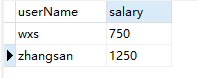
可以看到,实现了功能
但是当我们转账操作中间出现异常时,例如银行服务器断电,就会出现错误
这里我们在UserService文件中将int i = 1/0; 注释去掉,模拟出现异常,运行结果如下:

可以看到,wxs用户转走了250元,但是zhangsan用户并没有收到250元。
为了解决问题,引入事务机制。
在applicationContext.xml中添加事务操作:
 <!-- 第一步:配置事务管理器 -->
<bean id="txManager" class="org.springframework.jdbc.datasource.DataSourceTransactionManager">
    <!-- 注入dataSource -->
    <property name="dataSource" ref="dataSource" />
</bean>
<!-- 第二步:配置事务增强 -->
<tx:advice id="txAdvice" transaction-manager="txManager">
    <!-- 做事务操作 -->
    <tx:attributes>
        <!-- 设置进行事务操作的方法匹配规则 -->
        <tx:method name="fun*" />
    </tx:attributes>
</tx:advice>
<!-- 第三步:配置切面 -->
<aop:config>
    <!-- 配置切点 -->
    <aop:pointcut expression="execution(* com.cstor.service.AccountService.*(..))" id="pointcut1" />
    <!-- 引用事务增强 -->
    <aop:advisor advice-ref="txAdvice" pointcut-ref="pointcut1" />
</aop:config>
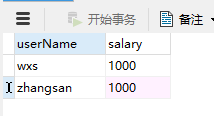
重新运行后,发现并没有做操作,说明事务起了作用。
#使用注解配置事务
相比于使用XML配置事务,使用注解配置事务就简单了许多。
首先,在applicationContext.xml文件中配置事务管理器和配置注解:
<!-- 配置事务管理器 -->
<bean id="txManager" class="org.springframework.jdbc.datasource.DataSourceTransactionManager">
	<property name="dataSource" ref="dataSource"></property>
</bean>

<!-- 配置事务注解 -->
<tx:annotation-driven transaction-manager="txManager"/>
然后,在需要添加事务的方法的所在类上方,添加@Transactional注解。
在本例中,即在UserService中添加注解:
package com.cstor.service;

import org.springframework.transaction.annotation.Transactional;

import com.cstor.dao.AccountDao;

@Transactional
public class AccountService {
	private AccountDao accountDao;

	public void setAccountDao(AccountDao accountDao) {
		this.accountDao = accountDao;
	}

	public void fun(){

		accountDao.lessMoney("wxs",250);

		//int i = 1/0;

		accountDao.addMoney("zhangsan",250);
	}
}
这样依然能达到事务的功能,且更为简单。
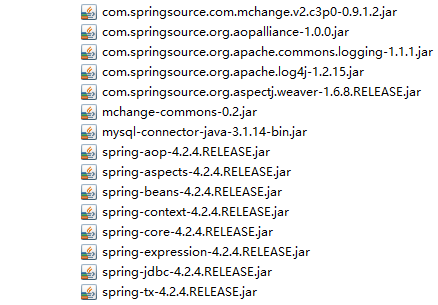
#相关JAR包






 扫一扫
扫一扫


 1254
1254

 被折叠的 条评论
为什么被折叠?
被折叠的 条评论
为什么被折叠?
 到【灌水乐园】发言





