


NumberFormatException: For input string: ""数字格式异常解决

本文介绍了解决在浏览器中提交数据时遇到的NumberFormatException:Forinputstring:异常的方法。通过检查id选择器名称与文本框名称的一致性来解决问题,并强调了确保参数正确性和避免ajax请求中的拼写错误的重要性。


java.lang.NumberFormatException: For input string: ""异常是指数字格式异常
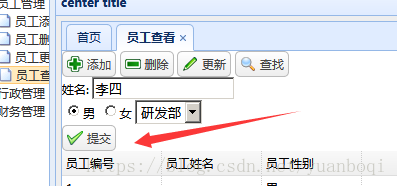

在浏览器中提交数据时控制台报NumberFormatException: For input string: ""异常

这时候不要关闭网页  按下F12 查找错误
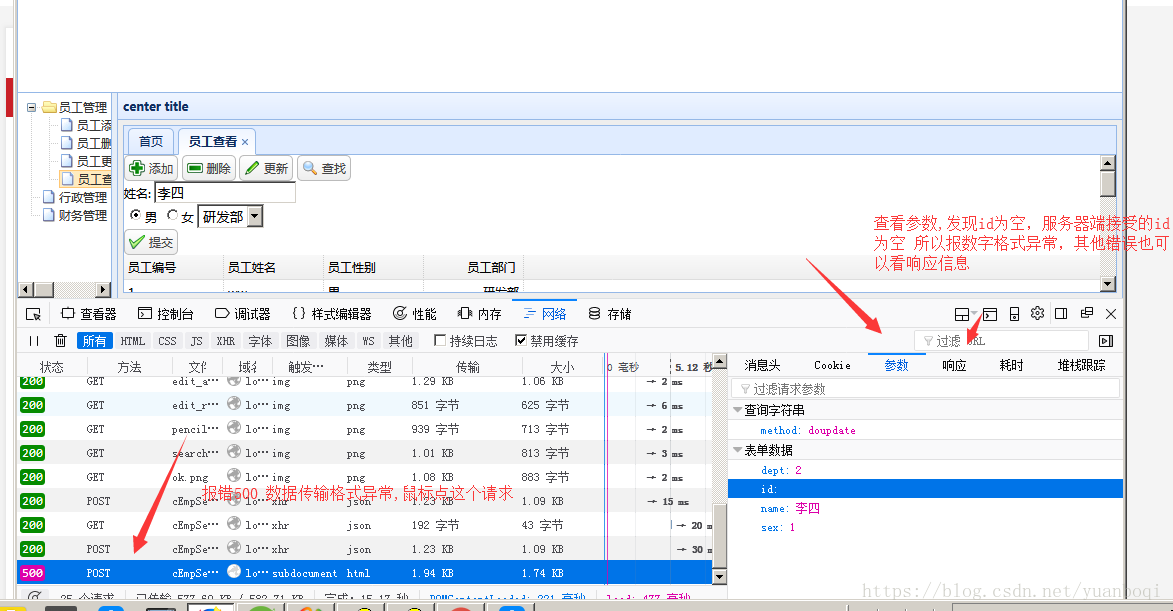

最后检查发现id选择器的名字和文本框的不一样


修改一样后更新成功


总结,检查传递的参数是否正确,还有ajax请求,检查是否书写错误,data很容易写为date 如果书写错误报错也是数据传输错误

`NumberFormatException: for input string :""` 错误是在尝试将空字符串转换为数值类型(如 int、double)时抛出的异常,这属于 Java 中常见的运行时异常解决该错误的方法如下: ### 使用 try - catch 处理异常 使用 try - catch 块捕获 `NumberFormatException` 异常,并在捕获到异常时提供默认值或进行相应处理。示例代码如下: ```java public class Main { public static void main(String[] args) { String input = ""; int num; try { num = Integer.parseInt(input); } catch (NumberFormatException e) { System.out.println("转换失败: " + e.getMessage()); num = 0; // 提供默认值 } System.out.println("最终结果: " + num); } } ``` ### 检查字符串是否为空 在进行转换之前,先检查字符串是否为空或为 null,如果是则不进行转换或提供默认值。示例代码如下: ```java public class Main { public static void main(String[] args) { String input = ""; int num; if (input == null || input.isEmpty()) { num = 0; // 提供默认值 } else { num = Integer.parseInt(input); } System.out.println("最终结果: " + num); } } ``` ### 使用正则表达式验证 使用正则表达式来验证字符串是否只包含数字,如果不包含则不进行转换或提供默认值。示例代码如下: ```java import java.util.regex.Pattern; public class Main { public static void main(String[] args) { String input = ""; int num; if (Pattern.matches("\\d+", input)) { num = Integer.parseInt(input); } else { num = 0; // 提供默认值 } System.out.println("最终结果: " + num); } } ```
评论
添加红包

请填写红包祝福语或标题

红包个数最小为10个

红包金额最低5元

当前余额3.43前往充值 >
需支付:10.00
成就一亿技术人!
领取后你会自动成为博主和红包主的粉丝 规则
hope_wisdom
发出的红包
实付
使用余额支付
点击重新获取
扫码支付
钱包余额 0

抵扣说明:

1.余额是钱包充值的虚拟货币,按照1:1的比例进行支付金额的抵扣。
2.余额无法直接购买下载,可以购买VIP、付费专栏及课程。

余额充值



