






When I submit a java job (include some map/reduce jobs) in the hue UI using oozie Editor, the third party jars are not loaded correctly.
1. the only success way i used is to build a fat jar which contains all dependency classes in thrid party jars.
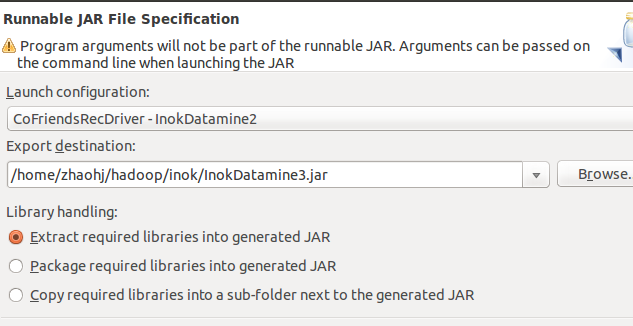
2.If I export my application jar from eclipse with option including the thrid party jars in the jar's lib dir, hadoop still
can't find these jars, although some posts show that hadoop will auto extract these jars when run job.
And in oozie document, it says that if set related configuration using uber jar. The raw content is below, I followed
it, but fails too.
------------
For Map-Reduce jobs (not including streaming or pipes), additional jar files can also be included via an uber jar. An uber jar is a jar file that contains additional jar files within a "lib" folder (see Workflow Functional Specification for more information). Submitting a workflow with an uber jar requires at least Hadoop 2.2.0 or 1.2.0. As such, using uber jars in a workflow is disabled by default. To enable this feature, use the oozie.action.mapreduce.uber.jar.enable property in the oozie-site.xml (and make sure to use a supported version of Hadoop).
<configuration>
    <property>
        <name>oozie.action.mapreduce.uber.jar.enable</name>
        <value>true</value>
    </property>
</configuration>
----------
3.I put the third party jars in oozie deploy dir, some works but anothers doesn't work.
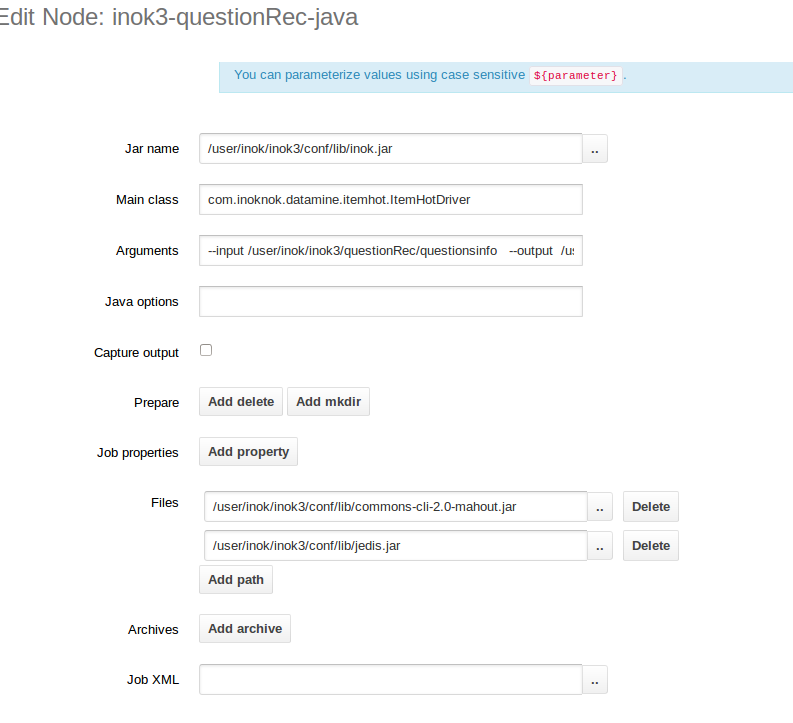
4.when i design a job, add the third party jars in file option, see below. But the result likes 3
--------------
There are multiple ways to add the jars to the lib path.
I would suggest you try one of the following

1) in your job.properties, add the path to your jar files (comma separated)
to *oozie.libpath *property
2) create a *lib* directory under your application's directory and put your
jars under lib so oozie can pick them up.
-------------------------------------------------
The same problem is http://qnalist.com/questions/4588838/how-to-manage-dependencies-for-m-r-job-which-is-executed-using-oozie-java-action
The solution is :http://pangool.net/executing_examples.html
a. in java driver class which sumbit a map/reduce job, You should use
Job job = HadoopUtil.prepareJob(inputPath, outputPath, inputFormat,
				mapper, mapperKey, mapperValue, reducer, reducerKey,
				reducerValue, outputFormat, getConf());
instead of using
// Path input = new Path(userContactNumberDir);
// String redisServer = getOption("redisServer");
// String zsetkey = getOption("zsetkey") + "_user";
//
// Configuration conf = new Configuration();
// Job job = new Job(conf, "push topk users to reids zset");
// job.setJarByClass(TopKItemHotToRedisJob.class);
// job.setOutputKeyClass(NullWritable.class);
// job.setOutputValueClass(ItemPropertyWritable.class);
//
// job.setMapperClass(TopKItemHotToRedisJob.Map.class);
//
// job.setReducerClass(TopKItemHotToRedisJob.Reduce.class);
// job.setNumReduceTasks(1);
// job.setInputFormatClass(TextInputFormat.class);
// job.setOutputFormatClass(RedisZSetOutputFormat.class);
//
// RedisZSetOutputFormat.setRedisHosts(job,redisServer);
// RedisZSetOutputFormat.setRedisKey(job, zsetkey);
//
// FileInputFormat.addInputPath(job,input);
//
// job.getConfiguration().setInt(TopKItemHotToRedisJob.NUMK,
// Integer.parseInt(getOption("numKUser")));
//
// job.waitForCompletion(true);
Path input = new Path(userContactNumberDir);
Path output = new Path(notUsedDir);
HadoopUtil.delete(getConf(), output);

Job getTopKUsersJob = prepareJob(input, output,TextInputFormat.class,
					TopKItemHotToRedisJob.Map.class, NullWritable.class,
					ItemPropertyWritable.class,
					TopKItemHotToRedisJob.Reduce.class, IntWritable.class,
					DoubleWritable.class,RedisZSetOutputFormat.class);
getTopKUsersJob.setJobName("Get topk user and write to redis");
getTopKUsersJob.setNumReduceTasks(1);

RedisZSetOutputFormat.setRedisHosts(getTopKUsersJob,getOption("redisServer"));
RedisZSetOutputFormat.setRedisKey(getTopKUsersJob, getOption("zsetkey") + "_user");
	getTopKUsersJob.getConfiguration().setInt(TopKItemHotToRedisJob.NUMK,
	Integer.parseInt(getOption("numKUser")));

getTopKUsersJob.waitForCompletion(true);
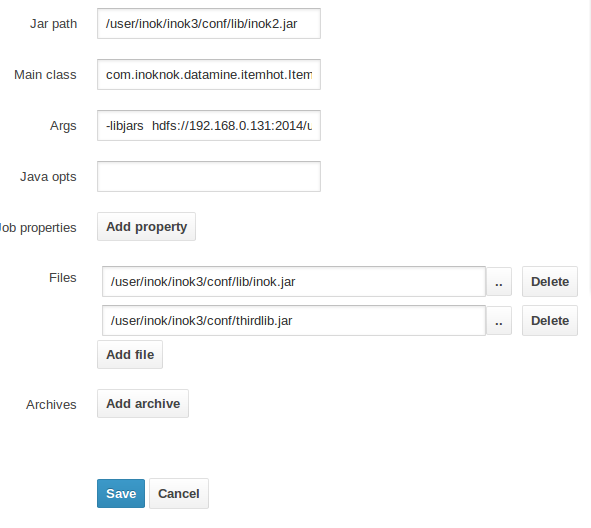
b. when design java action, you should add the following arg
-libjars hdfs://192.168.0.131:2014/user/inok/inok3/conf/thirdlib.jar
and add the thirdlib.jar as file
------
But I thought there otherway is to avoid step b is upload thirdlib.jar to path/to/wf-deployment-dir/lib/ .
and set
oozie.wf.application.path
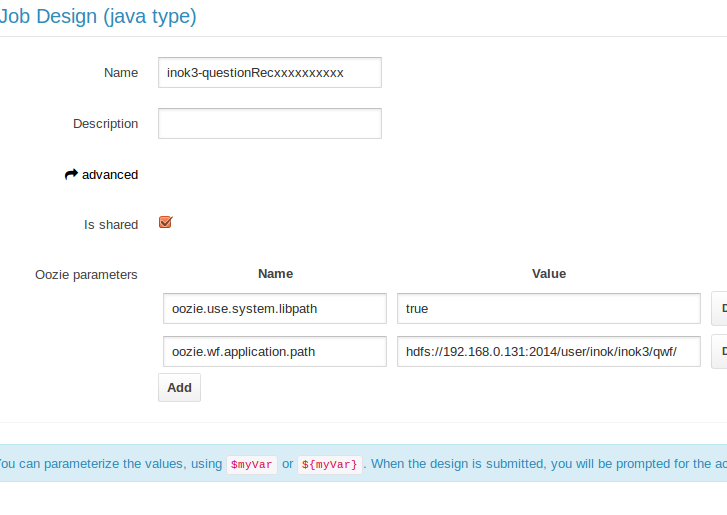
but the actual oozie.wf.application.path is
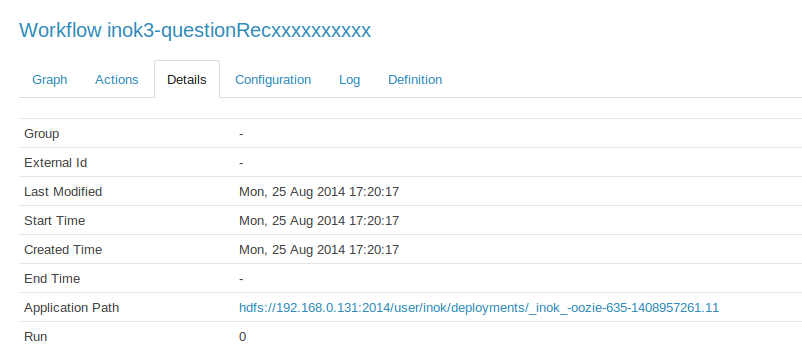
This means that in hue, the oozie.wf.application.path cann't be owerwrited
References
http://hadoopi.wordpress.com/2014/06/05/hadoop-add-third-party-libraries-to-mapreduce-job/
http://blog.cloudera.com/blog/2011/01/how-to-include-third-party-libraries-in-your-map-reduce-job/





 扫一扫
扫一扫


 969
969

 被折叠的 条评论
为什么被折叠?
被折叠的 条评论
为什么被折叠?
 到【灌水乐园】发言





