


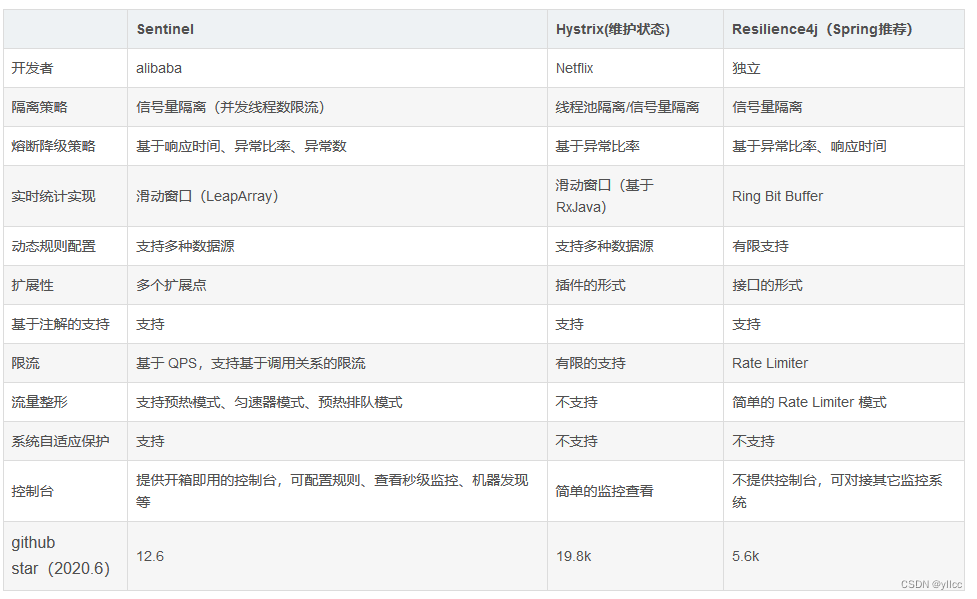
 本文介绍了Hystrix、Resilience4J和Sentinel这三个常见的容错组件在互联网系统中的应用,重点讨论了熔断策略、Sentinel与SpringBoot集成、流控规则、降级机制以及规则持久化的方法。
1.常见的容错组件
Hystrix
Hystrix是由Netflix开源的一个延迟和容错库,用于隔离访问远程系统、服务或者第三方库,防止 级联失败,从而提升系统的可用性与容错性。
Resilience4J
Resilicence4J一款非常轻量、简单,并且文档非常清晰、丰富的熔断工具,这也是Hystrix官方推 荐的替代产品。不仅如此,Resilicence4j还原生支持Spring Boot 1.x/2.x,而且监控也支持和 prometheus等多款主流产品进行整合。
Sentinel
Sentinel 是阿里巴巴开源的一款断路器实现,本身在阿里内部已经被大规模采用,非常稳定
熔断
在互联网系统中,当下游服务因访问压力过大而响应变慢或失败,上游服务为了保护系统整 体的可用性,可以暂时切断对下游服务的调用。这种牺牲局部,保全整体的措施就叫做熔断。
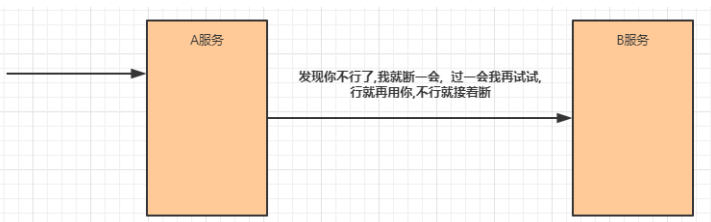
服务熔断一般有三种状态:
熔断关闭状态(Closed)
a->b ->c
服务没有故障时,熔断器所处的状态,对调用方的调用不做任何限制
熔断开启状态(Open)
a->b->c(x)
a->b
后续对该服务接口的调用不再经过网络,直接执行本地的fallback方法
半熔断状态(Half-Open)
c
尝试恢复服务调用,允许有限的流量调用该服务,并监控调用成功率。如果成功率达到预 期,则说明服务已恢复,进入熔断关闭状态;如果成功率仍旧很低,则重新进入熔断关闭状态
降级
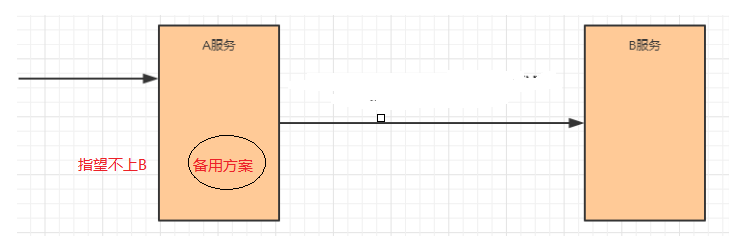
降级其实就是为服务提供一个备用方案,一旦服务无法正常调用,就使用备用方案
2.Sentinel 和服务交互
2.1.启动sentinel jar包
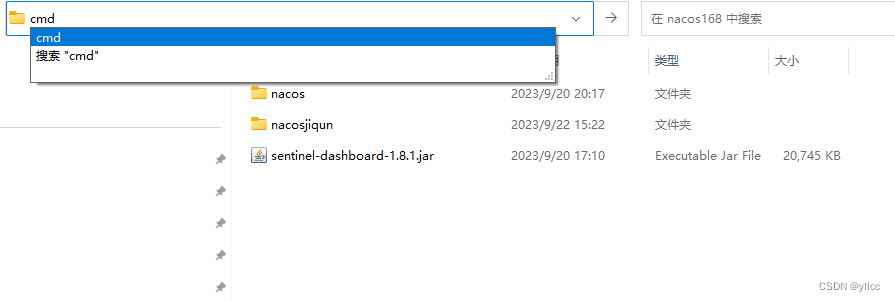 # 直接使用jar命令启动项目(控制台本身是一个SpringBoot项目)
java -jar sentinel-dashboard-1.8.1.jar --server.port=8888
用户密码 sentinel
2.2修改product,在里面加入有关控制台的配置
spring.cloud.sentinel.transport.port=9999
# 该端口号为sentinal于服务之间的交互 随便写只要不被占用
spring.cloud.sentinel.transport.dashboard=localhost:8888
#sentinal服务所在的地址和端口号
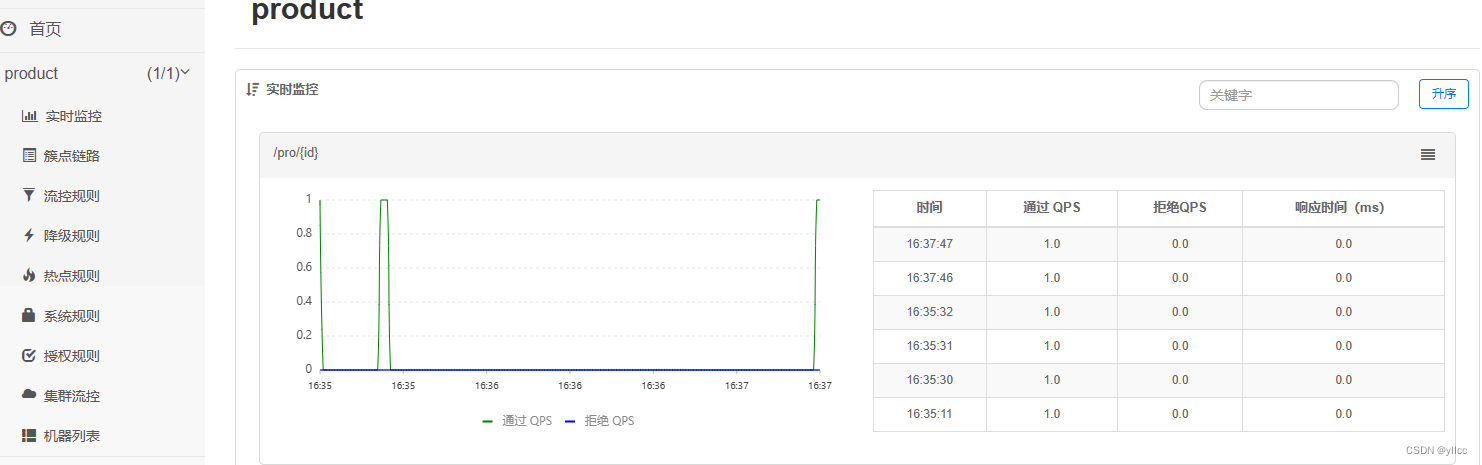
2.3 新增 流控规则
资源名:唯一名称,默认是请求路径,可自定义
针对来源:指定对哪个微服务进行限流,默认指default,意思是不区分来源,全部限制
阈值类型/单机阈值:
l QPS(每秒请求数量): 当调用该接口的QPS达到阈值的时候,进行限流
l 线程数:当调用该接口的线程数达到阈值的时候,进行限流
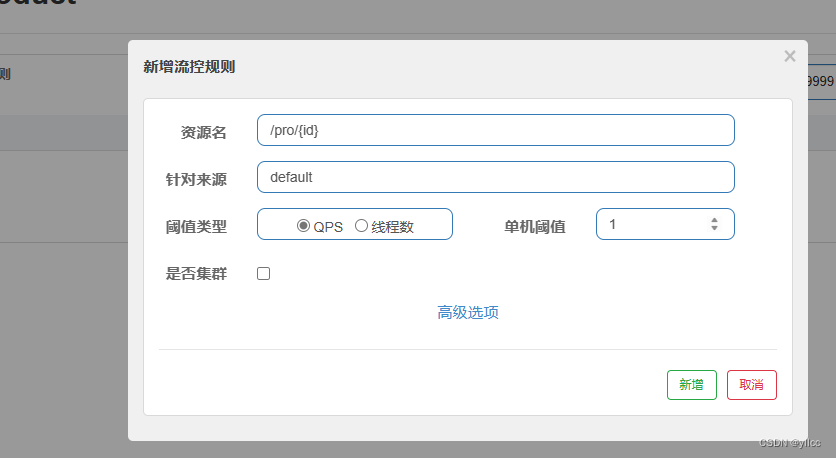
访问 当QPS > 2的时候
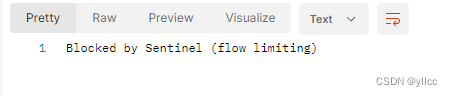
2.3.1异常处理
@Component
public class MyException implements BlockExceptionHandler {
    @Override
    public void handle(HttpServletRequest httpServletRequest, HttpServletResponse httpServletResponse, BlockException e) throws Exception {
        Result result = new Result();
        //限流 aps FlowExcption
        if(e instanceof FlowException){
                result=new Result(450,"限流了",null);
        }
        ObjectMapper objectMapper = new ObjectMapper();
        String s = objectMapper.writeValueAsString(result);
        PrintWriter writer = httpServletResponse.getWriter();
        writer.println(s);
        writer.flush();
        writer.close();
    }
}
访问 当QPS > 2的时候
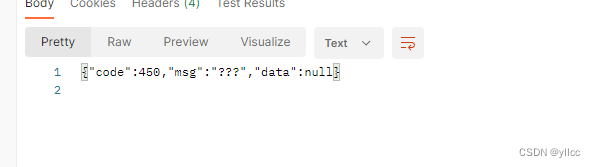
2.3.2流控关联
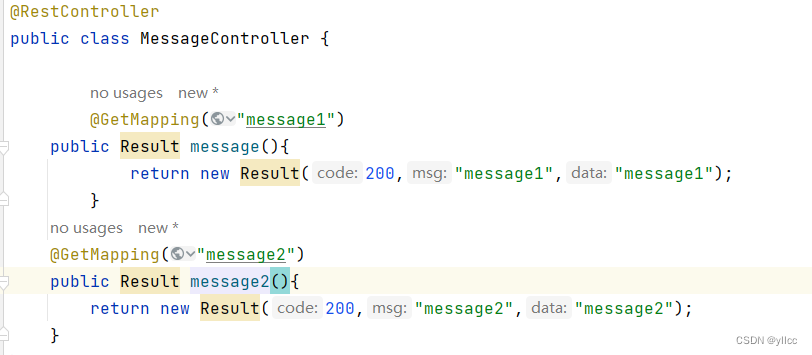
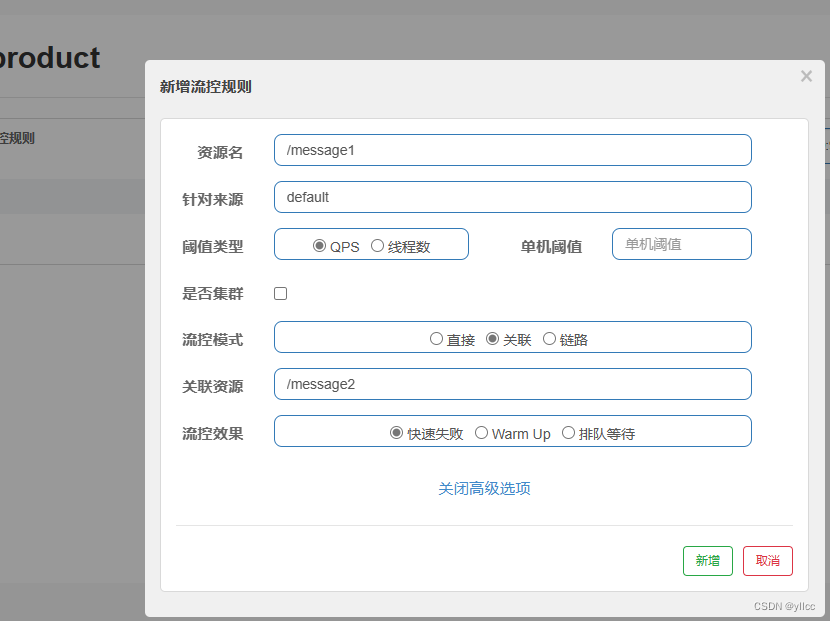
message2 访问达到一的时候 就会限流
2.3.3链路流控模式
注解
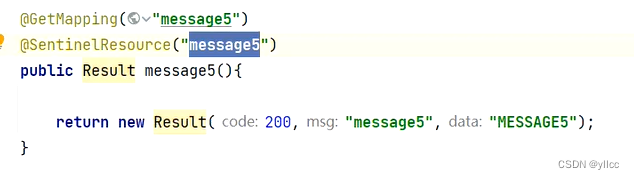
@SentinelResource
我们可以对某一个方法进行限流控制,无论是谁在何处调用了它,这里需要使用到@SentinelResource,一旦方法被标注,那么就会进行监控@SentinelResource,一旦方法被标注,那么就会进行监控。
1.编写一个service,在里面添加一个方法message
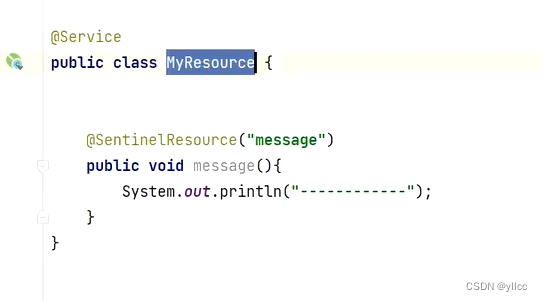
第2步: 在Controller中声明两个方法,分别调用service中的方法message
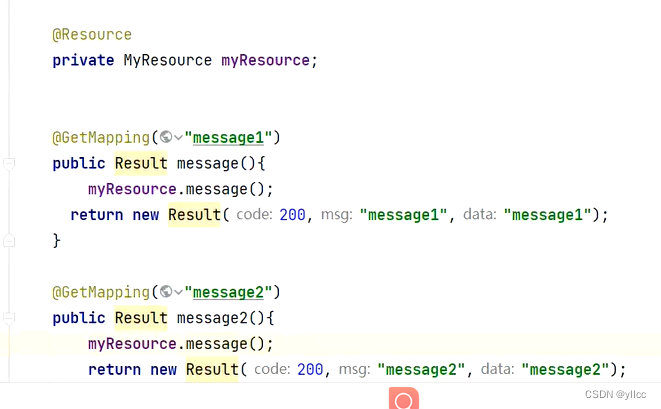 第3第3步: 禁止收敛URL的入口 context
在application.properties中添加:
#用于控制是否收敛context。将其配置为 false 即可根据不同的URL 进行链路限流。
spring.cloud.sentinel.web-context-unify=false
第4步: 控制台配置限流规则
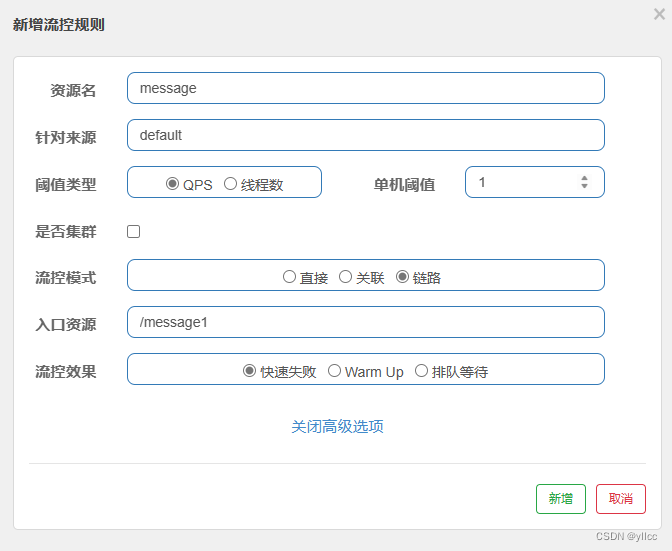
从message1 路径访问message资源的时候 如果达到了流控的上限 限流
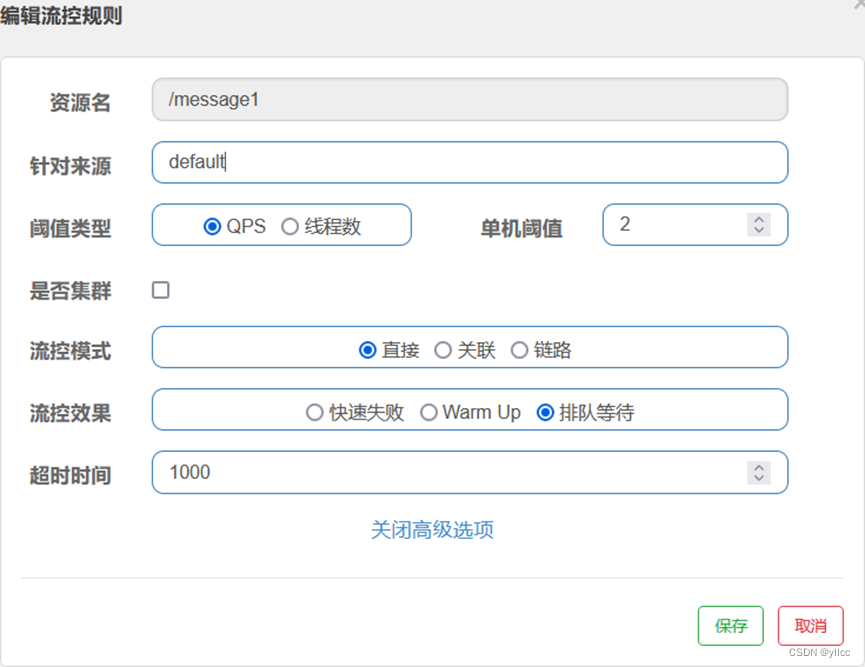
2.3.4等待流控
2.4降级规则
降级规则就是设置当满足什么条件的时候,对服务进行降级。
2.4.1慢调用比例
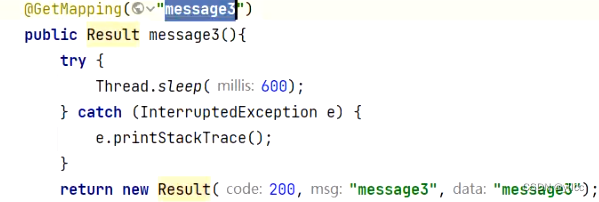
访问两次 只要有一次超过500毫秒 就视为慢调用比例
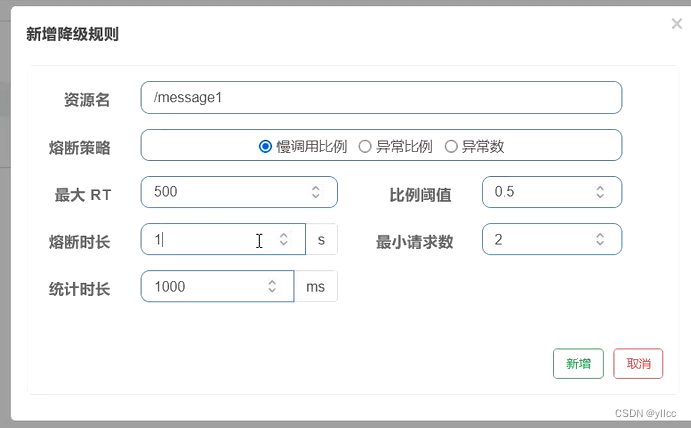
RT:平均响应时间 (DEGRADE_GRADE_RT);当 1s 内持续进入 5 个请求,对应时刻的平均响应时间(秒级)均超过阈值(count,以 ms 为单位),那么在接下来的时间窗口(DegradeRule 中的 timeWindow,以 s 为单位)之内,对这个方法的调用都会自动地熔断(抛出 DegradeException)。
注意 Sentinel 默认统计的 RT 上限是 4900 ms,超出此阈值的都会算作 4900 ms
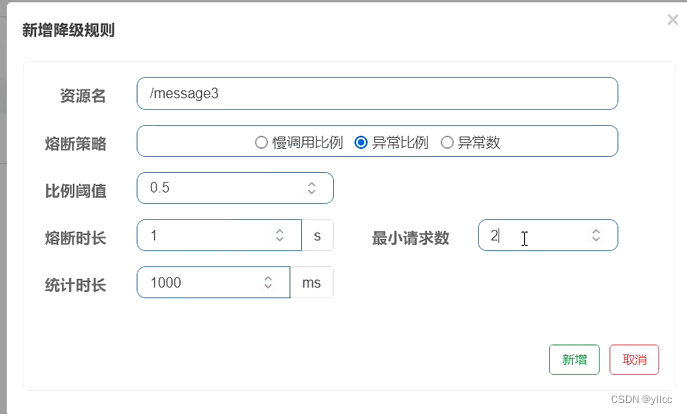
2.4.2异常比例
1秒钟之内,请求这个路径异常比例达到0.5就进行熔断,
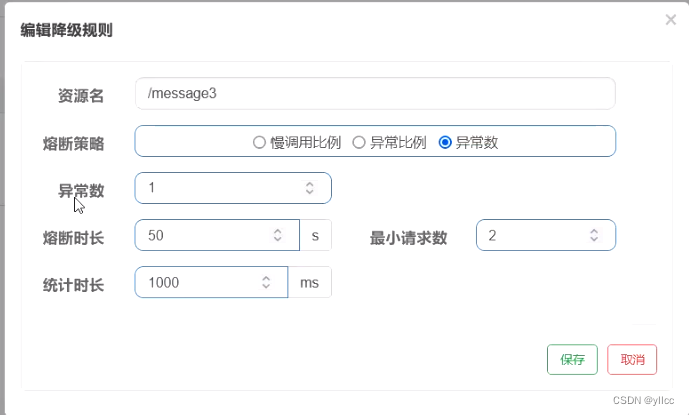
2.4.3 异常数
2个请求,只要有一个请求有异常,就会进行熔断
2.5热点规则
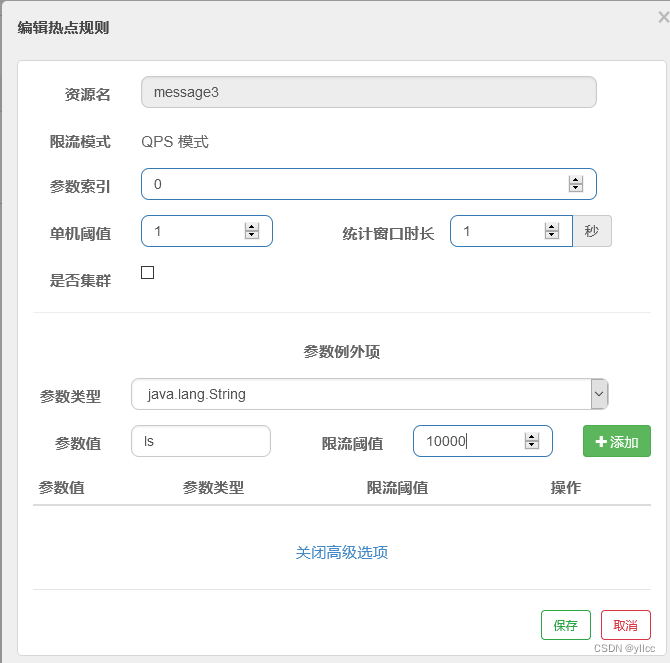
热点参数流控规则是一种更细粒度的流控规则, 它允许将规则具体到参数上。
有一个请求的时候 就进行限流
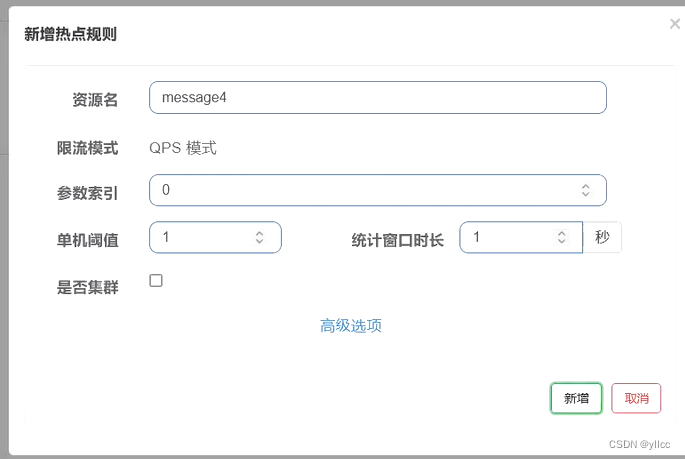
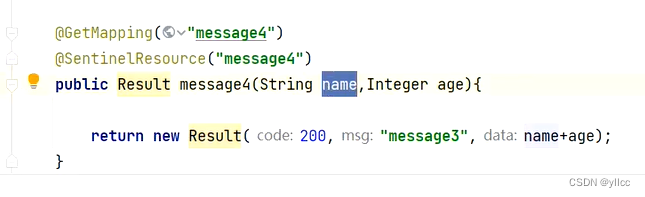
分别用两个参数访问,会发现只对第一个参数限流了
热点规则增强使用
参数例外项允许对一个参数的具体值进行流控编辑刚才定义的规则,增加参数例外项
2.6授权规则
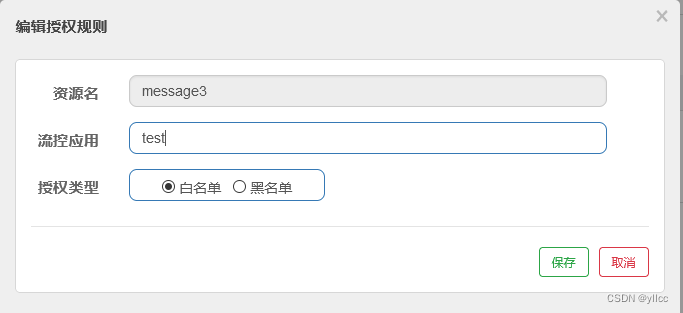
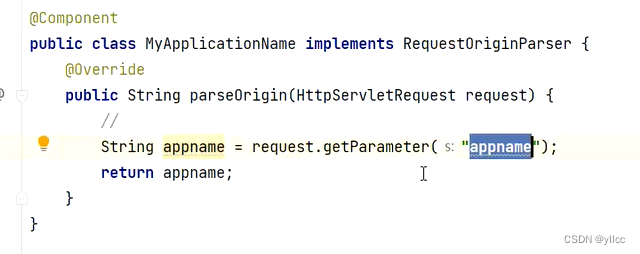
很多时候,我们需要根据调用来源来判断该次请求是否允许放行,这时候可以使用 Sentinel 的来源 访问控制的功能。来源访问控制根据资源的请求来源(origin)限制资源是否通过:
若配置白名单,则只有请求来源位于白名单内时才可通过;
若配置黑名单,则请求来源位于黑名单时不通过,其余的请求通过
全局异常的返回
@ControllerAdvice // 全局异常
public class GlobalException {
    @ResponseBody // 以json
    // 抛出的异常{} 代表的就是一个集合
    @ExceptionHandler({UndeclaredThrowableException.class})
    public Result test(){
      return new Result("没有授权!!!");
    }
}
3.持久化
通过前面的讲解,我们已经知道,可以通过Dashboard来为每个Sentinel客户端设置各种各样的规则,但是这里有一个问题,就是这些规则默认是存放在内存中,极不稳定,所以需要将其持久化。
使用文件
package com.ht.chijiuhua;

import com.alibaba.csp.sentinel.command.handler.ModifyParamFlowRulesCommandHandler;
import com.alibaba.csp.sentinel.datasource.*;
import com.alibaba.csp.sentinel.init.InitFunc;
import com.alibaba.csp.sentinel.slots.block.authority.AuthorityRule;
import com.alibaba.csp.sentinel.slots.block.authority.AuthorityRuleManager;
import com.alibaba.csp.sentinel.slots.block.degrade.DegradeRule;
import com.alibaba.csp.sentinel.slots.block.degrade.DegradeRuleManager;
import com.alibaba.csp.sentinel.slots.block.flow.FlowRule;
import com.alibaba.csp.sentinel.slots.block.flow.FlowRuleManager;
import com.alibaba.csp.sentinel.slots.block.flow.param.ParamFlowRule;
import com.alibaba.csp.sentinel.slots.block.flow.param.ParamFlowRuleManager;
import com.alibaba.csp.sentinel.slots.system.SystemRule;
import com.alibaba.csp.sentinel.slots.system.SystemRuleManager;
import com.alibaba.csp.sentinel.transport.util.WritableDataSourceRegistry;
import com.alibaba.fastjson.JSON;
import com.alibaba.fastjson.TypeReference;
import org.springframework.beans.factory.annotation.Value;
import java.io.File;
import java.io.IOException;
import java.util.List;
public class FilePersistence implements InitFunc {
    @Value("${spring.application.name}")
    private String appcationName;
    @Override
    public void init() throws Exception {
        String ruleDir = System.getProperty("user.home") + "/sentinel-rules/" + appcationName;
        String flowRulePath = ruleDir + "/flow-rule.json";
        String degradeRulePath = ruleDir + "/degrade-rule.json";
        String systemRulePath = ruleDir + "/system-rule.json";
        String authorityRulePath = ruleDir + "/authority-rule.json";
        String paramFlowRulePath = ruleDir + "/param-flow-rule.json";
        this.mkdirIfNotExits(ruleDir);
        this.createFileIfNotExits(flowRulePath);
        this.createFileIfNotExits(degradeRulePath);
        this.createFileIfNotExits(systemRulePath);
        this.createFileIfNotExits(authorityRulePath);
        this.createFileIfNotExits(paramFlowRulePath);
        // 流控规则
        ReadableDataSource<String, List<FlowRule>> flowRuleRDS = new FileRefreshableDataSource<>(
                flowRulePath,
                flowRuleListParser
        );
        FlowRuleManager.register2Property(flowRuleRDS.getProperty());
        WritableDataSource<List<FlowRule>> flowRuleWDS = new FileWritableDataSource<>(
                flowRulePath,
                this::encodeJson
        );
        WritableDataSourceRegistry.registerFlowDataSource(flowRuleWDS);
        // 降级规则
        ReadableDataSource<String, List<DegradeRule>> degradeRuleRDS = new FileRefreshableDataSource<>(
                degradeRulePath,
                degradeRuleListParser
        );
        DegradeRuleManager.register2Property(degradeRuleRDS.getProperty());
        WritableDataSource<List<DegradeRule>> degradeRuleWDS = new FileWritableDataSource<>(
                degradeRulePath,
                this::encodeJson
        );
        WritableDataSourceRegistry.registerDegradeDataSource(degradeRuleWDS);
        // 系统规则
        ReadableDataSource<String, List<SystemRule>> systemRuleRDS = new FileRefreshableDataSource<>(
                systemRulePath,
                systemRuleListParser
        );
        SystemRuleManager.register2Property(systemRuleRDS.getProperty());
        WritableDataSource<List<SystemRule>> systemRuleWDS = new FileWritableDataSource<>(
                systemRulePath,
                this::encodeJson
        );
        WritableDataSourceRegistry.registerSystemDataSource(systemRuleWDS);
        // 授权规则
        ReadableDataSource<String, List<AuthorityRule>> authorityRuleRDS = new FileRefreshableDataSource<>(
                authorityRulePath,
                authorityRuleListParser
        );
        AuthorityRuleManager.register2Property(authorityRuleRDS.getProperty());
        WritableDataSource<List<AuthorityRule>> authorityRuleWDS = new FileWritableDataSource<>(
                authorityRulePath,
                this::encodeJson
        );
        WritableDataSourceRegistry.registerAuthorityDataSource(authorityRuleWDS);
        // 热点参数规则
        ReadableDataSource<String, List<ParamFlowRule>> paramFlowRuleRDS = new FileRefreshableDataSource<>(
                paramFlowRulePath,
                paramFlowRuleListParser
        );
        ParamFlowRuleManager.register2Property(paramFlowRuleRDS.getProperty());
        WritableDataSource<List<ParamFlowRule>> paramFlowRuleWDS = new FileWritableDataSource<>(
                paramFlowRulePath,
                this::encodeJson
        );
        ModifyParamFlowRulesCommandHandler.setWritableDataSource(paramFlowRuleWDS);
    }
    private Converter<String, List<FlowRule>> flowRuleListParser = source -> JSON.parseObject(
            source,
            new TypeReference<List<FlowRule>>() {
            }
    );
    private Converter<String, List<DegradeRule>> degradeRuleListParser = source -> JSON.parseObject(
            source,
            new TypeReference<List<DegradeRule>>() {
            }
    );
    private Converter<String, List<SystemRule>> systemRuleListParser = source -> JSON.parseObject(
            source,
            new TypeReference<List<SystemRule>>() {
            }
    );
    private Converter<String, List<AuthorityRule>> authorityRuleListParser = source -> JSON.parseObject(
            source,
            new TypeReference<List<AuthorityRule>>() {
            }
    );

    private Converter<String, List<ParamFlowRule>> paramFlowRuleListParser = source -> JSON.parseObject(
            source,
            new TypeReference<List<ParamFlowRule>>() {
            }
    );

    private void mkdirIfNotExits(String filePath) throws IOException {
        File file = new File(filePath);
        if (!file.exists()) {
            file.mkdirs();
        }
    }
    private void createFileIfNotExits(String filePath) throws IOException {
        File file = new File(filePath);
        if (!file.exists()) {
            file.createNewFile();
        }
    }
    private <T> String encodeJson(T t) {
        return JSON.toJSONString(t);
    }
}
将这个配置文件使用
在对应的微服务下面的resources里面创建一个目录
META-INF文件夹下
在创建
services 文件夹
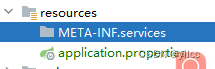
并在目录下面写一个文件
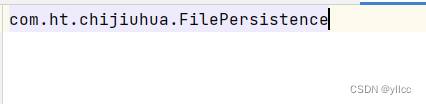
com.alibaba.csp.sentinel.init.InitFunc
文件里面写的是刚才的配置类的包名加类名 :com.ht.chijiuhua.FilePersistence






 扫一扫
扫一扫


 2543
2543

 被折叠的 条评论
为什么被折叠?
被折叠的 条评论
为什么被折叠?
 到【灌水乐园】发言





