


一、前言
在WIndows开发中,使用UWP(Universal WIndows)项目开发过程中,使用ContentDialog 的过程中,我们可能并不满足现有的样式,这时就需要自定义样式。笔者在自定义样式过程中,遇到了一个难题,当使用了自定义的背景之后,发现后面总有一个阴影无法去除,由于背景是白色的,这个阴影就特别显眼,非常不好看。接下来,将详细介绍一下遇到的问题。
二、自定义 ContentDilaog 样式
笔者在使用UWP开发,需要自定义ContentDialog 的样式,自定义样式的方法其实很简单,网上也很多介绍,主要是自定义Style样式。首先,需要从 Windows Kits 安装目录中找到 ContentDilaog 的默认样式,默认样式文件在 [你电脑中WIndows Kits 安装目录]\10\DesignTime\CommonConfiguration\Neutral\UAP\10.0.18362.0\Generic\generic.xaml,找到这个文件并打开,搜索TargetType="ContentDialog" 就可以找到了,将整个Style复制出来,放到自己的项目中(可以新建自己的xaml资源文件,也可以直接放在 ContentDialog xaml声明文件中)。
说到这里,必须注意的是,如果需要自定义 ContentDialog,你必须添加一个 xaml 文件来定义ContentDialog,在项目中右键 -> 添加 -> 新建项,在弹出的对话框中,选择C#,然后选“内容对话框”,输入对话框名称并“确定”,如下图:
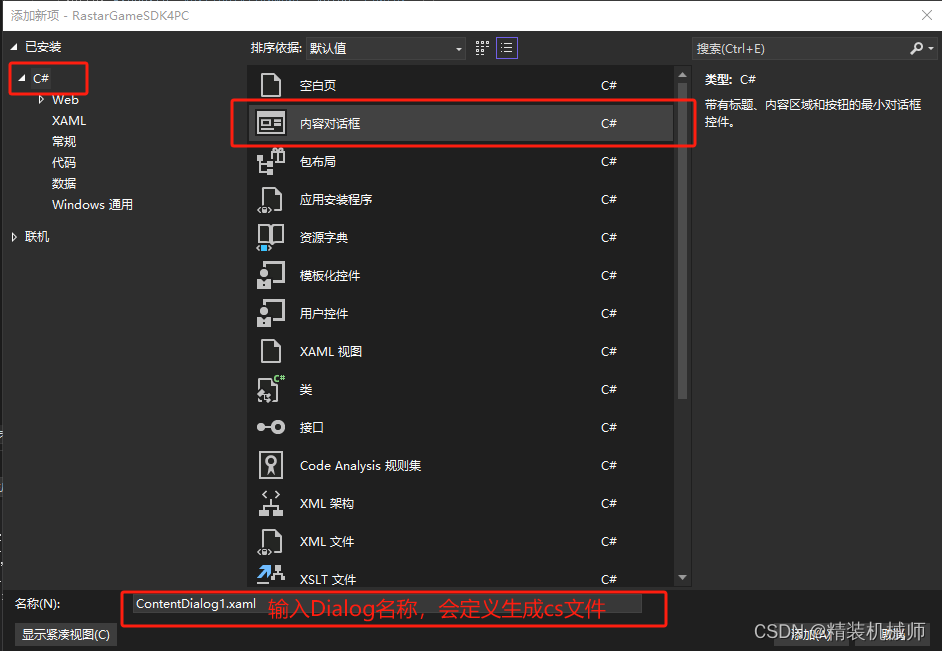
创建xaml文件后,内容大致如下:
<ContentDialog
    x:Class="Game.PrivacyPolicyDialog"
    xmlns="http://schemas.microsoft.com/winfx/2006/xaml/presentation"
    xmlns:x="http://schemas.microsoft.com/winfx/2006/xaml"
    xmlns:local="using:Game"
    xmlns:d="http://schemas.microsoft.com/expression/blend/2008"
    xmlns:mc="http://schemas.openxmlformats.org/markup-compatibility/2006"
    mc:Ignorable="d"
    PrimaryButtonText="不同意"
    PrimaryButtonClick="PrivacyPolicyDialog_DenyButtonClick"
    SecondaryButtonText="同意并继续"
    SecondaryButtonClick="PrivacyPolicyDialog_AcceptButtonClick">
    <!-- 省略其他内容=-->
</ContentDialog>
说明:以上示例代码中,
x:Class对应的是cs文件类名称,如果你需要更改命名空间,要同时修改 xaml和cs文件,否则编译会报错。
上面创建的内容对话框,样式是默认的样式,通过定义自定义样式,就可以改变原来的样式。如下示例:
ContentDialog
    x:Class="Game.PrivacyPolicyDialog"
    xmlns="http://schemas.microsoft.com/winfx/2006/xaml/presentation"
    xmlns:x="http://schemas.microsoft.com/winfx/2006/xaml"
    xmlns:local="using:Game"
    xmlns:d="http://schemas.microsoft.com/expression/blend/2008"
    xmlns:mc="http://schemas.openxmlformats.org/markup-compatibility/2006"
    mc:Ignorable="d"
    PrimaryButtonText="不同意"
    PrimaryButtonClick="PrivacyPolicyDialog_DenyButtonClick"
    SecondaryButtonText="同意并继续"
    SecondaryButtonClick="PrivacyPolicyDialog_AcceptButtonClick">
    <ContentDialog.Resources>
        <ImageBrush x:Key="PrivacyPolicyDenyButtonBg" ImageSource="Assets/PrivacyPolicyDenyButtonBg.png" />
        <ImageBrush x:Key="PrivacyPolicyAcceptButtonBg" ImageSource="Assets/PrivacyPolicyAcceptButtonBg.png" />

        <!-- 隐私协议拒绝按钮样板 -->
        <Style TargetType="Button" x:Key="PrivacyPolicyDenyButtonStyle">
            <Setter Property="Background" Value="{StaticResource PrivacyPolicyDenyButtonBg}" />
            <Setter Property="Foreground" Value="#FFE30416" />
            <Setter Property="BorderBrush" Value="Transparent" />
            <Setter Property="BorderThickness" Value="0" />
            <Setter Property="Padding" Value="{ThemeResource ButtonPadding}" />
            <Setter Property="HorizontalAlignment" Value="Left" />
            <Setter Property="VerticalAlignment" Value="Center" />
            <Setter Property="FontFamily" Value="{ThemeResource ContentControlThemeFontFamily}" />
            <Setter Property="FontWeight" Value="Normal" />
            <Setter Property="FontSize" Value="30" />
            <Setter Property="UseSystemFocusVisuals" Value="{StaticResource UseSystemFocusVisuals}" />
            <Setter Property="FocusVisualMargin" Value="-3" />
            <Setter Property="Width" Value="302" />
            <Setter Property="Height" Value="80" />
            <Setter Property="HorizontalContentAlignment" Value="Center" />
            <Setter Property="Template">
                <Setter.Value>
                    <ControlTemplate TargetType="Button">
                        <ContentPresenter x:Name="ContentPresenter"
                                          Background="{TemplateBinding Background}"
                                          BackgroundSizing="{TemplateBinding BackgroundSizing}"
                                          BorderBrush="Transparent"
                                          BorderThickness="{TemplateBinding BorderThickness}"
                                          Content="{TemplateBinding Content}"
                                          ContentTemplate="{TemplateBinding ContentTemplate}"
                                          ContentTransitions="{TemplateBinding ContentTransitions}"
                                          CornerRadius="{TemplateBinding CornerRadius}"
                                          Padding="{TemplateBinding Padding}"
                                          HorizontalContentAlignment="{TemplateBinding HorizontalContentAlignment}"
                                          VerticalContentAlignment="{TemplateBinding VerticalContentAlignment}"
                                          AutomationProperties.AccessibilityView="Raw">

                            <VisualStateManager.VisualStateGroups>
                                <VisualStateGroup x:Name="CommonStates">
                                    <VisualState x:Name="Normal" >
                                        <Storyboard>
                                            <PointerUpThemeAnimation Storyboard.TargetName="ContentPresenter" />
                                        </Storyboard>
                                    </VisualState>

                                    <VisualState x:Name="PointerOver">
                                        <Storyboard>
                                            <ObjectAnimationUsingKeyFrames Storyboard.TargetName="ContentPresenter" Storyboard.TargetProperty="Background">
                                                <DiscreteObjectKeyFrame KeyTime="0" Value="{StaticResource PrivacyPolicyDenyButtonBg}" />
                                            </ObjectAnimationUsingKeyFrames>
                                            <ObjectAnimationUsingKeyFrames Storyboard.TargetName="ContentPresenter" Storyboard.TargetProperty="BorderBrush">
                                                <DiscreteObjectKeyFrame KeyTime="0" Value="Transparent" />
                                            </ObjectAnimationUsingKeyFrames>
                                            <ObjectAnimationUsingKeyFrames Storyboard.TargetName="ContentPresenter" Storyboard.TargetProperty="Foreground">
                                                <DiscreteObjectKeyFrame KeyTime="0" Value="#FFE30416" />
                                            </ObjectAnimationUsingKeyFrames>
                                        </Storyboard>
                                    </VisualState>

                                    <VisualState x:Name="Pressed">

                                        <Storyboard>
                                            <ObjectAnimationUsingKeyFrames Storyboard.TargetName="ContentPresenter" Storyboard.TargetProperty="Background">
                                                <DiscreteObjectKeyFrame KeyTime="0" Value="{StaticResource PrivacyPolicyDenyButtonBg}" />
                                            </ObjectAnimationUsingKeyFrames>
                                            <ObjectAnimationUsingKeyFrames Storyboard.TargetName="ContentPresenter" Storyboard.TargetProperty="BorderBrush">
                                                <DiscreteObjectKeyFrame KeyTime="0" Value="Transparent" />
                                            </ObjectAnimationUsingKeyFrames>
                                            <ObjectAnimationUsingKeyFrames Storyboard.TargetName="ContentPresenter" Storyboard.TargetProperty="Foreground">
                                                <DiscreteObjectKeyFrame KeyTime="0" Value="#FFE30416" />
                                            </ObjectAnimationUsingKeyFrames>
                                        </Storyboard>
                                    </VisualState>

                                    <VisualState x:Name="Disabled">
                                        <Storyboard>
                                            <ObjectAnimationUsingKeyFrames Storyboard.TargetName="ContentPresenter" Storyboard.TargetProperty="Background">
                                                <DiscreteObjectKeyFrame KeyTime="0" Value="{StaticResource PrivacyPolicyDenyButtonBg}" />
                                            </ObjectAnimationUsingKeyFrames>
 最低0.47元/天 解锁文章






 扫一扫
扫一扫


 1891
1891

 被折叠的 条评论
为什么被折叠?
被折叠的 条评论
为什么被折叠?
 到【灌水乐园】发言





