Previous Articles
New Features of WCF 4.0: Part I
New Features of WCF 4.0: Part II
Introduction
Microsoft.NET 4.0 and Visual Studio.NET 2010 ships a lot of new features in their underlying technologies. In this series of articles, I want to talk about the new features in the area of Windows Communication Foundation (WCF) in order to improve the development experience, enable more communication scenario, support new WS-* standards and provide a good integration with Windows Workflow Foundation (WF).
The new features are essentially the following: simplified configuration, standard endpoints, IIS hosting without a SVC file, support for WS-Discovery, routing service, REST improvements, enhancements for the integration with WF to support workflow services, simple byte stream encoding and ETW tracing.
In this series of article, I will illustrate each feature explaining the principles and showing some examples.
Routing service
Routing service is one of the most interesting features in WCF 4.0. This approach is aimed at taking advantage of centralized routing services that acts as brokers to the catalog of services in the organization. This makes to decouple the consumers from the services and to make some processing while the messages pass through the channel between the consumer and the service for example implement security services or use content-based routing techniques to determine the target service based on the content of a particular message.
In order to implement this routing service, WCF 4.0 provides a new class called RoutingService. The function of RoutingService is to receive incoming messages from consumers and to route them to the target service by evaluating each message against a set of message filters. You can host the RoutingService instances in your application like a traditional WCF service and can be configured either by code or by configuration. The configuration is done by enabling the RoutingBehavior on the RouterService, and then by specifying the name of the filter table.
In order to illustrate the principles of routing service, I'm going to develop a RoutingService as a content-based router. Our example scenario is an order shipping service implemented using the principles of routing services in WCF 4.0. The orders, sent by the clients, are processed by the routing service and submitted to the target shipping service according to a tag in the message to identify two possible outcomes: by plane or by bus. One important advantage is that the clients don't know the target services.
The first step is to define the shipping service contract and order shipping data contract for the messages in the ShippingServiceContract project. The ShippingServiceContract is shown in the Listing 1.
using
System;
using
System.Collections.Generic;
using
System.Linq;
using
System.Text;
using
System.ServiceModel;
namespace
ShippingServiceContract
{
[ServiceContract ]
public interface IShippingService
{
[OperationContract ]
void
Submit(ShippingOrder shippingOrder);
}
}
Listing 1
And the definition of the ShippingOrder message is shown in the Listing 2.
using
System;
using
System.Collections.Generic;
using
System.Linq;
using
System.Text;
using
System.Runtime.Serialization;
namespace
ShippingServiceContract
{
[DataContract ]
public class ShippingOrder
{
[DataMember ]
public int ShippingId { get ; set ; }
[DataMember ]
public string Origin { get ; set ; }
[DataMember ]
public string Destination { get ; set ; }
[DataMember ]
public string Order { get ; set ; }
/// <summary>
/// If ShippingMethod is 1 then by Plane.
/// If ShippingMethod is 2 then by Bus.
/// </summary>
[DataMember ]
public int ShippingMethod { get ; set ; }
}
}
Listing 2
Next step is to implement the service contract in two different services: PlaneShippingService and BusShippingService. The PlaneShippingService is implemented in the PlaneShippingServiceCons as shown in the following listings: Listing 3, Listing 4 and Listing 5.
using
System;
using
System.Collections.Generic;
using
System.Linq;
using
System.Text;
using
ShippingServiceContract;
namespace
PlaneShippingServiceCons
{
public class PlaneShippingService : IShippingService
{
#region
IShippingService Members
public void Submit(ShippingOrder shippingOrder)
{
System.Console .WriteLine("ShippingOrder Info. ShippingId {0}. ShippingMethod {1}" , shippingOrder.ShippingId, shippingOrder.ShippingMethod);
}
#endregion
}
}
Listing 3
using
System;
using
System.Collections.Generic;
using
System.Linq;
using
System.Text;
using
System.ServiceModel;
namespace
PlaneShippingServiceCons
{
class Program
{
static void Main(string [] args)
{
ServiceHost serviceHost = new ServiceHost (typeof (PlaneShippingService ), new Uri ("http://localhost:8080/Services/PlaneShippingService" ));
serviceHost.Open();
System.Console .WriteLine("Press any key to finish the service ..." );
System.Console .ReadLine();
}
}
}
Listing 4
<?
xml
version
=
"1.0 " encoding = "utf-8 " ?>
<
configuration
>
<
system.serviceModel
>
<
behaviors
>
<
serviceBehaviors
>
<
behavior
name
=
"">
<
serviceMetadata
httpGetEnabled
=
"true " />
</
behavior
>
</
serviceBehaviors
>
</
behaviors
>
</
system.serviceModel
>
</
configuration
>
Listing 5
The BusShippingService is implemented in the BusShippingServiceCons as shown in the following listings: Listing 6, Listing 7 and Listing 8.
using
System;
using
System.Collections.Generic;
using
System.Linq;
using
System.Text;
using
ShippingServiceContract;
namespace
BusShippingServiceCons
{
public class BusShippingService : IShippingService
{
#region
IShippingService Members
public void Submit(ShippingOrder shippingOrder)
{
System.Console .WriteLine("ShippingOrder Info. ShippingId {0}. ShippingMethod {1}" , shippingOrder.ShippingId, shippingOrder.ShippingMethod);
}
#endregion
}
}
Listing 6
using
System;
using
System.Collections.Generic;
using
System.Linq;
using
System.Text;
using
System.ServiceModel;
namespace
BusShippingServiceCons
{
class Program
{
static void Main(string [] args)
{
ServiceHost serviceHost = new ServiceHost (typeof (BusShippingService ), new Uri ("http://localhost:8080/Services/BusShippingService" ));
serviceHost.Open();
System.Console .WriteLine("Press any key to finish the service ..." );
System.Console .ReadLine();
}
}
}
Listing 7
<?
xml
version
=
"1.0 " encoding = "utf-8 " ?>
<
configuration
>
<
system.serviceModel
>
<
behaviors
>
<
serviceBehaviors
>
<
behavior
name
=
"">
<
serviceMetadata
httpGetEnabled
=
"true " />
</
behavior
>
</
serviceBehaviors
>
</
behaviors
>
</
system.serviceModel
>
</
configuration
>
Listing 8
Next step is to define the routing service. We need to add another console project to the solution and a reference to the System.ServiceModel.dll and System.ServiceModel.Routing.dll assemblies (see Figure 1).
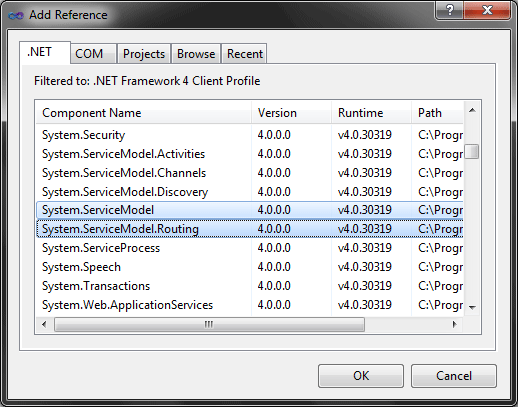 Figure 1
Then, we're going to host a RoutingService instance as a traditional WCF service as shown in the Listing 9. This service will act as a broker.
using
System;
using
System.Collections.Generic;
using
System.Linq;
using
System.Text;
using
System.ServiceModel;
using
System.ServiceModel.Routing;
namespace
ShippingRoutingServiceCons
{
class Program
{
static void Main(string [] args)
{
ServiceHost serviceHost = new ServiceHost (typeof (RoutingService ));
serviceHost.Open();
System.Console .WriteLine("Press any key to finish the service ..." );
System.Console .ReadLine();
}
}
}
Listing 9
Next step in the solution is to create the configuration for the routing service.
If you examine the documentation for the RoutingService class, you will find that this class implements four interfaces: IDuplexSessionRouter, IRequestReplyRouter, ISimplexDatagramRouter and ISimplexSessionRouter.
In our example, the main endpoint will expose the IRequestReplyRouter contract for the address http://localhost:8080/Services/ShippingRoutingService using the binding basicHttpBinding. Then, as part of the service behavior, I will assign a routing table with the routing rules for our scenario (see Listing 10).
<?
xml
version
=
"1.0 " encoding = "utf-8 " ?>
<
configuration
>
<
system.serviceModel
>
<
services
>
<
service
name
=
"System.ServiceModel.Routing.RoutingService " behaviorConfiguration = "ShippingRoutingServiceBeh ">
<
endpoint
address
=
"http://localhost:8080/Services/ShippingRoutingService " binding = "basicHttpBinding "
contract
=
"System.ServiceModel.Routing.IRequestReplyRouter " />
</
service
>
</
services
>
<
client
>
<
endpoint
address
=
"http://localhost:8080/Services/PlaneShippingService " binding = "basicHttpBinding " contract = "* " name = "PlaneShippingService "/>
<
endpoint
address
=
"http://localhost:8080/Services/BusShippingService " binding = "basicHttpBinding " contract = "* " name = "BusShippingService "/>
</
client
>
<
behaviors
>
<
serviceBehaviors
>
<
behavior
name
=
"ShippingRoutingServiceBeh ">
<
routing
filterTableName
=
"ShippingRoutingServiceFilterTable " routeOnHeadersOnly = "false "/>
</
behavior
>
</
serviceBehaviors
>
</
behaviors
>
<
routing
>
<
filters
>
<
filter
name
=
"PlaneShippingServiceFilter " filterType = "XPath " filterData = "boolean(//*[local-name()='ShippingMethod']/text()=1) "/>
<
filter
name
=
"BusShippingServiceFilter " filterType = "XPath " filterData = "boolean(//*[local-name()='ShippingMethod']/text()=2) "/>
</
filters
>
<
filterTables
>
<
filterTable
name
=
"ShippingRoutingServiceFilterTable ">
<
add
filterName
=
"PlaneShippingServiceFilter " endpointName = "PlaneShippingService "/>
<
add
filterName
=
"BusShippingServiceFilter " endpointName = "BusShippingService "/>
</
filterTable
>
</
filterTables
>
</
routing
>
</
system.serviceModel
>
</
configuration
>
Listing 10
Finally, we're going to implement the client-side component of our solution. We're going to communicate to the shipping routing service using dynamic mechanism implemented in the ChannelFactory class without the need to create a proxy representing the services (the bus and plance shipping services). The only requirement is to reference the ShippingServiceContract.dll assembly (see Figure 2) in order to use the service definition.
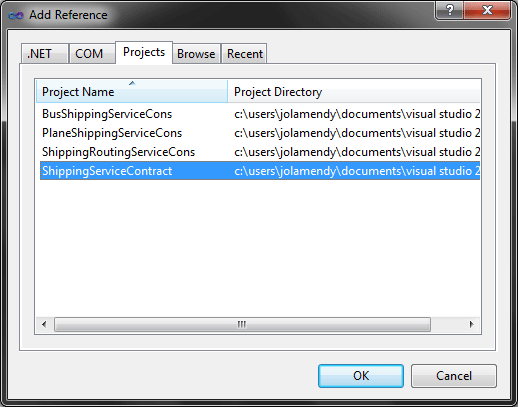 Figure 2
We're going to host our client components in a console application too.
The code for the implementation of the client-side is shown in the Listing 11.
using
System;
using
System.Collections.Generic;
using
System.Linq;
using
System.Text;
using
System.ServiceModel;
using
ShippingServiceContract;
namespace
ConsoleApplication2
{
class Program
{
static void Main(string [] args)
{
BasicHttpBinding basicBinding = new BasicHttpBinding ();
EndpointAddress endpointAddress = new EndpointAddress ("http://localhost:8080/Services/ShippingRoutingService" );
IShippingService shippingSvcProxy = ChannelFactory <IShippingService >.CreateChannel(basicBinding, endpointAddress);
ShippingOrder shippingOrder = new ShippingOrder ();
shippingOrder.ShippingId = 1;
shippingOrder.ShippingMethod = 1;
shippingSvcProxy.Submit(shippingOrder);
}
}
}
Listing 11
Conclusion
In this series of article, I've explained the new features of WCF 4.0 through concepts and examples.
Next Articles
New Features of WCF 4.0: Part IV
New Features of WCF 4.0: Part V



 本文详细介绍了WCF 4.0中的路由服务功能,通过实例演示了如何利用内容路由技术将消息定向到不同的目标服务。文章涵盖了路由服务的配置、实现和服务合同定义等方面。





 扫一扫
扫一扫


 636
636

 被折叠的 条评论
为什么被折叠?
被折叠的 条评论
为什么被折叠?
 到【灌水乐园】发言





