



 本文深入解析了Android应用的三种启动方式:冷启动、热启动和温启动,并详细介绍了冷启动的具体流程,包括system tasks和app process tasks。文章还提供了推荐的启动时间指标,指导开发者如何通过日志和adb shell命令来获取启动时间,最后探讨了启动时间瓶颈的分析方法,如使用Android Studio的CPU Profiler和System Tracing。
1 启动方式
cold startup
warm startup
hot startup
2 cold startup过程
system tasks:
在后台加载和launch app
当后台launch app结束后立刻在前台屏幕上显示出一个空白window
后台创建app进程
app process tasks:
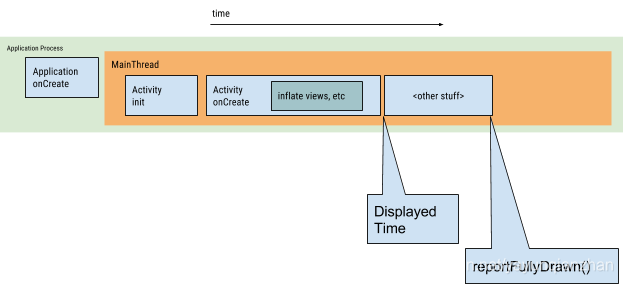
创建app对象
launch主线程(UI线程)
创建MainActivity
inflate views
在屏幕上布局
在屏幕上绘制
绘制完成后,后台使用这个MainActivity替换屏幕上的window,此时用户可以和app交互。
windowDisablePreview theme可以去掉preview window
3 启动时间指标
推荐时间(From Android vitals)
Cold startup takes 5 seconds or longer.
Warm startup takes 2 seconds or longer.
Hot startup takes 1.5 seconds or longer.
4 获取启动时间
通过log搜索启动时间
09-14 18:26:19.883 1393 1425 I ActivityManager: Displayed com.ezia.coreservices.testcarservice/.MainActivity: +1s18ms
若MainActivity与总启动时间之间存在差异时,还会显示总时间度量
09-14 18:25:32.708 1393 1425 I ActivityManager: Displayed com.maezia.sevco.syshmicommgr.demo/.MainActivity: +1s801ms (total +2m24s378ms)
通过adb shell命令打印启动时间
adb shell am start -S -W
com.example.app/.MainActivity
-c android.intent.category.LAUNCHER
-a android.intent.action.MAIN
5 分析启动时间瓶颈
Android Studio CPU Profiler
System tracing
using a dependency injection framework like Hilt that creates objects and dependencies when they are injected for the first time
If your app uses content providers to initialize app components at startup, consider using the App Startup library instead





 扫一扫
扫一扫


 814
814

 被折叠的 条评论
为什么被折叠?
被折叠的 条评论
为什么被折叠?
 到【灌水乐园】发言





