


用到的jar包有:
commons-beanutils-1.7.0.jar、commons-collections-3.2.jar、commons-fileupload-1.2.1.jar、commons-io-1.3.2.jar、commons-lang-2.3.jar、commons-logging-1.0.4.jar、freemarker-2.3.15.jar、json-lib-2.1.jar、ognl-2.7.3.jar、struts2-core-2.1.8.1.jar、struts2-json-plugin-2.1.8.1.jar、xwork-core-2.1.6.jar
这些包在struts2.1.8的lib文件夹中都有,还需要加上一个ezmorph-1.0.4.jar,本实例中没有用到jsonplugin-0.33.jar包。
一、首先写一个javabean:Person.java
Java代码


- package com.leo.bean;
- public class Person {
- private String name;
- private int age;
- private String sex;
- private String birthday;
- public Person(String name, int age, String sex, String birthday) {
- super();
- this.name = name;
- this.age = age;
- this.sex = sex;
- this.birthday = birthday;
- }
- public String getName() {
- return name;
- }
- public void setName(String name) {
- this.name = name;
- }
- public int getAge() {
- return age;
- }
- public void setAge(int age) {
- this.age = age;
- }
- public String getSex() {
- return sex;
- }
- public void setSex(String sex) {
- this.sex = sex;
- }
- public String getBirthday() {
- return birthday;
- }
- public void setBirthday(String birthday) {
- this.birthday = birthday;
- }
- }
package com.leo.bean;

public class Person {
	private String name;
	private int age;
	private String sex;
	private String birthday;

	public Person(String name, int age, String sex, String birthday) {
		super();
		this.name = name;
		this.age = age;
		this.sex = sex;
		this.birthday = birthday;
	}

	public String getName() {
		return name;
	}

	public void setName(String name) {
		this.name = name;
	}

	public int getAge() {
		return age;
	}

	public void setAge(int age) {
		this.age = age;
	}

	public String getSex() {
		return sex;
	}

	public void setSex(String sex) {
		this.sex = sex;
	}

	public String getBirthday() {
		return birthday;
	}

	public void setBirthday(String birthday) {
		this.birthday = birthday;
	}

}
二、写Action:ExtjsAction.java
Java代码
- package com.leo.action;
- import java.util.ArrayList;
- import java.util.List;
- import com.leo.bean.Person;
- import com.opensymphony.xwork2.ActionSupport;
- public class ExtjsAction extends ActionSupport {
- private long results;
- private List items;
- public long getResults() {
- return results;
- }
- public void setResults(long results) {
- this.results = results;
- }
- public List getItems() {
- return items;
- }
- public void setItems(List items) {
- this.items = items;
- }
- public String execute() throws Exception {
- this.results = 3;
- Person p1 = new Person("张三", 29, "男", "1990-10-22");
- Person p2 = new Person("李四", 28, "男", "1991-03-30");
- Person p3 = new Person("王五", 27, "女", "1993-08-17");
- this.items = new ArrayList<Person>();
- this.items.add(p1);
- this.items.add(p2);
- this.items.add(p3);
- return SUCCESS;
- }
- }
package com.leo.action;

import java.util.ArrayList;
import java.util.List;

import com.leo.bean.Person;
import com.opensymphony.xwork2.ActionSupport;

public class ExtjsAction extends ActionSupport {
	private long results;
	private List items;

	public long getResults() {
		return results;
	}

	public void setResults(long results) {
		this.results = results;
	}

	public List getItems() {
		return items;
	}

	public void setItems(List items) {
		this.items = items;
	}

	public String execute() throws Exception {
		this.results = 3;
		Person p1 = new Person("张三", 29, "男", "1990-10-22");
		Person p2 = new Person("李四", 28, "男", "1991-03-30");
		Person p3 = new Person("王五", 27, "女", "1993-08-17");
		this.items = new ArrayList<Person>();
		this.items.add(p1);
		this.items.add(p2);
		this.items.add(p3);
		return SUCCESS;
	}
}
三、写配置文件
1.web.xml
Xml代码
- <?xml version="1.0" encoding="UTF-8"?>
- <web-app xmlns:xsi="http://www.w3.org/2001/XMLSchema-instance"
- xmlns="http://java.sun.com/xml/ns/javaee" xmlns:web="http://java.sun.com/xml/ns/javaee/web-app_2_5.xsd"
- xsi:schemaLocation="http://java.sun.com/xml/ns/javaee http://java.sun.com/xml/ns/javaee/web-app_2_5.xsd"
- version="2.5">
- <display-name>struts2</display-name>
- <welcome-file-list>
- <welcome-file>index.jsp</welcome-file>
- </welcome-file-list>
- <filter>
- <filter-name>struts2</filter-name>
- <filter-class>org.apache.struts2.dispatcher.FilterDispatcher</filter-class>
- </filter>
- <filter-mapping>
- <filter-name>struts2</filter-name>
- <url-pattern>/*</url-pattern>
- </filter-mapping>
- </web-app>
<?xml version="1.0" encoding="UTF-8"?>
<web-app xmlns:xsi="http://www.w3.org/2001/XMLSchema-instance"
	xmlns="http://java.sun.com/xml/ns/javaee" xmlns:web="http://java.sun.com/xml/ns/javaee/web-app_2_5.xsd"
	xsi:schemaLocation="http://java.sun.com/xml/ns/javaee http://java.sun.com/xml/ns/javaee/web-app_2_5.xsd"
	version="2.5">
	<display-name>struts2</display-name>
	<welcome-file-list>
		<welcome-file>index.jsp</welcome-file>
	</welcome-file-list>
	<filter>
		<filter-name>struts2</filter-name>
		<filter-class>org.apache.struts2.dispatcher.FilterDispatcher</filter-class>
	</filter>
	<filter-mapping>
		<filter-name>struts2</filter-name>
		<url-pattern>/*</url-pattern>
	</filter-mapping>
</web-app>
2.struts.xml
Xml代码
- <?xml version="1.0" encoding="UTF-8"?>
- <!DOCTYPE struts PUBLIC "-//Apache Software Foundation//DTD Struts Configuration 2.1//EN"
- "http://struts.apache.org/dtds/struts-2.1.dtd">
- <struts>
- <include file="struts-default.xml" />
- <package name="json" namespace="/" extends="json-default">
- <action name="extjs" class="com.leo.action.ExtjsAction">
- <result type="json"></result>
- </action>
- </package>
- </struts>
<?xml version="1.0" encoding="UTF-8"?>
<!DOCTYPE struts PUBLIC "-//Apache Software Foundation//DTD Struts Configuration 2.1//EN"
"http://struts.apache.org/dtds/struts-2.1.dtd">
<struts>
	<include file="struts-default.xml" />
	<package name="json" namespace="/" extends="json-default">
		<action name="extjs" class="com.leo.action.ExtjsAction">
			<result type="json"></result>
		</action>
	</package>
</struts>
四、最后写jsp
index.jsp
Html代码
- <%@ page language="java" import="java.util.*" pageEncoding="UTF-8"%>
- <!DOCTYPE HTML PUBLIC "-//W3C//DTD HTML 4.01 Transitional//EN">
- <html>
- <head>
- <title>ExtJs与Struts2结合</title>
- <meta http-equiv="pragma" content="no-cache">
- <meta http-equiv="cache-control" content="no-cache">
- <meta http-equiv="expires" content="0">
- <meta http-equiv="keywords" content="keyword1,keyword2,keyword3">
- <meta http-equiv="description" content="This is my page">
- <link rel="stylesheet" type="text/css"
- href="../../ext-4.0.7/resources/css/ext-all.css" />
- <script type="text/javascript" src="../../ext-4.0.7/bootstrap.js"></script>
- <script type="text/javascript"
- src="../../ext-4.0.7/locale/ext-lang-zh_CN.js"></script>
- <script type="text/javascript">
- Ext.onReady(function() {
- Ext.create('Ext.grid.Panel', {
- title : '人员列表',
- renderTo : Ext.getBody(),
- width : 400,
- height : 170,
- frame : true,
- store : {
- fields : [ 'name', 'age', 'sex', 'birthday' ],
- proxy : {
- type : 'ajax',
- url : '/s2json/extjs.action',
- reader : {
- type : 'json',
- root : 'items'
- }
- },
- autoLoad : true
- },
- columns : [ new Ext.grid.RowNumberer(), {
- header : "姓名",
- width : 80,
- dataIndex : 'name',
- sortable : true
- }, {
- header : "年龄",
- width : 80,
- dataIndex : 'age',
- sortable : true
- }, {
- header : "性别",
- width : 80,
- dataIndex : 'sex',
- sortable : true
- }, {
- header : "生日",
- width : 80,
- dataIndex : 'birthday',
- sortable : true
- } ]
- });
- });
- </script>
- </head>
- <body>
- </body>
- </html>
<%@ page language="java" import="java.util.*" pageEncoding="UTF-8"%>
<!DOCTYPE HTML PUBLIC "-//W3C//DTD HTML 4.01 Transitional//EN">
<html>
	<head>

		<title>ExtJs与Struts2结合</title>
		<meta http-equiv="pragma" content="no-cache">
		<meta http-equiv="cache-control" content="no-cache">
		<meta http-equiv="expires" content="0">
		<meta http-equiv="keywords" content="keyword1,keyword2,keyword3">
		<meta http-equiv="description" content="This is my page">
		<link rel="stylesheet" type="text/css"
			href="../../ext-4.0.7/resources/css/ext-all.css" />
		<script type="text/javascript" src="../../ext-4.0.7/bootstrap.js"></script>
		<script type="text/javascript"
			src="../../ext-4.0.7/locale/ext-lang-zh_CN.js"></script>
		<script type="text/javascript">
	Ext.onReady(function() {
		Ext.create('Ext.grid.Panel', {
			title : '人员列表',
			renderTo : Ext.getBody(),
			width : 400,
			height : 170,
			frame : true,
			store : {
				fields : [ 'name', 'age', 'sex', 'birthday' ],
				proxy : {
					type : 'ajax',
					url : '/s2json/extjs.action',
					reader : {
						type : 'json',
						root : 'items'
					}
				},
				autoLoad : true
			},
			columns : [ new Ext.grid.RowNumberer(), {
				header : "姓名",
				width : 80,
				dataIndex : 'name',
				sortable : true
			}, {
				header : "年龄",
				width : 80,
				dataIndex : 'age',
				sortable : true
			}, {
				header : "性别",
				width : 80,
				dataIndex : 'sex',
				sortable : true
			}, {
				header : "生日",
				width : 80,
				dataIndex : 'birthday',
				sortable : true
			} ]
		});
	});
</script>
	</head>
	<body>
	</body>
</html>
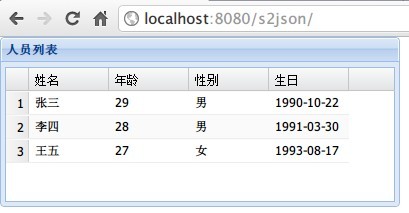
五、效果图





 扫一扫
扫一扫


 1097
1097

 被折叠的 条评论
为什么被折叠?
被折叠的 条评论
为什么被折叠?
 到【灌水乐园】发言





