


行为树介绍
行为树(Behavior Tree)是一种用于实现人工智能(AI)决策逻辑的数据结构。在游戏开发中,行为树被广泛用于控制非玩家角色(NPC)的行为。
介绍几种常用的节点
-
序列节点(Sequence Node):
- 顺序执行其所有子节点。
- 只有当所有子节点都成功时,序列节点才返回成功;如果任何一个子节点失败,则序列节点立即返回失败。
-
选择节点(Selector Node):
- 依次尝试执行其子节点,直到找到一个成功的节点。
- 如果所有子节点都失败,则选择节点返回失败。
-
条件节点(Condition Node):
- 检查某个条件是否满足。
- 如果条件满足,返回成功;否则返回失败。
-
动作节点(Action Node):
- 执行具体的动作或任务。
- 动作完成后返回成功或失败。
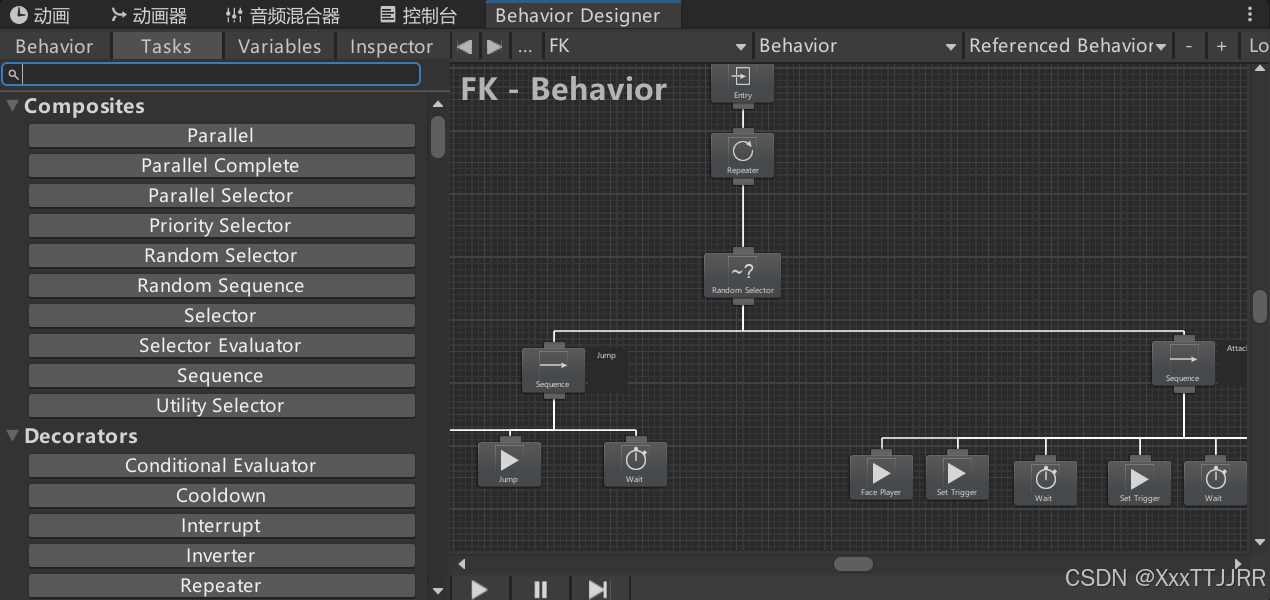
使用行为树需要注意的事项
引入命名空间才能继承Action类
创建一个父类 在重写的OnAwake方法中获取重要的组件
using System.Collections;
using System.Collections.Generic;
using UnityEngine;
using BehaviorDesigner.Runtime.Tasks;

public class EnemyAction : Action
{
    protected Animator animator;
    protected Rigidbody2D rigidbody;
    protected PlayerCtrl player;

    public override void OnAwake()
    {
        animator = gameObject.GetComponentInChildren<Animator>();
        rigidbody = GetComponent<Rigidbody2D>();
        player = PlayerCtrl.Instance;
    }
}
然后再继承父类
Jump脚本
using System.Collections;
using System.Collections.Generic;
using UnityEngine;
using DG.Tweening;
using Unity.VisualScripting;
using BehaviorDesigner.Runtime.Tasks;


public class Jump : EnemyAction
{
    [SerializeField] private float horizontalForce;
    [SerializeField] private float jumpForce;

    public float startTime;//开始执行的时间
    public float jumpTime;

    private bool hasLanded;

    private Tween startJumpTween;
    private Tween JumpTween;


    /// <summary>
    /// 节点开始的时候调用
    /// </summary>
    public override void OnStart()
    {
        startJumpTween = DOVirtual.DelayedCall(startTime, StartJump, false);
        animator.SetTrigger("Jump");
    }

    private void StartJump()
    {
        float direction = player.transform.position.x < transform.position.x ? -1 : 1;
        //开局会有一个反方向的力 horizontalForce在控制面板设置是负值
        rigidbody.AddForce(new Vector2(horizontalForce * direction, jumpForce),ForceMode2D.Impulse);

        //在跳跃期间hasLand都为true;
        JumpTween = DOVirtual.DelayedCall(jumpTime, () =>
        {
            hasLanded = true;
        }, false
        );
    }

    public override TaskStatus OnUpdate()
    {
        return hasLanded ? TaskStatus.Success : TaskStatus.Running;//如果hasLand 为true 则执行状态为成功 否则执行状态为运行当中
    }

    /// <summary>
    /// 节点结束的时候调用
    /// </summary>
    public override void OnEnd()
    {
        //释放性能
        startJumpTween.Kill();
        JumpTween.Kill();
        hasLanded = false;
    }
}
在里面引入了DOTween 调用他延时方法
落石的方法 也是调用 DOTween的队列回调函数
using System.Collections;
using System.Collections.Generic;
using UnityEngine;
using BehaviorDesigner.Runtime.Tasks;
using DG.Tweening;


public class SpawnFallingRocks : EnemyAction
{
    public Collider2D spawnAreaCollider;
    public AbstractProjectile rockPrefabs;
    public int spawnCount = 4;
    public float spawnInterval = 0.5f;

    public override TaskStatus OnUpdate()
    {
        var sequence = DOTween.Sequence();
        for(int i = 0;i<spawnCount;i++)
        {
            sequence.AppendCallback(SpawnRock);//回调函数执行
            sequence.AppendInterval(spawnInterval);//延迟
        }

        return TaskStatus.Success;
    }

    private void SpawnRock()
    {

        var randomX = Random.Range(spawnAreaCollider.bounds.min.x, spawnAreaCollider.bounds.max.x);
        //实例化生成落石
        var rock = Object.Instantiate(
            rockPrefabs, new Vector3(randomX, spawnAreaCollider.bounds.min.y), Quaternion.identity
            );
        //施加的力为0 用自身重力
        rock.SetForce(Vector2.zero);
    }


}
这里注意的是 需要重写OnUpdate 返回行为状态类型 TaskStatus底层是一个枚举类型 里面是行为动作的状态
TaskStatus.Success:
表示任务节点成功完成了其操作。
在条件节点中,如果条件满足,则返回 TaskStatus.Success。
在动作节点中,如果动作成功执行,则返回 TaskStatus.Success。
TaskStatus.Failure:
表示任务节点未能成功完成其操作。
在条件节点中,如果条件不满足,则返回 TaskStatus.Failure。
在动作节点中,如果动作未能成功执行,则返回 TaskStatus.Failure。
TaskStatus.Running:
表示任务节点正在执行中,尚未完成。
通常用于需要多帧或多步才能完成的任务。
当节点返回 TaskStatus.Running 时,行为树会在下一次更新时继续执行该节点。
TaskStatus.Inactive:
表示任务节点当前未处于活动状态。
通常用于初始化或重置时的状态。
这个状态在 Behavior Designer 中较少使用,但在某些自定义实现中可能会用到。
EnemyConditional条件节点
创建条件节点父类
using System.Collections;
using System.Collections.Generic;
using UnityEngine;
using BehaviorDesigner.Runtime.Tasks;

/// <summary>
/// Conditional 是一个基类,用于创建条件节点。条件节点是行为树中的一个重要组成部分,
/// 它们用于评估某个条件是否满足,并根据结果返回 TaskStatus.Success 或 TaskStatus.Failure。
/// </summary>
public class EnemyConditional : Conditional
{
    protected Animator animator;
    protected Rigidbody2D rigidbody;
    protected PlayerCtrl player;
    protected Enemy enemy;

    public override void OnAwake()
    {
        animator = gameObject.GetComponentInChildren<Animator>();
        rigidbody = GetComponent<Rigidbody2D>();
        player = PlayerCtrl.Instance;
        enemy = GetComponent<Enemy>();
    }
}
举例判断血量的条件节点
using System.Collections;
using System.Collections.Generic;
using UnityEngine;
using BehaviorDesigner.Runtime.Tasks;
using BehaviorDesigner.Runtime;


public class IsHealthUnder : EnemyConditional
{
    //SharedInt 是一种共享变量类型,用于在不同的节点之间传递和共享整数值。
    public SharedInt healthThreshold;

    public override TaskStatus OnUpdate()
    {
        return enemy.health < healthThreshold.Value ? TaskStatus.Success : TaskStatus.Failure;
    }
}
Boss不同血量状态会触发不同的技能效果

复制到一个新的脚本
using BehaviorDesigner.Runtime.Tasks;
using System.Collections;
using System.Collections.Generic;
using UnityEngine;
using static Unity.VisualScripting.Metadata;
using BehaviorDesigner.Runtime;
using System.Linq;


public class StageSelector : Composite
{
    public SharedInt CurrentStage;
    public List<string> IncludeTaskPerStage = new List<string>();

    [UnityEngine.Tooltip("Seed the random number generator to make things easier to debug")]
    public int seed = 0;
    [UnityEngine.Tooltip("Do we want to use the seed?")]
    public bool useSeed = false;

    // A list of indexes of every child task. This list is used by the Fischer-Yates shuffle algorithm.
    private List<int> childIndexList = new List<int>();
    // The random child index execution order.
    private Stack<int> childrenExecutionOrder = new Stack<int>();
    // The task status of the last child ran.
    private TaskStatus executionStatus = TaskStatus.Inactive;

    public override void OnAwake()
    {
        // If specified, use the seed provided.
        if (useSeed)
        {
            Random.InitState(seed);
        }

        // Add the index of each child to a list to make the Fischer-Yates shuffle possible.
        //childIndexList.Clear();
        //for (int i = 0; i < children.Count; ++i)
        //{
        //    childIndexList.Add(i);
        //}

    }

    public override void OnStart()
    {
        childIndexList.Clear();
        //IncludeTaskPerStage的字符串分割成字符串数组,再对每个字符串数字调用int.Parse 变成int放到childIndexList中
        childIndexList = IncludeTaskPerStage[CurrentStage.Value].Split(',').Select(int.Parse).ToList();
        // Randomize the indecies
        ShuffleChilden();

    }

    public override int CurrentChildIndex()
    {
        // Peek will return the index at the top of the stack.
        return childrenExecutionOrder.Peek();
    }

    public override bool CanExecute()
    {
        // Continue exectuion if no task has return success and indexes still exist on the stack.
        return childrenExecutionOrder.Count > 0 && executionStatus != TaskStatus.Success;
    }

    public override void OnChildExecuted(TaskStatus childStatus)
    {
        // Pop the top index from the stack and set the execution status.
        if (childrenExecutionOrder.Count > 0)
        {
            childrenExecutionOrder.Pop();
        }
        executionStatus = childStatus;
    }

    public override void OnConditionalAbort(int childIndex)
    {
        // Start from the beginning on an abort
        childrenExecutionOrder.Clear();
        executionStatus = TaskStatus.Inactive;
        ShuffleChilden();
    }

    public override void OnEnd()
    {
        // All of the children have run. Reset the variables back to their starting values.
        executionStatus = TaskStatus.Inactive;
        childrenExecutionOrder.Clear();
    }

    public override void OnReset()
    {
        // Reset the public properties back to their original values
        seed = 0;
        useSeed = false;
    }

    private void ShuffleChilden()
    {
        // Use Fischer-Yates shuffle to randomize the child index order.
        for (int i = childIndexList.Count; i > 0; --i)
        {
            int j = Random.Range(0, i);
            int index = childIndexList[j];
            childrenExecutionOrder.Push(index);
            childIndexList[j] = childIndexList[i - 1];
            childIndexList[i - 1] = index;
        }
    }
}
我们需要修改其中的代码OnAwake的增加孩子节点注释掉
在OnStart 每次调用脚本的时候增加自己的节点 目的是 比如boss阶段的不同能调用的技能也不一样

list的链表存储不同阶段调用的技能






 扫一扫
扫一扫


 5916
5916

 被折叠的 条评论
为什么被折叠?
被折叠的 条评论
为什么被折叠?
 到【灌水乐园】发言





