


 本文介绍了如何在uni-app中自定义底部导航栏,包括整体代码展示、获取页面安全距离的函数封装以及页面跳转的注意事项,如跳转路径的配置和pages.json的tabBar设置。此外,还提到了使用scss简化媒体查询的方法。
整体代码
<template>
	<view class="tabbar" :style="{paddingBottom:PaddingBottom}">
		<template v-for="(item,index) in list">
			<view class="pageList" @click="toNewPage(item.path)">
				<image :src="item.trueIcon" class="icon" v-if="pageIndex == index"></image>
				<image :src="item.icon" class="icon" v-else></image>

				<view class="pageName" :class="pageIndex == index ? 'nowPage':''">
					{{item.text}}
				</view>
			</view>
		</template>
	</view>
</template>

<script>
export default{
	props:{
		pageIndex:{
			type:Number,
			default:0
		}
	},
	data(){
		return{
			PaddingBottom:'0',
			list:[
				{
					text:'记账',
					icon:'/static/icon/bookkeeping.png',
					trueIcon:'/static/icon/truebookkeeping.png',
					path:'/pages/bookkeeping/bookkeeping'
				},
				{
					text:'财富',
					icon:'/static/icon/wealth.png',
					trueIcon:'/static/icon/truewealth.png',
					path:'/pages/wealth/wealth'
				},
			]
		}
	},
	methods:{
		/**
		 *@description 跳转到新页面
		 *@param {String} path 要跳转的路径
		*/
		toNewPage(path){
			uni.switchTab({
				url: path,
				fail(res) {
					// console.log(res)
				}
			})
		}
	},
	mounted(){
		this.PaddingBottom = this.$publicFn.setSafeDistance().bottom
	}
}
</script>

<style lang="scss">
	@import "../../static/scss/publicScss.scss";
	@include mediaModel(){
		.tabbar{
			display: none;
		}
	}
	@include mediaModel('phone'){
		.tabbar{
			@include displayFlex($justify:space-around);
			position: fixed;
			height: 100rpx;
			bottom: 0;
			background-color: $domColor;
			width: 100%;
			box-shadow: 0 -10px 10px #ececec;
			z-index: 999;

			.pageList{
				// @include displayFlex();
				margin: 0 40rpx;
				.icon{
					width: 40rpx;
					height: 40rpx;
				}
				.pageName{
					font:{
						size: 14rpx;
					}
					text-align: center;
				}
				.nowPage{
					color: $tabbarText;
				}
			}

		}
	}
</style>
补充
获取页面显示的安全距离

封装的公共函数--用于获取手机端的安全可视距离(顶部top和底部bottom)
    /**
	 * @description 获取页面的安全显示区域
	 * @returns { object } 返回的安全top,bottom
	 */
	setSafeDistance(){
		let app = uni.getSystemInfoSync()
		let top = app.statusBarHeight+'px'
		let bottom = app.safeAreaInsets.bottom+'px'
		let safe = {
			top:top,
			bottom:bottom
		}
		return safe;
	}
进行页面点击跳转
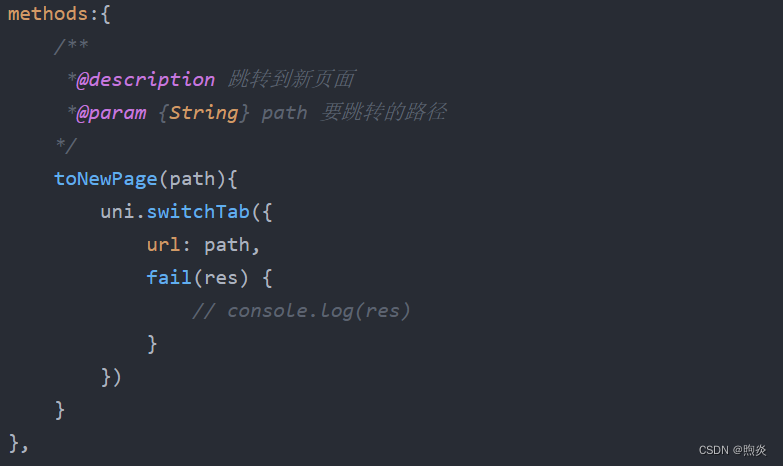
官网文档:uni.navigateTo(OBJECT) | uni-app官网
注意:
1、path的跳转路径前要加 " / "

2、pages.json文件夹要对tabBar进行配置要不不进行跳转
"tabBar": {
	"height": "1px",
	"custom": true,
	"list": [
		{
			"pagePath": "pages/bookkeeping/bookkeeping",
			"text": ""
		},
		{
			"pagePath": "pages/wealth/wealth",
			"text": ""
		}
	]
}
scss简化媒体查询
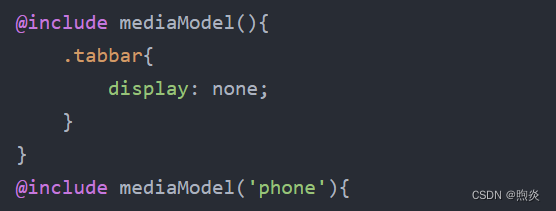
//媒体查询响应式开发
@mixin mediaModel($model:'pc'){
	@if $model == "pc"{
		@media (min-width:481px){
			@content;
		}
	}@else{
		@media (max-width:480px){
			@content;
		}
	}
}





 扫一扫
扫一扫


 1万+
1万+

 被折叠的 条评论
为什么被折叠?
被折叠的 条评论
为什么被折叠?
 到【灌水乐园】发言





