


 本文介绍如何利用Java和Selenium模拟登录过程,并详细解释了如何处理Cookie,包括从服务器接收Cookie、保存并在后续请求中发送Cookie的过程。
这里用蜗牛学院的网页为例,http://www.woniuxy.com/
Cookie的处理分为:
服务器向客户端发送cookie
浏览器将cookie保存
之后每次http请求浏览器都会将cookie发送给服务器端
服务器端向客户端发送Cookie是通过HTTP响应报文实现的,在Set-Cookie中设置需要像客户端发送的cookie。首先网页打开网址,点击登录,然后用抓包工具抓包,我这里用的是Charles,抓取的包如下图。每次捕获的id字段可能不同,同学自行甄别。
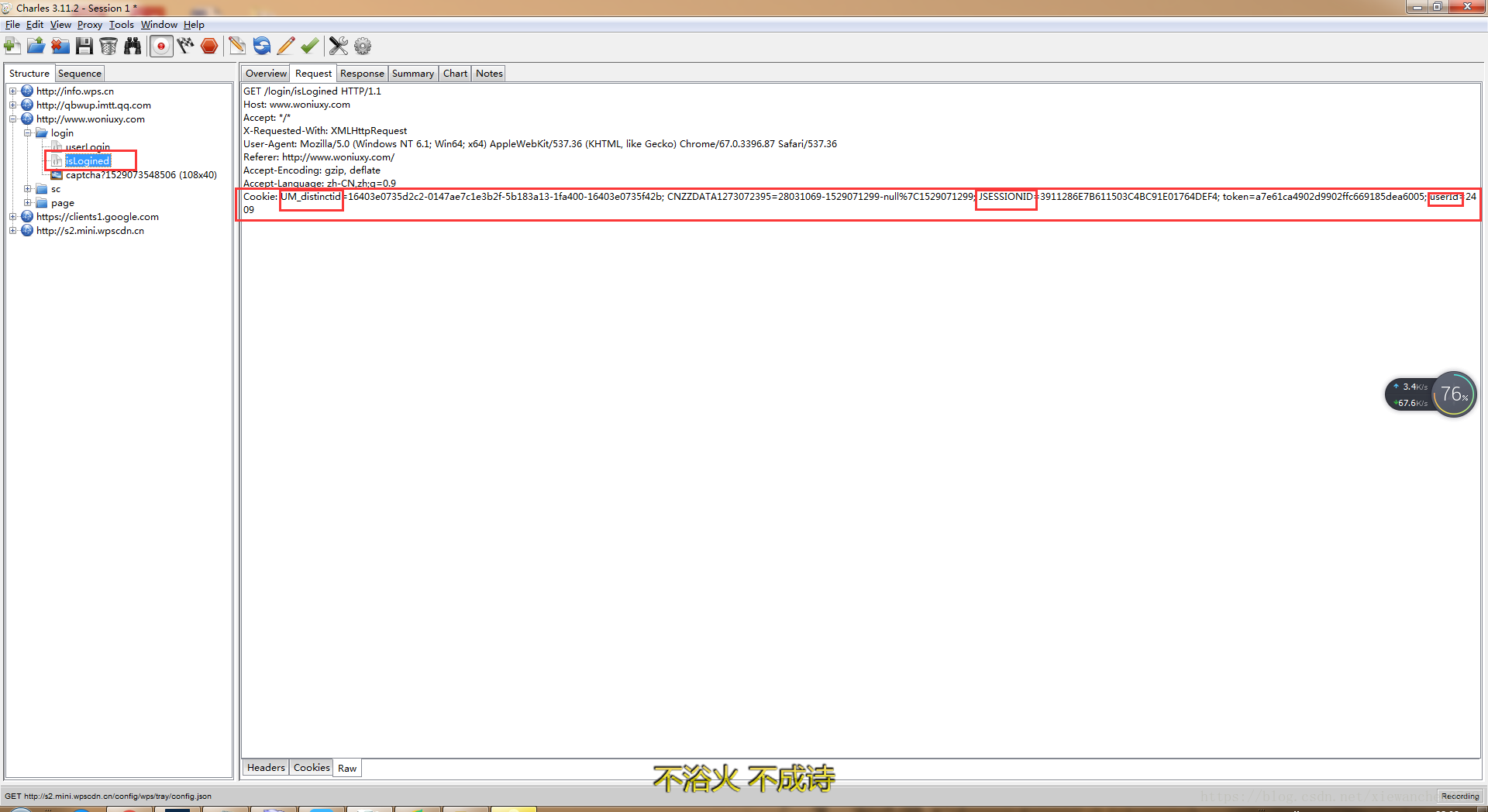
然后通过java把这个几个字段的cookie id发送给服务器,具体代码如下:
public class Cookiewoniu {
    public static void main(String[] args) throws InterruptedException {
    	System.setProperty("webdriver.chrome.driver", "C:\\Program Files (x86)\\Google\\Chrome\\Application\\chromedriver.exe");
    	WebDriver driver = new ChromeDriver();
    	driver.manage().window().maximize();
    	driver.manage().timeouts().implicitlyWait(5, TimeUnit.SECONDS);
        Thread.sleep(3000);
        driver.get("http://www.woniuxy.com");
        Thread.sleep(3000);
        System.out.println(driver.manage().getCookies());

        // 通过fiddler抓包工具,找到get为“http://www.woniuxy.com/login/isLogined”的URL,在右侧窗口查看该请求的Cookie,
        // 找到重要的三个参数“JSESSIONID”和“token”和 “userId”
        Cookie c1 = new Cookie("JSESSIONID", "A93C195B41FE5252CFB1AFFB381037F2");
        Cookie c2 = new Cookie("token", "a7e61ca4902d9902ffc669185dea6005");
        Cookie c3 = new Cookie("userId", "2409");

        driver.manage().addCookie(c1);
        driver.manage().addCookie(c2);
        driver.manage().addCookie(c3);
        driver.navigate().refresh();
        Thread.sleep(2000);

        //设置鼠标悬停
        WebElement settings = driver.findElement(By.linkText("注销"));
        Actions action = new Actions(driver);
        action.moveToElement(settings).build().perform();


        // 获得登录用户名
        String username = driver.findElement(By.id("OptDivUserName")).getText();
        System.out.println("username = " + username);

        System.out.println(driver.manage().getCookies());

        Thread.sleep(3000);
        driver.quit();

    }

} 





 扫一扫
扫一扫


 4806
4806

 被折叠的 条评论
为什么被折叠?
被折叠的 条评论
为什么被折叠?
 到【灌水乐园】发言





