



1.概要
1.理由
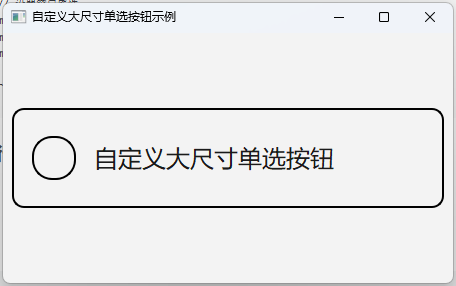
当单选按钮,出现在无边框表格中的时候,如果没有边框,会感觉和别的控件不协调。所以要显示边框。
为了保存页面风格,控件的默认颜色不变。
有时候为了触屏点击方便,需要将按钮变大。
2.代码
#include <QApplication>
#include <QMainWindow>
#include <QRadioButton>
#include <QVBoxLayout>
#include <QWidget>

int main(int argc, char *argv[]) {
    QApplication app(argc, argv);

    // 创建主窗口
    QMainWindow mainWindow;
    QWidget *centralWidget = new QWidget(&mainWindow);
    mainWindow.setCentralWidget(centralWidget);

    // 创建垂直布局
    QVBoxLayout *layout = new QVBoxLayout(centralWidget);

    // 创建自定义单选按钮
    QRadioButton *customRadio = new QRadioButton("自定义大尺寸单选按钮");
    customRadio->setObjectName("customRadio"); // 设置对象名称用于样式表

    // 自定义样式表(包含放大参数)
    QString style = R"(
        QRadioButton#customRadio {
            font-size: 18pt;            /* 增大字体至18pt */
            padding: 18px;              /* 增大内边距至18px */
            spacing: 18px;              /* 图标与文本间距增大至18px */
            border: 2px solid;          /* 边框存在但颜色使用系统默认 */
            border-radius: 12px;        /* 增大圆角半径 */
            min-height: 60px;           /* 最小高度保证显示空间 */
        }

        QRadioButton#customRadio::indicator {
            width: 40px;                 /* 图标宽度增大至40px */
            height: 40px;                /* 图标高度增大至40px */
            border-radius: 20px;         /* 保持圆形 */
        }

        /* 未选中状态 - 使用系统默认颜色 */
        QRadioButton#customRadio::indicator:unchecked {
            background-color: transparent; /* 透明背景 */
            border: 2px solid;             /* 边框存在但颜色默认 */
        }

        /* 选中状态 - 使用系统默认选中颜色 */
        QRadioButton#customRadio::indicator:checked {
            background-color: #4444ff;    /* 深蓝指示符 */
            border: 2px solid #0000cc;    /* 深蓝边框 */
        }
    )";

    // 应用样式表
    customRadio->setStyleSheet(style);

    // 添加按钮到布局
    layout->addWidget(customRadio);

    // 设置窗口属性
    mainWindow.resize(450, 250);
    mainWindow.setWindowTitle("自定义大尺寸单选按钮示例");
    mainWindow.show();

    return app.exec();
}
3.运行结果





 扫一扫
扫一扫


 2336
2336

 被折叠的 条评论
为什么被折叠?
被折叠的 条评论
为什么被折叠?
 到【灌水乐园】发言





