



1.概要
2.内容
1.qt c++ 创建一个矩形,点击这个矩形,可以上下或左右分别拖拽
在 Qt 中创建一个可以拖拽的矩形,我们需要使用 QGraphicsView、QGraphicsScene 和 QGraphicsRectItem 类。这些类为我们提供了绘制图形和处理事件的功能。
以下是一个完整的示例代码,展示如何创建一个可拖拽的矩形,并且可以通过点击并拖动来移动它的位置(上下或左右):
#include <QApplication>
#include <QGraphicsView>
#include <QGraphicsScene>
#include <QGraphicsRectItem>
#include <QMouseEvent>
#include <QGraphicsSceneMouseEvent> // 通常不需要这一行,但加上也不会出

class DraggableRectItem : public QGraphicsRectItem {
public:
    DraggableRectItem(QGraphicsItem* parent = nullptr)
        : QGraphicsRectItem(parent) {
        setFlag(QGraphicsItem::ItemIsMovable);
        setFlag(QGraphicsItem::ItemSendsGeometryChanges);
        setAcceptHoverEvents(true);
    }

protected:
    void mousePressEvent(QGraphicsSceneMouseEvent* event) override {
        if (event->button() == Qt::LeftButton) {
            m_dragStartPoint = event->pos();
        }
        QGraphicsRectItem::mousePressEvent(event);
    }

    void mouseMoveEvent(QGraphicsSceneMouseEvent* event) override {
        if (event->buttons() & Qt::LeftButton) {
            QPointF newPos = pos() + event->pos() - m_dragStartPoint;
            setPos(newPos);
            m_dragStartPoint = event->pos();
        }
        QGraphicsRectItem::mouseMoveEvent(event);
    }

private:
    QPointF m_dragStartPoint;
};

int main(int argc, char *argv[]) {
    QApplication app(argc, argv);

    // 创建一个场景
    QGraphicsScene scene;

    // 创建一个可拖拽的矩形
    DraggableRectItem* rectItem = new DraggableRectItem();
    rectItem->setRect(0, 0, 100, 100);  // 设置矩形的位置和大小
    rectItem->setBrush(Qt::blue);       // 设置矩形的颜色

    // 将矩形添加到场景中
    scene.addItem(rectItem);

    // 创建一个视图来显示场景
    QGraphicsView view(&scene);
    view.setRenderHint(QPainter::Antialiasing);
    view.setFixedSize(800, 600);
    view.setSceneRect(0, 0, 800, 600);

    // 显示视图
    view.show();

    return app.exec();
}
运行结果:
矩形上下左右拖拽
解释
- DraggableRectItem 类:
- 继承自
QGraphicsRectItem,表示一个矩形图形项。 - 重载
mousePressEvent和mouseMoveEvent来处理鼠标点击和拖动事件。 mousePressEvent:记录鼠标点击位置。mouseMoveEvent:根据鼠标当前位置和初始点击位置的差值来移动矩形。
- 继承自
- main 函数:
- 创建
QApplication对象。 - 创建
QGraphicsScene对象来管理所有的图形项。 - 创建
DraggableRectItem对象,并设置其大小和颜色。 - 将矩形项添加到场景中。
- 创建
QGraphicsView对象来显示场景,并设置视图的大小和场景的范围。 - 调用
view.show()来显示视图。
- 创建
运行这个示例程序后,你会看到一个蓝色的矩形。你可以通过点击并拖动矩形来移动它的位置。这个示例展示了基本的拖拽功能,如果需要更复杂的拖拽行为(如限制拖拽方向),可以在 mouseMoveEvent 中添加额外的逻辑。
2.qt c++ 创建一个矩形,点击这个矩形,可以上下或左右分别拖拽,要求上下和左右区别开来,不能同时
在 Qt C++ 中,要实现一个可以分别拖拽上下和左右的矩形,你需要自定义一个 QGraphicsRectItem 的子类,并在其中处理鼠标事件。具体来说,你可以在 mousePressEvent 中记录鼠标的初始位置,然后在 mouseMoveEvent 中根据鼠标的移动来更新矩形的位置,但要区分是上下拖拽还是左右拖拽。
下面是一个示例代码,展示了如何实现这个功能:
#include <QGraphicsRectItem>
#include <QGraphicsSceneMouseEvent>
#include <QGraphicsScene>
#include <QGraphicsView>
#include <QApplication>

class DraggableRectItem : public QGraphicsRectItem {
public:
    DraggableRectItem(QGraphicsItem* parent = nullptr)
        : QGraphicsRectItem(parent), m_dragging(false), m_dragType(None) {
        setRect(0, 0, 100, 100); // 设置矩形的初始大小
        setFlag(QGraphicsItem::ItemIsMovable, false); // 禁用默认的移动标志
        setAcceptHoverEvents(true); // 如果需要的话,可以启用悬停事件
    }

protected:
    void mousePressEvent(QGraphicsSceneMouseEvent* event) override {
        if (event->button() == Qt::LeftButton) {
            m_dragStartPoint = event->pos();
            m_dragging = true;
            m_dragType = None; // 初始时没有拖拽类型
        }
        //QGraphicsRectItem::mousePressEvent(event); // 调用基类的方法(如果需要的话)
    }

    void mouseMoveEvent(QGraphicsSceneMouseEvent* event) override {
        if (!m_dragging) return;

        QPointF delta = event->pos() - m_dragStartPoint;

        // 判断是上下拖拽还是左右拖拽
        if (qAbs(delta.x()) > qAbs(delta.y())) {
            // 左右拖拽
            if (!m_dragType || m_dragType == Horizontal) {
                m_dragType = Horizontal;
                setPos(x() + delta.x(), y());
            }
        } else {
            // 上下拖拽
            if (!m_dragType || m_dragType == Vertical) {
                m_dragType = Vertical;
                setPos(x(), y() + delta.y());
            }
        }

        //m_dragStartPoint = event->pos(); // 更新拖拽起点
    }

    void mouseReleaseEvent(QGraphicsSceneMouseEvent* event) override {
        if (event->button() == Qt::LeftButton && m_dragging) {
            m_dragging = false;
            m_dragType = None; // 重置拖拽类型
        }
        QGraphicsRectItem::mouseReleaseEvent(event); // 调用基类的方法(如果需要的话)
    }

private:
    enum DragType { None, Horizontal, Vertical };
    QPointF m_dragStartPoint;
    bool m_dragging;
    DragType m_dragType;
};

int main(int argc, char** argv) {
    QApplication app(argc, argv);

    QGraphicsScene scene;
    DraggableRectItem* rectItem = new DraggableRectItem();
    scene.addItem(rectItem);

    QGraphicsView view(&scene);
    view.setRenderHint(QPainter::Antialiasing);
    view.setFixedSize(800, 600);
    view.setSceneRect(0, 0, 800, 600);
    view.show();

    return app.exec();
}
运行结果
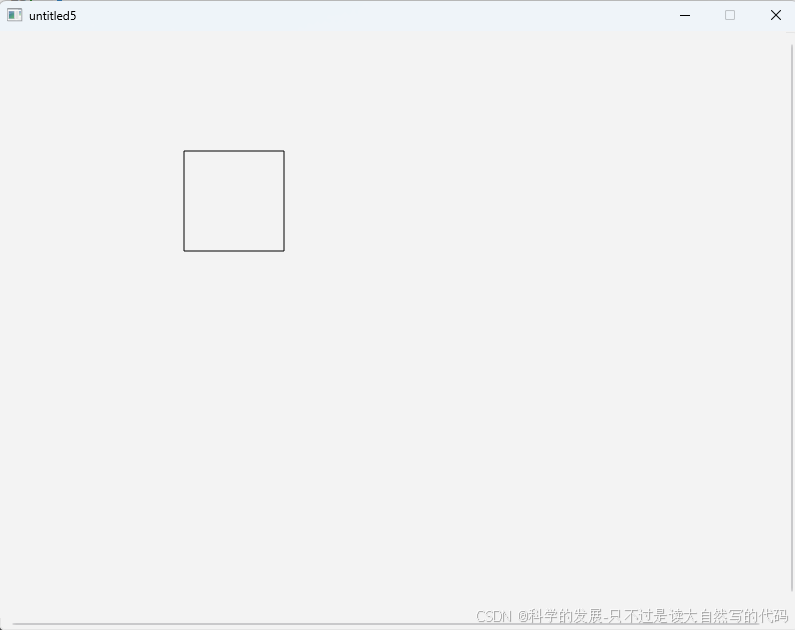
录屏演示
矩形上下或者左右拖拽
在这个示例中,DraggableRectItem 类继承了 QGraphicsRectItem 并重载了 mousePressEvent、mouseMoveEvent 和 mouseReleaseEvent 方法。在 mousePressEvent 中,我们记录了鼠标的初始位置,并设置了拖拽标志。在 mouseMoveEvent 中,我们根据鼠标的移动来计算位移,并根据位移的 x 和 y 分量的绝对值来判断是上下拖拽还是左右拖拽。一旦确定了拖拽方向,我们就只更新矩形在该方向上的位置。在 mouseReleaseEvent 中,我们清除了拖拽标志和拖拽类型。
请注意,这个示例中的逻辑是简单的,并且可能不是最完善的。在实际应用中,你可能需要更复杂的逻辑来处理例如快速拖拽切换方向、拖拽限制、拖拽时的视觉反馈等情况。
3.问题处理
main.cpp:18:18: Member access into incomplete type 'QGraphicsSceneMouseEvent' qgraphicsscene.h:37:7: forward declaration of 'QGraphicsSceneMouseEvent' 出现这个错误是因为在 DraggableRectItem 类中,你尝试访问 QGraphicsSceneMouseEvent 类的成员,但是此时 QGraphicsSceneMouseEvent 类只是一个前向声明,它的完整定义还没有被包含进来。
为了解决这个问题,你需要在 DraggableRectItem 类的实现文件(或者在这个类的定义之前)包含 QGraphicsSceneMouseEvent 类的定义。这通常是通过包含相应的 Qt 头文件来实现的。
在 Qt 中,QGraphicsSceneMouseEvent 类是在 <QGraphicsSceneMouseEvent> 头文件中定义的,但是这个类实际上是 QGraphicsSceneEvent 的一个子类,并且通常你不需要直接包含它的头文件,因为当你包含 <QGraphicsScene> 时,它应该已经被间接包含了。但是,为了保险起见,你可以尝试直接包含它,或者确保你的项目已经正确配置了 Qt 的包含路径。
然而,在你的代码中,实际上你并不需要直接访问 QGraphicsSceneMouseEvent 的任何成员,因为你是通过继承 QGraphicsRectItem 并重载其 mousePressEvent 和 mouseMoveEvent 方法来处理事件的。这些方法接收的参数类型是 QGraphicsSceneMouseEvent*,但是你可以通过调用基类的方法(如 QGraphicsItem::mousePressEvent(event);)来将事件传递给基类处理,而不需要直接访问事件对象的成员。
如果你的代码确实出现了上述错误,并且你没有直接访问 QGraphicsSceneMouseEvent 的成员,那么可能是你的项目配置有问题,或者你的 Qt 版本与你的代码不兼容。请确保你的 Qt 版本是最新的,或者至少是与你的代码兼容的。
此外,请检查你的包含语句是否正确。你应该在 DraggableRectItem 类的实现文件(或者在这个类的定义之前)包含 <QGraphicsItem> 和 <QGraphicsSceneMouseEvent>(如果需要的话,尽管通常不需要直接包含后者)。但是,更常见的是只包含 <QGraphicsItem>,因为 QGraphicsRectItem 是从 QGraphicsItem 派生的,并且 mousePressEvent 和 mouseMoveEvent 是 QGraphicsItem 类的一部分。
这里是一个修正后的 DraggableRectItem 类的实现示例,它应该不需要直接包含 <QGraphicsSceneMouseEvent>:
#include <QGraphicsRectItem>
#include <QGraphicsSceneMouseEvent> // 通常不需要这一行,但加上也不会出错

class DraggableRectItem : public QGraphicsRectItem {
public:
    DraggableRectItem(QGraphicsItem* parent = nullptr)
        : QGraphicsRectItem(parent) {
        setFlag(QGraphicsItem::ItemIsMovable);
        setFlag(QGraphicsItem::ItemSendsGeometryChanges);
        setAcceptHoverEvents(true);
    }

protected:
    void mousePressEvent(QGraphicsSceneMouseEvent* event) override {
        if (event->button() == Qt::LeftButton) {
            m_dragStartPoint = event->pos();
        }
        QGraphicsRectItem::mousePressEvent(event); // 调用基类的方法
    }

    void mouseMoveEvent(QGraphicsSceneMouseEvent* event) override {
        if (event->buttons() & Qt::LeftButton) {
            QPointF newPos = pos() + event->pos() - m_dragStartPoint;
            setPos(newPos);
            m_dragStartPoint = event->pos();
        }
        QGraphicsRectItem::mouseMoveEvent(event); // 调用基类的方法
    }

private:
    QPointF m_dragStartPoint;
};
请确保你的项目正确配置了 Qt 的包含路径和库路径,并且你的编译器能够找到所有必要的 Qt 头文件和库文件。如果你使用的是 Qt Creator,这些配置通常会自动处理。如果你使用的是其他 IDE 或命令行工具,你可能需要手动设置这些路径。





 扫一扫
扫一扫


 1341
1341

 被折叠的 条评论
为什么被折叠?
被折叠的 条评论
为什么被折叠?
 到【灌水乐园】发言





