



 本文介绍了如何通过进程名结束程序(Process.GetProcessesByName()),文件替换(File.Copy())以及使用Process.Start()启动程序。展示了C#实例中针对'程序1'的控制操作。
1.概要
1.1 通过进程名找程序
Process[] myProcess = Process.GetProcessesByName("程序1");
            foreach (Process process in myProcess)
            {
                process.Kill();
            }
1.2 文件替换
string oldPath = Application.StartupPath + @"\程序2.exe";
            string newPath = Application.StartupPath + @"\程序1.exe";
            System.IO.File.Copy(oldPath, newPath, true);
1.3 通过文件启动
Process process = new Process();
            process.StartInfo.FileName = Application.StartupPath + @"\程序1.exe";
            process.Start();
2.代码
using System;
using System.Diagnostics;
using System.Windows.Forms;

namespace 控制启动关闭2
{
    public partial class Form1 : Form
    {
        public Form1()
        {
            InitializeComponent();
        }

        private void button1_Click(object sender, EventArgs e)
        {
            Process[] myProcess = Process.GetProcessesByName("程序1");
            foreach (Process process in myProcess)
            {
                process.Kill();
            }
        }

        private void button2_Click(object sender, EventArgs e)
        {
            string oldPath = Application.StartupPath + @"\程序2.exe";
            string newPath = Application.StartupPath + @"\程序1.exe";
            System.IO.File.Copy(oldPath, newPath, true);
        }

        private void button3_Click(object sender, EventArgs e)
        {
            Process process = new Process();
            process.StartInfo.FileName = Application.StartupPath + @"\程序1.exe";
            process.Start();
        }
    }
}
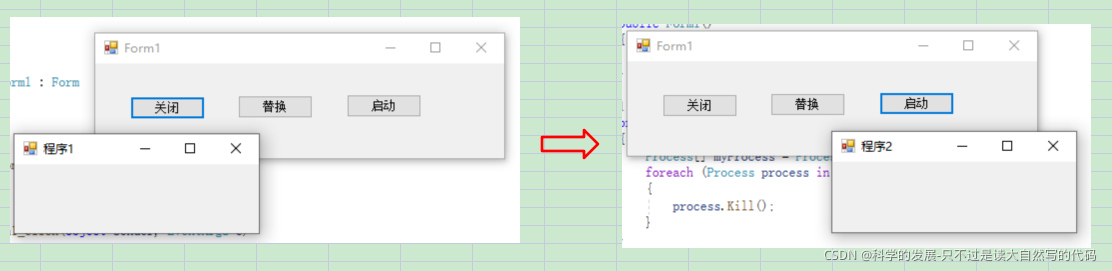
3.运行结果





 扫一扫
扫一扫


 884
884

 被折叠的 条评论
为什么被折叠?
被折叠的 条评论
为什么被折叠?
 到【灌水乐园】发言





